在多设备开发的场景中,开发者可以使用@Env装饰器监听系统环境变量的改变,并根据系统环境变量来进行相应的场景判断,以减少不同设备间的适配逻辑和重复开发。

概述
@Env是响应式系统环境变量装饰器,其功能包括:
根据入参读取相应的环境变量信息,详情见@Env支持参数。目前支持以下几种环境变量:
- SystemProperties.BREAK_POINT,用于获取窗口不同宽高阈值下对应的断点值信息。
- SystemProperties.WINDOW_SIZE23+,用于获取窗口的大小信息,单位为vp。
- SystemProperties.WINDOW_SIZE_PX23+,用于获取窗口的大小信息,单位为px。
- SystemProperties.WINDOW_AVOID_AREA23+,用于获取窗口的避让区域信息,单位为vp。
- SystemProperties.WINDOW_AVOID_AREA_PX23+,用于获取窗口的避让区域信息,单位为px。
- ReadonlyEnvKey.WINDOW_DISPLAY_ID,用于获取窗口所在屏幕的ID,从API版本26.0.0开始支持。
- ReadonlyEnvKey.WINDOW_SYSTEM_DENSITY,用于获取窗口所在屏幕的系统显示大小缩放系数,从API版本26.0.0开始支持。
- ReadonlyEnvKey.WINDOW_IS_FOCUSED,用于获取当前自定义组件所在窗口是否处于获焦状态,从API版本26.0.0开始支持。
- ReadonlyEnvKey.WINDOW_IS_HIGHLIGHTED,用于获取当前自定义组件所在窗口是否处于高亮状态,从API版本26.0.0开始支持。
- WritableEnvKey.FONT_SCALE,用于为后代组件提供局部字体缩放比例,从API版本26.0.0开始支持。
- WritableEnvKey.DIRECTION,用于为后代组件提供布局方向,从API版本26.0.0开始支持。
- 系统环境变量改变时,通知@Env装饰的变量更新,并触发@Env关联组件刷新,以实现界面内容的同步更新,@Env的参数为WritableEnvKey.FONT_SCALE和WritableEnvKey.DIRECTION时,父组件可通过WithEnv中的.env方法向子组件中的@Env传值。
- @Env装饰的变量不允许开发者初始化。
- 当@Env装饰的类型是复杂类型时,@Env会返回给开发者可观察的环境变量类(由@ObservedV2装饰,且其属性由@Trace装饰)的实例。开发者如果想监听环境变量的变化,可以使用addMonitor,具体示例见在@ComponentV2中使用@Env。
- 当@Env装饰的类型是简单类型时,开发者可以在@Component中使用@Watch,在@ComponentV2中使用@Monitor监听变化,具体示例见@Watch与@Monitor监听@Env装饰的变量。
@Env和Environment能力对比
@Env和Environment都是系统环境变量相关,但两者能力有较大的不同,具体能力对比见下表。
| 能力 | @Env | Environment |
|---|---|---|
| 起始API version | 从API version 22开始支持。 | 从API version 7开始支持。 |
| 支持参数 | API版本26.0.0之后支持SystemProperties|SystemEnvKey<T>类型说明 | 支持languageCode等参数,详情见Environment内置参数。 |
| 使用形式 | @Env为装饰器,可声明在@Component或@ComponentV2中,获取对应参数的环境变量信息。 API版本26.0.0之后,开发者可通过WithEnv的env接口设置SystemEnvKey<T>类型参数的系统环境变量。 | 通过envProp等接口获取当前应用的环境变量,并存入AppStorage中,开发者可通过AppStorage的接口访问系统环境变量的值,具体例子见从ui中访问environment参数。 |
| 是否有响应式能力 | 有,当系统环境变量变化时,会通知@Env装饰的环境变量的改变,并通知@Env关联组件刷新。 | 无,系统环境变量变化时,不会通知Environment改变。 |
限制条件
-
@Env仅支持在@Component和@ComponentV2中使用,否则会有编译时报错。如果开发者绕过编译时检查,则会有运行时报错。
import { uiObserver } from '@kit.ArkUI'; class Info { @Env(SystemProperties.BREAK_POINT) breakpoint: uiObserver.WindowSizeLayoutBreakpointInfo; // 错误用法,编译时报错 } @Entry @Component struct Index { @Env(SystemProperties.BREAK_POINT) breakpoint: uiObserver.WindowSizeLayoutBreakpointInfo; // 正确用法 build() { } } -
@Env装饰的变量为只读属性,不允许开发者进行初始化或赋值操作,否则会有编译时报错。如果开发者绕过编译时检查,则会有运行时报错。
import { uiObserver } from '@kit.ArkUI'; @Entry @Component struct Index { @Env(SystemProperties.BREAK_POINT) breakpoint: uiObserver.WindowSizeLayoutBreakpointInfo = new uiObserver.WindowSizeLayoutBreakpointInfo(); // 错误用法,编译时报错 build() { Column() { Text(`breakpoint height ${this.breakpoint.heightBreakpoint}`).fontSize(20) Text(`breakpoint width ${this.breakpoint.widthBreakpoint}`).fontSize(20) Button('change breakpoint').onClick(() => { this.breakpoint = new uiObserver.WindowSizeLayoutBreakpointInfo(); // 错误用法,编译时报错 }) } } } -
@Env当前支持SystemProperties的枚举值。若使用不支持的参数,将触发编译时报错。
import { uiObserver } from '@kit.ArkUI'; @Entry @Component struct Index { @Env(SystemProperties.BREAK_POINT) breakpoint1: uiObserver.WindowSizeLayoutBreakpointInfo; // 正确写法 @Env('unsupported_key') breakpoint2: uiObserver.WindowSizeLayoutBreakpointInfo; // 错误写法,@Env非法入参,编译时报错。 build() { Text(`breakpoint2 width: ${this.breakpoint2.widthBreakpoint} height: ${this.breakpoint2.heightBreakpoint}`) } } -
@Env使用不同的key值时,装饰的变量类型必须一一对应,否则会有编译时报错。
- @Env使用SystemProperties.BREAK_POINT时,装饰的变量类型必须为uiObserver.WindowSizeLayoutBreakpointInfo类型。
- @Env使用SystemProperties.WINDOW_SIZE时,装饰的变量类型必须为window.SizeInVP类型。
- @Env使用SystemProperties.WINDOW_SIZE_PX时,装饰的变量类型必须为window.Size类型。
- @Env使用SystemProperties.WINDOW_AVOID_AREA时,装饰的变量类型必须为window.UIEnvWindowAvoidAreaInfoVP类型。
- @Env使用SystemProperties.WINDOW_AVOID_AREA_PX时,装饰的变量类型必须为window.UIEnvWindowAvoidAreaInfoPX类型。
- @Env使用ReadonlyEnvKey.WINDOW_DISPLAY_ID时,装饰的变量类型必须为number类型。
- @Env使用ReadonlyEnvKey.WINDOW_SYSTEM_DENSITY时,装饰的变量类型必须为number类型。
- @Env使用ReadonlyEnvKey.WINDOW_IS_FOCUSED时,装饰的变量类型必须为boolean类型。
- @Env使用ReadonlyEnvKey.WINDOW_IS_HIGHLIGHTED时,装饰的变量类型必须为boolean类型。
- @Env使用WritableEnvKey.FONT_SCALE时,装饰的变量类型必须为number类型。
- @Env使用WritableEnvKey.DIRECTION时,装饰的变量类型必须为Direction类型。
import { uiObserver } from '@kit.ArkUI'; @Entry @Component struct Index { @Env(SystemProperties.BREAK_POINT) breakpoint1: uiObserver.WindowSizeLayoutBreakpointInfo; // 正确写法 @Env(SystemProperties.BREAK_POINT) breakpoint2: string; // 错误写法,@Env使用SystemProperties.BREAK_POINT时仅支持装饰WindowSizeLayoutBreakpointInfo类型 build() { } } -
@Env只能单独使用,不能和其他V1V2状态变量装饰器或@Require联用,否则会有编译时报错。从API版本26.0.0开始,在@Component中,可通过@Watch监听@Env装饰变量的变化,具体示例见@Watch与@Monitor监听@Env装饰的变量。
@Env(SystemProperties.BREAK_POINT) breakpoint1: uiObserver.WindowSizeLayoutBreakpointInfo; // 正确写法
@State @Env(SystemProperties.BREAK_POINT) breakpoint2: uiObserver.WindowSizeLayoutBreakpointInfo; // 错误写法,编译时报错
@Require @Env(SystemProperties.BREAK_POINT) breakpoint3: uiObserver.WindowSizeLayoutBreakpointInfo; // 错误写法,编译时报错
@Local @Env(SystemProperties.BREAK_POINT) breakpoint4: uiObserver.WindowSizeLayoutBreakpointInfo; // 错误写法,编译时报错
-
@Env装饰的变量在@Component和@ComponentV2传递遵循以下规则:
- @Env装饰的变量仅能用于初始化@ComponentV2中@Param装饰的变量,否则会有编译时报错。
- @Env装饰的变量仅能用于初始化@Component中常规变量,否则会有编译时报错。需要注意,通过BuilderNode切换窗口,会导致@Env依据新的窗口更新环境变量实例。在切换窗口的场景中,不建议开发者使用@Env变量来初始化子组件的常规变量,否则会造成该常规变量无法被@Env通知触发其关联UI组件刷新。具体示例可见通过BuilderNode切换窗口。
import { uiObserver } from '@kit.ArkUI';

@Entry
@Component
struct Index {
  @Env(SystemProperties.BREAK_POINT) breakpoint: uiObserver.WindowSizeLayoutBreakpointInfo; // 正确写法

  build() {
    Column() {
      CompV2({ breakpoint: this.breakpoint }) // 正确写法
      Comp({ breakpoint: this.breakpoint }) // 正确写法

      CompV2Invalid({ breakpoint: this.breakpoint }) // 错误写法,@Env装饰的变量仅能初始化V2的@Param变量
      CompInvalid({ breakpoint: this.breakpoint }) // 错误写法,@Env装饰的变量仅能初始化V1的常规变量
    }
  }
}

@ComponentV2
struct CompV2 {
  @Require @Param breakpoint: uiObserver.WindowSizeLayoutBreakpointInfo; // 正确写法

  build() {
  }
}

@ComponentV2
struct CompV2Invalid {
  @Require breakpoint: uiObserver.WindowSizeLayoutBreakpointInfo; // 错误写法

  build() {
  }
}

@Component
struct Comp {
  @Require breakpoint: uiObserver.WindowSizeLayoutBreakpointInfo; // 正确写法

  build() {
  }
}

@Component
struct CompInvalid {
  @ObjectLink breakpoint: uiObserver.WindowSizeLayoutBreakpointInfo; // 错误写法

  build() {
  }
}
@Env初始化流程
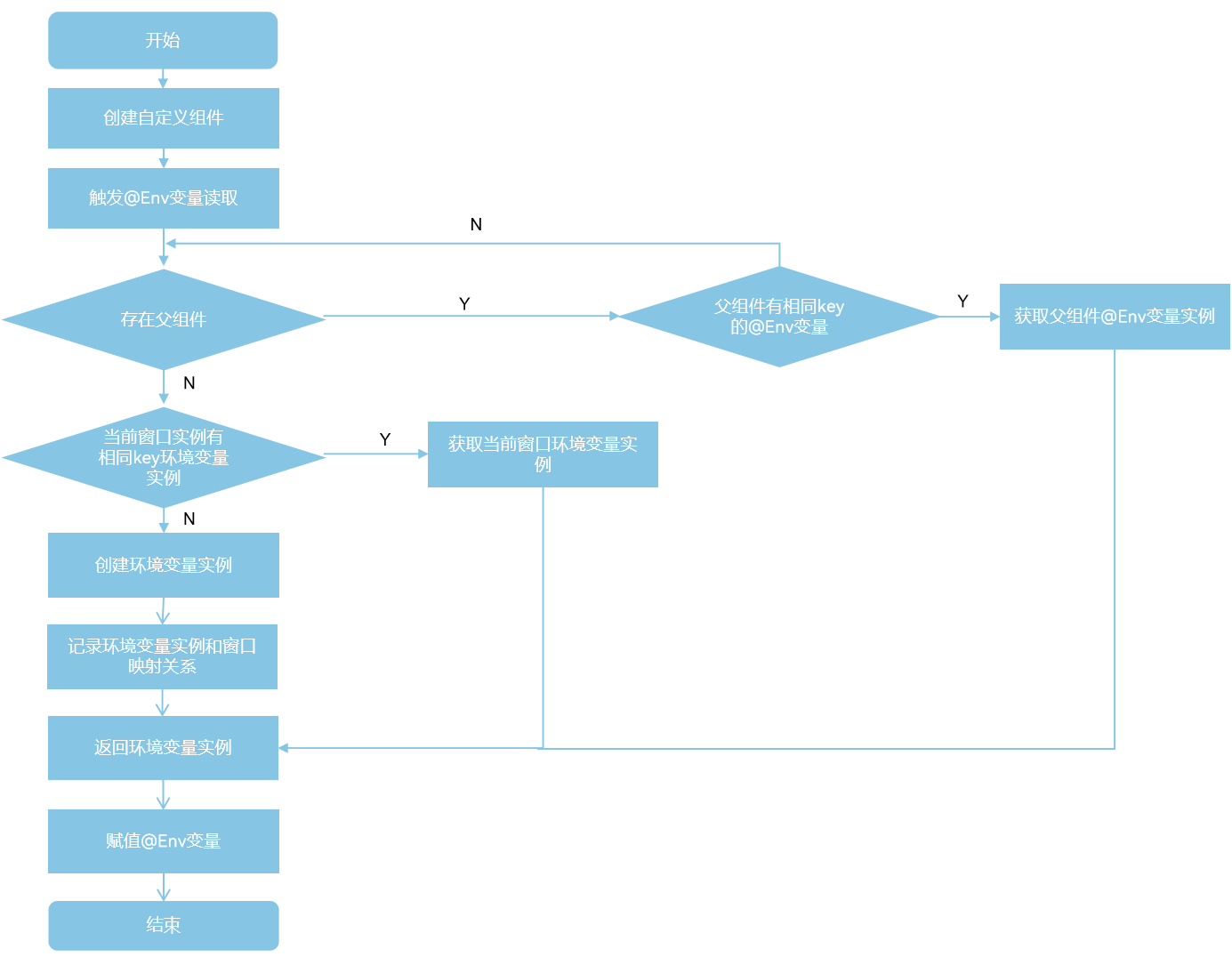
@Env变量不允许开发者初始化,其值由框架根据当前窗口的环境变量自动提供,@Env变量在被第一次读值的时候,会触发初始化。@Env变量初始化遵循以下流程:
- 从父组件中查找已有实例:
- 向上递归查找父组件。
- 如果某个父组件在同一窗口中已经初始化过相同key的@Env变量,则直接复用该实例。
- 若未找到,则继续向上查找,直到父组件为空。需要注意,向上查找父组件的流程会被BuilderNode打断。
- 查找当前窗口的@Env实例。
- 如果在父组件中未找到对应的实例,则检查当前窗口是否已有相同key的@Env变量实例。
- 如存在,则复用该窗口内的@Env实例。
- 首次请求:创建新环境变量实例。
- 若以上两步都无法得到实例,则说明当前窗口第一次读取该环境变量。
- 框架会创建一个新的可观察环境变量实例并与当前窗口绑定,然后完成初始化。
流程图如下。
基于上面流程,下面的示例中以@Env使用SystemProperties.BREAK_POINT为例,各个组件中的初始化如下图。
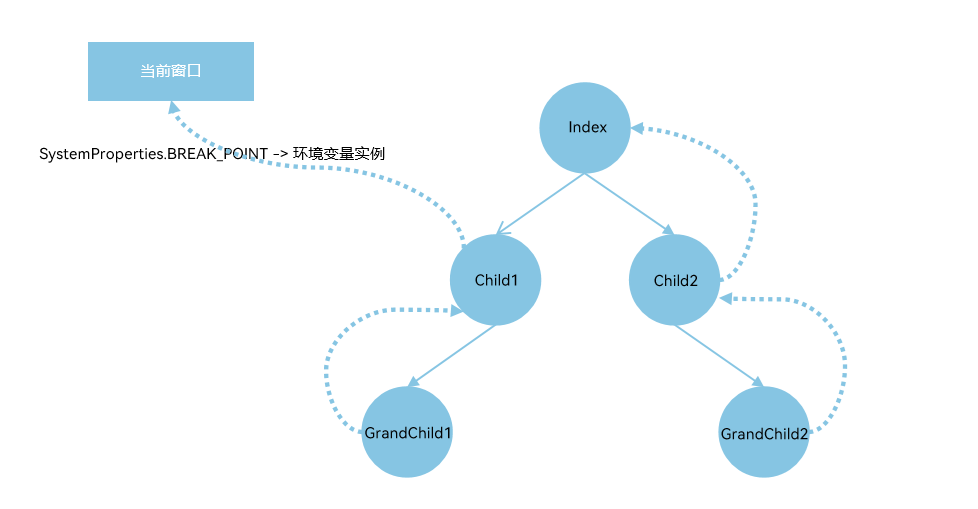
- Child1初始化@Env(SystemProperties.BREAK_POINT):
- 递归查找直到父组件为空:向上查找父组件Index,没有@Env对应的SystemProperties.BREAK_POINT实例。
- 查找当前窗口:没有@Env对应的SystemProperties.BREAK_POINT实例。
- 创建SystemProperties.BREAK_POINT对应的可观察的环境变量实例,并和当前窗口绑定。
- GrandChild1初始化@Env(SystemProperties.BREAK_POINT):
- 递归查找父组件,直到父组件为空:向上查找父组件Child1,查找到Child1有@Env对应的SystemProperties.BREAK_POINT实例。
- 复用Child1中@Env对应的SystemProperties.BREAK_POINT实例。
- GrandChild2初始化@Env(SystemProperties.BREAK_POINT):
- 递归查找直到父组件为空:向上查找父组件Child2和祖先节点Index,均没有@Env对应的SystemProperties.BREAK_POINT实例。
- 查找当前窗口:有@Env对应的SystemProperties.BREAK_POINT实例。
- 复用窗口中SystemProperties.BREAK_POINT对应的环境变量实例。
import { uiObserver } from '@kit.ArkUI';

@Entry
@Component
struct Index {
  build() {
    Column() {
      Text(`Index`)
      Child1()
      Child2()
    }
    .height('100%')
    .width('100%')
  }
}

@Component
struct Child1 {
  // @Env读取系统环境变量
  @Env(SystemProperties.BREAK_POINT) breakpoint: uiObserver.WindowSizeLayoutBreakpointInfo;

  build() {
    Column() {
      Text(`Child1 breakpoint width: ${this.breakpoint.widthBreakpoint}`).fontSize(20)
      Text(`Child1 breakpoint height: ${this.breakpoint.heightBreakpoint}`).fontSize(20)
      GrandChild1()
    }
  }
}

@Component
struct Child2 {
  build() {
    Column() {
      GrandChild2()
    }
  }
}

@Component
struct GrandChild1 {
  @Env(SystemProperties.BREAK_POINT) breakpoint: uiObserver.WindowSizeLayoutBreakpointInfo;

  build() {
    Column() {
      Text(`GrandChild1 breakpoint width: ${this.breakpoint.widthBreakpoint}`).fontSize(20)
      Text(`GrandChild1 breakpoint height: ${this.breakpoint.heightBreakpoint}`).fontSize(20)
    }
  }
}


@Component
struct GrandChild2 {
  @Env(SystemProperties.BREAK_POINT) breakpoint: uiObserver.WindowSizeLayoutBreakpointInfo;

  build() {
    Column() {
      Text(`GrandChild2 breakpoint width: ${this.breakpoint.widthBreakpoint}`).fontSize(20)
      Text(`GrandChild2 breakpoint height: ${this.breakpoint.heightBreakpoint}`).fontSize(20)
    }
  }
} [h2]在@ComponentV2中使用@Env
下面的例子中:
- 在@ComponentV2中声明@Env,获取当前@ComponentV2组件创建时所在窗口尺寸的布局断点信息,并用addMonitor监听this.breakpoint的属性的变化。
- 将@Env装饰的变量传递给CompV2中@Param装饰的变量和Comp中的常规变量。
- 点击Button('Landscape')和Button('Portrait')切换横竖屏,Index、CompV2和Comp关联组件进行对应的刷新,orientationChange被触发监听回调。
import { uiObserver, UIUtils, window } from '@kit.ArkUI';
import { common } from '@kit.AbilityKit';

@Entry
@ComponentV2
struct Index {
  @Env(SystemProperties.BREAK_POINT) breakpoint: uiObserver.WindowSizeLayoutBreakpointInfo;

  private changeOrientation(isLandscape: boolean) {
    const context = this.getUIContext()?.getHostContext() as common.UIAbilityContext;
    window.getLastWindow(context).then((lastWindow) => {
      lastWindow.setPreferredOrientation(isLandscape ? window.Orientation.LANDSCAPE : window.Orientation.PORTRAIT);
    });
  }

  orientationChange(mon: IMonitor) {
    mon.dirty.forEach((path: string) => {
      console.info(`${path} changes from ${mon.value(path)?.before} to ${mon.value(path)?.now}`);
    })
  }

  aboutToAppear(): void {
    // @Env返回的对象实际上是@ObservedV2装饰的对象(其属性是@Trace装饰的),所以其属性的改变可以通过addMonitor监听
    UIUtils.addMonitor(this.breakpoint, ['widthBreakpoint', 'heightBreakpoint'], this.orientationChange);
  }

  build() {
    Column() {
      Text(`Index breakpoint width: ${this.breakpoint.widthBreakpoint}`).fontSize(20)
      Text(`Index breakpoint height: ${this.breakpoint.heightBreakpoint}`).fontSize(20)

      Button('Landscape').onClick(() => {
        this.changeOrientation(true);
      })

      Button('Portrait').onClick(() => {
        this.changeOrientation(false);
      })

      CompV2({ breakpoint: this.breakpoint })
      Comp({ breakpoint: this.breakpoint })
    }
  }
}

@ComponentV2
struct CompV2 {
  @Require @Param breakpoint: uiObserver.WindowSizeLayoutBreakpointInfo;

  build() {
    Column() {
      Text(`CompV2 breakpoint width: ${this.breakpoint.widthBreakpoint}`).fontSize(20)
      Text(`CompV2 breakpoint height: ${this.breakpoint.heightBreakpoint}`).fontSize(20)
    }
  }
}

@Component
struct Comp {
  @Require breakpoint: uiObserver.WindowSizeLayoutBreakpointInfo;

  build() {
    Column() {
      Text(`Comp breakpoint width: ${this.breakpoint.widthBreakpoint}`).fontSize(20)
      Text(`Comp breakpoint height: ${this.breakpoint.heightBreakpoint}`).fontSize(20)
    }
  }
}
[h2]在@Component中使用@Env
@Env在@Component中使用和其在@ComponentV2中使用类似,示例如下。
import { uiObserver, UIUtils, window } from '@kit.ArkUI';
import { common } from '@kit.AbilityKit';

@Entry
@Component
struct Index {
  @Env(SystemProperties.BREAK_POINT) breakpoint: uiObserver.WindowSizeLayoutBreakpointInfo;

  private changeOrientation(isLandscape: boolean) {
    const context = this.getUIContext()?.getHostContext() as common.UIAbilityContext;
    window.getLastWindow(context).then((lastWindow) => {
      lastWindow.setPreferredOrientation(isLandscape ? window.Orientation.LANDSCAPE : window.Orientation.PORTRAIT);
    });
  }

  orientationChange(mon: IMonitor) {
    mon.dirty.forEach((path: string) => {
      console.info(`${path} changes from ${mon.value(path)?.before} to ${mon.value(path)?.now}`);
    })
  }

  aboutToAppear(): void {
    // @Env返回的对象实际上是@ObservedV2装饰的对象(其属性是@Trace装饰的),所以其属性的改变可以通过addMonitor监听
    UIUtils.addMonitor(this.breakpoint, ['widthBreakpoint', 'heightBreakpoint'], this.orientationChange);
  }

  build() {
    Column() {
      Text(`Index breakpoint width: ${this.breakpoint.widthBreakpoint}`).fontSize(20)
      Text(`Index breakpoint height: ${this.breakpoint.heightBreakpoint}`).fontSize(20)

      Button('Landscape').onClick(() => {
        this.changeOrientation(true);
      })

      Button('Portrait').onClick(() => {
        this.changeOrientation(false);
      })

      CompV2({ breakpoint: this.breakpoint })
      Comp({ breakpoint: this.breakpoint })
    }
  }
}

@ComponentV2
struct CompV2 {
  @Require @Param breakpoint: uiObserver.WindowSizeLayoutBreakpointInfo;

  build() {
    Column() {
      Text(`CompV2 breakpoint width: ${this.breakpoint.widthBreakpoint}`).fontSize(20)
      Text(`CompV2 breakpoint height: ${this.breakpoint.heightBreakpoint}`).fontSize(20)
    }
  }
}

@Component
struct Comp {
  @Require breakpoint: uiObserver.WindowSizeLayoutBreakpointInfo;

  build() {
    Column() {
      Text(`Comp breakpoint width: ${this.breakpoint.widthBreakpoint}`).fontSize(20)
      Text(`Comp breakpoint height: ${this.breakpoint.heightBreakpoint}`).fontSize(20)
    }
  }
}
[h2]通过BuilderNode切换窗口
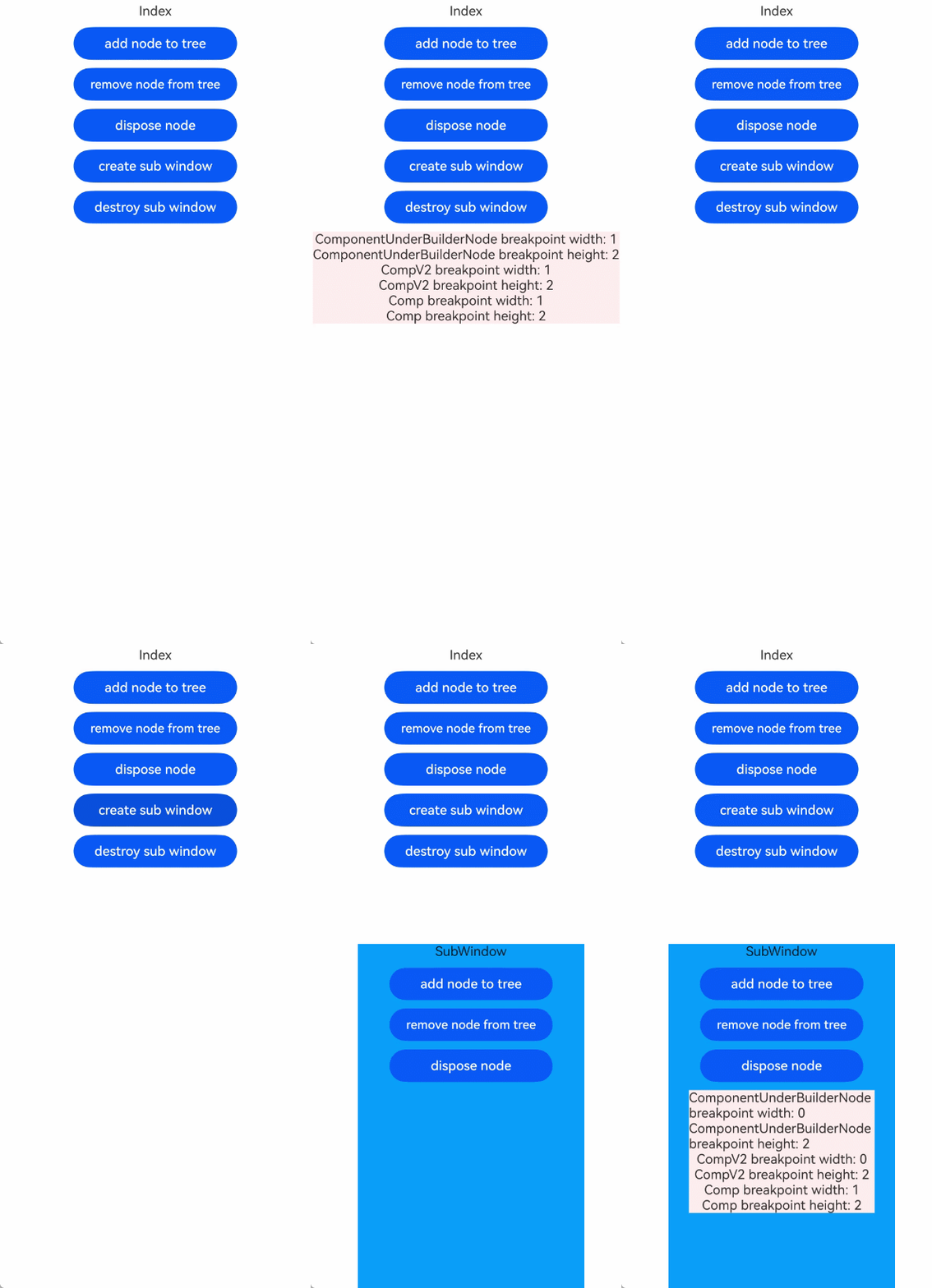
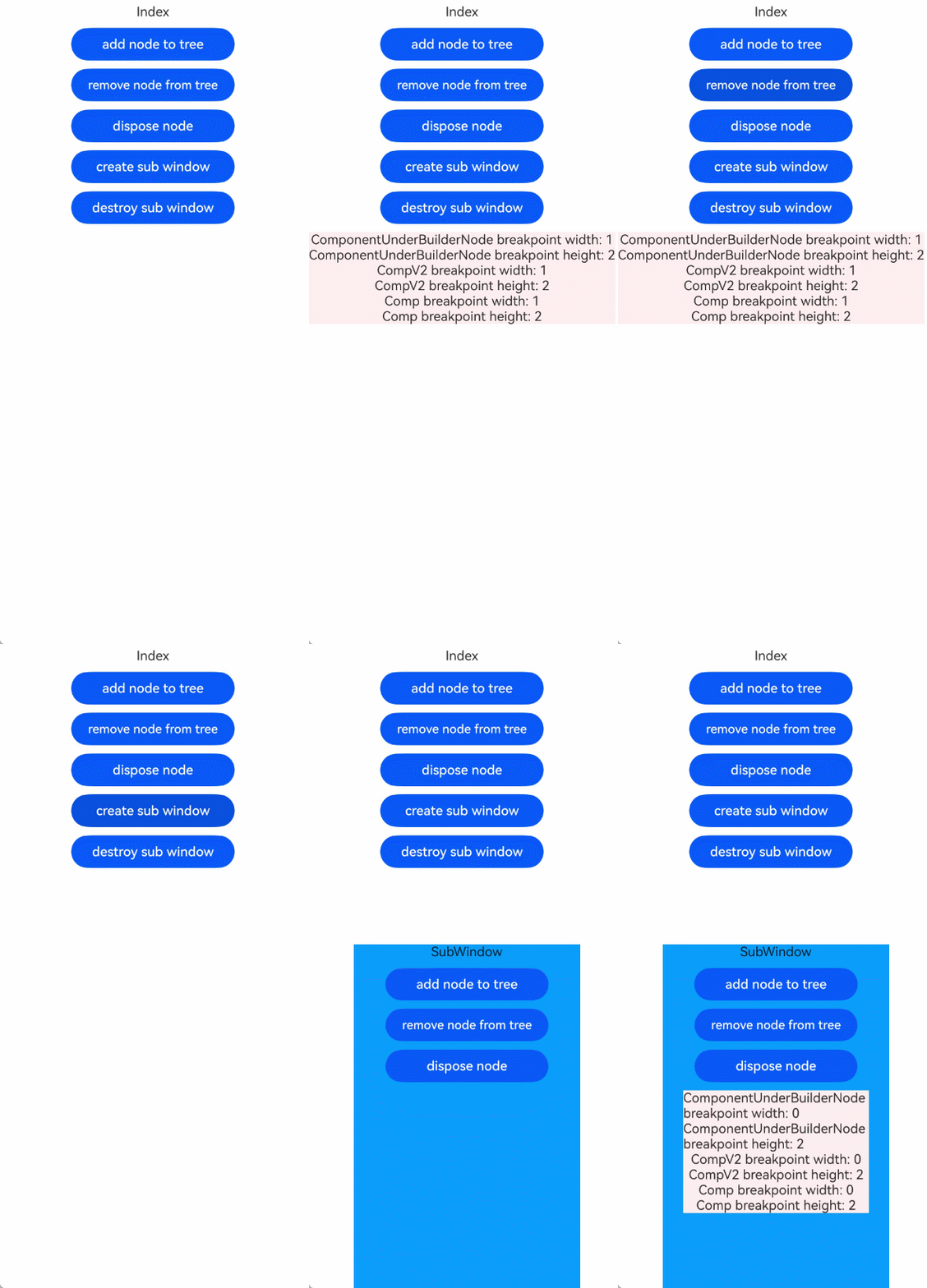
@Env用于展示@Component/@ComponentV2所在窗口的环境变量信息。开发者通过BuilderNode切换@Component/@ComponentV2所在的窗口实例时,@Env会根据新的窗口获取对应的环境变量信息,并触发关联的UI组件刷新。以SystemProperties.BREAK_POINT为例。
在下面的示例中:
- 点击Button('add node to tree'),创建BuilderNode节点挂载到NodeContainer下。
- 点击Button('remove node from tree'),将BuilderNode节点从NodeContainer上移除。
- 点击Button(`create sub window`),创建子窗并显示SubWindow窗口。
- 点击SubWindow窗口内的Button('add node to tree'),将BuilderNode节点重新挂载到SubWindow内的NodeContainer下。
- ComponentUnderBuilderNode在被挂载到新的窗口下时,会触发@Env重新获取新的环境变量。
- @Env重新获取新的环境变量后,触发其关联组件的刷新。其中ComponentUnderBuilderNode中@Env(SystemProperties.BREAK_POINT) breakpoint: uiObserver.WindowSizeLayoutBreakpointInfo会通知CompV2内的@Param breakpoint刷新,但是并不会通知Comp内的常规变量breakpoint触发UI刷新。所以在切换窗口,@Env重新获取环境变量的场景下,建议开发者不要将@Env传递给常规变量,以避免常规变量不能被通知UI刷新的问题。
下面的示例包含了创建子窗的流程,具体可参考子窗口开发指导。
// EntryAbility.ets
import { UIAbility } from '@kit.AbilityKit';
import { hilog } from '@kit.PerformanceAnalysisKit';
import { window } from '@kit.ArkUI';

const DOMAIN = 0x0000;

export default class EntryAbility extends UIAbility {
  onWindowStageCreate(windowStage: window.WindowStage) {
    windowStage.loadContent('pages/Index', (err) => {
      if (err.code) {
        hilog.error(DOMAIN, 'testTag', 'Failed to load the content. Cause: %{public}s', JSON.stringify(err));
        return;
      }
      hilog.info(DOMAIN, 'testTag', 'Succeeded in loading the content.');
    })

    // 给Index页面传递windowStage
    AppStorage.setOrCreate('windowStage', windowStage);
  }
}
import { BuilderNode, FrameNode, NodeController, uiObserver, window } from '@kit.ArkUI';
import { BusinessError } from '@kit.BasicServicesKit';
import { hilog } from '@kit.PerformanceAnalysisKit';
const DOMAIN = 0x0000;
let windowStage: window.WindowStage | undefined = undefined;
let subWindowClass: window.Window | undefined = undefined;
let globalBuilderNode: BuilderNode<[]> | undefined = undefined;
export class MyNodeController extends NodeController {
private rootNode: FrameNode | null = null;
private uiContext: UIContext | null = null;
makeNode(uiContext: UIContext): FrameNode | null {
this.rootNode = new FrameNode(uiContext);
this.uiContext = uiContext;
return this.rootNode;
}
addBuilderNode(): void {
if (!globalBuilderNode && this.uiContext) {
globalBuilderNode = new BuilderNode(this.uiContext);
globalBuilderNode.build(wrapBuilder<[]>(buildComponent), undefined);
}
if (this.rootNode && globalBuilderNode) {
this.rootNode.appendChild(globalBuilderNode.getFrameNode());
}
}
removeBuilderNode(): void {
if (this.rootNode && globalBuilderNode) {
this.rootNode.removeChild(globalBuilderNode.getFrameNode());
}
}
disposeNode(): void {
if (this.rootNode && globalBuilderNode) {
globalBuilderNode.dispose();
globalBuilderNode = undefined;
}
}
}
@Builder
function buildComponent() {
Column() {
ComponentUnderBuilderNode()
}
}
@Entry
@ComponentV2
struct Index {
private nodeController: MyNodeController = new MyNodeController();
private createSubWindow() {
windowStage = AppStorage.get('windowStage');
if (windowStage == null) {
hilog.error(DOMAIN, 'testTag', 'Failed to create the subwindow. Cause: windowStage is null');
} else {
// 创建应用子窗口。
windowStage.createSubWindow('mySubWindow', (err: BusinessError, data) => {
let errCode: number = err.code;
if (errCode) {
hilog.error(DOMAIN, 'testTag', 'Failed to create the subwindow. Cause: ' + JSON.stringify(err));
return;
}
subWindowClass = data;
if (!subWindowClass) {
hilog.error(DOMAIN, 'testTag', 'subWindowClass is null');
return;
}
hilog.info(DOMAIN, 'testTag', 'Succeeded in creating the subwindow. Data: ' + JSON.stringify(data));
// 子窗口创建成功后,设置子窗口的位置、大小及相关属性等。
subWindowClass.moveWindowTo(200, 1300, (err: BusinessError) => {
let errCode: number = err.code;
if (errCode) {
hilog.error(DOMAIN, 'testTag', 'Failed to move the window. Cause:' + JSON.stringify(err));
return;
}
hilog.info(DOMAIN, 'testTag', 'Succeeded in moving the window.');
});
subWindowClass.resize(900, 1800, (err: BusinessError) => {
let errCode: number = err.code;
if (errCode) {
hilog.error(DOMAIN, 'testTag', 'Failed to change the window size. Cause:' + JSON.stringify(err));
return;
}
hilog.info(DOMAIN, 'testTag', 'Succeeded in changing the window size.');
});
// 为子窗口加载对应的目标页面。
subWindowClass.setUIContent('pages/EnvBuilderNodeSubWindow', (err: BusinessError) => {
let errCode: number = err.code;
if (errCode) {
hilog.error(DOMAIN, 'testTag', 'Failed to load the content. Cause:' + JSON.stringify(err));
return;
}
hilog.info(DOMAIN, 'testTag', 'Succeeded in loading the content.');
if (!subWindowClass) {
hilog.error(DOMAIN, 'testTag', 'subWindowClass is null');
return;
}
subWindowClass.showWindow((err: BusinessError) => {
let errCode: number = err.code;
if (errCode) {
hilog.error(DOMAIN, 'testTag', 'Failed to show the window. Cause: ' + JSON.stringify(err));
return;
}
hilog.info(DOMAIN, 'testTag', 'Succeeded in showing the window.');
});
});
})
}
}
private destroySubWindow() {
if (!subWindowClass) {
console.error('subWindowClass is null');
return;
}
// 销毁子窗口。当不再需要子窗口时,可根据具体实现逻辑,使用destroy对其进行销毁。
subWindowClass.destroyWindow((err: BusinessError) => {
let errCode: number = err.code;
if (errCode) {
console.error('Failed to destroy the window. Cause: ' + JSON.stringify(err));
return;
}
console.info('Succeeded in destroying the window.');
});
}
build() {
Column({ space: 10 }) {
Text(`Index`)
// 第一步:创建globalBuilderNode,并将globalBuilderNode下的节点挂在NodeContainer的占位节点下
Button('add node to tree').width(200).onClick(() => {
this.nodeController.addBuilderNode();
})
// 第二步:从NodeContainer的占位节点下移除globalBuilderNode下的节点
Button('remove node from tree').width(200).onClick(() => {
this.nodeController.removeBuilderNode();
})
// 销毁globalBuilderNode下的节点
Button('dispose node').width(200).onClick(() => {
this.nodeController.disposeNode();
})
// 第三步:创建子窗
Button(`create sub window`).width(200).onClick(() => {
this.createSubWindow();
})
// 销毁子窗
Button(`destroy sub window`).width(200).onClick(() => {
this.destroySubWindow();
})
NodeContainer(this.nodeController).backgroundColor('#FFEEF0')
}
.width('100%')
.height('100%')
}
}
@Component
struct ComponentUnderBuilderNode {
@Env(SystemProperties.BREAK_POINT) breakpoint: uiObserver.WindowSizeLayoutBreakpointInfo;
build() {
Column() {
Text(`ComponentUnderBuilderNode breakpoint width: ${this.breakpoint.widthBreakpoint}`)
Text(`ComponentUnderBuilderNode breakpoint height: ${this.breakpoint.heightBreakpoint}`)
CompV2({ breakpoint: this.breakpoint })
Comp({ breakpoint: this.breakpoint })
}
}
}
@ComponentV2
struct CompV2 {
@Require @Param breakpoint: uiObserver.WindowSizeLayoutBreakpointInfo;
build() {
Column() {
Text(`CompV2 breakpoint width: ${this.breakpoint.widthBreakpoint}`)
Text(`CompV2 breakpoint height: ${this.breakpoint.heightBreakpoint}`)
}
}
}
@Component
struct Comp {
@Require breakpoint: uiObserver.WindowSizeLayoutBreakpointInfo;
build() {
Column() {
Text(`Comp breakpoint width: ${this.breakpoint.widthBreakpoint}`)
Text(`Comp breakpoint height: ${this.breakpoint.heightBreakpoint}`)
}
}
} import { MyNodeController } from './EnvBuilderNode';
@Entry
@Component
struct SubWindow {
private nodeController: MyNodeController = new MyNodeController();
build() {
Column({ space: 10 }) {
Text(`SubWindow`)
// 第四步:在第一步中已在创建globalBuilderNode。将globalBuilderNode下的节点挂子窗的NodeContainer的占位节点下
Button('add node to tree').width(200).onClick(() => {
this.nodeController.addBuilderNode();
})
Button('remove node from tree').width(200).onClick(() => {
this.nodeController.removeBuilderNode();
})
Button('dispose node').width(200).onClick(() => {
this.nodeController.disposeNode();
})
NodeContainer(this.nodeController).backgroundColor('#FFEEF0')
}
.height('100%')
.width('100%')
.backgroundColor('#0D9FFB')
}
} 运行效果图如下。
可以使用lambda闭包函数将ComponentUnderBuilderNode中的@Env向下传递。通过这种方式ComponentUnderBuilderNode中的@Env可以收集到子组件Comp内组件的依赖,在切换窗口实例的时候触发Comp内组件的刷新。
仅需修改ComponentUnderBuilderNode向Comp的传参方式以及Comp自身的取值方式,其余部分(EntryAbility、MyNodeController、Index、createSubWindow、destroySubWindow、SubWindow、CompV2)与上例完全相同。具体示例如下。
// 仅修改 ComponentUnderBuilderNode 与 Comp,其余与上例相同
@Component
struct ComponentUnderBuilderNode {
  @Env(SystemProperties.BREAK_POINT) breakpoint: uiObserver.WindowSizeLayoutBreakpointInfo;

  build() {
    Column() {
      Text(`ComponentUnderBuilderNode breakpoint width: ${this.breakpoint.widthBreakpoint}`)
      Text(`ComponentUnderBuilderNode breakpoint height: ${this.breakpoint.heightBreakpoint}`)

      CompV2({ breakpoint: this.breakpoint })
      // 通过lambda闭包函数,使得@Env可以关联到Comp内的组件
      Comp({ getEnv: () => this.breakpoint })
    }
  }
}

@Component
struct Comp {
  // 通过lambda闭包函数获取父组件的@Env的实例
  @Require getEnv: () => uiObserver.WindowSizeLayoutBreakpointInfo;

  build() {
    Column() {
      Text(`Comp breakpoint width: ${this.getEnv().widthBreakpoint}`)
      Text(`Comp breakpoint height: ${this.getEnv().heightBreakpoint}`)
    }
  }
}
运行效果图如下。
[h2]@Watch与@Monitor监听@Env装饰的变量
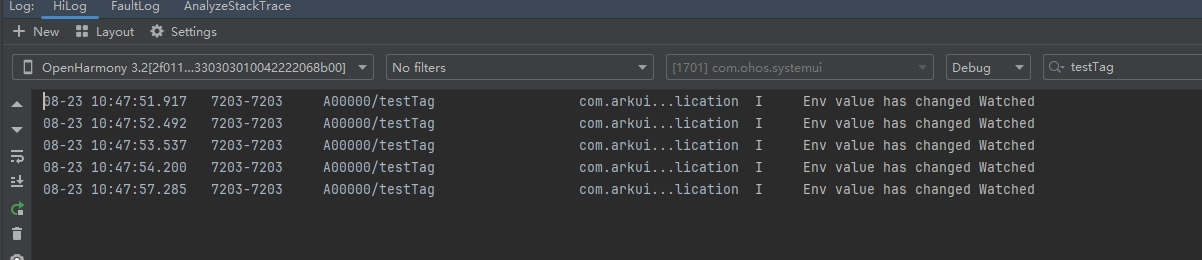
从API版本26.0.0开始,在@Component中,可通过@Watch监听@Env装饰变量的变化。需要注意的是,仅当@Env装饰的变量被整体赋值时才会触发@Watch监听回调,其内部属性的变化不会触发回调。
import { WithEnv } from '@kit.ArkUI';
import { hilog } from '@kit.PerformanceAnalysisKit';

@Entry
@Component
struct Index {
  @State fontScaleNum: number = 1;

  build() {
    Column() {
      Button('update').onClick(() => {
        this.fontScaleNum++;
      })

      WithEnv() {
        ChildV1()
      }
      .env(WritableEnvKey.FONT_SCALE, this.fontScaleNum)
    }
    .height('100%')
    .width('100%')
  }
}

@Component
struct ChildV1 {
  @Env(WritableEnvKey.FONT_SCALE) @Watch('onEnvUpdate') fontScaleVal: number;

  onEnvUpdate(){
    hilog.info(0x0000, 'testTag',`Env value has changed Watched`);
  }

  build() {
    Column() {
      Text('FontScale val is:'  + this.fontScaleVal)
    }
    .height('100%')
    .width('100%')
  }
}
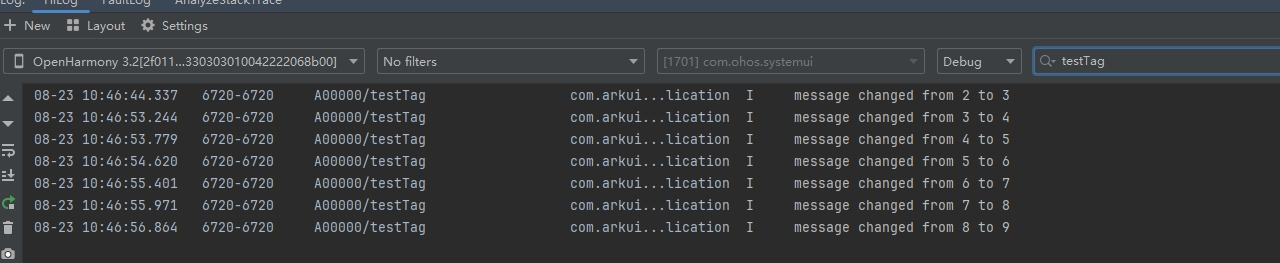
运行效果图如下。
在@ComponentV2中,可通过@Monitor监听@Env装饰变量的变化。需要注意的是,仅当@Env装饰的变量被整体赋值时才会触发@Monitor监听回调,其内部属性的变化不会触发回调。
import { WithEnv } from '@kit.ArkUI';
import { hilog } from '@kit.PerformanceAnalysisKit';


@Entry
@ComponentV2
struct MonitorTest {
  @Local message: number = 2;

  build() {
    Row() {
      Column() {
        Button('change message').onClick(() => {
          this.message++;
        })
        WithEnv() {
          Child()
        }.env(WritableEnvKey.FONT_SCALE, this.message)
      }
      .width('100%')
    }
    .height('100%')
  }
}

@ComponentV2
struct Child {
  @Env(WritableEnvKey.FONT_SCALE) message: number;

  @Monitor('message')
  onStrChange(monitor: IMonitor) {
    monitor.dirty.forEach((path: string) => {
      hilog.info(0x0000, 'testTag',
        `${path} changed from ${monitor.value(path)?.before} to ${monitor.value(path)?.now}`);
    });
  }

  build() {
    Column() {
      Text('message' + `${this.message}`)
        .fontSize(50)
        .fontWeight(FontWeight.Bold)
    }
  }
}
运行效果图如下。