开发者可以调用本模块的Native API接口,完成音频编码,即将音频PCM编码压缩成不同的格式。
接口不限制PCM数据的来源,开发者可以调用麦克风录制获取、也可以导入编辑后的PCM数据,通过音频编码,输出对应格式的码流,最后封装为目标格式文件。
当前支持的编码能力请参考AVCodec支持的格式。
适用场景

- AAC编码器默认采用的VBR可变码率模式,与配置的预期参数可能存在偏差。
- AAC编码器默认输出携带ADTS头部,帧数据的前7字节为ADTS头部。
开发指导
详细的API说明请参考native_avcodec_audiocodec.h。
参考以下示例代码,完成音频编码的全流程,包括:创建编码器、设置编码参数(采样率/码率/声道数等)、开始、刷新、重置、销毁资源。
示例代码引用了示例工程中自定义的工具宏与数据结构(如CHECK_AND_RETURN_RET_LOG、AVCODEC_SAMPLE_ERR_*、AVCODEC_SAMPLE_LOG*、CodecUserData、CodecBufferInfo、SampleInfo等),不属于SDK的接口,完整定义请参见示例工程,移植时需自行实现或替换。
在应用开发过程中,开发者应按一定顺序调用方法,执行对应操作,否则系统可能会抛出异常或生成其他未定义的行为。具体顺序可参考下列开发步骤及对应说明。
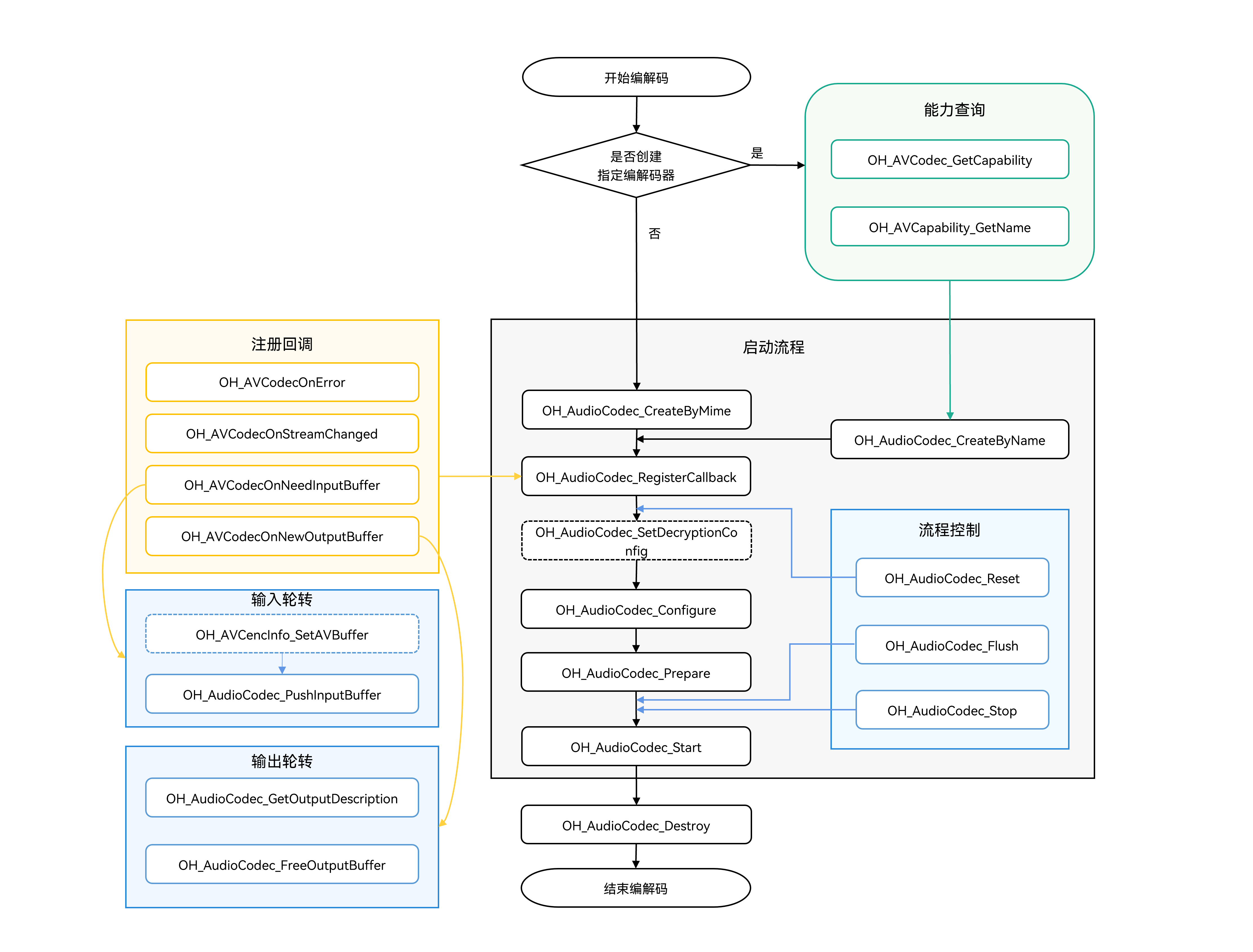
如下为音频编码调用关系图:
-
虚线表示可选。
-
实线表示必选。
[h2]在 CMake 脚本中链接动态库
target_link_libraries(sample PUBLIC libnative_media_codecbase.so)
target_link_libraries(sample PUBLIC libnative_media_core.so)
target_link_libraries(sample PUBLIC libnative_media_acodec.so)

上述'sample'字样仅为示例,此处由开发者根据实际工程目录自定义。
[h2]开发步骤
-
添加所需的头文件。
#include <multimedia/player_framework/native_avcodec_audiocodec.h>
#include <multimedia/native_audio_channel_layout.h>
#include <multimedia/player_framework/native_avcapability.h>
#include <multimedia/player_framework/native_avcodec_base.h>
#include <multimedia/player_framework/native_avformat.h>
#include <multimedia/player_framework/native_avbuffer.h>
-
创建编码器实例对象,OH_AVCodec*为编码器实例指针。
应用可以通过媒体类型或编解码器名称创建编码器。
- 方法一:通过mime type创建编码器。
int32_t AudioEncoder::Create(const std::string &codecMime) { // 设置判定是否为编码。true表示当前是编码。 constexpr bool isEncoder = true; // 通过mime type创建编码器。此处传入的mime type以实际编码格式为准。 encoder_ = OH_AudioCodec_CreateByMime(codecMime.c_str(), isEncoder); CHECK_AND_RETURN_RET_LOG(encoder_ != nullptr, AVCODEC_SAMPLE_ERR_ERROR, "Create failed"); return AVCODEC_SAMPLE_ERR_OK; }- 方法二:通过codec name创建编码器。
int32_t AudioEncoder::CreateByName(const std::string &codecMime) { // 通过codec name创建编码器。 OH_AVCapability *capability = OH_AVCodec_GetCapability(codecMime.c_str(), true); CHECK_AND_RETURN_RET_LOG(capability != nullptr, AVCODEC_SAMPLE_ERR_ERROR, "GetCapability failed"); const char *name = OH_AVCapability_GetName(capability); encoder_ = OH_AudioCodec_CreateByName(name); CHECK_AND_RETURN_RET_LOG(encoder_ != nullptr, AVCODEC_SAMPLE_ERR_ERROR, "CreateByName failed"); return AVCODEC_SAMPLE_ERR_OK; } -
调用OH_AudioCodec_RegisterCallback()注册回调函数。
注册回调函数指针集合OH_AVCodecCallback,包括:
- OH_AVCodecOnError:编码器运行错误。
- OH_AVCodecOnStreamChanged:音频编码器暂未支持此回调。
- OH_AVCodecOnNeedInputBuffer:运行过程中需要新的输入数据,即编码器已准备好,可以输入PCM数据。
- OH_AVCodecOnNewOutputBuffer:运行过程中产生了新的输出数据,即编码完成。
开发者可以通过处理该回调报告的信息,确保编码器正常运转。
示例中的CodecUserData为应用自定义的透传数据结构,用于在回调线程与消费线程之间传递buffer队列。

请勿在回调中调用编码器的相关接口或进行耗时操作。
void SampleCallback::OnCodecError(OH_AVCodec *codec, int32_t errorCode, void *userData)
{
    (void)codec;
    auto *codecUserData = static_cast<CodecUserData *>(userData);
    if (codecUserData != nullptr && !codecUserData->isDestroyed.load()) {
        codecUserData->SignalError();
    }
    AVCODEC_SAMPLE_LOGE("On codec error, error code: %{public}d", errorCode);
}
void SampleCallback::OnNeedInputBuffer(OH_AVCodec *codec, uint32_t index, OH_AVBuffer *buffer, void *userData) { auto *codecUserData = static_cast<CodecUserData *>(userData); if (codecUserData == nullptr || codecUserData->isDestroyed.load()) { return; } if (codec == nullptr || buffer == nullptr) { AVCODEC_SAMPLE_LOGE("Invalid codec input callback argument"); codecUserData->SignalError(); return; } UpdateEncoderFirstInputDescription(codec, codecUserData); // 输入帧的数据buffer和对应的index送入inputBufferQueue队列。 codecUserData->inputBufferQueue.Enqueue(std::make_shared<CodecBufferInfo>(index, buffer)); }OnNeedInputBuffer()中的UpdateEncoderFirstInputDescription()为视频编码首帧的信息获取逻辑(内部调用OH_VideoEncoder_GetInputDescription()),音频编码场景不会生效,可忽略。
void SampleCallback::OnNewOutputBuffer(OH_AVCodec *codec, uint32_t index, OH_AVBuffer *buffer, void *userData)
{
    auto *codecUserData = static_cast<CodecUserData *>(userData);
    if (codecUserData == nullptr || codecUserData->isDestroyed.load()) {
        return;
    }
    if (codec == nullptr || buffer == nullptr) {
        AVCODEC_SAMPLE_LOGE("Invalid codec output callback argument");
        codecUserData->SignalError();
        return;
    }
    if (codecUserData->isDecFirstFrame) {
        OH_AVFormat *format = OH_VideoDecoder_GetOutputDescription(codec);
        if (format != nullptr) {
            UpdateVideoOutputInfo(format, codecUserData);
            OH_AVFormat_Destroy(format);
        }
        codecUserData->isDecFirstFrame = false;
    }
    // 输出帧的数据buffer和对应的index送入outputBufferQueue队列。
    codecUserData->outputBufferQueue.Enqueue(std::make_shared<CodecBufferInfo>(index, buffer));

    // 从AVBuffer中获取时域层级信息。
    int32_t layerID = GetTemporalLayerID(buffer);
    if (layerID >= 0 && index % LIMIT_LOGD_FREQUENCY == 0) {
        AVCODEC_SAMPLE_LOGD("Temporal layer ID: %{public}d", layerID);
    }
}
isDecFirstFrame分支内部调用OH_VideoDecoder_GetOutputDescription(),该接口声明于native_avcodec_videodecoder.h,属于视频解码库。示例中isDecFirstFrame分支与时域层级信息的获取(GetTemporalLayerID())为视频场景的扩展逻辑,音频编码场景不会生效,可忽略。
配置回调:
int32_t AudioEncoder::SetCallback(CodecUserData *codecUserData) { // 编码器在内部线程回调userData;释放前应停止编码器并等待消费线程退出。 int32_t ret = AV_ERR_OK; ret = OH_AudioCodec_RegisterCallback(encoder_, { SampleCallback::OnCodecError, SampleCallback::OnCodecFormatChange, SampleCallback::OnNeedInputBuffer, SampleCallback::OnNewOutputBuffer }, codecUserData); CHECK_AND_RETURN_RET_LOG(ret == AV_ERR_OK, AVCODEC_SAMPLE_ERR_ERROR, "Set callback failed, ret: %{public}d", ret); return AVCODEC_SAMPLE_ERR_OK; } -
调用OH_AudioCodec_Configure设置编码器。
配置选项key值说明:

各音频编码类型参数范围说明:

例如对一个44100Hz采样率、2声道立体声、SAMPLE_S16LE采样格式的PCM音频,以32000bps的码率进行AAC编码的调用流程如下:
配置前建议先通过OH_AVCapability能力查询接口校验待配置参数是否在编码器支持范围内,再写入format并调用OH_AudioCodec_Configure()。
   int32_t ret;
   // 配置音频采样率(必须)
   constexpr uint32_t DEFAULT_SAMPLERATE = 44100;
   // 配置音频码率(必须)
   constexpr uint64_t DEFAULT_BITRATE = 32000;
   // 配置音频声道数(必须)
   constexpr uint32_t DEFAULT_CHANNEL_COUNT = 2;
   // 配置音频声道类型(必须)
   constexpr OH_AudioChannelLayout CHANNEL_LAYOUT = OH_AudioChannelLayout::CH_LAYOUT_STEREO;
   // 配置音频位深(必须)
   constexpr OH_BitsPerSample SAMPLE_FORMAT = OH_BitsPerSample::SAMPLE_S16LE;
   // 配置AAC profile(可选,默认值:AAC_PROFILE_LC,其他可选值:AAC_PROFILE_HE、AAC_PROFILE_HE_V2)
   constexpr int32_t AAC_PROFILE = OH_AACProfile::AAC_PROFILE_LC;

   OH_AVFormat *format = OH_AVFormat_Create();
   // 写入format
   OH_AVFormat_SetIntValue(format, OH_MD_KEY_AUD_CHANNEL_COUNT, DEFAULT_CHANNEL_COUNT);
   OH_AVFormat_SetIntValue(format, OH_MD_KEY_AUD_SAMPLE_RATE, DEFAULT_SAMPLERATE);
   OH_AVFormat_SetLongValue(format, OH_MD_KEY_BITRATE, DEFAULT_BITRATE);
   OH_AVFormat_SetIntValue(format, OH_MD_KEY_AUDIO_SAMPLE_FORMAT, SAMPLE_FORMAT);
   OH_AVFormat_SetLongValue(format, OH_MD_KEY_CHANNEL_LAYOUT, CHANNEL_LAYOUT);
   OH_AVFormat_SetIntValue(format, OH_MD_KEY_PROFILE, AAC_PROFILE);
   // 配置编码器
   ret = OH_AudioCodec_Configure(audioEnc_, format);
   if (ret != AV_ERR_OK) {
       // 异常处理
   }
例AMR编码调用流程:
int32_t ret;
// 配置音频采样率(必须),amr-nb输入采样率为8000hz的PCM,amr-wb输入采样率为16000hz的PCM
constexpr uint32_t DEFAULT_SAMPLERATE = 8000;
// 配置音频码率(必须)
// amr-nb支持码率4750、5150、5900、6700、7400、7950、10200、12200
// amr-wb支持码率6600、8850、12650、14250、15850、18250、19850、23050、23850
constexpr uint64_t DEFAULT_BITRATE = 10200;
// 配置音频声道数(必须)
constexpr uint32_t DEFAULT_CHANNEL_COUNT = 1;
// 配置音频声道类型(必须)
constexpr OH_AudioChannelLayout CHANNEL_LAYOUT = OH_AudioChannelLayout::CH_LAYOUT_MONO;
// 配置音频位深(必须)
constexpr OH_BitsPerSample SAMPLE_FORMAT = OH_BitsPerSample::SAMPLE_S16LE;
OH_AVFormat *format = OH_AVFormat_Create();
// 写入format
OH_AVFormat_SetIntValue(format, OH_MD_KEY_AUD_CHANNEL_COUNT, DEFAULT_CHANNEL_COUNT);
OH_AVFormat_SetIntValue(format, OH_MD_KEY_AUD_SAMPLE_RATE, DEFAULT_SAMPLERATE);
OH_AVFormat_SetLongValue(format, OH_MD_KEY_BITRATE, DEFAULT_BITRATE);
OH_AVFormat_SetIntValue(format, OH_MD_KEY_AUDIO_SAMPLE_FORMAT, SAMPLE_FORMAT);
OH_AVFormat_SetLongValue(format, OH_MD_KEY_CHANNEL_LAYOUT, CHANNEL_LAYOUT);
// 配置编码器
ret = OH_AudioCodec_Configure(audioEnc_, format);
if (ret != AV_ERR_OK) {
    // 异常处理
}
例opus编码调用流程:
int32_t ret;
// 配置音频采样率(必须)
// opus编码支持采样率:8000、12000、16000、24000、48000
constexpr uint32_t DEFAULT_SAMPLERATE = 8000;
// 配置音频码率(必须)
// opus编码码率范围:[6000, 510000]
constexpr uint64_t DEFAULT_BITRATE = 6000;
// 配置音频声道数(必须)
// opus编码支持声道数:1、2
constexpr uint32_t DEFAULT_CHANNEL_COUNT = 1;
// 配置音频位深(必须)
// opus编码支持位深:SAMPLE_S16LE
constexpr OH_BitsPerSample SAMPLE_FORMAT = OH_BitsPerSample::SAMPLE_S16LE;
OH_AVFormat *format = OH_AVFormat_Create();
// 写入format
OH_AVFormat_SetIntValue(format, OH_MD_KEY_AUD_CHANNEL_COUNT, DEFAULT_CHANNEL_COUNT);
OH_AVFormat_SetIntValue(format, OH_MD_KEY_AUD_SAMPLE_RATE, DEFAULT_SAMPLERATE);
OH_AVFormat_SetLongValue(format, OH_MD_KEY_BITRATE, DEFAULT_BITRATE);
OH_AVFormat_SetIntValue(format, OH_MD_KEY_AUDIO_SAMPLE_FORMAT, SAMPLE_FORMAT);
// 配置编码器
ret = OH_AudioCodec_Configure(audioEnc_, format);
if (ret != AV_ERR_OK) {
    // 异常处理
}
除上述配置的参数外,还可以在Configure阶段配置以下可选参数:
-
OH_MD_KEY_AUDIO_MAX_INPUT_BUFFER_SIZE:配置音频编码器最大输入缓冲区大小(单位:字节)。FLAC、MP3等帧对齐编码器设置该参数后会启用内部PCM缓存机制,允许输入数据无需按帧大小对齐,编码器会自动进行缓存与拆帧。实际缓冲区大小受编码器实现限制,如果设置的值超出上限,会被设置为上限值(上限为10MB)。
-
OH_MD_KEY_AUDIO_ENCODER_PTS_MODE:配置音频编码器输出PTS模式,值类型为OH_AudioEncoderPTSMode。不同模式下输出帧的PTS计算方式不同:
- OH_AUDIO_ENCODER_PTS_MODE_DEFAULT:默认行为,不同编码器的PTS输出方式可能不同。
- OH_AUDIO_ENCODER_PTS_MODE_ZERO_START:PTS从0开始,按帧时长递增。适用于不依赖输入PTS、需要从0开始计时的场景。
- OH_AUDIO_ENCODER_PTS_MODE_FIRST_INPUT_START:PTS从首个输入帧的PTS开始,按帧时长递增。适用于需要保持与输入流PTS连续性的场景。
-
OH_MD_KEY_AUDIO_ENCODER_ENABLE_SAMPLE_FORMAT_CONVERT:配置音频编码器采样格式转换开关,1表示开启,0表示关闭(默认)。音频编码器原生支持的采样格式有限(例如G711mu仅支持SAMPLE_S16LE),开启后编码器会自动将输入的PCM数据转换为编码器支持的格式进行编码,支持的输入采样格式扩展为:SAMPLE_U8、SAMPLE_S16LE、SAMPLE_S24LE、SAMPLE_S32LE、SAMPLE_F32LE。适用于输入PCM格式与编码器原生格式不一致的场景。
// 配置编码器最大输入缓冲区大小(可选),FLAC/MP3设置后可接受非帧对齐的输入数据。此处4096仅为参考值,开发者可按实际需要动态设置。
OH_AVFormat_SetIntValue(format, OH_MD_KEY_AUDIO_MAX_INPUT_BUFFER_SIZE, 4096);
// 配置编码器PTS输出模式(可选)。
OH_AVFormat_SetIntValue(format, OH_MD_KEY_AUDIO_ENCODER_PTS_MODE,
    OH_AUDIO_ENCODER_PTS_MODE_FIRST_INPUT_START);
// 配置编码器采样格式转换开关(可选),开启后支持更多采样格式输入。
OH_AVFormat_SetIntValue(format, OH_MD_KEY_AUDIO_ENCODER_ENABLE_SAMPLE_FORMAT_CONVERT, 1); -
调用OH_AudioCodec_Prepare(),编码器就绪。
示例工程将OH_AudioCodec_Prepare()封装在Config()函数中调用:在Config()函数中先完成Configure()配置与回调注册,之后再调用OH_AudioCodec_Prepare()使编码器就绪。以下为其中Prepare部分的代码:
{ // 编码器就绪。 int ret = OH_AudioCodec_Prepare(encoder_); CHECK_AND_RETURN_RET_LOG(ret == AV_ERR_OK, AVCODEC_SAMPLE_ERR_ERROR, "Prepare failed, ret: %{public}d", ret); } -
调用OH_AudioCodec_Start()启动编码器,进入运行态。
int32_t AudioEncoder::Start() { CHECK_AND_RETURN_RET_LOG(encoder_ != nullptr, AVCODEC_SAMPLE_ERR_ERROR, "Encoder is null"); int ret = OH_AudioCodec_Start(encoder_); CHECK_AND_RETURN_RET_LOG(ret == AV_ERR_OK, AVCODEC_SAMPLE_ERR_ERROR, "Start failed, ret: %{public}d", ret); return AVCODEC_SAMPLE_ERR_OK; } -
调用OH_AudioCodec_PushInputBuffer(),写入待编码的数据。需开发者填充完整的输入数据后调用。
每次输入的采样点数(SAMPLES_PER_FRAME)取值方法如下:
AAC-LC编码每帧包含1024个PCM样点,建议单次输入1024个样点的数据量。
HE-AAC编码每帧包含2048个PCM样点,建议单次输入2048个样点的数据量。
flac比较特殊,需要根据如下表格进行设置。
采样率 样点数 8000 576 16000 1152 22050 2304 24000 2304 32000 2304 44100 4608 48000 4608 88200 8192 96000 8192 
单次编码输入的数据量(单位:字节)为:采样点数(SAMPLES_PER_FRAME) * 声道数 * 单个采样点的占用字节。
flac编码的样点数建议参考表格根据采样率对应的样点数进行设置,否则可能出现编码文件损坏问题。
int32_t AudioEncoder::PushInputData(CodecBufferInfo &info)
{
    CHECK_AND_RETURN_RET_LOG(encoder_ != nullptr, AVCODEC_SAMPLE_ERR_ERROR, "Encoder is null");
    CHECK_AND_RETURN_RET_LOG(info.buffer != nullptr, AVCODEC_SAMPLE_ERR_ERROR, "Input buffer is null");
    int32_t ret = OH_AVBuffer_SetBufferAttr(info.buffer, &info.attr);
    CHECK_AND_RETURN_RET_LOG(ret == AV_ERR_OK, AVCODEC_SAMPLE_ERR_ERROR, "Set avbuffer attr failed");
    ret = OH_AudioCodec_PushInputBuffer(encoder_, info.bufferIndex);
    CHECK_AND_RETURN_RET_LOG(ret == AV_ERR_OK, AVCODEC_SAMPLE_ERR_ERROR, "Push input data failed");
    return AVCODEC_SAMPLE_ERR_OK;
}
示例中以麦克风录音(AudioCapturer)作为PCM数据来源,录音数据先写入应用自定义的PCM缓存,攒够一个输入buffer的数据量后填充到编码器输入buffer并送入编码器,输入线程示例如下:
void Recorder::AudioEncInputThread()
{
    while (true) {
        CHECK_AND_BREAK_LOG(!isEos_, "Work done, thread out");
        CHECK_AND_BREAK_LOG(isStarted_, "Encoder input thread out");
        if (isStopping_.load()) {
            std::this_thread::sleep_for(std::chrono::milliseconds(AUDIO_INPUT_STOP_POLL_INTERVAL_MS));
            continue;
        }
        if (!WaitForAudioInputFrame(5s)) {
            continue;
        }
        std::shared_ptr<CodecBufferInfo> bufferInfo = audioEncContext_->inputBufferQueue.Dequeue();
        std::shared_lock<std::shared_mutex> codecLock(audioEncContext_->codecMutex);
        CHECK_AND_CONTINUE_LOG(bufferInfo != nullptr, "Audio buffer queue is empty, continue");
        if (!SubmitAudioInputFrame(*bufferInfo, bufferInfo->buffer, false)) {
            break;
        }
    }
}
在上方案例中,attr.flags代表缓冲区标记的类别。
结束时需要将flags标识为AVCODEC_BUFFER_FLAGS_EOS。在示例中,当录制结束时获取一个输入buffer,填入长度为0的数据并标识EOS标志后送入编码器。
int32_t AudioEncoder::NotifyEndOfStream()
{
    CHECK_AND_RETURN_RET_LOG(encoder_ != nullptr, AVCODEC_SAMPLE_ERR_ERROR, "Encoder is null");

    // 使用空输入Buffer携带EOS。即使没有媒体数据也必须提交该Buffer,编码器才会输出尾部数据。
    CodecBufferInfo bufferInfo;
    auto buffer = GetInputBuffer(bufferInfo, TIMEOUT_US);
    if (buffer == nullptr) {
        AVCODEC_SAMPLE_LOGW("GetInputBuffer for EOS failed");
        return AVCODEC_SAMPLE_ERR_ERROR;
    }

    // EOS不包含有效音频字节;调用PushInputBuffer后该Buffer立即归codec管理。
    bufferInfo.attr.size = 0;
    bufferInfo.attr.flags = AVCODEC_BUFFER_FLAGS_EOS;
    int32_t ret = OH_AVBuffer_SetBufferAttr(buffer, &bufferInfo.attr);
    if (ret != AV_ERR_OK) {
        AVCODEC_SAMPLE_LOGE("SetBufferAttr for EOS failed, ret: %{public}d", ret);
        return AVCODEC_SAMPLE_ERR_ERROR;
    }

    bufferInfo.buffer = buffer;
    ret = OH_AudioCodec_PushInputBuffer(encoder_, bufferInfo.bufferIndex);
    CHECK_AND_RETURN_RET_LOG(ret == AV_ERR_OK, AVCODEC_SAMPLE_ERR_ERROR,
                             "PushInputBuffer for EOS failed, ret: %{public}d", ret);
    return AVCODEC_SAMPLE_ERR_OK;
}
枚举值 描述 AVCODEC_BUFFER_FLAGS_NONE 表示为普通帧。 AVCODEC_BUFFER_FLAGS_EOS 表示缓冲区是流结束帧。 AVCODEC_BUFFER_FLAGS_CODEC_DATA 表示缓冲区包含编解码特定数据。 -
调用OH_AudioCodec_FreeOutputBuffer(),释放编码后的数据。
在取走编码码流后,就应及时调用OH_AudioCodec_FreeOutputBuffer()进行释放。
int32_t AudioEncoder::FreeOutputData(uint32_t bufferIndex)
{
    CHECK_AND_RETURN_RET_LOG(encoder_ != nullptr, AVCODEC_SAMPLE_ERR_ERROR, "Encoder is null");

    int32_t ret = AVCODEC_SAMPLE_ERR_OK;
    ret = OH_AudioCodec_FreeOutputBuffer(encoder_, bufferIndex);
    CHECK_AND_RETURN_RET_LOG(ret == AV_ERR_OK, AVCODEC_SAMPLE_ERR_ERROR, "Free output data failed");
    return AVCODEC_SAMPLE_ERR_OK;
}
示例中编码输出的码流写入封装模块,写完一帧后及时释放输出buffer,输出消费示例如下:
void Recorder::AudioEncOutputThread() { while (true) { CHECK_AND_BREAK_LOG(isStarted_, "Work done, thread out"); std::shared_ptr<CodecBufferInfo> bufferInfo = audioEncContext_->outputBufferQueue.Dequeue(); std::shared_lock<std::shared_mutex> codecLock(audioEncContext_->codecMutex); CHECK_AND_BREAK_LOG(isStarted_, "Work done, thread out"); CHECK_AND_CONTINUE_LOG(bufferInfo != nullptr, "Buffer queue is empty, continue"); audioEncContext_->outputFrameCount++; AVCODEC_SAMPLE_LOGW( "Audio Out buffer count: %{public}u, size: %{public}d, flag: %{public}u, pts: %{public}" PRId64, audioEncContext_->outputFrameCount, bufferInfo->attr.size, bufferInfo->attr.flags, bufferInfo->attr.pts); const bool isEosBuffer = (bufferInfo->attr.flags & AVCODEC_BUFFER_FLAGS_EOS) != 0; int32_t writeRet = AVCODEC_SAMPLE_ERR_OK; if (!isEosBuffer && bufferInfo->attr.size > 0) { // AAC只编码一次;同一输出Buffer依次写入两个Muxer,之后仍按原索引归还。 writeRet = muxer_->WriteSample(muxer_->GetAudioTrackId(), bufferInfo->buffer, bufferInfo->attr); if (writeRet == AVCODEC_SAMPLE_ERR_OK && secondaryMuxer_ != nullptr) { writeRet = secondaryMuxer_->WriteSample(secondaryMuxer_->GetAudioTrackId(), bufferInfo->buffer, bufferInfo->attr); } } int32_t ret = audioEncoder_->FreeOutputData(bufferInfo->bufferIndex); CHECK_AND_BREAK_LOG(ret == AVCODEC_SAMPLE_ERR_OK, "Encoder output thread out"); if (writeRet != AVCODEC_SAMPLE_ERR_OK) { AbortRecording("Write encoded audio sample failed"); break; } if (isEosBuffer) { AVCODEC_SAMPLE_LOGI("Audio EOS processed, exiting output thread"); isAudioEos_.store(true); videoEosCond_.notify_all(); break; } } AVCODEC_SAMPLE_LOGI("Exit, frame count: %{public}u", audioEncContext_->inputFrameCount); } -
(可选)调用OH_AudioCodec_Flush()刷新编码器。
调用OH_AudioCodec_Flush()后,编码器处于Flush状态,会将当前编码队列清空。
此时需要调用OH_AudioCodec_Start()重新开始编码。
使用情况:
- 在编码输出buffer属性为AVCODEC_BUFFER_FLAGS_EOS后,若想重新使用相同配置进行编码时,需要调用刷新。
- 在执行过程中遇到可继续执行的错误时(即OH_AudioCodec_IsValid()为true)可以调用刷新,然后调用OH_AudioCodec_Start()重新开始编码。
int32_t AudioEncoder::Flush() { CHECK_AND_RETURN_RET_LOG(encoder_ != nullptr, AVCODEC_SAMPLE_ERR_ERROR, "Encoder is null"); // 刷新编码器,清空当前队列,之后需要调用Start()重新开始编码。 int32_t ret = OH_AudioCodec_Flush(encoder_); CHECK_AND_RETURN_RET_LOG(ret == AV_ERR_OK, AVCODEC_SAMPLE_ERR_ERROR, "Flush failed, ret: %{public}d", ret); return AVCODEC_SAMPLE_ERR_OK; } -
(可选)调用OH_AudioCodec_Reset()重置编码器。
调用OH_AudioCodec_Reset()后,编码器回到初始化状态,重置前获取到的输入/输出buffer都无法继续使用,需先调用OH_AudioCodec_Configure()重新配置,再调用OH_AudioCodec_Start()重新开始编码。启动后重新获取输入/输出buffer。
int32_t AudioEncoder::Reset() { CHECK_AND_RETURN_RET_LOG(encoder_ != nullptr, AVCODEC_SAMPLE_ERR_ERROR, "Encoder is null"); // 重置编码器,之后需要重新调用Configure()配置、Start()启动。 int32_t ret = OH_AudioCodec_Reset(encoder_); CHECK_AND_RETURN_RET_LOG(ret == AV_ERR_OK, AVCODEC_SAMPLE_ERR_ERROR, "Reset failed, ret: %{public}d", ret); return AVCODEC_SAMPLE_ERR_OK; } -
调用OH_AudioCodec_Stop()停止编码器。
停止后,可以通过调用OH_AudioCodec_Start()重新进入已启动状态(started)。停止前获取到的输入/输出buffer都无法继续使用,需要在启动后重新获取输入/输出buffer。
int32_t AudioEncoder::Stop() { CHECK_AND_RETURN_RET_LOG(encoder_ != nullptr, AVCODEC_SAMPLE_ERR_ERROR, "Encoder is null"); int ret = Flush(); CHECK_AND_RETURN_RET_LOG(ret == AVCODEC_SAMPLE_ERR_OK, AVCODEC_SAMPLE_ERR_ERROR, "Flush failed, ret: %{public}d", ret); ret = OH_AudioCodec_Stop(encoder_); CHECK_AND_RETURN_RET_LOG(ret == AV_ERR_OK, AVCODEC_SAMPLE_ERR_ERROR, "Stop failed, ret: %{public}d", ret); return AVCODEC_SAMPLE_ERR_OK; } -
调用OH_AudioCodec_Destroy()销毁编码器实例,释放资源。

禁止重复销毁编码器。
int32_t AudioEncoder::Release()
{
    if (encoder_ != nullptr) {
        // 销毁前刷新并停止编码器,不可重复destroy。
        Flush();
        Stop();
        OH_AudioCodec_Destroy(encoder_);
        encoder_ = nullptr;
    }
    return AVCODEC_SAMPLE_ERR_OK;
}