















智能客服
你问我答,随时在线为你解决问题
可以滚动的视图区域。
限制条件 | 说明 |
|---|---|
适用终端 | 手机、平板、智慧屏、车机 |
适用区域 | 全球 |
支持。
除了支持通用属性以外,还支持如下属性。
名称 | 类型 | 默认值 | 是否必填 | 描述 |
|---|---|---|---|---|
scroll-direction | string | vertical | 否 | 滚动方向,取值为vertical、horizontal和vertical_horizontal。
|
show-scrollbar | boolean | true | 否 | 是否显示滚动条。 |
支持通用样式。
除了支持通用事件以外,还支持如下事件。
名称 | 参数 | 描述 |
|---|---|---|
scroll | {scrollX:Number, scrollY:Number, oldScrollX:Number, oldScrollY:Number} | 滚动时触发。
|
scrollbegindrag | - | 用户开始拖动滚动视图时触发。 |
scrollenddrag | - | 用户停止拖动滚动视图时触发。 |
scrollstart | {scrollX:Number, scrollY:Number} | 滚动视图开始滑动时触发。 |
scrollstop | {scrollX:Number, scrollY:Number} | 滚动视图滑动结束时触发。 |
名称 | 参数 | 描述 |
|---|---|---|
scrollIntoView | {id} | 滚动到指定id子组件的位置,设置向哪个方向滚动,然后滚动到哪个方向的元素。 |
scrollTo | {x: Number/String, y: Number/String, smooth: Boolean} | 滚动到指定的 x、y 偏移量。 smooth:是否平滑滚动,可选,默认为true。 说明
|
- <template>
- <!-- Only one root node is allowed in template. -->
- <div class="container">
- <text class="title">Vertical ScrollView</text>
- <scroll-view id="verticalScrollView" class="content" height="100px" flex-direction="column">
- <text>Some Information</text>
- <text>Some Information</text>
- <text>Some Information</text>
- <text>Some Information</text>
- <text>Some Information</text>
- <text>Some Information</text>
- <text>Some Information</text>
- <text>Some Information</text>
- </scroll-view>
- <text class="title">Horizontal ScrollView</text>
- <scroll-view id="horizontalScrollView" class="content" width="300px" scroll-direction="horizontal" flex-direction="row">
- <text>Some Information</text>
- <text>Some Information</text>
- <text>Some Information</text>
- <text>Some Information</text>
- <text>Some Information</text>
- <text>Some Information</text>
- <text>Some Information</text>
- <text>Some Information</text>
- </scroll-view>
- <text class="title">Vertical Horizontal ScrollView</text>
- <scroll-view id="verticalHorizontalScrollView" class="content" height="300px" scroll-direction="vertical_horizontal" flex-direction="column" onscrollbegindrag="onscrollbegindrag" onscrollenddrag="onscrollenddrag" onscrollstart="onscrollstart" onscrollstop="onscrollstop" onscroll="onscroll">
- <text id="here">Some Information</text>
- <text>Some Information</text>
- <text>Some Information</text>
- <text>Some Information</text>
- <text>Some Information</text>
- <text>Some Information</text>
- <text>Some Information</text>
- <text>Some Information</text>
- <div class="container" width="2000" height="2000">
- <image src="/Common/img/xmad.jpg"></image>
- </div>
- <select id="select">
- <option value="01"selected="false">Option 1</option>
- <option value="02"selected="false">Option 2</option>
- <option value="03"selected="false">Option 3</option>
- <option value="04"selected="false">Option 4</option>
- <option value="05"selected="true">Option 5</option>
- </select>
- <text id="here" style="color: #048004;">ScrollIntoView to here</text>
- <text>Some Information</text>
- <text>Some Information</text>
- <text>Some Information</text>
- </scroll-view>
- <input type="button" class="content" value="scrollIntoView" onclick=scrollIntoView></input>
- <input type="button" class="content" value="ScrollInto" onclick=scrollInto></input>
- </div>
- </template>
- <style>
- .container {
- flex-direction: column;
- }
- .title {
- color: #c71585;
- font-size: 40px;
- }
- .content {
- margin: 10px;
- border: 1px solid #000000;
- }
- </style>
- <script>
- module.exports = {
- data: {
- },
- onInit() {
- this.$page.setTitleBar({ text: 'SR337' })
- },
- scrollIntoView() {
- this.$element('verticalHorizontalScrollView').scrollIntoView({ id: "here" })
- },
- scrollInto() {
- this.$element('verticalHorizontalScrollView').scrollTo({ x: 300, y: 500 })
- }, onscroll(event) {
- console.log("onscroll x " + event.scrollX + " y " + event.scrollY);
- },
- onscrollbegindrag() {
- console.log("scrollbegindrag");
- },
- onscrollenddrag() {
- console.log("scrollenddrag");
- },
- onscrollstart(event) {
- console.log("onscrollstart x " + event.scrollX + " y " + event.scrollY);
- },
- onscrollstop(event) {
- console.log("onscrollstop x " + event.scrollX + " y " + event.scrollY);
- }
- }
- </script>
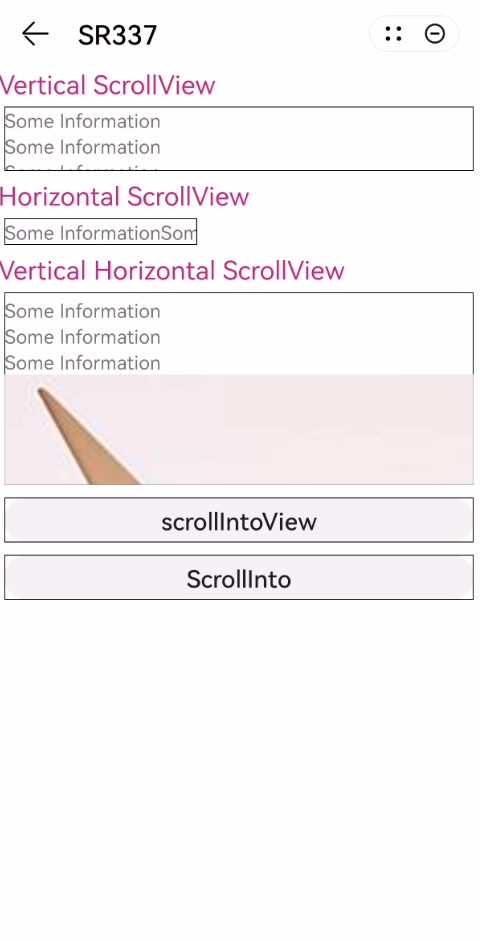
效果图如下:
版本 | 发布日期 | 描述 |
|---|---|---|
1110 | 2024-02-07 | 第一次正式发布。 |