Native code debugging depends on the LLDB. For details, see LLDB Debugger.
Before starting debugging, choose Run > Edit Configurations to open the Debug Configurations page. On the Debugger tab, set Debug type to Dual (ArkTS/JS + Native), Native, or Detect Automatically. Set the code type for debugging to C/C++.

- If Debug type is Detect Automatically, the debugger determines the debugging type based on the code type detected.
- During debugging, enabling compiler optimization – by adding optimization options – or using the release build mode – can lead to more efficient code execution, as the compiler modifies the assembly instructions. However, this optimization can complicate the mapping back to the original source code, potentially causing debugging issues such as unexpected deletion of local variable information or incorrect line breakpoints. To prevent such optimization-related exceptions during debugging, you are advised to disable optimization or use the debug build mode.
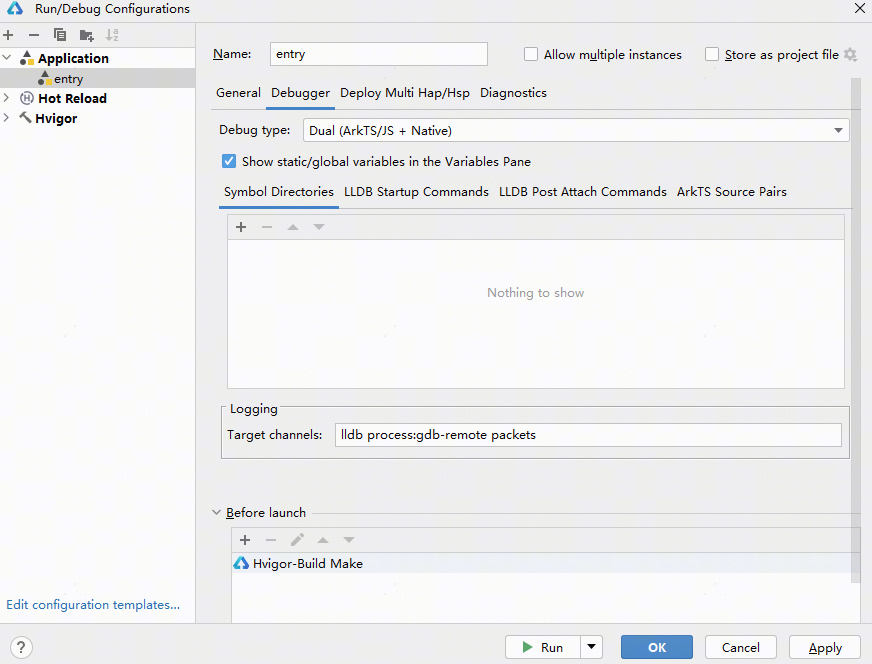
On the Debugger tab, you can customize the following configurations:
- Whether to display static/global variables in the Variables pane during debugging: Check or uncheck Show static/global variables in the Variables Pane.
- Symbol directories: On the Symbol Directories tab, click + to add a symbol directory (.so file with debugging information). For example, compile the .so library with debugging information first, then strip its debugging information. Run the stripped .so library on the device, and add the path to the unstripped .so library here to debug it.
LLDB commands: You can set LLDB commands on the LLDB Startup Commands and LLDB Post Attach Commands tabs. The commands set on the LLDB Startup Commands tab are executed immediately after the LLDB is started, and the commands set on the LLDB Post Attach Commands tab are executed after the LLDB is successfully attached to a process.
After the configuration is complete, you can start native code debugging in debug or attach mode. For details, see Starting Debugging in Debug Mode or Starting Debugging in Attach Mode.