You can call native APIs to perform audio encoding, which compresses audio PCM data into a desired format.
PCM data can be from any source. For example, you can use a microphone to record audio data or import edited PCM data. After audio encoding, you can output streams in the desired format and encapsulate the streams into a target file.
For details about the supported encoding capabilities, see AVCodec Supported Formats.
When to Use
-
Audio recording
Record PCM data, encode it into the desired format, and then multiplex it into an audio file in the desired format.
-
Audio editing
Export edited PCM data, encode it into the corresponding audio format, and then multiplex it into a file.

- AAC encoders adopt the VBR mode by default. This may result in differences from the configured parameters.
- By default, AAC encoders include an ADTS header in its output, which occupies the first 7 bytes of each frame.
Development Guidelines
For detailed API descriptions, refer to native_avcodec_audiocodec.h.
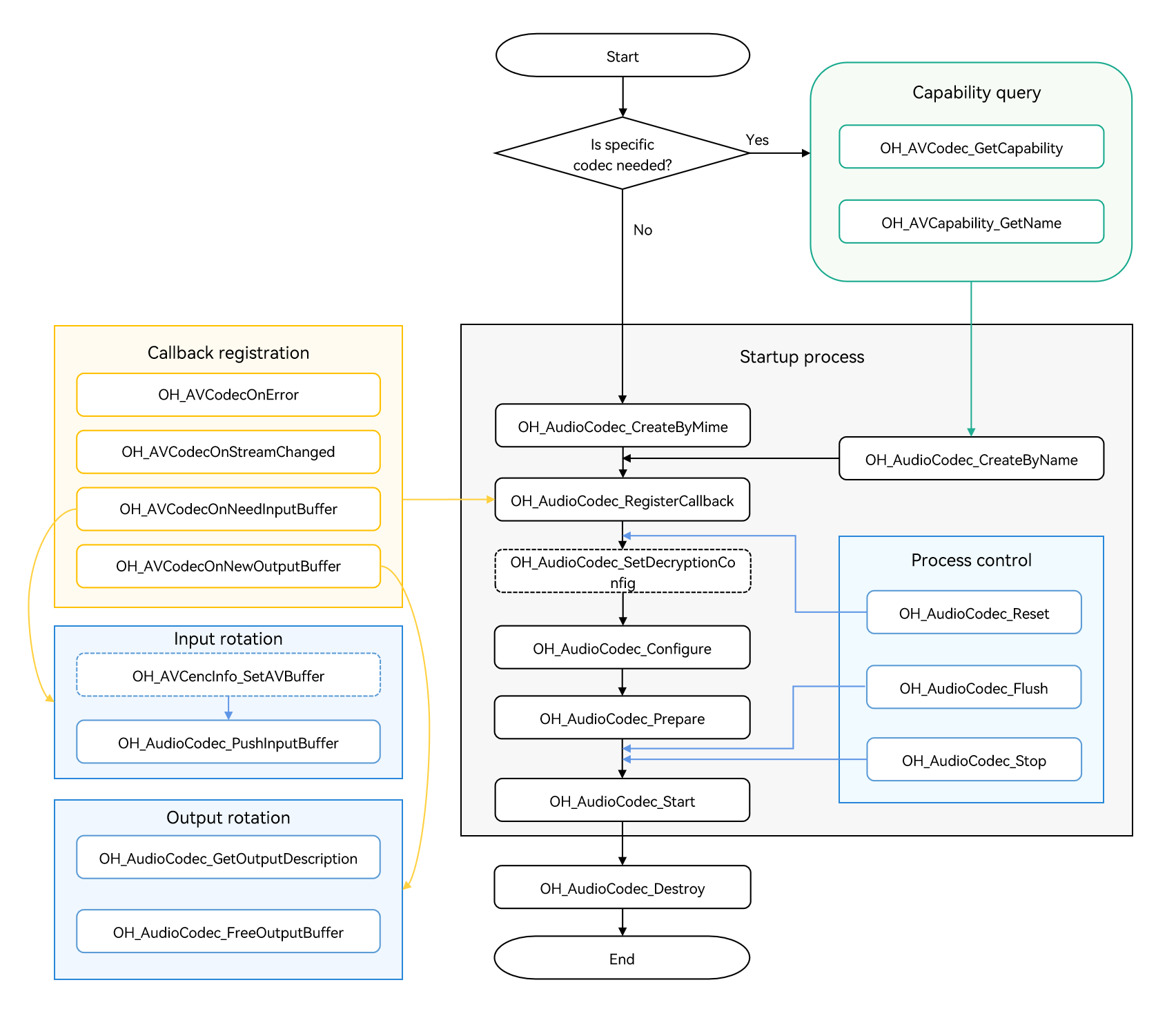
Refer to the code snippet below to complete the entire audio encoding process, including creating an encoder, setting encoding parameters (such as the sample rate, bit rate, and audio channel count), and starting, refreshing, resetting, and destroying the encoder.
During application development, you must call the APIs in the defined sequence. Otherwise, an exception or undefined behavior may occur.
The figure below shows the call relationship of audio encoding.
-
The dotted line indicates an optional operation.
-
The solid line indicates a mandatory operation.
[h2]Linking the Dynamic Libraries in the CMake Script
target_link_libraries(sample PUBLIC libnative_media_codecbase.so)
target_link_libraries(sample PUBLIC libnative_media_core.so)
target_link_libraries(sample PUBLIC libnative_media_acodec.so)

The word sample in the preceding code snippet is only an example. Use the actual project directory name.
[h2]How to Develop
-
Add the required header files.
#include <multimedia/player_framework/native_avcodec_audiocodec.h>
#include <multimedia/native_audio_channel_layout.h>
#include <multimedia/player_framework/native_avcapability.h>
#include <multimedia/player_framework/native_avcodec_base.h>
#include <multimedia/player_framework/native_avformat.h>
#include <multimedia/player_framework/native_avbuffer.h>
-
Create an encoder instance. In the code snippet below, OH_AVCodec * is the pointer to the encoder instance created.
You can create an encoder by MIME type or codec name.
Method 1: Create an encoder by MIME type.
// Set whether this is encoding. The value true indicates encoding.
bool isEncoder = true;
// Create an encoder by media type.
OH_AVCodec *audioEnc_ = OH_AudioCodec_CreateByMime(OH_AVCODEC_MIMETYPE_AUDIO_AAC, isEncoder);
Method 2: Create an encoder by codec name.
// Create an encoder by codec name.
OH_AVCapability *capability = OH_AVCodec_GetCapability(OH_AVCODEC_MIMETYPE_AUDIO_AAC, true);
const char *name = OH_AVCapability_GetName(capability);
OH_AVCodec *audioEnc_ = OH_AudioCodec_CreateByName(name);
Add the header file and namespace:
#include <mutex>
#include <queue>
// C++ standard library namespace.
using namespace std;
The sample code is as follows:
// Initialize the queue. class AEncBufferSignal { public: std::mutex inMutex_; std::mutex outMutex_; std::mutex startMutex_; std::condition_variable inCond_; std::condition_variable outCond_; std::condition_variable startCond_; std::queue<uint32_t> inQueue_; std::queue<uint32_t> outQueue_; std::queue<OH_AVBuffer *> inBufferQueue_; std::queue<OH_AVBuffer *> outBufferQueue_; }; AEncBufferSignal *signal_; -
Call OH_AudioCodec_RegisterCallback() to register callback functions.
Register the OH_AVCodecCallback struct that defines the following callback function pointers:
-
OH_AVCodecOnError, a callback used to report a codec operation error
-
OH_AVCodecOnStreamChanged, a callback not supported by the audio encoder yet
-
OH_AVCodecOnNeedInputBuffer, a callback used to report input data required, which means that the encoder is ready for receiving PCM data
-
OH_AVCodecOnNewOutputBuffer, a callback used to report output data generated, which means that encoding is complete
You need to process the callback functions to ensure that the encoder runs properly.

Do not call the encoder APIs or perform time-consuming operations in the callbacks.
// Implementation of the OH_AVCodecOnError callback.
static void OnError(OH_AVCodec *codec, int32_t errorCode, void *userData)
{
    (void)codec;
    (void)errorCode;
    (void)userData;
}
// Implementation of the OH_AVCodecOnStreamChanged callback.
static void OnOutputFormatChanged(OH_AVCodec *codec, OH_AVFormat *format, void *userData)
{
    (void)codec;
    (void)format;
    (void)userData;
}
// Implementation of the OH_AVCodecOnNeedInputBuffer callback.
static void OnInputBufferAvailable(OH_AVCodec *codec, uint32_t index, OH_AVBuffer *data, void *userData)
{
    (void)codec;
    // Push the input stream to be encoded into the InputBuffer queue.
    AEncBufferSignal *signal = static_cast<AEncBufferSignal *>(userData);
    unique_lock<mutex> lock(signal->inMutex_);
    signal->inQueue_.push(index);
    signal->inBufferQueue_.push(data);
    signal->inCond_.notify_all();
}
// Implementation of the OH_AVCodecOnNewOutputBuffer callback.
static void OnOutputBufferAvailable(OH_AVCodec *codec, uint32_t index, OH_AVBuffer *data, void *userData)
{
    (void)codec;
    // Push the index of the corresponding output buffer into the OutputQueue_ queue.
    // Push the encoded data into the outBuffer queue.
    AEncBufferSignal *signal = static_cast<AEncBufferSignal *>(userData);
    unique_lock<mutex> lock(signal->outMutex_);
    signal->outQueue_.push(index);
    signal->outBufferQueue_.push(data);
    signal->outCond_.notify_all();
}
Configure the callback:
signal_ = new AEncBufferSignal(); OH_AVCodecCallback cb_ = {&OnError, &OnOutputFormatChanged, &OnInputBufferAvailable, &OnOutputBufferAvailable}; // Configure the asynchronous callback. int32_t ret = OH_AudioCodec_RegisterCallback(audioEnc_, cb_, signal_); if (ret != AV_ERR_OK) { // Handle exceptions. } -
-
Call OH_AudioCodec_Configure to configure the encoder.
Key values of configuration options are described as follows:
Key Description AAC FLAC MPEG (MP3) G711mu Opus AMR-NB AMR-WB OH_MD_KEY_AUD_SAMPLE_RATE Sample rate. Mandatory Mandatory Mandatory Mandatory Mandatory Mandatory Mandatory OH_MD_KEY_AUD_CHANNEL_COUNT Audio channel count. Mandatory Mandatory Mandatory Mandatory Mandatory Mandatory Mandatory OH_MD_KEY_AUDIO_SAMPLE_FORMAT Output audio stream format. Mandatory Mandatory Mandatory Mandatory Mandatory Mandatory Mandatory OH_MD_KEY_BITRATE Bit rate. Optional Mandatory Mandatory - Mandatory Mandatory Mandatory OH_MD_KEY_CHANNEL_LAYOUT Audio channel layout. Optional Mandatory - - - - - OH_MD_KEY_MAX_INPUT_SIZE Maximum input length. Optional Optional Optional Optional Optional Optional Optional OH_MD_KEY_PROFILE Encoding profile. Optional - - - - - - OH_MD_KEY_COMPLIANCE_LEVEL Compatibility level. - Optional - - - - - The sample below lists the value range of each audio encoding type.
| AAC-LC | 8000, 11025, 12000, 16000, 22050, 24000, 32000, 44100, 48000, 64000, 88200, 96000 | 1, 2, 3, 4, 5, 6, 8 |
| HE-AAC, HE-AAC v2| 16000, 22050, 24000, 32000, 44100, 48000, 64000, 88200, 96000 | 1, 2, 3, 4, 5, 6, 8 |
| Opus |8000, 12000, 16000, 24000, 48000 | 1-2 |
| AMR (AMR-NB) | 8000 | 1 |
| AMR (AMR-WB) | 16000 | 1 |
The code snippet below shows the API call process, where AAC encoding at the bit rate of 32000 bit/s is carried out on the PCM audio with the 44100 Hz sample rate, 2-channel stereo, and SAMPLE_S16LE sample format.
int32_t ret;
// (Mandatory) Configure the audio sample rate.
constexpr uint32_t DEFAULT_SAMPLERATE = 44100;
// (Mandatory) Configure the audio bit rate.
constexpr uint64_t DEFAULT_BITRATE = 32000;
// (Mandatory) Configure the audio channel count.
constexpr uint32_t DEFAULT_CHANNEL_COUNT = 2;
// (Mandatory) Configure the audio channel types.
constexpr OH_AudioChannelLayout CHANNEL_LAYOUT = OH_AudioChannelLayout::CH_LAYOUT_STEREO;
// (Mandatory) Configure the audio bit depth.
constexpr OH_BitsPerSample SAMPLE_FORMAT = OH_BitsPerSample::SAMPLE_S16LE;
// (Optional) Configure the AAC profile. The default value is AAC_PROFILE_LC. Other values are AAC_PROFILE_HE and AAC_PROFILE_HE_V2.
constexpr int32_t AAC_PROFILE = OH_AACProfile::AAC_PROFILE_LC;

OH_AVFormat *format = OH_AVFormat_Create();
// Set the format.
OH_AVFormat_SetIntValue(format, OH_MD_KEY_AUD_CHANNEL_COUNT, DEFAULT_CHANNEL_COUNT);
OH_AVFormat_SetIntValue(format, OH_MD_KEY_AUD_SAMPLE_RATE, DEFAULT_SAMPLERATE);
OH_AVFormat_SetLongValue(format, OH_MD_KEY_BITRATE, DEFAULT_BITRATE);
OH_AVFormat_SetIntValue(format, OH_MD_KEY_AUDIO_SAMPLE_FORMAT, SAMPLE_FORMAT);
OH_AVFormat_SetLongValue(format, OH_MD_KEY_CHANNEL_LAYOUT, CHANNEL_LAYOUT);
OH_AVFormat_SetIntValue(format, OH_MD_KEY_PROFILE, AAC_PROFILE);
// Configure the encoder.
ret = OH_AudioCodec_Configure(audioEnc_, format);
if (ret != AV_ERR_OK) {
    // Handle exceptions.
}
Example FLAC call flow:
int32_t ret;
// Configure the audio sampling rate (required).
constexpr uint32_t DEFAULT_SAMPLERATE = 44100;
// Configure the audio bitrate (required).
constexpr uint64_t DEFAULT_BITRATE = 261000;
// Configure the number of audio channels (required).
constexpr uint32_t DEFAULT_CHANNEL_COUNT = 2;
// Configure the audio channel layout (required).
// The value is one of CH_LAYOUT_MONO, CH_LAYOUT_STEREO, CH_LAYOUT_SURROUND, CH_LAYOUT_QUAD, CH_LAYOUT_5POINT0, CH_LAYOUT_5POINT1, CH_LAYOUT_6POINT1, or CH_LAYOUT_7POINT1.
constexpr OH_AudioChannelLayout CHANNEL_LAYOUT = OH_AudioChannelLayout::CH_LAYOUT_STEREO;
// Configure the audio bit depth (required). For FLAC, only SAMPLE_S16LE and SAMPLE_S32LE are supported.
constexpr OH_BitsPerSample SAMPLE_FORMAT = OH_BitsPerSample::SAMPLE_S32LE;
// Configure the audio compliance level (default value: 0, value range: -2 to 2).
constexpr int32_t COMPLIANCE_LEVEL = 0;

OH_AVFormat *format = OH_AVFormat_Create();
// Write the format.
OH_AVFormat_SetIntValue(format, OH_MD_KEY_AUD_CHANNEL_COUNT, DEFAULT_CHANNEL_COUNT);
OH_AVFormat_SetIntValue(format, OH_MD_KEY_AUD_SAMPLE_RATE, DEFAULT_SAMPLERATE);
OH_AVFormat_SetLongValue(format, OH_MD_KEY_BITRATE, DEFAULT_BITRATE);
// Configure the audio precision. Before API version 20, you must set this parameter for FLAC encoding. Set it to 1. If this parameter is not set when configuring the FLAC encoder, calling OH_AudioCodec_Configure returns error code AV_ERR_INVALID_VAL. This value has no actual effect and does not affect the encoding result. Starting from API version 20, you do not need to set this parameter.
// constexpr int32_t BITS_PER_CODED_SAMPLE = 1;
// OH_AVFormat_SetIntValue(format, OH_MD_KEY_BITS_PER_CODED_SAMPLE, BITS_PER_CODED_SAMPLE);
OH_AVFormat_SetIntValue(format, OH_MD_KEY_AUDIO_SAMPLE_FORMAT, SAMPLE_FORMAT);
OH_AVFormat_SetLongValue(format, OH_MD_KEY_CHANNEL_LAYOUT, CHANNEL_LAYOUT);
OH_AVFormat_SetLongValue(format, OH_MD_KEY_COMPLIANCE_LEVEL, COMPLIANCE_LEVEL);
// Configure the encoder.
ret = OH_AudioCodec_Configure(audioEnc_, format);
if (ret != AV_ERR_OK) {
    // Handle exceptions.
}
AMR encoding process:
int32_t ret;
// (Mandatory) Configure the audio sample rate. The input sample rate of AMR-NB is 8000 Hz (PCM), and that of AMR-WB is 16000 Hz (PCM).
constexpr uint32_t DEFAULT_SAMPLERATE = 8000;
// (Mandatory) Configure the audio bit rate.
// AMR-NB supports the bit rates 4750, 5150, 5900, 6700, 7400, 7950, 10200, and 12200.
// AMR-WB supports the bit rates 6600, 8850, 12650, 14250, 15850, 18250, 19850, 23050, and 23850.
constexpr uint64_t DEFAULT_BITRATE = 10200;
// (Mandatory) Configure the audio channel count.
constexpr uint32_t DEFAULT_CHANNEL_COUNT = 1;
// (Mandatory) Configure the audio channel types.
constexpr OH_AudioChannelLayout CHANNEL_LAYOUT = OH_AudioChannelLayout::CH_LAYOUT_MONO;
// (Mandatory) Configure the audio bit depth.
constexpr OH_BitsPerSample SAMPLE_FORMAT = OH_BitsPerSample::SAMPLE_S16LE;
OH_AVFormat *format = OH_AVFormat_Create();
// Set the format.
OH_AVFormat_SetIntValue(format, OH_MD_KEY_AUD_CHANNEL_COUNT, DEFAULT_CHANNEL_COUNT);
OH_AVFormat_SetIntValue(format, OH_MD_KEY_AUD_SAMPLE_RATE, DEFAULT_SAMPLERATE);
OH_AVFormat_SetLongValue(format, OH_MD_KEY_BITRATE, DEFAULT_BITRATE);
OH_AVFormat_SetIntValue(format, OH_MD_KEY_AUDIO_SAMPLE_FORMAT, SAMPLE_FORMAT);
OH_AVFormat_SetLongValue(format, OH_MD_KEY_CHANNEL_LAYOUT, CHANNEL_LAYOUT);
// Configure the encoder.
ret = OH_AudioCodec_Configure(audioEnc_, format);
if (ret != AV_ERR_OK) {
    // Handle exceptions.
}
Opus encoding process:
int32_t ret;
// (Mandatory) Configure the audio sample rate.
// Sample rates supported by Opus: 8000, 12000, 16000, 24000, and 48000.
constexpr uint32_t DEFAULT_SAMPLERATE = 8000;
// (Mandatory) Configure the audio bit rate.
// Bit rates supported by Opus: [6000, 510000].
constexpr uint64_t DEFAULT_BITRATE = 6000;
// (Mandatory) Configure the audio channel count.
// Audio channel count supported by Opus: 1 and 2.
constexpr uint32_t DEFAULT_CHANNEL_COUNT = 1;
// (Mandatory) Configure the audio bit depth.
// Bit depth supported by Opus: SAMPLE_S16LE
constexpr OH_BitsPerSample SAMPLE_FORMAT = OH_BitsPerSample::SAMPLE_S16LE;
OH_AVFormat *format = OH_AVFormat_Create();
// Set the format.
OH_AVFormat_SetIntValue(format, OH_MD_KEY_AUD_CHANNEL_COUNT, DEFAULT_CHANNEL_COUNT);
OH_AVFormat_SetIntValue(format, OH_MD_KEY_AUD_SAMPLE_RATE, DEFAULT_SAMPLERATE);
OH_AVFormat_SetLongValue(format, OH_MD_KEY_BITRATE, DEFAULT_BITRATE);
OH_AVFormat_SetIntValue(format, OH_MD_KEY_AUDIO_SAMPLE_FORMAT, SAMPLE_FORMAT);
// Configure the encoder.
ret = OH_AudioCodec_Configure(audioEnc_, format);
if (ret != AV_ERR_OK) {
    // Handle exceptions.
}
In addition to the parameters configured above, you can also configure the following optional parameters during the Configure phase:
-
OH_MD_KEY_AUDIO_MAX_INPUT_BUFFER_SIZE: Configures the maximum input buffer size (in bytes) for the audio encoder. For frame-aligned encoders such as FLAC and MP3, setting this parameter enables the internal PCM caching mechanism, allowing input data to be submitted without frame-size alignment; the encoder automatically caches and splits frames. The actual buffer size is subject to encoder implementation limits. If the configured value exceeds the upper limit, it is capped at the upper limit (10 MB).
-
OH_MD_KEY_AUDIO_ENCODER_PTS_MODE: Configures the output PTS mode of the audio encoder. The value type is OH_AudioEncoderPTSMode. The PTS calculation method for output frames varies by mode:
-
OH_AUDIO_ENCODER_PTS_MODE_DEFAULT: Default behavior. The PTS output method may vary across different encoders.
-
OH_AUDIO_ENCODER_PTS_MODE_ZERO_START: PTS starts from 0 and increments by frame duration. This mode is suitable for scenarios where input PTS is not relied upon and timing needs to start from 0.
-
OH_AUDIO_ENCODER_PTS_MODE_FIRST_INPUT_START: PTS starts from the PTS of the first input frame and increments by frame duration. This mode is suitable for scenarios where PTS continuity with the input stream must be maintained.
-
-
OH_MD_KEY_AUDIO_ENCODER_ENABLE_SAMPLE_FORMAT_CONVERT: Configures the sample format conversion switch for the audio encoder. The value 1 enables conversion, and 0 disables it (default). The audio encoder natively supports a limited set of sample formats (for example, G711mu supports only SAMPLE_S16LE). When enabled, the encoder automatically converts the input PCM data to a format supported by the encoder for encoding, extending the supported input sample formats to SAMPLE_U8, SAMPLE_S16LE, SAMPLE_S24LE, SAMPLE_S32LE, and SAMPLE_F32LE. This is suitable for scenarios where the input PCM format differs from the encoder's native format.
// Configure the maximum input buffer size of the encoder (optional). After this is set for FLAC/MP3, non-frame-aligned input data can be accepted. The value 4096 here is only a reference, and you can dynamically set it as needed. OH_AVFormat_SetIntValue(format, OH_MD_KEY_AUDIO_MAX_INPUT_BUFFER_SIZE, 4096); // Configure the encoder PTS output mode (optional). OH_AVFormat_SetIntValue(format, OH_MD_KEY_AUDIO_ENCODER_PTS_MODE, OH_AUDIO_ENCODER_PTS_MODE_FIRST_INPUT_START); // Configure the encoder sample format conversion switch (optional). After this is enabled, more sample formats are supported for input. OH_AVFormat_SetIntValue(format, OH_MD_KEY_AUDIO_ENCODER_ENABLE_SAMPLE_FORMAT_CONVERT, 1); -
-
Call OH_AudioCodec_Prepare() to prepare internal resources for the encoder.
int32_t ret = OH_AudioCodec_Prepare(audioEnc_); if (ret != AV_ERR_OK) { // Handle exceptions. } -
Call OH_AudioCodec_Start() to start the encoder.
Add the header file.
#include <fstream>
The sample code is as follows:
ifstream inputFile_; ofstream outFile_; // Fill in the input file path based on actual usage. const char* inputFilePath = "/"; // Fill in the output file path based on actual usage. const char* outputFilePath = "/"; // Open the binary file path to be encoded (using a PCM file as the input example). inputFile_.open(inputFilePath, ios::in | ios::binary); // Configure the encoded file output path (using an encoded bitstream file as the output example). outFile_.open(outputFilePath, ios::out | ios::binary); // Start encoding. int32_t ret = OH_AudioCodec_Start(audioEnc_); if (ret != AV_ERR_OK) { // Exception handling. } -
Call OH_AudioCodec_PushInputBuffer() to write the data to encode. You should fill in complete input data before calling this API.
The method for determining the number of samples per frame (SAMPLES_PER_FRAME) is as follows:
AAC-LC encodes 1024 PCM samples per frame. Therefore, you are advised to input exactly 1024 samples at a time.
HE-AAC encodes 2048 PCM samples per frame. Therefore, you are advised to input exactly 2048 samples at a time.
For FLAC encoding, set SAMPLES_PER_FRAME based on the table below.
Sample Rate Sample Count 8000 576 16000 1152 22050 2304 24000 2304 32000 2304 44100 4608 48000 4608 88200 8192 96000 8192 
Data volume (in bytes) of a single encoding input: Number of samples (SAMPLES_PER_FRAME) * Number of channels * Number of bytes per sample.
In the case of FLAC encoding, use the table below to set the number of samples based on the sample rate to prevent possible file corruption.
// Number of channels.
constexpr int32_t DEFAULT_CHANNEL_COUNT = 2;
// Number of samples per frame. Here, AAC-LC is used as an example, with 1024 samples per frame.
constexpr int32_t SAMPLES_PER_FRAME = 1024;
// The amount of data for a single encoding input (in bytes) is: number of samples per frame * number of channels * bytes per sample (using the SAMPLE_S16LE format as an example).
// If the last frame does not meet the required length, discard or pad it.
constexpr int32_t INPUT_FRAME_BYTES = SAMPLES_PER_FRAME * DEFAULT_CHANNEL_COUNT * sizeof(short);
uint32_t index = signal_->inQueue_.front();
auto buffer = signal_->inBufferQueue_.front();
OH_AVCodecBufferAttr attr = {0};
if (!inputFile_.eof()) {
    inputFile_.read((char *)OH_AVBuffer_GetAddr(buffer), INPUT_FRAME_BYTES);
    attr.size = INPUT_FRAME_BYTES;
    attr.flags = AVCODEC_BUFFER_FLAGS_NONE;
} else {
    attr.size = 0;
    attr.flags = AVCODEC_BUFFER_FLAGS_EOS;
}
OH_AVBuffer_SetBufferAttr(buffer, &attr);
// Send to the encoding input queue for encoding, where index is the corresponding queue index.
int32_t ret = OH_AudioCodec_PushInputBuffer(audioEnc_, index);
if (ret != AV_ERR_OK) {
    // Handle exceptions.
}
In the preceding example, attr.flags indicates the type of the buffer flag.
When finished, set the flags to AVCODEC_BUFFER_FLAGS_EOS.
Value Description AVCODEC_BUFFER_FLAGS_NONE Common frame. AVCODEC_BUFFER_FLAGS_EOS The buffer is an end-of-stream frame. AVCODEC_BUFFER_FLAGS_CODEC_DATA The buffer contains codec-specific data. -
Call OH_AudioCodec_FreeOutputBuffer() to release the encoded data.
Once you have retrieved the encoded stream, call OH_AudioCodec_FreeOutputBuffer() to free up the data.
uint32_t index = signal_->outQueue_.front(); OH_AVBuffer *avBuffer = signal_->outBufferQueue_.front(); if (avBuffer == nullptr) { // Handle exceptions. } // Obtain the buffer attributes. OH_AVCodecBufferAttr attr = {0}; int32_t ret = OH_AVBuffer_GetBufferAttr(avBuffer, &attr); if (ret != AV_ERR_OK) { // Handle exceptions. } // Write the encoded data to the corresponding output file. outFile_.write(reinterpret_cast<char *>(OH_AVBuffer_GetAddr(avBuffer)), attr.size); // Release the data that has been written. ret = OH_AudioCodec_FreeOutputBuffer(audioEnc_, index); if (ret != AV_ERR_OK) { // Handle exceptions. } if (attr.flags == AVCODEC_BUFFER_FLAGS_EOS) { // End. } -
(Optional) Call OH_AudioCodec_Flush() to flush the encoder.
After OH_AudioCodec_Flush() is called, the current encoding queue is cleared.
To continue encoding, you must call OH_AudioCodec_Start() again.
Usage:
-
To use the same encoder configuration after AVCODEC_BUFFER_FLAGS_EOS of the output buffer is set, call OH_AudioCodec_Flush() to refresh the encoder.
-
If a recoverable error occurs during the execution (OH_AudioCodec_IsValid() returns true), you can call OH_AudioCodec_Flush() to refresh the encoder and then call OH_AudioCodec_Start() to start encoding again.
// Flush the encoder audioEnc_. int32_t ret = OH_AudioCodec_Flush(audioEnc_); if (ret != AV_ERR_OK) { // Handle exceptions. } // Restart encoding. ret = OH_AudioCodec_Start(audioEnc_); if (ret != AV_ERR_OK) { // Handle exceptions. } -
-
(Optional) Call OH_AudioCodec_Reset() to reset the encoder.
After OH_AudioCodec_Reset() is called, the encoder returns to the initialized state. The input and output buffers obtained before the reset cannot be used. You must call OH_AudioCodec_Configure() to reconfigure the encoder and then call OH_AudioCodec_Start() to start encoding again. Obtain the input and output buffers again after the encoder is started.
// Reset the encoder. int32_t ret = OH_AudioCodec_Reset(audioEnc_); if (ret != AV_ERR_OK) { // Handle exceptions. } // Reconfigure the encoder. ret = OH_AudioCodec_Configure(audioEnc_, format); if (ret != AV_ERR_OK) { // Handle exceptions. } -
Call OH_AudioCodec_Stop() to stop the encoder.
After the encoder is stopped, you can call OH_AudioCodec_Start() to start it again. The input and output buffers obtained before the encoder is stopped cannot be reused. You must obtain them again after the encoder is started.
// Stop the encoder. int32_t ret = OH_AudioCodec_Stop(audioEnc_); if (ret != AV_ERR_OK) { // Handle exceptions. } -
Call OH_AudioCodec_Destroy() to destroy the encoder instance and release resources.

Do not repeatedly destroy the encoder.
// Call OH_AudioCodec_Destroy to destroy the encoder.
int32_t ret = OH_AudioCodec_Destroy(audioEnc_);
if (ret != AV_ERR_OK) {
    // Handle exceptions.
} else {
    audioEnc_ = NULL; // The encoder cannot be destroyed repeatedly.
}