The HarmonyOS NDK provides industry standard libraries musl libc and C++ Standard Library. This topic describes the mechanisms of these libraries in HarmonyOS. Understanding these mechanisms helps you avoid pitfalls during NDK development.
C++ Compatibility
In HarmonyOS, both the system library and application native library use C++ standard library (see libc++). However, the C++ standard library used by the system library is updated with the image version, and the C++ standard library used by the application native library is updated with the SDK used for compilation. Since both the C++ standard libraries have multiple major versions, the different update approach may cause ABI compatibility issues. To solve this problem, HarmonyOS differentiates the two C++ standard libraries as follows:
- System library: uses libc++.so, which is released with the system image.
- Application native library: uses libc++_shared.so, which is released with the application.
The two libraries use different C++ namespaces. libc++.so uses __h, and libc++_shared.so uses __n1.

The system and application cannot use the same C++ standard library. Native APIs are C APIs, which are used to isolate the C++ running environment. If the libc++_shared.so version in the HAR file is different from that of the application, incompatibility issues may occur. To solve this problem, use the same SDK version to update the HAR file.
Known C++ Compatibility Issues
If "symbol not found, s=__emutls_get_address" is reported when an application starts or when dlopen() is called, update the SDK of the application or HAR. This symbol is not provided by libc++_shared.so in the API version 9 or earlier, and is available since API version 11.
[h2]Linker Namespace
Unlike the namespace in C++, a linker namespace (also referred to as ns) is a mechanism provided by the dynamic linker to isolate shared libraries within different namespaces. For example, the system native library can load the native library in the system directories, such as /system/lib64 or /vendor/lib64; a common application can load only the common application native library and NDK library, but cannot directly load the system native library.
The dynamic linker must be associated with a specific namespace when it loads the shared library specified by DT_NEEDED in compilation or calls dlopen to load a shared library.
HarmonyOS has the following types of linker namespaces:
-
Default ns: default namespace created for locating the .so files in /system/lib{abi} and /vendor/lib{abi} when the dynamic linker stats.
-
NDK ns: default namespace created for exposing the NDK interfaces in .so files in /system/lib{abi}/ndk when the dynamic linker stats.
-
App ns: namespace created when the application starts. Its search path is generally the application installation path (possibly a sandbox path), so that the application's .so files can be loaded.
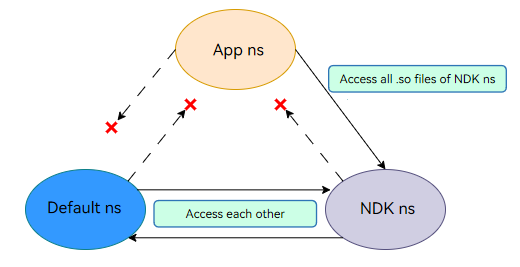
The namespace mechanism restricts the invocation between the application native library and the system native library, as shown in the following figure.
- The default ns and NDK ns can access all .so files of each other, but cannot access the .so files of the app ns.
- The app ns can access all .so files of the NDK ns, but cannot access the .so files of the default ns.
[h2]rpath
Run-time path (rpath) is a mechanism for specifying the runtime search path of a shared library. This mechanism allows a runtime search path to be embedded in an executable file or shared library. The dynamic linker uses this path to find required libraries.
The namespace mechanism allows an application to load only the native libraries in its installation directory (for example, libs/arm64 on the ARM64 platform). If an application needs to load multiple native libraries, the native library in a new directory cannot be loaded if multiple loading paths are created. In this case, you can use the rpath mechanism to specify the search path during compilation.
For example, libhello.so in the application installation directory lib/arm64 depends on libworld.so in the newly created directory lib/arm64/module. Set rpath in the CMakeLists.txt file of the application and compile the file, and run readelf to view the rpath of libhello.so. As shown in the following figure, $ORIGIN indicates the path of libhello.so. The application can load libworld.so in the module directory during running.
SET(CMAKE_BUILD_WITH_INSTALL_RPATH TRUE)
SET(CMAKE_INSTALL_RPATH "\${ORIGIN}/module") 
[h2]symbol-version
symbol-version is a symbol retrieval mechanism provided by libc for symbol relocation in dynamic linking. It supports relocation of the symbols of different versions and helps solve the problem of duplicate symbols. For details, see LD Version Scripts (GNU Gnulib).
[h2]Fortified Check of the FD in select()
If the file descriptor (fd) passed in FD_SET or FD_CLR is not within the value range [0, 1024), abort crash will be triggered.
If the fd value passed in FD_ISSET is not within the value range [0, 1024), false will be returned.
[h2]Globalization
Since API version 12, locale in newlocale() and setlocale() can be set to C, C.UTF-8, en_US, en_US.UTF-8, zh_CN, or zh_CN.UTF-8. strtod_l, wcstod_l, and localeconv support the locale values zh_CN and zh_CN.UTF-8. Note that strtod_l() and wcstod_l() do not support conversion of hexadecimal numbers and hexadecimal floating-point numbers.
[h2]fdsan
File descriptor sanitizer (fdsan) helps detect the user-after-close and double-close issues of FDs.
[h2]Network Usage
Using RTM_GETLINK (the core message type for network interface information) through the send, sendto, sendmsg, getifaddrs, and if_nameindex APIs on sockets of the route netlink type poses security risks and is therefore not recommended. You are advised to use the C library ioctl API and the corresponding cmd values to query network interface information.
The meanings of HarmonyOS internal ioctl cmd values are as follows:
| Name | Description |
|---|---|
| SIOCGIFINDEX | Obtains the network interface index. |
| SIOCGIFFLAGS | Obtains the flags (status) of a network interface. |
| SIOCGIFADDR | Obtains the address of a network interface. |
| SIOCGIFBRDADDR | Obtains the broadcast address of a network interface. |
| SIOCGIFNAME | Obtains the network interface name by index. |
| SIOCGIFCONF | Obtains the list of all network interfaces. |
Signal Usage
To avoid conflicts with system reserved signals, comply with the following rules when using signals:
- Signals 1 to 34 are reserved for the system and cannot be used.
- Signals 35 to 45 have been occupied by internal system modules (such as memory, DFX, runtime, and system services) by API version 19. To avoid conflicts with system behaviors and unexpected problems, do not use these signals.
- The values of SIGRTMIN and __libc_current_sigrtmin are 35, indicating the start number of real-time signals available to applications (applications can actually use only signals 46 and later).
The HarmonyOS internal signals are as follows.
| ID | Name | Description | ID | Name | Description |
|---|---|---|---|---|---|
| 1 | SIGHUP | Terminal suspension control. | 24 | SIGXCPU | CPU time limit exceeded. |
| 2 | SIGINT | Interrupted. | 25 | SIGXFSZ | Maximum file size exceeded. |
| 3 | SIGQUIT | Keyboard exit. | 26 | SIGVTALRM | Virtual timer. |
| 4 | SIGILL | Invalid instruction. | 27 | SIGPROF | Profiling timer expired. |
| 5 | SIGTRAP | Debug breakpoint. | 28 | SIGWINCH | Terminal window size changed. |
| 6 | SIGABRT | Aborted. | 29 | SIGIO | I/O availability notification. |
| 7 | SIGBUS | Bus error. | 30 | SIGPWR | Power fault. |
| 8 | SIGFPE | Arithmetic exception. | 31 | SIGSYS | Invalid system call. |
| 9 | SIGKILL | Forcible termination. | 32 | SIGTIMER | Timer. |
| 10 | SIGUSR1 | Custom signal 1. | 33 | SIGCANCEL | Thread canceled. |
| 11 | SIGSEGV | Invalid memory access. | 34 | SIGSYNCCALL | Synchronous call. |
| 12 | SIGUSR2 | Custom signal 2. | 35 | MUSL_SIGNAL_NATIVE_REMOTE (SIGRTMIN + 0) | System reserved. |
| 13 | SIGPIPE | Pipe damaged. | 36 | MUSL_SIGNAL_HOOK (SIGRTMIN + 1) | System reserved. |
| 14 | SIGALRM | Alarm. | 37 | MUSL_SIGNAL_UNHOOK (SIGRTMIN + 2) | System reserved. |
| 15 | SIGTERM | Application termination request. | 38 | MUSL_SIGNAL_NATIVE_LOCAL (SIGRTMIN + 3) | System reserved. |
| 16 | SIGSTKFLT | Coprocessor stack error. | 39 | MUSL_SIGNAL_JSHEAP (SIGRTMIN + 4) | System reserved. |
| 17 | SIGCHLD | Child process exit/stop. | 40 | MUSL_SIGNAL_JSHEAP_PRIV (SIGRTMIN + 5) | System reserved. |
| 18 | SIGCONT | Continue the execution. | 41 | MUSL_SIGNAL_SAMPLE_STACK (SIGRTMIN + 6) | System reserved. |
| 19 | SIGSTOP | Forcible stop. | 42 | MUSL_SIGNAL_LEAK_STACK (SIGRTMIN + 7) | System reserved. |
| 20 | SIGTSTP | Stop inputting on the terminal. | 43 | MUSL_SIGNAL_RECYCLE_JEMALLOC (SIGRTMIN + 8) | System reserved. |
| 21 | SIGTTIN | Background terminal reading. | 44 | MUSL_SIGNAL_MEMCHECK (SIGRTMIN + 9) | System reserved. |
| 22 | SIGTTOU | Background terminal writing. | 45 | MUSL_SIGNAL_FDTRACK (SIGRTMIN + 10) | System reserved. |
| 23 | SIGURG | Socket has urgent data. | - | - | - |