With the Set Execution Point to Cursor feature, you can jump to any line of code in the editor during a debugging session and set an execution point at that location, bypassing all the code between the current location and the target location.
This feature applies to linear and non-linear execution paths, used for interrupting and skipping loops, or for selecting another branch in if-else statements or switch-case statements. For example, if you want to check another branch without restarting the debugging session, you can use this feature.
Procedure
- Drag the current execution pointer (the orange arrow representing the current running position) to the desired line of code.
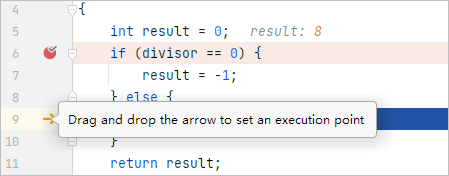
- Right-click the line where you want to set the execution point, and select Set Execution Point to Cursor from the shortcut menu.
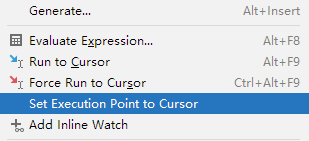

With Set Execution Point to Cursor, only the value of the program counter is changed, and the values of other registers are not modified, which may lead to unpredictable errors, such as:
- If the line where a variable is initialized is skipped, the app will fetch the value from the stack/register, which may cause a segmentation fault.
- If the executable code has been optimized by the compiler, you may get an unpredictable result, or it may not be possible to move the execution point.
There may be other unexpected issues, such as variable value confusion and abnormal stack information.