Since DevEco Studio 6.1.0 Beta1, Hvigor provides a task visualization window that displays common build tasks for the project and its modules, making it easy to execute them quickly.
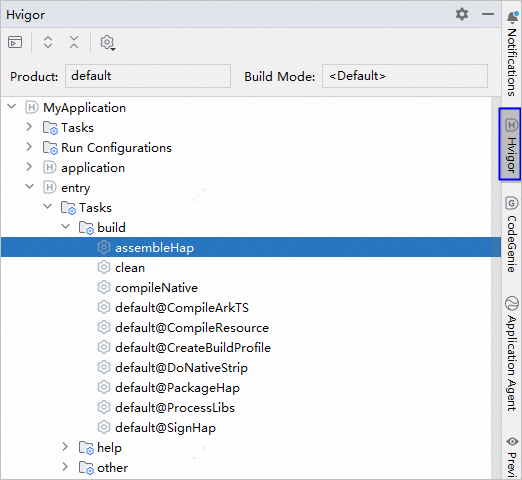
- Open the task visualization window by clicking Hvigor in the toolbar on the right of the editor, or by choosing View > Tool Windows > Hvigor from the menu bar. The window displays the tasks available for the current product and build mode. When the product or build mode is switched, the project synchronizes, and the task list refreshes upon successful synchronization.
- Tasks: project-level tasks.
- Run Configurations: tasks in the Run/Debug Configurations window.
- Other directories: module-level tasks, such as entry.
For project-level and module-level tasks, the build and help directories contain default tasks of Hvigor, while the other directory contains custom tasks.
- You can quickly execute a selected task by double-clicking it, right-clicking it, or pressing Enter. Alternatively, click
 to open the Run Anything window, where you can search for a task and double-click to execute it.