Third-party shared packages can be classified into two types: Harmony Archive (HAR) and Harmony Shared Package (HSP). The source code debugging methods for these two types of packages are different.
Distinguishing Between Bytecode HAR and Source Code HAR
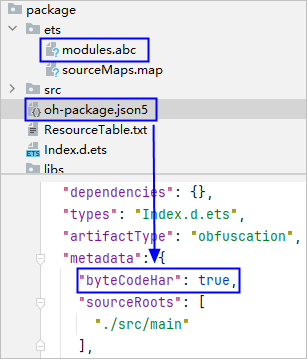
HAR packages are categorized into bytecode HARs and source code HARs. A HAR package is a bytecode HAR if it meets both of the following conditions. Otherwise, it is a source code HAR. For more guidance on building source code HAR and bytecode HAR, see Building HAR.
- The .abc file exists in the ets directory of the HAR package.
- The oh-package.json5 file of the HAR package contains the byteCodeHar field and the value is true.
[h2]Debugging C++ Code
If the HAP/HSP references a bytecode HAR package that contains C++ code, perform the following steps to debug the HAR package:
- Choose Run > Edit Configurations > Debugger, select the Symbol Directories tab, and click + to add the .so file with debugging information, which is stored in {ProjectPath}/{ModuleName}/build/{product}/intermediates/libs/default/arm64-v8a.

To generate the .so file with debugging information, add the strip field to the project- or module-level build-profile.json5 file and set it to false. For details, see Configuring for C++ Builds.
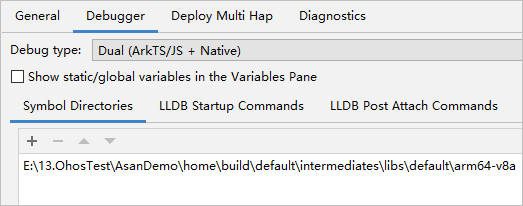
- When you debug an app, DevEco Studio loads the configured .so files preferentially. If these .so files contain debugging information, you can debug the source code. Since the source code file information embedded in the .so file refers to the file path at compile time, if it does not match the local source code file path, you need to associate the source files using either of the following methods:
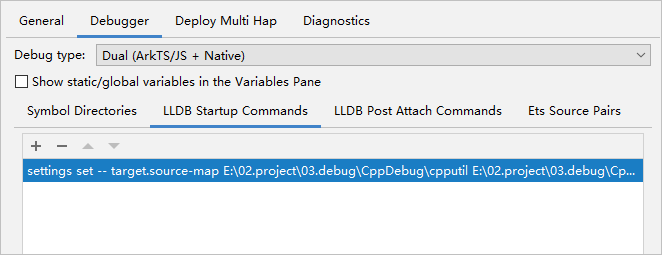
- Method 1: Add a command in the LLDB Startup Commands tab to create a mapping. Example:
settings set -- target.source-map {old-path} {new-path}- old-path: file path at compile time.
- new-path: local source code file path.
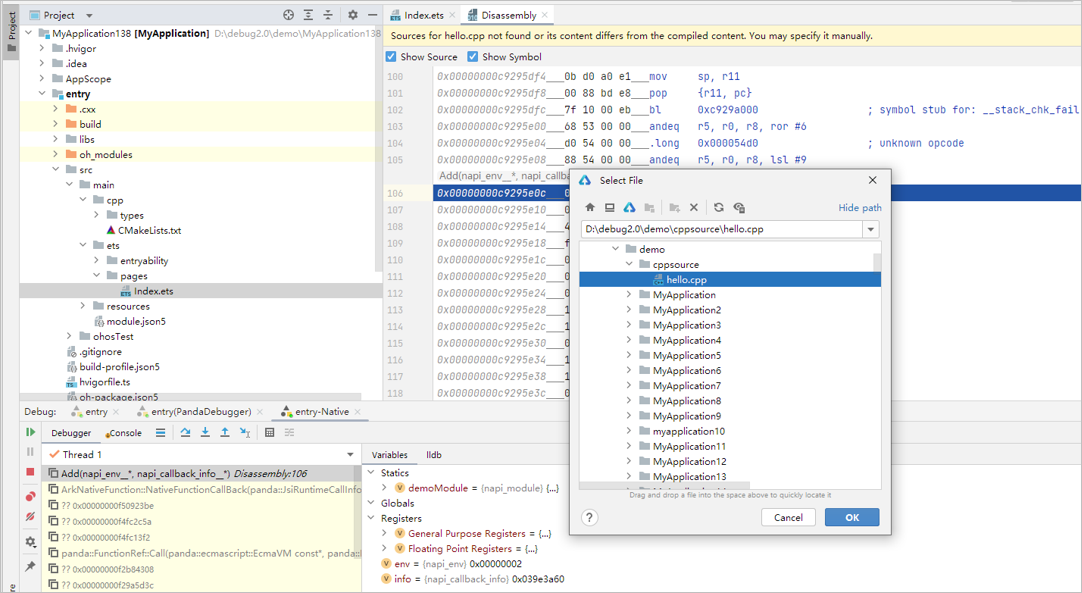
- Method 2: After the debugger steps into the assembly code, a message is displayed asking you to select the source code. Click Select File and select the local C++ source code.
- Method 1: Add a command in the LLDB Startup Commands tab to create a mapping. Example:
[h2]Debugging ArkTS Code
If a bytecode HAR package is compiled in debug mode in Project A (HAR package project), and Project B (host project) references this bytecode HAR package with local access to the source code of the HAR package. To debug this bytecode HAR, there are two methods: debugging in the host project or debugging in the HAR package project.

The bytecode HARs compiled in release mode do not support debugging.
- Method 1: Debugging in the host project
- Import the module corresponding to the bytecode HAR into the host project, and ensure that the module's directory hierarchy is consistent with that of the HAR package project. For example, all HAR modules are placed in the project root directory.
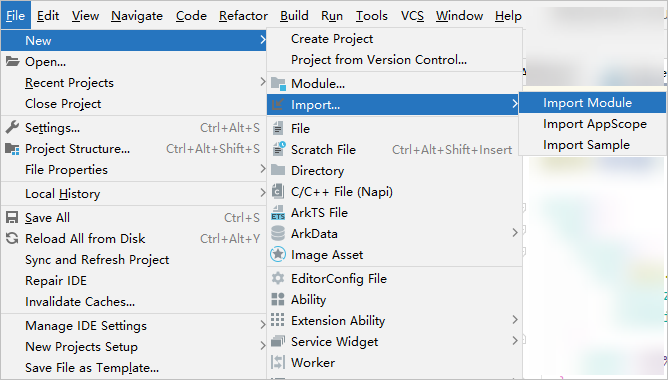
- After successful import, since the bytecode HAR compiled in debug mode contains sourceMap, the source code of the current project will be associated by default during debugging. At this point, you can directly set breakpoints in the HAR module.
- Import the module corresponding to the bytecode HAR into the host project, and ensure that the module's directory hierarchy is consistent with that of the HAR package project. For example, all HAR modules are placed in the project root directory.
- Method 2: Debugging in the HAR project by modifying the prefix configuration for attach debugging
- Create a demo host module of the entry type in the HAR package project. Skip this step if the host module already exists.
- Configure dependencies on the bytecode HAR package in the oh-package.json5 file of the demo host module.
// oh-package.json5 of the demo host module
"dependencies": {
  "@ohos/test_stage_ets_library": "file:./lib/test_stage_ets_library.har",
}
If dependencies on the bytecode HAR module, for example, file:../test_stage_ets_library, are configured in the oh-package.json5 file of the demo host module, breakpoints may be invalid during debugging.
- Call the APIs of the HAR module in the host module of the HAR package project. Ensure that the sourceMap file of the host module contains relevant information about the HAR module after compilation.
- Build the HAR package project, open the sourceMap file of the host module, and search by the name specified in the HAR's oh-package.json5 file. Record the prefix path of the Index file as the value of localUrl, for example, demo|test_stage_ets_library|1.0.0.
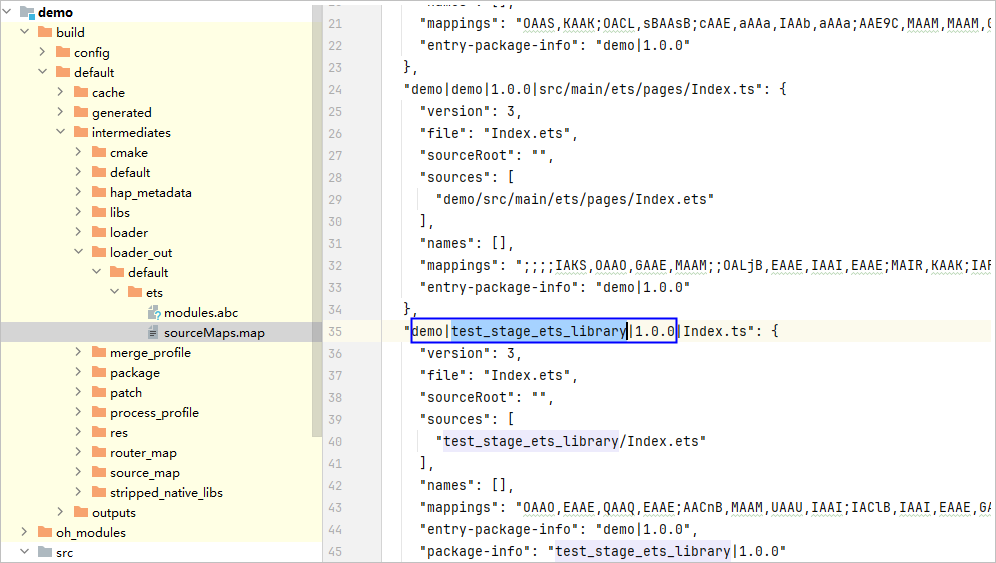
- After the host project application runs on the device, use the attach method in the HAR package project to debug the application. In the Debug window, obtain the prefix when the program is loaded and record it as the value of remoteUrl, for example, entry|@ohos/test_stage_ets_library|1.0.0.

- Choose Run > Edit Configurations > Debugger > ArkTS Source Pairs, click +, and enter the values of remoteUrl and localUrl obtained in the previous two steps.
- remoteUrl: prefix path for the application to load the HAR package.
- localUrl: prefix path of the HAR in the locally generated sourceMap.
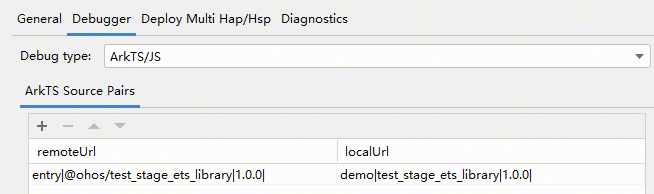
- Re-debug the host project application via the attach method in the HAR package project. Breakpoints can be added to the HAR module for debugging.
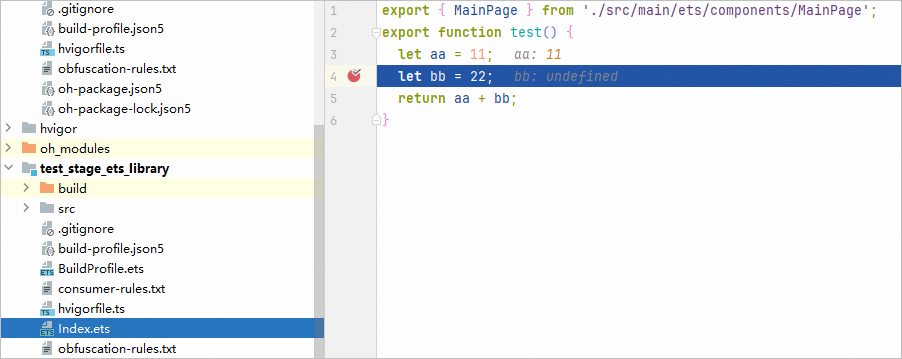

If both Symbol Directories and ArkTS Source Pairs are configured in the HAR package project, ArkTS code and C++ breakpoints can be debugged at the same time in attach mode.
[h2]Debugging C++ Code
If the HAP/HSP references a source code HAR package and the HAR package contains C++ code, perform debugging by referring to Debugging the Bytecode HAR.
[h2]Debugging ArkTS Code
If a project references a source code HAR package, debug this HAR package. The debugging methods vary depending on whether there is local source code.
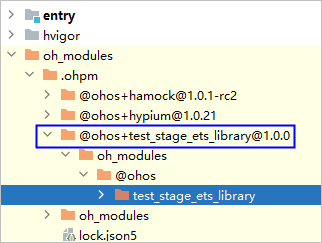
- If there is no HAR source code on the local side, the source code in the project-level oh_modules directory is referenced during the app build and packaging process. In this case, debug the source code in the oh_modules directory.
- If there is HAR source code on the local side, associate and debug the local HAR source code in either of the following methods:
- Method 1: Similar to the method described in Debugging the Bytecode HAR.
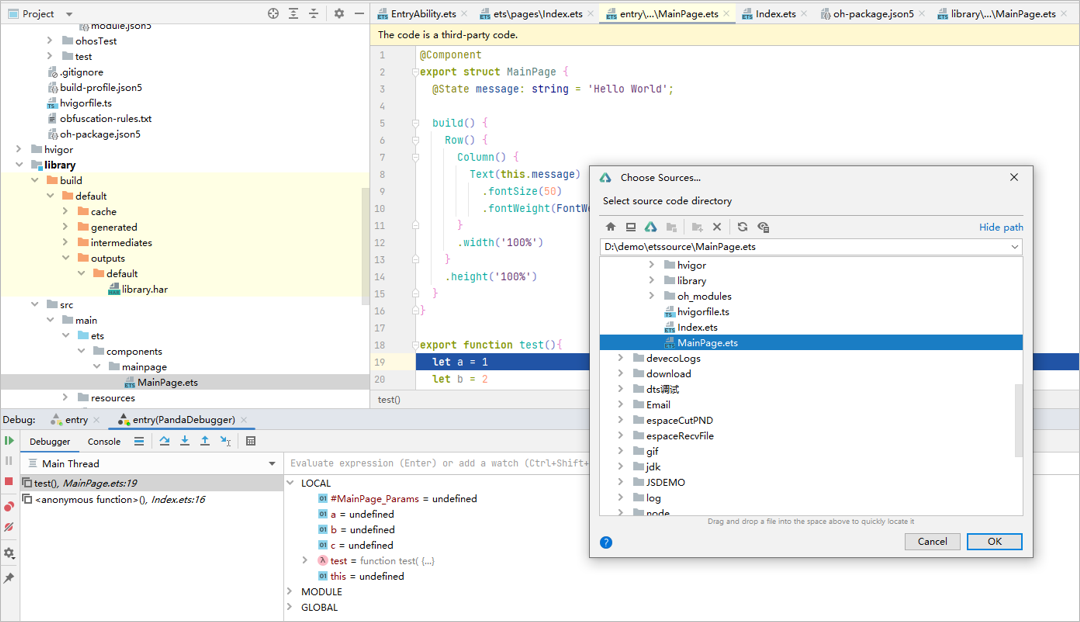
- Method 2: After the debugger steps into the ArkTS code in the oh_modules directory, a message is displayed asking you to select the source code. Click Choose Sources and select the local ArkTS source code.
Debugging HSP Source Code
To debug the HSP source code, place the source code in the local project module and debug it by referring to Method 1: Debugging in the host project.