You can import a module from another project in either of the following ways:
- Copy the feature code of other HarmonyOS modules to the current project by using the Import Module feature. Currently, only modules of the FA model can be imported into projects of the FA model, and only modules of the stage model can be imported into projects of the stage model.
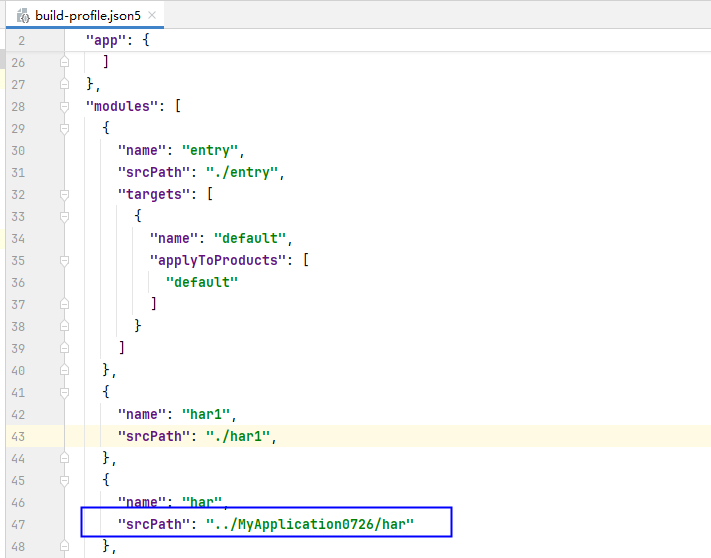
- Configure the relative path under the srcPath field to reference a module from another project. This method only references the module information but does not copy the module code to the local project. Currently, the HAR and HSP modules from other projects can be referenced.
Importing a Module
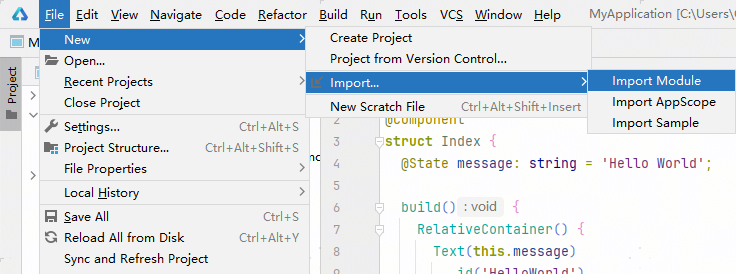
- On the menu bar, choose File > New > Import... > Import Module.
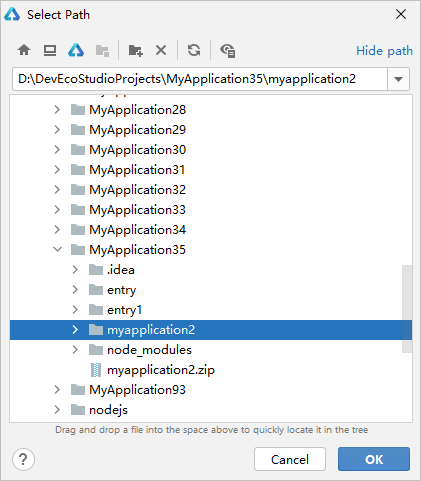
- Select the module to import.
Select the path to the module, which can be a folder or a .zip file, and click OK.
In the project-level build-profile.json5 file, configure the relative path of the module outside the project under the modules > srcPath field, as shown in the following figure. The module information is referenced, but the module code is not copied to the project. Currently, the HAR and HSP modules from other projects can be referenced.