InputMethodExtensionAbility provides the onCreate() and onDestroy() callbacks, as described below. Override them as required. InputMethodExtensionAbility lifecycle:
-
onCreate()
This callback is triggered when a service is created for the first time. You can perform initialization operations, for example, registering a common event listener.

If an InputMethodExtensionAbility has been created, starting it again does not trigger the onCreate() callback.
-
onDestroy()
This callback is triggered when the service is no longer used and the instance is ready for destruction. You can clear resources in this callback, for example, deregister the listener.
How to Develop
To implement an input method application, manually create an InputMethodExtensionAbility component in DevEco Studio. The procedure is as follows:
-
In the ets directory of the target module, right-click and choose New > Directory to create a directory named InputMethodExtensionAbility.
-
Right-click the InputMethodExtensionAbility directory, choose New > File, and create four files: KeyboardController.ets, InputMethodService.ets, Index.ets, and KeyboardKeyData.ets. The file directory is as follows:
/src/main/
├── ets/InputMethodExtensionAbility
│       └──model/KeyboardController.ets      # Keyboard display logic
│       └──InputMethodService.ets        # Custom class that inherits InputMethodExtensionAbility and implements lifecycle callbacks
│       └──pages
│         └── Index.ets            # Keyboard rendering with input and delete features
│         └── KeyboardKeyData.ets          # Definition of keyboard properties
├── resources/base/profile/main_pages.json
Related Files
-
InputMethodService.ets file.
In the InputMethodService.ets file, add the dependency package for importing InputMethodExtensionAbility. Customize a class that inherits from InputMethodExtensionAbility and add the required lifecycle callbacks.
import { InputMethodExtensionAbility } from '@kit.IMEKit'; import Log from '../model/Log'; import { keyboardController } from '../InputMethodExtensionAbility/model/KeyboardController'; import { Want } from '@kit.AbilityKit'; const TAG: string = 'ServiceExtAbility->'; export default class ServiceExtAbility extends InputMethodExtensionAbility { onCreate(want: Want): void { this.addLog(`onCreate want: ${want.abilityName}`); keyboardController.onCreate(this.context); } onDestroy(): void { this.addLog('onDestroy'); keyboardController.onDestroy(); } addLog(message: string): void { Log.showInfo(TAG, `kikaInput-new: ${message}`); } } -
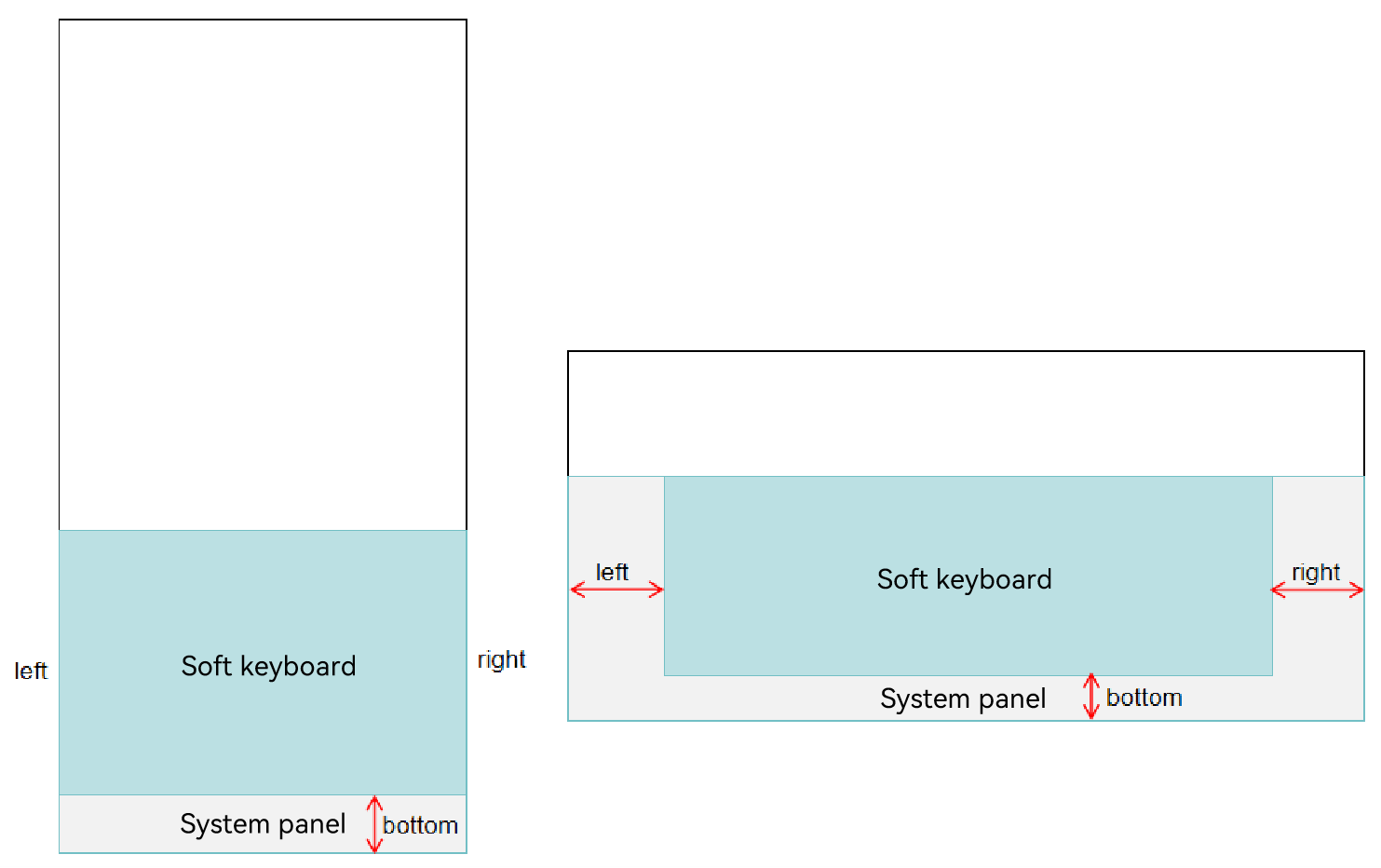
KeyboardController.ets file. In addition to creating the input method window, setting input method event listeners, and implementing text insertion and deletion, KeyboardController can also use the getSystemPanelCurrentInsets method of the Panel object to obtain the offset area between the input method keyboard and the system panel. The input method system panel varies across devices. When a device has a system panel, the offset area of the input method soft keyboard relative to the system panel is shown in the following figure:
// Define the two subtypes of the input method.
export enum CustomInputMethodSubtype {
  english = 0,
  chinese = 1
};

class KeyboardController {
  private keyCodes: Array<number> = [];
  private mContext: InputMethodExtensionContext | undefined;
  private panel: inputMethodEngine.Panel | undefined;
  private isSpecialKeyPress: boolean = false;
  private isKeyboardShow: boolean = false;
  private inputHandle: InputHandler = InputHandler.getInstance();
  private mKeyboardDelegate: inputMethodEngine.KeyboardDelegate | undefined;

  constructor() {
    this.mContext = undefined;
    this.panel = undefined;
    this.mKeyboardDelegate = undefined;
  }

  public onCreate(context: InputMethodExtensionContext): void {
    this.mContext = context;
    this.inputHandle.addLog('onCreate');
    this.initWindow();
    this.registerListener();
  }

  public onDestroy(): void {
    this.inputHandle.addLog('onDestroy');
    this.unRegisterListener();
    this.destroyPanel();
  }

  private initWindow(): void {
    if (this.mContext === undefined) {
      return;
    }
    this.inputHandle.addLog('initWindow');
    let dis: display.Display | undefined = undefined;
    try {
      dis = display.getDefaultDisplaySync();
    } catch (err) {
      let error = err as BusinessError;
      Log.showError(TAG, `getDefaultDisplaySync catch error: ${error.code} ${error.message}`);
      return;
    }
    if (dis == undefined) {
      return;
    }
    this.inputHandle.addLog("initWindow-oncall display");
    let dWidth = dis.width;
    let dHeight = dis.height;
    let keyHeightRate = KEYBOARD_HEIGHT_RATE_DEFAULT;
    AppStorage.setOrCreate('windowWidth', dis.width);
    AppStorage.setOrCreate('windowHeight', dis.height);
    let isLandscape = false;
    let isRkDevice = false;
    if (dis.width > dis.height) {
      isLandscape = true;
      AppStorage.setOrCreate('isLandscape', true);
    } else {
      AppStorage.setOrCreate('isLandscape', false);
    }
    if (dWidth === DEVICE_PHONE.width && dHeight === DEVICE_PHONE.height) {
      keyHeightRate = KEYBOARD_HEIGHT_RATE_PHONE;
    } else if (dWidth === DEVICE_PHONE.height && dHeight === DEVICE_PHONE.width) {
      keyHeightRate = KEYBOARD_HEIGHT_RATE_PHONE_LAND;
    } else if (dWidth === DEVICE_RK.width && dHeight === DEVICE_RK.height) {
      AppStorage.setOrCreate('isRkDevice', true);
      isRkDevice = true;
    } else if (dWidth === DEVICE_BIG.width && dHeight === DEVICE_BIG.height) {
      keyHeightRate = KEYBOARD_HEIGHT_RATE_BIG_LAND;
    } else if (dWidth === DEVICE_BIG.height && dHeight === DEVICE_BIG.width) {
      keyHeightRate = KEYBOARD_HEIGHT_RATE_BIG;
    }
    let keyHeight = dHeight * keyHeightRate;
    this.inputHandle.addLog(`initWindow-dWidth = ${dWidth};dHeight = ${dHeight};keyboard height = ${keyHeight};navibar height = navigationBar_height`);
    this.inputHandle.addLog(`initWindow-deviceType = ${deviceInfo.deviceType}`);
    let panelInfo: inputMethodEngine.PanelInfo = {
      type: inputMethodEngine.PanelType.SOFT_KEYBOARD,
      flag: inputMethodEngine.PanelFlag.FLG_FIXED
    }
    let inputStyle = StyleConfiguration.getInputStyle(isLandscape, isRkDevice, deviceInfo.deviceType);
    AppStorage.setOrCreate('inputStyle', inputStyle);
    inputMethodAbility.createPanel(this.mContext, panelInfo).then((panel: inputMethodEngine.Panel) => {
      this.panel = panel;
      panel.resize(dWidth, keyHeight).then(() => {
        panel.setUiContent('InputMethodExtensionAbility/pages/Index').then(() => {
          this.inputHandle.addLog('loadContent finished');
        }).catch((err: BusinessError) => {
          Log.showError(TAG, `Failed to setUiContent: ${err.code} ${err.message}`);
        });
      }).catch((err: BusinessError) => {
        Log.showError(TAG, `Failed to resize: ${err.code} ${err.message}`);
      });
    }).catch((err: BusinessError) => {
      Log.showError(TAG, `Failed to resize: ${err.code} ${err.message}`);
    });
  }

  private destroyPanel(): void {
    this.inputHandle.addLog('destroyPanel');
    if (this.panel) {
      inputMethodAbility.destroyPanel(this.panel).then(() => {
        this.inputHandle.addLog('Succeeded in destroyPanel.');
      }).catch((err: BusinessError) => {
        Log.showError(TAG, `Failed to destroyPanel: ${err.code} ${err.message}`);
      });
    }
  }

  private resizePanel(): void {
    this.inputHandle.addLog('resizeWindow');
    let dis: display.Display | undefined = undefined;
    try {
      dis = display.getDefaultDisplaySync();
    } catch (err) {
      let error = err as BusinessError;
      Log.showError(TAG, `getDefaultDisplaySync catch error: ${error.code} ${error.message}`);
      return;
    }
    if (dis == undefined) {
      return;
    }
    this.inputHandle.addLog('resizeWindow-oncall display');
    let dWidth = dis.width;
    let dHeight = dis.height;
    let keyHeightRate = KEYBOARD_HEIGHT_RATE_DEFAULT;
    AppStorage.setOrCreate<number>('windowWidth', dis.width);
    AppStorage.setOrCreate<number>('windowHeight', dis.height);
    let isLandscape = false;
    let isRkDevice = false;
    if (dis.width > dis.height) {
      isLandscape = true;
      AppStorage.setOrCreate('isLandscape', true);
    } else {
      AppStorage.setOrCreate('isLandscape', false);
    }
    if (dWidth === DEVICE_PHONE.width && dHeight === DEVICE_PHONE.height) {
      keyHeightRate = KEYBOARD_HEIGHT_RATE_PHONE;
    } else if (dWidth === DEVICE_PHONE.height && dHeight === DEVICE_PHONE.width) {
      keyHeightRate = KEYBOARD_HEIGHT_RATE_PHONE_LAND;
    } else if (dWidth === DEVICE_RK.width && dHeight === DEVICE_RK.height) {
      AppStorage.setOrCreate('isRkDevice', true);
      isRkDevice = true;
    } else if (dWidth === DEVICE_BIG.width && dHeight === DEVICE_BIG.height) {
      keyHeightRate = KEYBOARD_HEIGHT_RATE_BIG_LAND;
    } else if (dWidth === DEVICE_BIG.height && dHeight === DEVICE_BIG.width) {
      keyHeightRate = KEYBOARD_HEIGHT_RATE_BIG;
    }
    let keyHeight = dHeight * keyHeightRate;
    let inputStyle = StyleConfiguration.getInputStyle(isLandscape, isRkDevice, deviceInfo.deviceType);
    AppStorage.setOrCreate('inputStyle', inputStyle);
    if (this.panel) {
      this.panel.resize(dWidth, keyHeight).then(() => {
      }).catch((err: BusinessError) => {
        this.inputHandle.addLog(`resizePanel err = ${err.code} ${err.message}`);
      })
    }
  }
private registerListener(): void { this.inputHandle.addLog('registerListener'); try { display.on('change', () => { this.inputHandle.addLog('screenChangeEvent'); this.resizePanel(); }); } catch (err) { let error = err as BusinessError; Log.showError(TAG, `display on change catch error: ${error.code} ${error.message}`); } inputMethodAbility.on('inputStart', (kbController: inputMethodEngine.KeyboardController, textInputClient: inputMethodEngine.InputClient) => { this.inputHandle.addLog('keyboard inputStart'); this.inputHandle.onInputStart(kbController, textInputClient); }) // Register a listener in the input method application for subtype changes. inputMethodAbility.on('setSubtype', (inputMethodSubtype: InputMethodSubtype) => { if (inputMethodSubtype.id === 'InputMethodExtAbility') { AppStorage.setOrCreate('subtypeChange', CustomInputMethodSubtype.english); } if (inputMethodSubtype.id === 'InputMethodExtAbility1') { AppStorage.setOrCreate('subtypeChange', CustomInputMethodSubtype.chinese); } }); inputMethodAbility.on('inputStop', () => { this.inputHandle.addLog('keyboard inputStop'); this.onDestroy(); if (this.mContext) { this.mContext.destroy(); } }); this.inputHandle.addLog('pre on privateCommand'); try { inputMethodAbility.on('privateCommand', (record: Record<string, inputMethodEngine.CommandDataType>) => { this.inputHandle.addLog(`keyboard privateCommand : ${record}`); Object.keys(record).forEach((key: string) => { this.inputHandle.addLog(`onPageShow private command key: ${key}, value: ${record[key]}`); }) }); } catch (err) { let error = err as BusinessError; this.inputHandle.addLog(`on privateCommand sendPrivateCommand catch error: ${error.code} ${error.message}`); } this.mKeyboardDelegate = inputMethodEngine.getKeyboardDelegate(); this.mKeyboardDelegate.on('keyDown', (keyEvent: inputMethodEngine.KeyEvent) => { if (this.isKeyboardShow) { this.inputHandle.hideKeyboardSelf(); } this.inputHandle.addLog(`keyDown: code = ${keyEvent.keyCode}`); let result = this.onKeyDown(keyEvent); this.inputHandle.addLog(`keyDown: result = ${result}`); return result; }); this.mKeyboardDelegate.on('keyUp', (keyEvent: inputMethodEngine.KeyEvent) => { this.inputHandle.addLog(`keyUp: code = ${keyEvent.keyCode}`); let result = this.onKeyUp(keyEvent); this.inputHandle.addLog(`keyUp: result = ${result}`); return result; }); this.mKeyboardDelegate.on('cursorContextChange', (x: number, y: number, height: number) => { let cursorInfo: CursorInfo = { x: x, y: y, height: height }; this.inputHandle.setCursorInfo(cursorInfo); }); if (isDebug) { this.mKeyboardDelegate.on('selectionChange', (oldBegin: number, oldEnd: number, newBegin: number, newEnd: number) => { this.inputHandle.setSelectInfo('selectInfo: from(' + oldBegin + ',' + oldEnd + ') to (' + newBegin + ',' + newEnd + ')'); }); this.mKeyboardDelegate.on('textChange', (text: string) => { this.inputHandle.setTextInfo('textInfo: ' + text); }); } }public isShiftKeyHold(): boolean { if (this.keyCodes.length === 0) { return false; } let preDownKey = this.keyCodes[0]; return preDownKey === KeyCode.KEYCODE_SHIFT_LEFT || preDownKey === KeyCode.KEYCODE_SHIFT_RIGHT; } public onKeyDown(keyEvent: inputMethodEngine.KeyEvent): boolean { this.inputHandle.addLog('onKeyDown: code = ' + keyEvent.keyCode); let keyCode = keyEvent.keyCode; let idx = this.keyCodes.indexOf(keyCode); if (idx === -1) { this.keyCodes.push(keyCode); } else { this.inputHandle.addLog(`keyCode down is intercepted: ${keyCode}`); } if (this.isShiftKeyHold() && this.keyCodes.length === 2 && !this.isKeyCodeAZ(keyCode)) { this.isSpecialKeyPress = true; return false; } if (this.isSpecialKeyPress || keyCode === KeyCode.KEYCODE_ALT_LEFT || keyCode === KeyCode.KEYCODE_ALT_RIGHT) { return false; } let keyValue: string = getHardKeyValue(keyCode, this.isShiftKeyHold()); if (keyValue === '') { this.inputHandle.addLog('onKeyDown: unknown keyCode'); this.isSpecialKeyPress = true; return false; } return this.inputHardKeyCode(keyValue, keyCode); } public onKeyUp(keyEvent: inputMethodEngine.KeyEvent): boolean { this.inputHandle.addLog('OnKeyUp: code = ' + keyEvent.keyCode); let keyCode = keyEvent.keyCode; let idx = this.keyCodes.indexOf(keyCode); if (idx !== -1) { this.keyCodes.splice(idx, 1); } else { this.inputHandle.addLog(`keyCode KeyUp is intercepted: ${keyCode}`); } // For KEYCODE_DEL/KEYCODE_FORWARD_DEL, processed in OnKeyDown, so just intercept it if (keyCode === 2055 || keyCode === 2071 || (keyCode >= 2012 && keyCode <= 2016)) { this.inputHandle.addLog(`special code: ${keyCode}`); return true; } if (this.isSpecialKeyPress) { let keyValue = getHardKeyValue(keyCode, this.isShiftKeyHold()); if (!keyValue) { this.isSpecialKeyPress = true; } if (this.keyCodes.length === 0) { this.isSpecialKeyPress = false; } this.inputHandle.addLog(`OnKeyUp: this.isSpecialKeyPress: ${this.isSpecialKeyPress}`); return false; } return true; } public isKeyCodeAZ(keyCode: number): boolean { return keyCode >= KeyCode.KEYCODE_A && keyCode <= KeyCode.KEYCODE_Z; } public isKeyCodeNumber(keyCode: number): boolean { return (keyCode >= KeyCode.KEYCODE_0 && keyCode <= KeyCode.KEYCODE_9) || (keyCode >= KeyCode.KEYCODE_NUMPAD_0 && keyCode <= KeyCode.KEYCODE_NUMPAD_9); } public inputHardKeyCode(keyValue: string, keyCode: number): boolean { this.inputHandle.addLog(`inputHardKeyCode keyValue is: ${keyValue}`); if (this.processFunctionKeys(keyValue)) { return true; } if (this.shiftKeys(keyValue)) { return false; } this.inputHandle.insertText(keyValue); return true; } public shiftKeys(keyValue: string): boolean { this.inputHandle.addLog(`shiftKeys keyValue is: ${keyValue}`); switch (keyValue) { case 'KEYCODE_SHIFT_LEFT': case 'KEYCODE_SHIFT_RIGHT': return true; default: return false; } } public processFunctionKeys(keyValue: string): boolean { this.inputHandle.addLog(`processFunctionKeys keyValue is: ${keyValue}`); switch (keyValue) { case "KEYCODE_DEL": this.inputHandle.deleteForward(1); return true; case "KEYCODE_FORWARD_DEL": this.inputHandle.deleteBackward(1); return true; case "KEYCODE_DPAD_UP": this.inputHandle.moveCursor(inputMethodEngine.Direction.CURSOR_UP); return true; case "KEYCODE_DPAD_DOWN": this.inputHandle.moveCursor(inputMethodEngine.Direction.CURSOR_DOWN); return true; case "KEYCODE_DPAD_LEFT": this.inputHandle.moveCursor(inputMethodEngine.Direction.CURSOR_LEFT); return true; case "KEYCODE_DPAD_RIGHT": this.inputHandle.moveCursor(inputMethodEngine.Direction.CURSOR_RIGHT); return true; default: return false; } } private unRegisterListener(): void { this.inputHandle.addLog('unRegisterListener'); try { display.off('change'); } catch (err) { let error = err as BusinessError; Log.showError(TAG, `display off change catch error: ${error.code} ${error.message}`); } inputMethodAbility.off('inputStop', () => { this.inputHandle.addLog('inputStop off'); }); if (this.mKeyboardDelegate) { this.mKeyboardDelegate.off('keyDown'); this.mKeyboardDelegate.off('keyUp'); if (isDebug) { this.mKeyboardDelegate.off('cursorContextChange'); this.mKeyboardDelegate.off('selectionChange'); this.mKeyboardDelegate.off('textChange'); } } } } export const keyboardController: KeyboardController = new KeyboardController(); -
KeyboardKeyData.ets file.
In this file you can define the content displayed on the soft keyboard.
export interface keySourceListType {
  title: string,
  content: string,
  upperContent: string
}

export interface sourceListType {
  content: string
}

export enum MenuKey {
  NUMBER_KEY = '?123',
  NORMAL_KEY = 'ABC',
  SPECIAL_KEY = '=/\<'
}

export enum SubMenuType {
  NORMAL = 0,
  MENU = 1,
  EDIT = 2
}

export enum MenuType {
  NORMAL = 0,
  NUMBER = 1,
  SPECIAL = 2
}

export enum KeyState {
  LOWER_CASE = 0,
  ONCE_UPPER_CASE = 1,
  UPPER_CASE = 2
}

export let keySourceListData: keySourceListType[] = [
  {
    title: '1',
    content: 'q',
    upperContent: 'Q'
  },
  {
    title: '2',
    content: 'w',
    upperContent: 'W'
  },
  {
    title: '3',
    content: 'e',
    upperContent: 'E'
  },
  {
    title: '4',
    content: 'r',
    upperContent: 'R'
  },
  {
    title: '5',
    content: 't',
    upperContent: 'T'
  },
  {
    title: '6',
    content: 'y',
    upperContent: 'Y'
  },
  {
    title: '7',
    content: 'u',
    upperContent: 'U'
  },
  {
    title: '8',
    content: 'i',
    upperContent: 'I'
  },
  {
    title: '9',
    content: 'o',
    upperContent: 'O'
  },
  {
    title: '0',
    content: 'p',
    upperContent: 'P'
  },
  {
    title: String.fromCharCode(126),
    content: 'a',
    upperContent: 'A'
  },
  {
    title: String.fromCharCode(33),
    content: 's',
    upperContent: 'S'
  },
  {
    title: '@',
    content: 'd',
    upperContent: 'D'
  },
  {
    title: String.fromCharCode(35),
    content: 'f',
    upperContent: 'F'
  },
  {
    title: '%',
    content: 'g',
    upperContent: 'G'
  },
  {
    title: String.fromCharCode(39),
    content: 'h',
    upperContent: 'H'
  },
  {
    title: '&',
    content: 'j',
    upperContent: 'J'
  },
  {
    title: '*',
    content: 'k',
    upperContent: 'K'
  },
  {
    title: '?',
    content: 'l',
    upperContent: 'L'
  },
  {
    title: String.fromCharCode(72),
    content: 'z',
    upperContent: 'Z'
  },
  {
    title: String.fromCharCode(73),
    content: 'x',
    upperContent: 'X'
  },
  {
    title: String.fromCharCode(175),
    content: 'c',
    upperContent: 'C'
  },
  {
    title: String.fromCharCode(95),
    content: 'v',
    upperContent: 'V'
  },
  {
    title: String.fromCharCode(58),
    content: 'b',
    upperContent: 'B'
  },
  {
    title: String.fromCharCode(59),
    content: 'n',
    upperContent: 'N'
  },
  {
    title: String.fromCharCode(47),
    content: 'm',
    upperContent: 'M'
  }
]
export let numberSourceListData: sourceListType[] = [ { content: '1' }, { content: '2' }, { content: '3' }, { content: '4' }, { content: '5' }, { content: '6' }, { content: '7' }, { content: '8' }, { content: '9' }, { content: '0' }, { content: '@' }, { content: '#' }, { content: '$' }, { content: '%' }, { content: '&' }, { content: '-' }, { content: '+' }, { content: '(' }, { content: ')' }, { content: '/' }, { content: '*' }, { content: '"' }, { content: "'" }, { content: ':' }, { content: ';' }, { content: '!' }, { content: '?' }, ] export let symbolSourceListData: sourceListType[] = [ { content: '~' }, { content: '`' }, { content: '|' }, { content: '\u2022' }, { content: '\u221A' }, { content: '\u03A0' }, { content: '\u00F7' }, { content: '\u00D7' }, { content: String.fromCharCode(182) }, { content: '\u2206' }, { content: String.fromCharCode(163) }, { content: '\u20ac' }, { content: String.fromCharCode(165) }, { content: String.fromCharCode(162) }, { content: String.fromCharCode(94) }, { content: '\u00B0' }, { content: '=' }, { content: String.fromCharCode(123) }, { content: String.fromCharCode(125) }, { content: String.fromCharCode(44) }, { content: String.fromCharCode(92) }, { content: String.fromCharCode(169) }, { content: String.fromCharCode(174) }, { content: '\u2122' }, { content: '\u2105' }, { content: '[' }, { content: ']' } ] -
Index.ets file:
This file describes the functions of keys. For example, the number keys print numbers in the text box, and the delete key deletes what's entered.
import { deviceInfo } from '@kit.BasicServicesKit'; import Log from '../../model/Log'; import { EditView } from '../../components/EditView'; import { InputHandler, CustomInputMethodSubtype } from '../model/KeyboardController'; import { MenuType, SubMenuType, } from '../../model/KeyboardKeyData'; import { KeyMenu } from '../../components/KeyMenu'; import { NumberMenu } from '../../components/NumberMenu'; import { StyleConfiguration, KeyStyle } from '../../common/StyleConfiguration'; import { SymbolMenu } from '../../components/SymbolMenu'; import { Submenu } from '../../components/Submenu'; import { TopMenu } from '../../components/TopMenu'; import { inputMethodEngine } from '@kit.IMEKit'; const DEVICE_TYPE: string = deviceInfo.deviceType; const TAG: string = 'index->'; @Entry @Component struct Index { @Provide menuType: number = MenuType.NORMAL; @StorageLink('inputPattern') @Watch('inputPatternChange') inputPattern: InputType = InputType.Normal @StorageLink('submenuType') submenuType: number = SubMenuType.NORMAL; @StorageLink('isLandscape') @Watch('change') isLandscape: boolean = false; @StorageLink('isRkDevice') isRkDevice: boolean = true; @StorageLink('inputStyle') inputStyle: KeyStyle = StyleConfiguration.getInputStyle(this.isLandscape, this.isRkDevice, DEVICE_TYPE); private panel: inputMethodEngine.Panel | undefined; @StorageLink('subtypeChange') subtypeChange: number = CustomInputMethodSubtype.english; aboutToAppear(): void { // Check whether the immersive mode is used. If the immersive mode is used, select the immersive mode. inputMethodEngine.getKeyboardDelegate().on("editorAttributeChanged", (attr : inputMethodEngine.EditorAttribute) => { console.info('recv editorAttributeChanged, immersiveMode: ', attr.immersiveMode); if (attr.immersiveMode == inputMethodEngine.ImmersiveMode.DARK_IMMERSIVE) { this.panel?.setImmersiveMode(inputMethodEngine.ImmersiveMode.DARK_IMMERSIVE); console.info('recv editorAttributeChanged, panel:', this.panel?.getImmersiveMode()); } }) } onBackPress(): boolean { Log.showInfo(TAG, 'kikaInput onBackPress'); this.submenuType = SubMenuType.NORMAL; InputHandler.getInstance().hideKeyboardSelf(); return true; } inputPatternChange(): void { if (this.inputPattern === InputType.Number || this.inputPattern === InputType.PhoneNumber) { this.menuType = MenuType.NUMBER; } else { this.menuType = MenuType.NORMAL; } } change(): void { AppStorage.set('inputStyle', StyleConfiguration.getInputStyle(this.isLandscape, this.isRkDevice, DEVICE_TYPE)); } build() { Stack() { Column() { TopMenu() Column() { if (this.submenuType > SubMenuType.NORMAL) { if (this.submenuType === SubMenuType.MENU) { Submenu() } else { EditView(); } } else { if (this.menuType === MenuType.NORMAL) { if (this.subtypeChange == CustomInputMethodSubtype.english) { KeyMenu() } else { NumberMenu() } } else if (this.menuType === MenuType.NUMBER) { NumberMenu() } else { SymbolMenu() } } } .width('100%') .layoutWeight(1) .justifyContent(FlexAlign.Center) .backgroundColor('#D5D8DD') } .height('100%') } .height('100%') .backgroundColor(Color.White) } } -
main_pages.json file. Its configurations correspond to the keyboard rendering page in the path ets/InputMethodExtensionAbility/pages/.
{ "src": [ "InputMethodExtensionAbility/pages/Index" ] } -
module.json5 file:
Register the InputMethodExtensionAbility in the module.json5 file corresponding to the Module project. Set type to "inputMethod" and srcEntry to the code path of the InputMethodExtensionAbility component.
"extensionAbilities": [
  {
    "srcEntry": "./ets/InputMethodExtensionAbility/InputMethodService.ets",
    "name": "InputMethodService",
    "label": "$string:MainAbility_label",
    "description": "$string:extension_ability_descriptor",
    "type": "inputMethod",
    "exported": true,
    "metadata": [
      {
        "name": "ohos.extension.input_method",
        "resource": "$profile:input_method_config"
      }
    ]
  }
],
Constraints
To protect the InputMethodExtensionAbility against abuse, functional constraints of the basic access mode are provided.

Strictly comply with the functional constraints of the basic access mode. In this mode, you should provide only basic typing features, not interaction with online services in any form. The system will gradually introduce measures for compliance with the basic access mode, including but not limited to running the Extension process as an independent process and in sandbox mode, preventing the Extension process from creating subprocesses, and restricting inter-process communication and network access. Violations may result in service exceptions.
