
You cannot install and start ohpm-repo as the root user on Linux or macOS. Install and run it as a non-root user.
Installing the ohpm-repo Tool
- Ensure that Node.js is installed and that environment variables are properly configured. For details about how to install Node.js, visit the Node.js website.

The following lists compatible versions of ohpm-repo and Node.js:
- For ohpm-repo 5.4.4 and later versions, Node.js 24.x is recommended.
- For ohpm-repo 5.4.4 and earlier versions, if the data storage type is MySQL and the file storage type is SFTP, the supported Node.js version range is [18.x, 22.x].
Download the ohpm-repo tool package from the Download Center.
Decompress the ohpm-repo tool package.
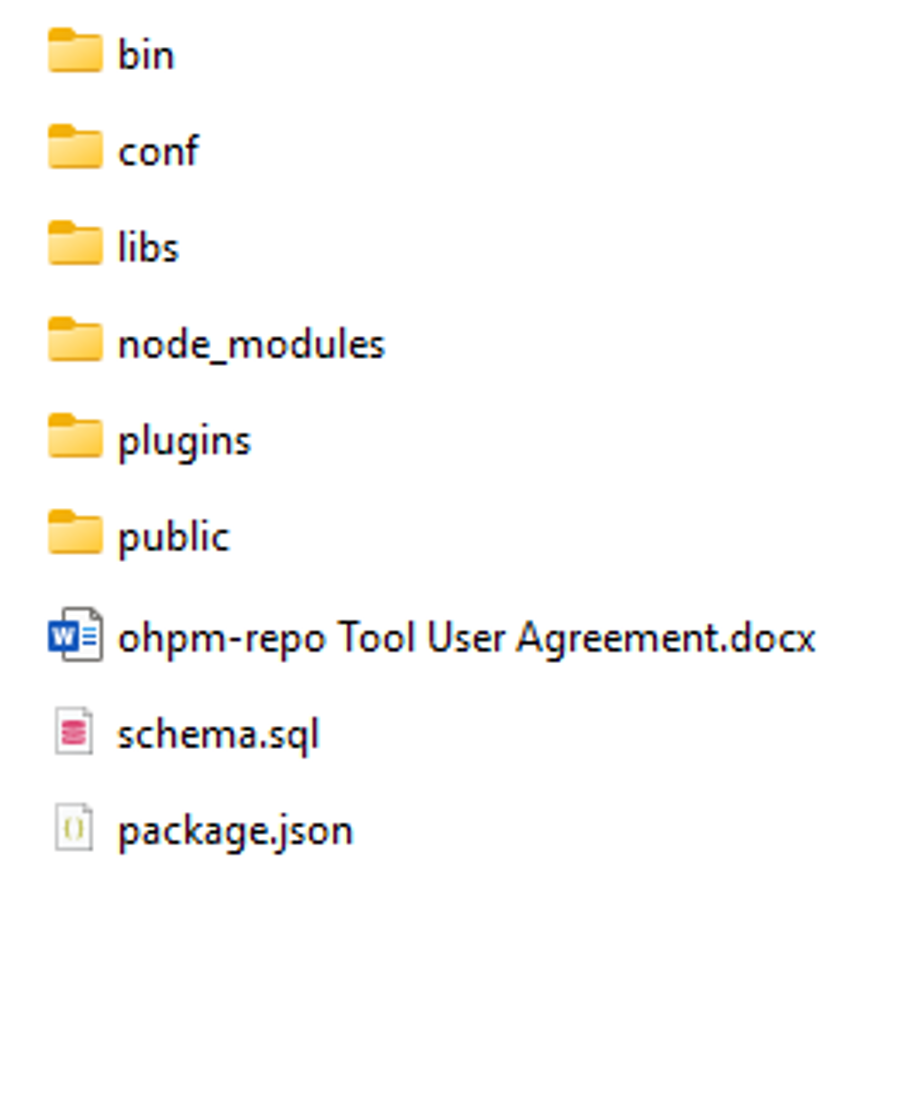
- Set the path of the bin directory in the directory where the ohpm-repo tool package is decompressed to the system environment variable path, and run the following command to query the version number:
ohpm-repo -v
If the version number (for example, 2.0.0) is displayed, the installation package is decompressed properly. If an error is reported, rectify the fault by referring to FAQs.

For Linux and macOS, you are advised to use Bash.
- Go to the conf directory in the ohpm-repo decompression directory and modify the config.yaml configuration file.
- Check the listen configuration. The default value is localhost:8088, indicating that only the local IP address can be listened on. If you want other hosts to access the system using the IP address or domain name, you are advised to change the value of listen to the IP address of the host where ohpm-repo is deployed.
listen: <IP address of the host where ohpm-repo is deployed>:8088
- Check the deploy_root configuration. If it is not configured, the default address is used. Do not set this path to the root directory where ohpm-repo is decompressed.
filedb is used for the data storage module db.
db:
  type: filedb
  config:
    path: ./db
fs is used for the file storage module store.
store:
  type: fs
  config:
    path: ./storage
    #server: http://localhost:8088
Check whether store.config.server is configured, which specifies the download address of the ohpm-repo repository content. If it is not configured, the default value is used. For details, see server: the address for downloading the repository content. You must set this parameter if the value of host in listen is 0.0.0.0 and the local host has multiple network interfaces. In such cases, you are advised to change the value of host to the specific IP address/domain name of the local host. For example, if the value of listen is 0.0.0.0:8088, set server to http://<IP address/domain name of the deployment host>:8088.

- If a reverse proxy server is configured for the ohpm-repo service, set store.config.server to the IP address or domain name of the reverse proxy server and use_reverse_proxy to true.
- For details about the configurations in the config.yaml file, see Configuration File.
- Check the listen configuration. The default value is localhost:8088, indicating that only the local IP address can be listened on. If you want other hosts to access the system using the IP address or domain name, you are advised to change the value of listen to the IP address of the host where ohpm-repo is deployed.
- Go to the bin directory where the ohpm-repo tool package is decompressed and run the install command:
ohpm-repo install

If the --config parameter is not configured, the config.yaml configuration file in the conf directory under the ohpm-repo root directory is used by default.
The following is an example of the log information indicating that the startup is successful:
PS D:\> ohpm-repo install
[2025-08-26T14:29:15.153] [WARN] default - "listen" protocol is set to 'http' in "config.yaml" file, which is insecure, advise to use the more secure 'https' protocol instead.
[2025-08-26T14:29:15.178] [INFO] default - initialize encryption component successfully.
[2025-08-26T14:29:15.179] [INFO] default - initialize "file database" successfully.
[2025-08-26T14:29:15.184] [INFO] default - initialize "file storage" successfully.
[2025-08-26T14:29:15.194] [INFO] console - install successfully.
[2025-08-26T14:29:15.195] [INFO] default - "deploy_root" environment variables: "OHPM_REPO_DEPLOY_ROOT = C:\Users\xxx\AppData\Roaming\Huawei\ohpm-repo".
- After the installation is successful, you must promptly reload environment variables based on the displayed information. The update method varies with the operating system — Windows or Linux/macOS.

- Windows: Close the current window and open a new window.
- Linux or macOS: Run the reload command in the CLI. If the shell is Bash, run the source ~/.bashrc or . ~/.bashrc command. If the shell is Zsh, run the source ~/.zshrc or . ~/.zshrc command.
Starting ohpm-repo
Run the start command to start ohpm-repo.
ohpm-repo start
If the startup is successful, the following information is displayed in the log:
PS D:\> ohpm-repo start
[2025-08-26T14:31:22.209] [WARN] default - "listen" protocol is set to 'http' in "config.yaml" file, which is insecure, advise to use the more secure 'https' protocol instead.
[2025-08-26T14:31:22.211] [INFO] default - config file path: "C:\Users\xxx\AppData\Roaming\Huawei\ohpm-repo\conf\config.yaml".
[2025-08-26T14:31:22.216] [INFO] default - initialize "file database" successfully.
[2025-08-26T14:31:22.217] [INFO] default - initialize "file storage" successfully.
[2025-08-26T14:31:22.237] [INFO] console - http address - localhost:8088 - ohpm-repo/5.1.5.