Multi Thread Check
In the JavaScript runtime environment, the safety of multi-threading is an important consideration. Since the JavaScript main thread is single-threaded, JS objects created in the main thread (especially DOM-related ones) can only be operated within it. Violating this rule can lead to multi-threading safety issues. This is where Multi Thread Check comes into the picture. Multi Thread Check is integrated in DevEco Studio, and displays error stack details and problematic code lines in FaultLog. For details about the principles of Multi Thread Check, see Technical Overview.
Enabling Multi Thread Check can introduce significant performance overhead. Enable it only when necessary.
[h2]Enabling Multi Thread Check
You can enable Multi Thread Check in any of the following ways:
- Method 1
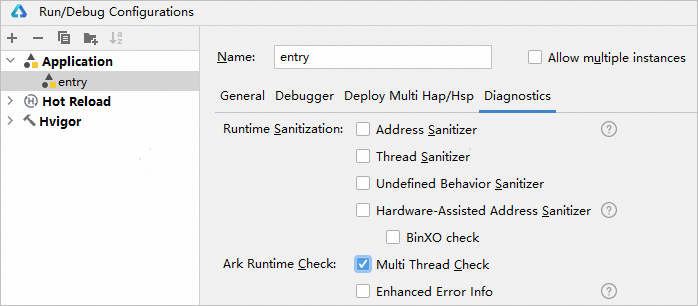
Choose Run > Edit Configurations > Diagnostics and select Multi Thread Check.
- Method 2
Run the following command:
hdc shell aa start -a {abilityName} -b {bundleName} -R
- Method 3
Call the setMultithreadingDetectionEnabled API.
[h2]Using Multi Thread Check
- Run or debug the app.
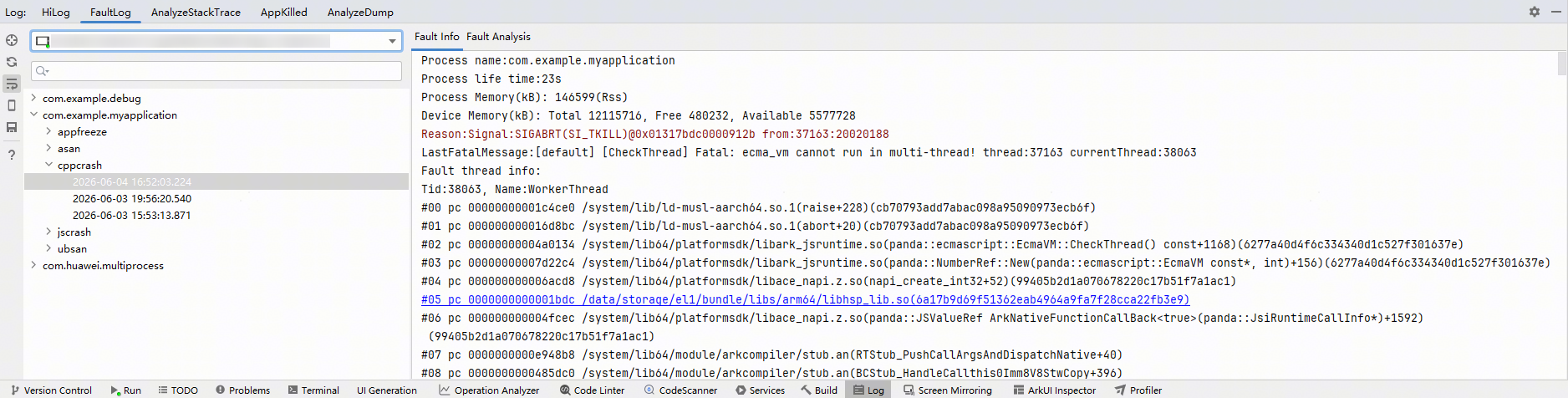
- When a multi-threading safety issue occurs, the crash log message will be displayed. You can click the link provided in the message to navigate to the code that causes the issue. For details about how to analyze multi-threading safety issues, see Analyzing Error Logs and Crashes Triggered by Using Node-API.
If Multi Thread Check is enabled via the setMultithreadingDetectionEnabled API (method 3), the API supports two modes for handling multithreading security issues: crash mode and non-crash mode. In crash mode, the app exits with a cppcrash log generated. In non-crash mode, the app does not exit with an arktsenvsan log generated. In this mode, the app can subscribe to address sanitizer events via hiAppEvent to detect multithreading security issues, and hilog logs will also be generated.
Enhanced Error Info
During ArkTS project development, native modules may need to be loaded. The Enhanced Error Info feature enriches error messages arising from native module loading, facilitating more accurate native issue troubleshooting.

