00302001 Unit Tests Not Supported in the FA Model
Error Message
FA mode does not support unit test.
Symptom
The FA model does not support unit tests.
Possible Causes
Unit tests are executed using commands in the FA model project.
Solution
Do not perform unit tests on FA model projects.
00302002 Failed to Find the Plug-in During Module Initialization
Error Message
The XXX plugin was not found when initializing the YYY module
Symptom
The XXX plug-in cannot be found during module initialization.
Possible Causes
The module.type field in the module.json5 file is inconsistent with the system plug-in exported from the hvigorfile.ts file.
Solution
Ensure that the value of module.type in the module.json5 file of the module is the same as the system plug-in exported from the hvigorfile.ts file.
00302013 Root Node Not Ready for Build
Error Message
The root node is not yet available for build.
Symptom
The root node is not ready for build.
Possible Causes
- The API is called in hvigorconfig.ts. The execution time of this file is earlier than that of nodesInitialized. As a result, the API fails to be called.
- DevEco Studio and Command Line Tools come with the hvigor plugin preinstalled by default, so no additional configuration is required. If there are multiple hvigor plugins in the environment, multiple plugins may be detected during the build process, resulting in an error.
Solution
- When calling the API in hvigorfile.ts, make sure that the execution sequence complies with Hvigor lifecycle execution sequence.
- If dependencies in the hvigor-config.json5 file includes @ohos/hvigor or @ohos/hvigor-ohos-plugin, remove them.
- If the package.json file of a plugin listed in dependencies in the hvigor-config.json5 file includes @ohos/hvigor or @ohos/hvigor-ohos-plugin in its dependencies, move them to devDependencies of that plugin.
Locate the plugin installation path by printing the following information via the hvigorconfig.ts or hvigorfile.ts file:
import { hvigor } from '@ohos/hvigor';
console.log(hvigor.getParameter().getWorkspaceDir())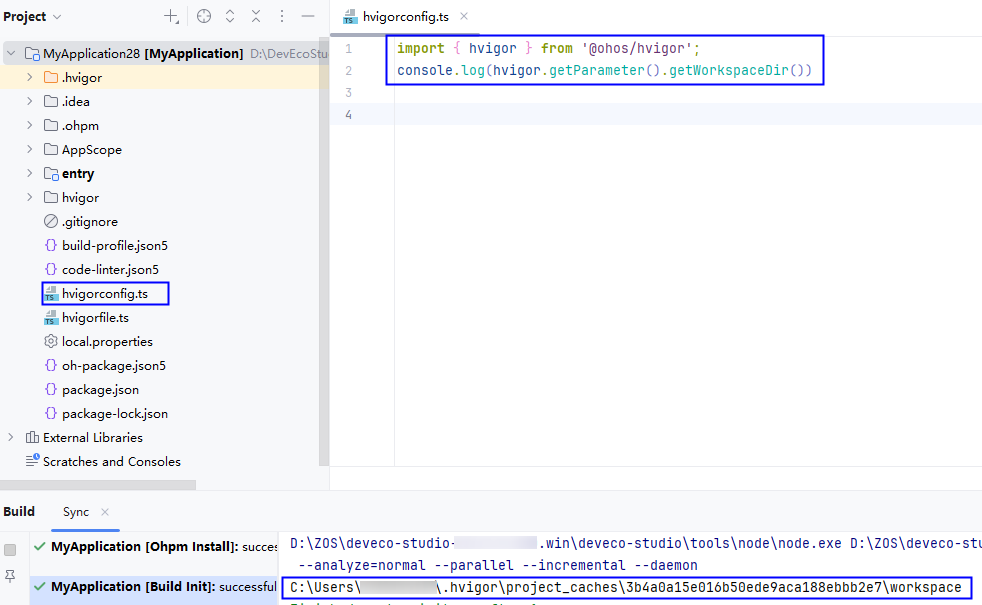

- Locate the running hvigor by printing the following information via the hvigorconfig.ts or hvigorfile.ts file. If hvigor is located under node_modules, delete that node_modules directory.
console.log(require.resolve('@ohos/hvigor'));
00302014 hvigorConfig Not Ready for Build
Error Message
The hvigorConfig is not yet available for build.
Symptom
hvigorConfig is not ready for build.
Possible Causes
DevEco Studio and Command Line Tools come with the hvigor plugin preinstalled by default, so no additional configuration is required. If there are multiple hvigor plugins in the environment, multiple plugins may be detected during the build process, resulting in an error.
Solution
- If dependencies in the hvigor-config.json5 file includes @ohos/hvigor or @ohos/hvigor-ohos-plugin, remove them.
- If the package.json file of a plugin listed in dependencies in the hvigor-config.json5 file includes @ohos/hvigor or @ohos/hvigor-ohos-plugin in its dependencies, move them to devDependencies of that plugin.
Locate the plugin installation path by printing the following information via the hvigorconfig.ts or hvigorfile.ts file:
import { hvigor } from '@ohos/hvigor';
console.log(hvigor.getParameter().getWorkspaceDir())

- Locate the running hvigor by printing the following information via the hvigorconfig.ts or hvigorfile.ts file. If hvigor is located under node_modules, delete that node_modules directory.
console.log(require.resolve('@ohos/hvigor'));
00302015 An Exception Occurs When the Internal hook Function Is Called.
Error Message
XXX in hvigorfile at XXX.
Symptom
An exception occurs when the internal hook function is called.
Possible Causes
An exception occurs when the hook function in the node is executed.
Solution
Call the API correctly by referring to the extended API document.
00302016 Lack of System Plugins in hvigorfile.ts of the Stage Model Project
Error Message
Invalid exports, no system plugins were found in hvigorfile: XXX.
Symptom
Export failed. No system plug-ins are found in hvigorfile.
Possible Causes
- The system field is missing in hvigorfile.ts.
- appTasks, hapTasks, hspTasks, or harTasks used in hvigorfile.ts does not exist.
- The hvigorfile.ts file does not use export default for its export.
Solution
- Ensure that the system field exists in hvigorfile.ts.
- Verify that the project-level hvigorfile.ts uses appTasks, and the module-level hvigorfile.ts uses hapTasks, hspTasks, or harTasks.
- Ensure that hvigorfile.ts uses export default for its export.
Example:
export default {
    system: appTasks,  /* Built-in plugin of Hvigor. It cannot be modified. */
    plugins:[]         /* Custom plugin to extend the functionality of Hvigor. */
}
00302017 Unknown Module Name in the Command Line
Error Message
Unknown module XXX in the command line.
Symptom
The CLI contains an unknown module XXX.
Possible Causes
The module name in the command is dynamically deleted from the hvigorconfig.ts file.
Solution
Ensure that the module is not deleted from the hvigorconfig.ts file.
00302018 Unknown Module Name in the Command Line
Error Message
Unknown module XXX in the command line.
Symptom
The CLI contains an unknown module XXX.
Possible Causes
The module name in the command does not exist in the project-level build-profile.json5 file.
Solution
Ensure that the module is set in the modules field of the project-level build-profile.json5 file.
00302019 Incorrect Return Value Type of the Custom Plugin
Error Message
File XXX exports an invalid plugin XXX with invalid order return XXX. Must return a number value.
Symptom
The return value type of the custom plugin is incorrect.
Possible Causes
The plugin exported from the specified file has an incorrect return value type.
Solution
Ensure that the return value of the exported plugin is a number.
00302020 Duplicate Custom Plugin Name
Error Message
File XXX exports an invalid plugin XXX whose name XXX duplicate with other plugins. Please rename this plugin.
Symptom
The custom plugin name is duplicated.
Possible Causes
The name of the custom plugin exported from the specified file conflicts with other plugin names.
Solution
Check for duplicate custom Hvigor plugin names and rename the conflicting plugin if necessary.
00302021 No Default Export in the Custom Plugin
Error Message
File XXX has no default export.
Symptom
The custom plugin does not have a default export.
Possible Causes
The custom Hvigor plugin does not use export default.
Solution
Add export default to the Hvigor plugin defined in the specified file.
00302022 Undefined Plugin Exported
Error Message
File XXX exports an undefined plugin.
Symptom
An undefined plugin is exported.
Possible Causes
An undefined Hvigor plugin is exported from the specified file.
Solution
Ensure that the correct Hvigor plugin is exported.
00302023 Incorrect Custom Plugin Type
Error Message
File XXX exports an invalid plugin with type XXX.
Symptom
The custom plugin type is incorrect.
Possible Causes
The plugin exported from the specified file has an incorrect type.
Solution
Check the type of the exported plugin to ensure it is an object.
00302024 Missing Custom Plugin Name
Error Message
File XXX exports an invalid plugin without a name.
Symptom
A plugin without a name is exported from the specified file.
Possible Causes
The plugin exported from the specified file does not have a name.
Solution
Ensure that the exported plugin has a name.
00302025 Invalid Plugin Name Type
Error Message
File XXX exports an invalid plugin whose name is not a string.
Symptom
A plugin with a non-string name is exported from the specified file.
Possible Causes
The name of the plugin exported from the specified file is not a string.
Solution
Ensure that the name of the exported plugin is a string.
00302026 Unknown Plugin Execution Order
Error Message
File XXX exports an invalid plugin YYY with unknown order ZZZ.
Symptom
A plugin with an unknown execution order is exported from the specified file.
Possible Causes
The execution order of the plugin exported from the specified file is unknown.
Solution
Ensure that the exported plugin has the correct execution order.
00302027 Invalid Hook Type in the Custom Plugin
Error Message
File XXX exports an invalid plugin YYY whose hook ZZZ is not a function.
Symptom
A plugin with a non-function hook is exported from the specified file.
Possible Causes
The hook of the plugin exported from the specified file is not a function.
Solution
Ensure that the hook of the exported plugin is correctly defined as a function.
00302029 Plug-in and Module Type Mismatch
Error Message
The plugin referenced in the hvigorfile does not match moduleType in the module.json5/config.json file.
Symptom
The plugin referenced in hvigorfile is inconsistent with the module type in the module.json5/config.json file.
Possible Causes
The task type (such as hapTasks) registered in hvigorfile is inconsistent with the module type (such as HAR module). For example, the HAP module references harPlugin.
Solution
Ensure that the task type matches the module type.
00302030 API Type Mismatch
Error Message
Mismatch with apiType at 'XXX'.
Symptom
The apiType configuration at XXX does not match.
Possible Causes
apiType configured in the module-level hvigorfile.ts file is inconsistent with that in the module-level build-profile.json5 file.
Solution
Set apiType to the same values in module-level hvigorfile.ts file and module-level build-profile.json5 file.
00302031 Lack of System Plugins in hvigorfile.ts of the FA Model Project
Error Message
Invalid exports, no system plugins were found in hvigorfile. At file: XXX.
Symptom
Export failed. No system plug-ins are found in hvigorfile.
Possible Causes
- The system field is missing in hvigorfile.ts.
- legacyAppTasks, legacyHapTasks, or legacyHarTasks used in hvigorfile.ts does not exist.
- The hvigorfile.ts file does not use export default for its export.
Solution
- Ensure that the system field exists in hvigorfile.ts.
- Ensure that the project-level hvigorfile.ts uses legacyAppTasks, and the module-level hvigorfile.ts uses legacyHapTasks or legacyHarTasks.
- Ensure that hvigorfile.ts uses export default for its export.
Example:
export default {
    system: legacyAppTasks,  /* Built-in plugin of Hvigor. It cannot be modified. */
    plugins:[]         /* Custom plugin to extend the functionality of Hvigor. */
}
00302032 Lack of System Plugins in hvigorfile.ts of the Stage Model Project
Error Message
Invalid exports, no system plugins were found in hvigorfile.
Symptom
Export failed. No system plug-ins are found in hvigorfile.
Possible Causes
- The system field is missing in hvigorfile.ts.
- appTasks, hapTasks, hspTasks, or harTasks used in hvigorfile.ts does not exist.
- The hvigorfile.ts file does not use export default for its export.
Solution
- Ensure that the system field exists in hvigorfile.ts.
- Verify that the project-level hvigorfile.ts uses appTasks, and the module-level hvigorfile.ts uses hapTasks, hspTasks, or harTasks.
- Ensure that hvigorfile.ts uses export default for its export.
Example:
export default {
    system: appTasks,  /* Built-in plugin of Hvigor. It cannot be modified. */
    plugins:[]         /* Custom plugin to extend the functionality of Hvigor. */
}
00302033 setProperty Method in hvigorfile.ts Failed to Be Verified
Error Message
Method setProperty validate failed in hvigorfile.ts.
Symptom
The setProperty method in the hvigorfile.ts file fails to be validated.
Possible Causes
The parameters passed to the setProperty method fail schema validation.
Solution
Modify the fields in the hvigorfile.ts file based on the error message.
00302034 Failed to Execute the Lifecycle
Error Message
Failed to execute hook 'XXX': YYY.
Symptom
The XXX lifecycle fails to be executed.
Possible Causes
An error is reported when the code in the XXX lifecycle is executed.
Solution
- Check the code in the XXX lifecycle based on the error message YYY.
- Set stacktrace in hvigor-config.json5 to true and rectify the fault based on the stack information.
00302035 Failed to Execute a Custom Plugin Function
Error Message
Failed to execute function 'XXX' of the custom plugin whose pluginId is 'YYY': ZZZ.
Symptom
The XXX function of the custom plugin YYY fails to be executed.
Possible Causes
An error is reported when the code in the XXX function of the custom plugin YYY is executed.
Solution
- Check the code in the XXX function of the custom plugin YYY based on the error message ZZZ. If the error message contains "The root node is not yet available for build" or "The hvigorConfig is not yet available for build," perform the following:
- If dependencies in the hvigor-config.json5 file includes @ohos/hvigor or @ohos/hvigor-ohos-plugin, remove them.
- If the package.json file of a plugin listed in dependencies in the hvigor-config.json5 file includes @ohos/hvigor or @ohos/hvigor-ohos-plugin in its dependencies, move them to devDependencies of that plugin.
Locate the plugin installation path by printing the following information via the hvigorconfig.ts or hvigorfile.ts file:
import { hvigor } from '@ohos/hvigor';
console.log(hvigor.getParameter().getWorkspaceDir())

- Locate the running hvigor by printing the following information via the hvigorconfig.ts or hvigorfile.ts file. If hvigor is located under node_modules, delete that node_modules directory.
console.log(require.resolve('@ohos/hvigor'));
- Set stacktrace in hvigor-config.json5 to true and rectify the fault based on the stack information.
00302036 Failed to Execute the Lifecycle
Error Message
Failed to execute node hook 'XXX': YYY.
Symptom
The XXX lifecycle fails to be executed.
Possible Causes
An error is reported when the code in the XXX lifecycle is executed.
Solution
- Check the code in the XXX lifecycle based on the error message YYY.
- Set stacktrace in hvigor-config.json5 to true and rectify the fault based on the stack information.
00302037 Failed to Execute hvigorfile.ts
Error Message
Failed to load or execute hvigorfile.ts: XXX At file: YYY.
Symptom
Failed to execute the hvigorfile.ts file.
Possible Causes
An error occurred during the execution of the hvigorfile.ts file and its dependent files.
Solution
- Check the code in the hvigorfile.ts file according to the error message. If the error message contains "The root node is not yet available for build" or "The hvigorConfig is not yet available for build," perform the following:
- If dependencies in the hvigor-config.json5 file includes @ohos/hvigor or @ohos/hvigor-ohos-plugin, remove them.
- If the package.json file of a plugin listed in dependencies in the hvigor-config.json5 file includes @ohos/hvigor or @ohos/hvigor-ohos-plugin in its dependencies, move them to devDependencies of that plugin.
Locate the plugin installation path by printing the following information via the hvigorconfig.ts or hvigorfile.ts file:
import { hvigor } from '@ohos/hvigor';
console.log(hvigor.getParameter().getWorkspaceDir())

- Locate the running hvigor by printing the following information via the hvigorconfig.ts or hvigorfile.ts file. If hvigor is located under node_modules, delete that node_modules directory.
console.log(require.resolve('@ohos/hvigor'));
- Set stacktrace in hvigor-config.json5 to true and rectify the fault based on the stack information.
00302038 getAllDependencyInfo Called Before Dependency Collection Completes
Error Message
'getAllDependencyInfo()' must be called after dependencies are collected.
Symptom
The dependency information is updated in taskGraphResolved. Therefore, the getAllDependencyInfo API must be called in lifecycle hooks at or after the taskGraphResolved phase.
Possible Causes
The getAllDependencyInfo API is called before the taskGraphResolved phase.
Solution
Call this API in lifecycle hooks at or after the nodesEvaluated phase by referring to getAllDependencyInfo.
00302039 Failed to Execute the hvigorfile.ts Script
Error Message
Failed to load or execute hvigorfile.ts: XXX. At file: YYY.
Symptom
Failed to execute the hvigorfile.ts script.
Possible Causes
- The plugin required for build tasks is not configured under dependencies in hvigor-config.json5.
- The plugin dependencies are configured in the dependencies field of hvigor-config.json5, and sync reports successful installation, yet the error persists. This is usually caused by a PNPM tool issue: PNPM displays a success prompt while the actual installation fails.
Solution
- Configure the plugin dependencies in the dependencies field of hvigor-config.json5 and run sync to install the dependencies.
- If the error persists after the dependencies are successfully installed, perform the following steps:
- Locate the file User directory/.hvigor/wrapper/tools/package.json and set the PNPM version to "10.16.1" (excluding the caret symbol ^).
- Open Terminal, go to the User directory/.hvigor/wrapper/tools directory, and run the npm install command.
- Delete the User directory/.hvigor/project_caches directory.
00302041 getOhpmDependencyInfoV2 Called Before Dependency Collection Completes
Error Message
'getOhpmDependencyInfoV2()' must be called after dependencies are collected.
Symptom
The dependency information is updated in taskGraphResolved. Therefore, the getOhpmDependencyInfoV2 API must be called in lifecycle hooks at or after the taskGraphResolved phase.
Possible Causes
The getOhpmDependencyInfoV2 API is called before the taskGraphResolved phase.
Solution
Call this API in lifecycle hooks at or after the nodesEvaluated phase by referring to getOhpmDependencyInfoV2.
00302042 getOhpmRemoteHspDependencyInfoV2 Called Before Dependency Collection Completes
Error Message
'getOhpmRemoteHspDependencyInfoV2()' must be called after dependencies are collected.
Symptom
The dependency information is updated in taskGraphResolved. Therefore, the getOhpmRemoteHspDependencyInfoV2 API must be called in lifecycle hooks at or after the taskGraphResolved phase.
Possible Causes
The getOhpmRemoteHspDependencyInfoV2 API is called before the taskGraphResolved phase.
Solution
Call this API in lifecycle hooks at or after the nodesEvaluated phase by referring to getOhpmRemoteHspDependencyInfoV2.