In DevEco Studio, you can develop apps/atomic services for various device types, with a wide range of project templates. The project creation wizard allows you to easily create projects for various scenarios, automatically creating corresponding code and resource templates. Better yet, DevEco Studio enables you to write code in multiple programming languages, including ArkTS, JS, and C/C++.
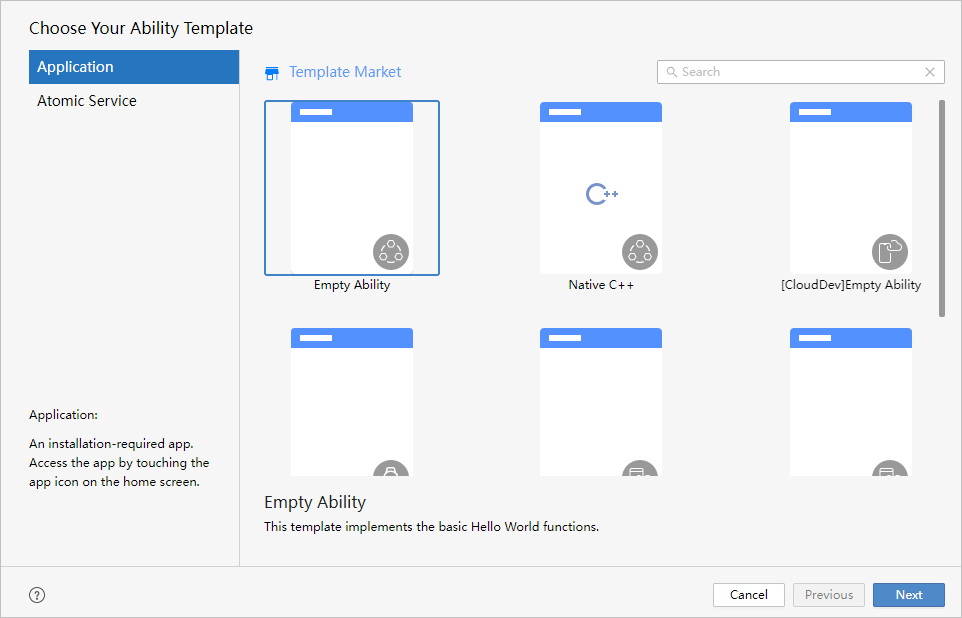
The following table lists the supported project templates.
Template | Description |
|---|---|
Empty Ability | Available for phones, tablets, 2-in-1 devices, wearables, TVs, and head units. Displays basic Hello World features. |
Native C++ | Available for phones, tablets, 2-in-1 devices, wearables, TVs, and head units. Provides a sample to call C++ code, with "Hello World" displayed on the UI. |
[CloudDev]Empty Ability | Implements features for device-cloud synergy. Constraints: Currently, this feature is available only in the Chinese mainland. |
[Lite]Empty Ability | Available for lite wearables. Displays basic Hello World features. You can modify the device type and runtime OS based on this template to develop small embedded devices. |
Flexible Layout Ability | Implements a three-layer project structure for cross-device app development. The three layers are common (common capability layer), features (basic feature layer), and products (product customization layer). |
Embeddable Ability | Implements an atomic service that can run on other apps in embedded mode. |
[ArkUI-X]Empty Ability | Displays basic Hello World features for cross-platform app development. For more information, see ArkUI-X Overview. |
[ArkUI-X]Library | Builds a dependency for cross-platform app development. The dependency can be added to existing apps. For more information, see ArkUI-X Overview. |
[ArkUI-X]Native C++ | Provides a sample to call C++ code for cross-platform app development. For more information, see ArkUI-X Overview. |