00521001 Invalid Characters Included in the Test Case Name
Error Message
XXX is an invalid it value. Enter a value that contains only digits, letters, underscores (_), and periods (.) or run from a higher level portal.
Symptom
The test case name contains invalid characters. The name must contain only digits, letters, underscores (_), or periods (.), or the test must be run from a higher-level entry point.
Possible Causes
The local test case name contains invalid characters.
Solution
- Ensure that the test case name contains only digits, letters, underscores (_), or periods (.).
- If the test case name contains invalid characters, run the test suite, test file, or test directory instead.
00521002 Invalid Characters Included in the Test Suite Name
Error Message
XXX is an invalid describe value. The value entered must contain only digits, letters, underscores (_), and periods (.), and can only start with a letter.
Symptom
The test suite name is invalid.
Possible Causes
The local test suite name contains invalid characters.
Solution
Ensure that the test suite name contains only digits, letters, underscores (_), or periods (.), and starts with a letter.
00521003 Variables Included in the Local Test Suite Name
Error Message
XXX is a Variable. Please use string as a describe name.
Symptom
The test suite name contains a variable.
Possible Causes
The local test suite name contains a variable.
Solution
Use a string as the test suite name.
00521004 Variables Included in the Local Test Case Name
Error Message
XXX is a Variable. Please use string as an It-name.
Symptom
The test case name contains a variable.
Possible Causes
The local test case name contains a variable.
Solution
- Use a string as the test case name.
- If the test case name is a variable, run the test suite, test file, or test directory instead.
00521005 Variables Included in the Local Test Case Name
Error Message
XXX is a Variable. Please use string as an It-name or execute from the higher running entrance.
Symptom
The test case name contains a variable. Use a string as the test case name, or run the test from a higher-level entry point.
Possible Causes
The local test case name contains a variable.
Solution
- Use a string as the test case name.
- If the test case name is a variable, run the test suite, test file, or test directory instead.
00521006 Duplicate Test Case Name
Error Message
Testing failed due to the duplicate test case name XXX. The test case name must be unique in a test suite.
Symptom
The test failed due to a duplicate test case name.
Possible Causes
Test cases with the same name exist within a test suite.
Solution
Check the test case names to ensure that they are unique.
00521007 Duplicate Test Suite Name
Error Message
Testing failed due to the duplicate test suite name XXX. The test suite name must be unique in a test package.
Symptom
The test failed due to a duplicate test suite name.
Possible Causes
Test suites with the same name exist within a test package.
Solution
Check the test suite names to ensure that they are unique.
00522001 Function Not Registered in List.test.ets
Error Message
The function where the method XXX is located is not registered in the 'List.test.ets' file!
Symptom
The function containing a specified method is not registered in the List.test.ets file.
Possible Causes
The function is not registered in the List.test.ets file.
Solution
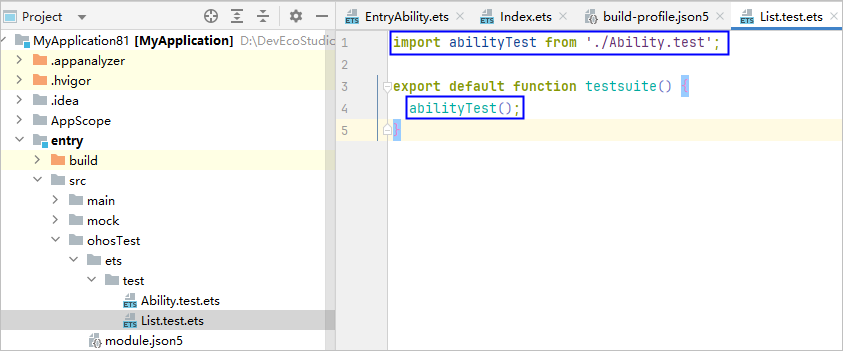
Register the function in the List.test.ets file, as shown in the following example:
00522002 Function Not Registered in List.test.ets
Error Message
The function where the suite XXX is located is not registered in the ''List.test.ets'' file!
Symptom
The function that contains the test suite is not registered in the List.test.ets file.
Possible Causes
The function is not registered in the List.test.ets file.
Solution
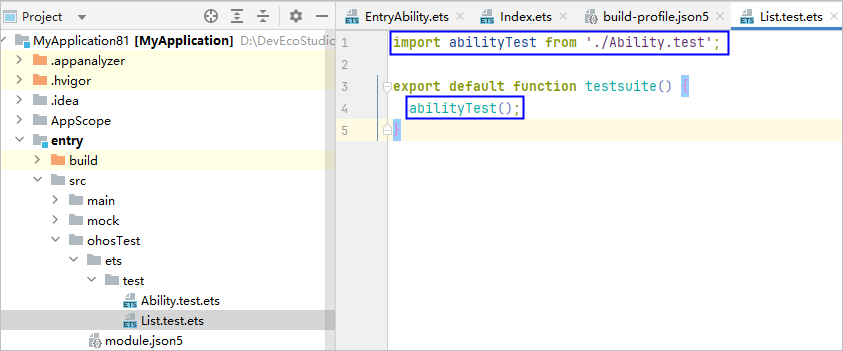
Register the function in the List.test.ets file, as shown in the following example:
00522005 No Function Registered in List.test.ets for the File
Error Message
None of the functions in the file XXX have been registered in the 'List.test.ets' file!
Symptom
None of the functions in the specified file are registered in the List.test.ets file.
Possible Causes
None of the functions in the specified file are registered.
Solution
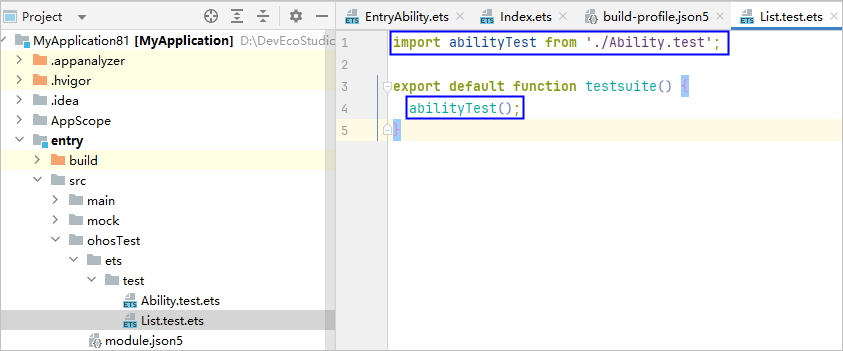
Register the function in the List.test.ets file, as shown in the following example:
00522006 Test Case Not Found in the Test File
Error Message
Current test case XXX not found in the test file.
Symptom
The specified test case cannot be found in the test file.
Possible Causes
The specified test case cannot be found in the test file.
Solution
- Select the correct test case and re-run the test.
- Modify Method name in the run configuration window.

00522007 No Test Case Found
Error Message
No Any Test Case Found In The XXX.
Symptom
No test case can be found in the specified target.
Possible Causes
No test case is defined in the test file.
Solution
Ensure that at least one test case exists in the test file.
00523001 C/C++ Methods Not Supported in Local Tests
Error Message
Testing on C/C++ methods not supported.
Symptom
C/C++ methods are not supported in local tests.
Possible Causes
C/C++ methods are not supported in local tests.
Solution
Use instrument tests to test C/C++ methods.
00523002 Required Components Missing in the SDK
Error Message
Required components are missing in the HarmonyOS SDK. Reinstall DevEco Studio again.
Symptom
Required components are missing in the SDK.
Possible Causes
Required components are missing in the SDK.
Solution
00523003 modules.abc File Not Found
Error Message
Failed to start local test, please check the XXX path!
Symptom
The build product modules.abc cannot be found, leading to local test startup failure.
Possible Causes
- The build and packaging failed.
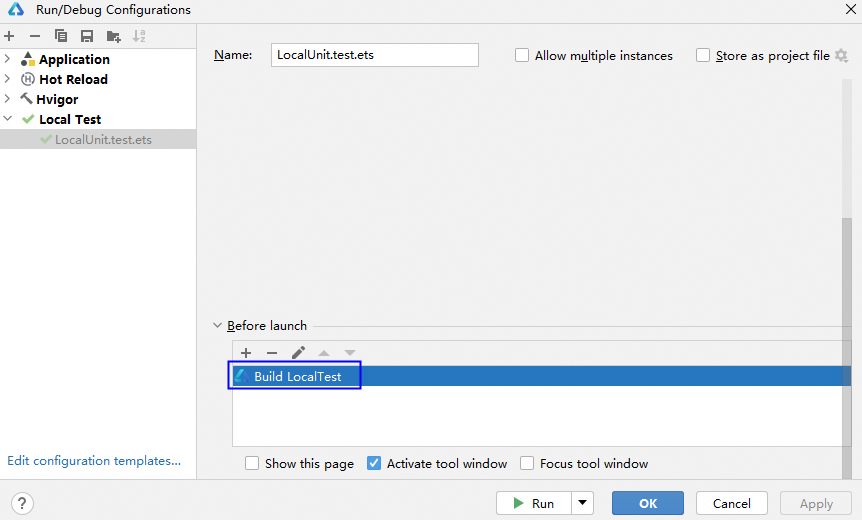
- The build task is canceled in the runtime configuration, so no local modules.abc file is generated.
Solution
- Choose Build > Clean Project on the menu bar to clear the cache and run the test again.
- Check whether the build task is canceled in the runtime configuration; if so, add the build task again.
00523004 Insufficient Memory
Error Message
Test failed due to lack of memory. Please clean up other heavy processes or restart the computer.
Symptom
The test failed due to insufficient memory.
Possible Causes
The memory is insufficient.
Solution
Free up the memory or restart the computer.
00523005 Failed to Execute the Historical Test Task
Error Message
Build history project failed.
Symptom
Failed to execute the historical test task.
Possible Causes
The historical task is no longer valid, or the execution environment has been modified.
Solution
Do not execute the historical task. Create a new one instead.
00526007 Runtime Error
Error Message
A runtime error occurs. The specific error message depends on the situation.
Symptom
A runtime error occurs.
Possible Causes
Unknown.
Solution
Troubleshoot based on the specific error message.
00526008 Module in the Run Configuration Is Empty
Error Message
No module found.
Symptom
The module in the current Run/Debug Configurations panel is empty.
Possible Causes
The project synchronization failed.
Solution
Synchronize the project again and ensure that the synchronization is successful.
00526009 Failed to Obtain product During Runtime
Error Message
The product can not be empty.
Symptom
product is empty during runtime.
Possible Causes
The product configuration is incorrect.
Solution
Ensure that the applyToProducts configuration for the corresponding module in the project-level build-profile.json5 file is correct. For details, see Building a HAP and App Pack.
00526010 Failed to Obtain target During Runtime
Error Message
The target can not be empty. Check the build-profile.json5 file of the project root directory and make sure the targets of the modules in configuration is set to specified product: default in applyToProducts.
Symptom
target is empty during runtime.
Possible Causes
target configured for the current module is incorrect.
Solution
Ensure that the applyToProducts configuration for the corresponding module in the project-level build-profile.json5 file is correct. For details, see Building a HAP and App Pack.