Constraints
This feature supports phones and tablets by default. Starting from version 5.1.0(18), support for wearables is added. From version 5.1.1(19), TVs are also supported. From version 6.1.0(23), PCs/2-in-1 devices are supported as well.
Setting Configuration Items of a Cloud Function
Add the network permission to the entry/src/main/module.json5 file.
"requestPermissions": [
  {
    "name": "ohos.permission.INTERNET"
  }
]
Querying the Name and Version of a Function
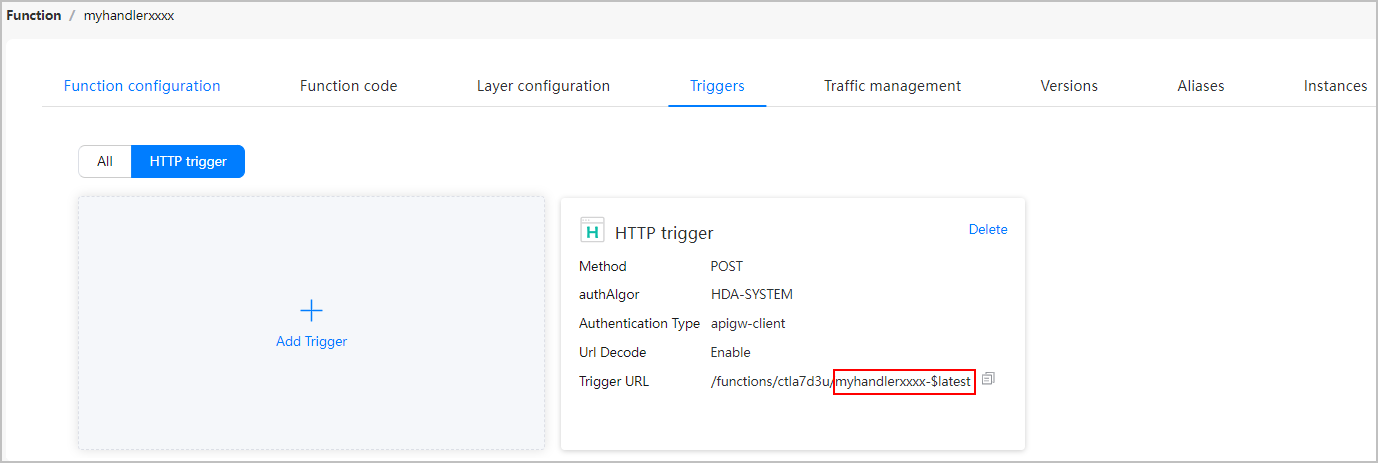
On the trigger list page of a function, click HTTP trigger and view the suffix of the value of Trigger URL. The suffix is the trigger identifier, which is in Function name-Version number format. As shown in the following figure, myhandlerxxxx-$latest is the HTTP trigger identifier, in which myhandlerxxxx is the function name, and $latest is the version number.
Calling a Function in an App
-
Import required modules.
import { cloudFunction } from '@kit.CloudFoundationKit'; import { BusinessError } from '@kit.BasicServicesKit'; import { hilog } from '@kit.PerformanceAnalysisKit'; -
Call call() to set a function and pass the function name to the method. The execution result will be returned.
- (Optional) Set timeout to the timeout interval for calling the function, in milliseconds.
- (Optional) Set version to the function version. The default value is $latest.
- (Optional) If the function has input parameters, the data parameter can be converted into a JSON object or JSON character string.
Return the result asynchronously through a promise:
cloudFunction.call({
  name: 'sort', // Replace sort with the actual function name.
  version: '$latest', // If no version number is specified, the default value $latest is used.
  timeout: 10 * 1000, // Timeout interval, in milliseconds. The default value is 70 x 1000 milliseconds.
  data: {
    // data indicates the function request body.
    param1: 'val1',
    param2: 'val2'
  }
}).then((res: cloudFunction.FunctionResult) => {
  hilog.info(0x0000, 'function', `Succeeded in calling the function, result: ${JSON.stringify(res.result)}`);
}).catch((err: BusinessError) => {
  hilog.error(0x0000, 'function', `Failed to call function , code: ${err.code}, message: ${err.message}`);
});
Or return the result asynchronously through a callback:
cloudFunction.call({
  name: 'sort-id', // Replace sort-id with the actual function name.
  version: '$latest', // If no version number is specified, the default value $latest is used.
  timeout: 10 * 1000, // Timeout interval, in milliseconds. The default value is 70 x 1000 milliseconds.
  data: {
    // data indicates the function request body.
    param1: 'val1',
    param2: 'val2'
  }
}, (err: BusinessError, res: cloudFunction.FunctionResult) => {
  hilog.info(0x0000, 'function', `Succeeded in calling the function, result: ${JSON.stringify(res.result)}`);
  if (err) {
    hilog.error(0x0000, 'function', `Failed to call function , code: ${err.code}, message: ${err.message}`);
    return;
  }
});