场景介绍
从5.0.3(15)版本开始,新增支持延迟链接能力。
当被分享用户未安装应用时,通过延迟链接能力,应用首次打开时,调用延迟链接接口,系统仍能获取用户之前点击的应用相关链接。在获取链接后,应用可直接跳转至对应的详情页,无需先跳转至应用首页,从而提升用户体验和链接的转化率。
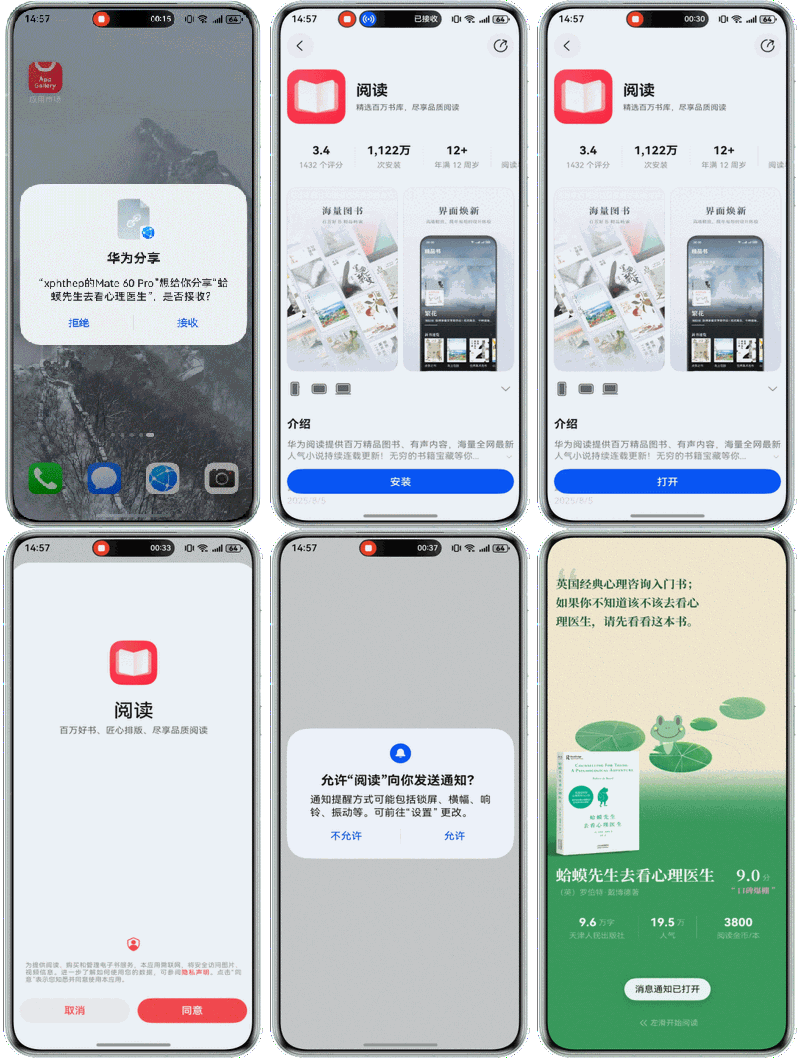
例如:华为阅读结合App Linking Kit延迟链接能力,实现了即使用户未安装应用,点击链接完成下载并首次打开时,仍能直接跳转至预设页面(如书籍详情页)。与传统方式(需先打开APP再手动定位内容)相比,操作步骤减少了43%。
约束与限制
-
支持Phone、Tablet设备。并且从6.1.0(23)版本开始,新增支持PC/2in1设备。
-
只能获取通过App Linking域名校验的应用链接,请参见在AGC为应用创建关联的网址域名。建议在首次启动签署隐私协议后再调用延迟链接接口,确保此时域名校验通过。
开发步骤
-
获取延迟链接。
-
在entry/src/main/ets/constants目录下的常量文件Constants.ets中设置目标方应用的详情页面链接,用于入口类文件页面引用。
export class Constants { /** * 将其替换为您自己的应用链接地址。 **/ static readonly APP_LINK_PAGE: string = 'https://linking.xiaobingtang.cn/path1?dst=DetailPage'; } -
在entry/src/main/ets/pages目录下的Page1.ets文件中展示具体信息,当拉起方应用打开链接时,设备会跳转到本应用的详情页面。
import { Constants } from '../constants/Constants'; @Component export struct Page1 { @Consume('pageInfos') pageInfos: NavPathStack; private desc: string = ''; aboutToAppear(): void { this.desc = this.pageInfos.getParamByIndex(0) as string; } build() { NavDestination() { Column() { Column() { Text(`This is detail Page\n\n AppLinking is ${Constants.APP_LINK_PAGE}\n\n${this.desc}.`) .fontColor($r('sys.color.font_primary')) .fontSize(24) .fontWeight(FontWeight.Bold) .padding(16) } .alignItems(HorizontalAlign.Start) .width('100%') .margin({ top: 12 }) .foregroundColor($r('sys.color.ohos_id_color_component_normal_dark')) } .width('100%') .height('100%') .foregroundColor($r('sys.color.comp_background_secondary')) }.title('Page1') } } -
在入口类文件页面Index.ets中添加如下代码。当应用首次启动时,调用deferredLink.popDeferredLink()接口,获取用户此前点击的该应用相关链接。
import { deferredLink } from '@kit.AppLinkingKit';
import { Constants } from '../constants/Constants';
import { Page1 } from './Page1';
// ...

@Entry
@Component
struct Index {
  @State message: string = 'App Link target APP';
  @Provide('pageInfos') pageInfos: NavPathStack = new NavPathStack();
  async aboutToAppear(): Promise<void> {
    // ...
    let curDeferredLink: string = await deferredLink.popDeferredLink();
    if (curDeferredLink === Constants.APP_LINK_PAGE) {
      this.pageInfos.pushPath({
        name: 'Page1',
        param: 'Pull up the Page1 through deferred link when the app has not be installed'
      });
    }
  }

  build() {
    // ...
  }

  // ...

  @Builder
  pageMap(name: string) {
    if (name === 'Page1') {
      Page1()
    }
  }
}
-
-
验证应用被拉起效果。
拉起方应用可调用UIAbilityContext.openLink()接口,传入目标应用的链接,从而拉起目标应用。
openLink接口提供了两种拉起目标应用的方式,开发者可根据业务需求进行选择。
-
方式一: 仅以App Linking的方式打开应用。
将appLinkingOnly参数设为true,若有App Linking匹配的应用,则直接打开目标应用。若无App Linking匹配的应用,则抛异常给开发者进行处理。
适用于无法打开目标应用时,开发者做了相应的异常处理。例如:拉起方应用集成了ArkWeb,当目标应用不存在时,可通过ArkWeb打开链接。
-
方式二: 以App Linking优先的方式打开应用。
将appLinkingOnly参数设为false或者不传,若有App Linking匹配的应用,则直接打开目标应用。若无App Linking匹配的应用,则尝试以浏览器打开链接的方式打开应用。
适用于无法打开目标应用时,开发者未做任何处理。此时目标应用不存在时,会通过系统浏览器打开链接。
本文为了方便验证App Linking的配置是否正确,选择方式一,示例如下。
-
在“entry/src/main/ets/common”目录下添加GlobalContext.ets文件,开发初始化和获取应用上下文的接口。
import { common } from '@kit.AbilityKit'; export class GlobalContext { private static context: common.UIAbilityContext; public static initContext(context: common.UIAbilityContext): void { GlobalContext.context = context; } public static getContext(): common.UIAbilityContext { return GlobalContext.context; } } -
在“entry/src/main/ets/entryability/EntryAbility.ets”文件中导入GlobalContext,在onCreate方法中使用GlobalContext.initContext(this.context)初始化全局应用上下文。
-
在“entry/src/main/ets/pages/Index.ets”文件中,使用UIAbilityContext.openLink()接口打开应用。
import { BusinessError } from '@kit.BasicServicesKit';
import { hilog } from '@kit.PerformanceAnalysisKit';
import { GlobalContext } from '../common/GlobalContext';
// ...

@Entry
@Component
struct Index {
  // ...

  build() {
    // ...
      Button('start link deferred', { type: ButtonType.Capsule, stateEffect: true })
        .width('100%')
        .height(40)
        .margin({ top: '20vp' })
        .onClick(() => {
          let context = GlobalContext.getContext();
          let link: string = 'https://www.example.com/product?pageName=productDetail';
          // 仅以App Linking的方式打开应用
          context.openLink(link, { appLinkingOnly: true })
            .then(() => {
              hilog.info(0x0000, 'testTag', `Succeeded in opening link.`);
            })
            .catch((error: BusinessError) => {
              hilog.error(0x0000, 'testTag', `Failed to open link, code: ${error.code}, message: ${error.message}`);
            })
        })
      // ...
  }

  // ...
}
-
-
安装拉起方应用,点击拉起方应用中的跳转按钮。
如果此时目标方应用未安装,会抛出系统异常。
-
安装目标方应用后,会根据获取的延迟链接直接跳转到目标方应用的详情页面。