码图生成能力支持将字符串转换为自定义格式的码图。
约束与限制
码图生成能力支持Phone、Tablet、Wearable、PC/2in1、TV(从API版本5.1.0(18)开始支持Wearable,从API版本5.1.1(19)开始支持PC/2in1、TV)。
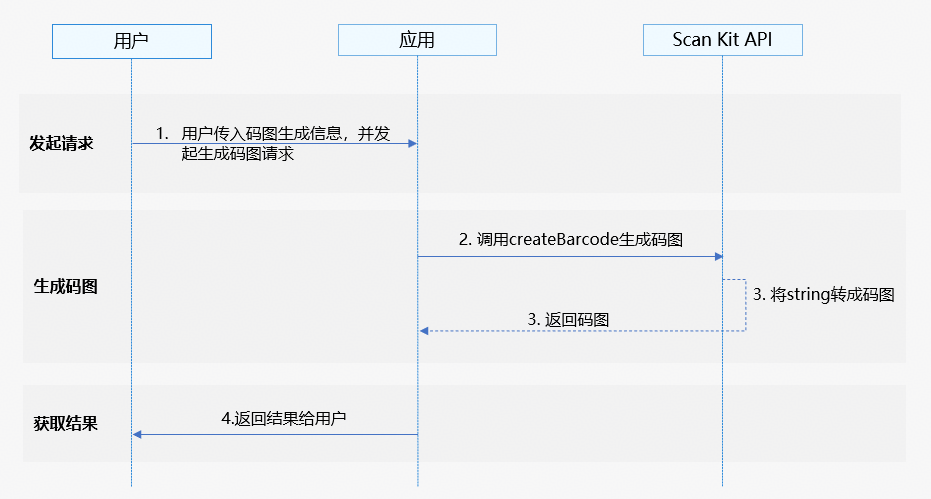
业务流程
-
用户向应用发起生成码图请求后,输入需要生成的码图信息,包括码图的类型、宽高等。
-
应用通过调用Scan Kit的createBarcode接口启动码图生成能力。
-
Scan Kit通过将字符串转换为所需格式的码图并返回给应用。
-
应用向用户返回生成码图结果。
接口说明
接口返回值有两种返回形式:Callback和Promise回调。下表中为码图生成能力的Callback和Promise形式接口,Callback和Promise只是返回值方式不一样,功能相同。具体API说明详见接口文档。
| 接口名 | 接口描述 |
|---|---|
| createBarcode(content: string, options: CreateOptions): Promise<image.PixelMap> | 码图生成接口,返回生成的码图,类型为image.PixelMap,可以使用Image组件渲染成图片。使用Promise异步回调。 |
| createBarcode(content: string, options: CreateOptions, callback: AsyncCallback<image.PixelMap>): void | 码图生成接口,返回生成的码图,类型为image.PixelMap,可以使用Image组件渲染成图片。使用callback异步回调。 |
开发步骤
码图生成根据传参内容直接生成所需码图,需要传入固定参数和可选参数。
为了方便开发者接入,我们提供了详细的样例工程供参考,推荐参考示例工程接入。
以下示例为调用码图生成能力的createBarcode接口实现码图生成。
-
导入码图生成接口模块,该模块提供了码图生成的参数和方法,导入方法如下。
// 导入码图生成需要的图片模块、错误码模块 import { scanCore, generateBarcode } from '@kit.ScanKit'; import { BusinessError } from '@kit.BasicServicesKit'; import { image } from '@kit.ImageKit'; import { hilog } from '@kit.PerformanceAnalysisKit'; -
调用码图生成能力的createBarcode接口实现码图生成。
- 通过Promise方式回调,获取生成的码图。
@Entry @Component struct Index { @State pixelMap: image.PixelMap | undefined = undefined; build() { Flex({ direction: FlexDirection.Column, alignItems: ItemAlign.Center, justifyContent: FlexAlign.Center }) { Button('generateBarcode') .backgroundColor($r('sys.color.ohos_id_color_button_normal')) .fontColor($r('sys.color.ohos_id_color_text_primary_activated')) .align(Alignment.Center) .type(ButtonType.Capsule) .width('90%') .margin({ bottom: 12 }) .onClick(() => { // 以QR码为例,码图生成参数 const content: string = 'huawei'; const options: generateBarcode.CreateOptions = { scanType: scanCore.ScanType.QR_CODE, height: 400, width: 400 }; try { // 码图生成接口,成功返回PixelMap格式图片 generateBarcode.createBarcode(content, options).then((pixelMap: image.PixelMap) => { this.pixelMap = pixelMap; }).catch((err: BusinessError) => { hilog.error(0x0001, '[generateBarcode]', `Failed to get PixelMap by promise with options. Code: ${err.code}, message: ${err.message}`); }); } catch (err) { hilog.error(0x0001, '[generateBarcode]', `Failed to createBarcode by promise with options. Code: ${err.code}, message: ${err.message}`); } }) // 获取生成码图后显示 if (this.pixelMap) { Image(this.pixelMap).width(300).height(300).objectFit(ImageFit.Contain) } } .width('100%') .height('100%') } } - 通过Callback方式回调,获取生成的码图。
@Entry
@Component
struct Index {
  @State pixelMap: image.PixelMap | undefined = undefined;

  build() {
    Flex({ direction: FlexDirection.Column, alignItems: ItemAlign.Center, justifyContent: FlexAlign.Center }) {
      Button('generateBarcode')
        .backgroundColor($r('sys.color.ohos_id_color_button_normal'))
        .fontColor($r('sys.color.ohos_id_color_text_primary_activated'))
        .align(Alignment.Center)
        .type(ButtonType.Capsule)
        .width('90%')
        .margin({ bottom: 12 })
        .onClick(() => {
          // 以QR码为例,码图生成参数
          const content: string = 'huawei';
          const options: generateBarcode.CreateOptions = {
            scanType: scanCore.ScanType.QR_CODE,
            height: 400,
            width: 400
          };
          try {
            // 码图生成接口,成功返回PixelMap格式图片
            generateBarcode.createBarcode(content, options, (err: BusinessError, pixelMap: image.PixelMap) => {
              if (err) {
                hilog.error(0x0001, '[generateBarcode]',
                  `Failed to get PixelMap by callback with options. Code: ${err.code}, message: ${err.message}`);
                return;
              }
              this.pixelMap = pixelMap;
            });
          } catch (err) {
            hilog.error(0x0001, '[generateBarcode]',
              `Failed to createBarcode by callback with options. Code: ${err.code}, message: ${err.message}`);
          }
        })
      // 获取生成码图后显示
      if (this.pixelMap) {
        Image(this.pixelMap).width(300).height(300).objectFit(ImageFit.Contain)
      }
    }
    .width('100%')
    .height('100%')
  }
}
- 通过Promise方式回调,获取生成的码图。