适用场景
AI字幕控件应用广泛,例如在用户不熟悉音频源语言或者静音的时候,为用户提供字幕服务。
本章节将向您介绍如何使用AI字幕组件AICaptionComponent和AICaptionController展示AI字幕,效果如下图所示。
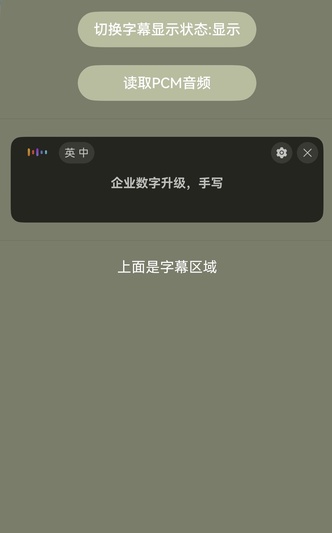
接口说明
AI字幕功能主要由AICaptionComponent提供,更多接口及使用方法请参见API参考。
| 接口 | 描述 |
|---|---|
| AICaptionComponent | AI字幕组件。 |
| AICaptionOptions | AI字幕初始化参数。 |
| AICaptionController | AI字幕组件的控制器,是AI字幕组件的主要功能入口类,用来操作AI字幕。它所承载的工作包括:写音频数据、获取音频流信息等。 |
开发步骤
-
从项目根目录进入/src/main/ets/pages/Index.ets文件,在使用AI字幕控件前,将实现AI字幕控件和其他相关的类添加至工程。
import { AICaptionComponent, AICaptionController, AICaptionOptions,AICaptionFontSize } from '@kit.SpeechKit'; -
简单配置页面的布局,加入AI字幕组件,判断设备是否支持(该查询接口仅支持26.0.0以上版本API),并在aboutToAppear中设置AI字幕组件的传入参数。
import { hilog } from '@kit.PerformanceAnalysisKit'; const TAG = 'AI_CAPTION_DEMO'; class Logger { static info(...msg: string[]) { hilog.info(0x0000, TAG, msg.join()); } static error(...msg: string[]) { hilog.error(0x0000, TAG, msg.join()); } } @Entry @Component struct Index { private captionOption ?: AICaptionOptions; private controller = new AICaptionController(); @State isSupport: boolean = false; @State isShown: boolean = false; aboutToAppear(): void { // 判断设备是否支持功能特性(仅支持26.0.0以上版本API) this.isSupport = this.controller.isCapabilitySupported() // AI字幕初始化参数,设置字幕的不透明度和回调函数 this.captionOption = { initialOpacity: 1, onPrepared: () => { Logger.info('onPrepared') }, onError: (error) => { Logger.error(`onError, code: ${error.code}, msg: ${error.message}`) }, // 源语言 sourceLanguage: 'zh', // 目标语言 targetLanguage: 'zh', // 字体大小 fontSize: AICaptionFontSize.NORMAL, // 字体颜色 fontColor: Color.Black }; } build() { Column({ space: 20 }) { if (this.isSupport) { // 调用AICaptionComponent组件初始化字幕 AICaptionComponent({ isShown: this.isShown, controller: this.controller, options: this.captionOption }) .width('100%') .height(100) Divider() if (this.isShown) { Text('上面是字幕区域') .fontColor(Color.White) } } } .width('100%') .height('100%') .padding(10) .backgroundColor('#7A7D6A') } } -
在布局中加入两个按钮以及点击事件的回调函数。
- 第一个按钮的回调函数负责控制AI字幕组件的显示状态。
- 第二个按钮的回调函数负责读取资源目录中的音频文件,将音频数据传给AI字幕组件。
import { AudioData } from '@kit.SpeechKit';

@Entry
@Component
struct Index {

  isReading: boolean = false;

  async readPcmAudio() {
    this.isReading = true;
    let fileData: Uint8Array | undefined = undefined;
    try {
      fileData =
        await this.getUIContext()?.getHostContext()?.resourceManager.getMediaContent($r('app.media.ChineseAudio').id);
    } catch (e) {
      Logger.info(`get fileData fail , msg ${e} `)
    }
    if (fileData === undefined) {
      return;
    }
    const bufferSize = 640;
    const byteLength = fileData.byteLength;
    let offset = 0;
    Logger.info('byteLength', byteLength.toString());
    let startTime = new Date().getTime();
    while (offset < byteLength) {
      // 模拟实际情况,读文件比录音机返回流快,所以要等待一段时间
      let nextOffset = offset + bufferSize;
      if (offset >= byteLength) {
        this.isReading = false;
        return;
      }
      const arrayBuffer = fileData.buffer.slice(offset, nextOffset);
      let data = new Uint8Array(arrayBuffer);
      Logger.info('data byteLength', data.byteLength.toString());
      const audioData: AudioData = {
        data: data
      };
      Logger.info(`offset: ${offset} | byteLength: ${byteLength} | bufferSize: ${bufferSize}`);

      if (this.controller) {
        Logger.info(`writeAudio: ${audioData.data.byteLength}`);
       try {
          this.controller.writeAudio(audioData);
        } catch (e) {
          Logger.error(`writeAudio exception`);
        }
      }
      offset = offset + bufferSize;
      const waitTime = bufferSize / 32;
      await this.sleep(waitTime);
    }
    let endTime = new Date().getTime();
    this.isReading = false;
    Logger.info('playtime', JSON.stringify(endTime - startTime));
  }

  async sleep(time: number): Promise<void> {
    return new Promise(resolve => setTimeout(resolve, time));
  }

  build() {
    Column({ space: 20 }) {
     // ...
      Button('切换字幕显示状态:' + (this.isShown ? '显示' : '隐藏'))
        .backgroundColor('#B8BDA0')
        .width(200)
        .onClick(() => {
          this.isShown = !this.isShown;
        })
      Button('读取PCM音频')
        .backgroundColor('#B8BDA0')
        .width(200)
        .onClick(() => {
          if (!this.isReading) {
            void this.readPcmAudio();
          }
        })
     // ...
    }
  }
}
开发实例
Index.ets
import { AICaptionComponent, AICaptionOptions, AICaptionController, AudioData,AICaptionFontSize } from '@kit.SpeechKit';
import { BusinessError } from '@kit.BasicServicesKit';
import { hilog } from '@kit.PerformanceAnalysisKit';

const TAG = 'AI_CAPTION_DEMO';

class Logger {
  static info(...msg: string[]) {
    hilog.info(0x0000, TAG, msg.join());
  }

  static error(...msg: string[]) {
    hilog.error(0x0000, TAG, msg.join());
  }
}

@Entry
@Component
struct Index {
  private captionOption?: AICaptionOptions;
  private controller: AICaptionController = new AICaptionController();
  @State isSupport: boolean = false;
  @State isShown: boolean = false;
  isReading: boolean = false;

  aboutToAppear(): void {
    // 判断设备是否支持功能特性
    this.isSupport = this.controller.isCapabilitySupported()
    // AI字幕初始化参数,设置字幕的不透明度和回调函数
    this.captionOption = {
      initialOpacity: 1,
      onPrepared: () => {
        Logger.info('onPrepared')
      },
      onError: (error: BusinessError) => {
        Logger.error(`AICaption component error. Error code: ${error.code}, message: ${error.message}`);
      },
      // 源语言
      sourceLanguage: 'zh',
      // 目标语言
      targetLanguage: 'zh',
      // 字体大小
      fontSize: AICaptionFontSize.NORMAL,
      // 字体颜色
      fontColor: Color.Black
    };
  }

  async readPcmAudio() {
    this.isReading = true;
    // ChineseAudio.pcm文件放在entry\src\main\resources\base\media路径下
    let fileData: Uint8Array | undefined = undefined;
    try {
      fileData =
        await this.getUIContext()?.getHostContext()?.resourceManager.getMediaContent($r('app.media.ChineseAudio').id);
    } catch (e) {
      Logger.info(`get fileData fail , msg ${e} `);
    }
    if (fileData === undefined) {
      return;
    }
    const bufferSize = 640;
    const byteLength = fileData.byteLength;
    let offset = 0;
    Logger.info(`Pcm data total bytes: ${byteLength.toString()}`);
    let startTime = new Date().getTime();
    while (offset < byteLength) {
      // 模拟实际情况,读文件比录音机返回流快,所以要等待一段时间
      let nextOffset = offset + bufferSize;
      if (offset >= byteLength) {
        this.isReading = false;
        return;
      }
      const arrayBuffer = fileData.buffer.slice(offset, nextOffset);
      let data = new Uint8Array(arrayBuffer);
      const audioData: AudioData = {
        data: data
      };

      if (this.controller) {
        try {
          this.controller.writeAudio(audioData);
        } catch (e) {
          Logger.error(`writeAudio exception`);
        }
      }
      offset = offset + bufferSize;
      const waitTime = bufferSize / 32;
      await this.sleep(waitTime);
    }
    let endTime = new Date().getTime();
    this.isReading = false;
    Logger.info(`Audio play time: ${JSON.stringify(endTime - startTime)}`);
  }

  async sleep(time: number): Promise<void> {
    return new Promise(resolve => setTimeout(resolve, time))
  }

  build() {
    Column({ space: 20 }) {
      if (this.isSupport ) {
        Button('切换字幕显示状态:' + (this.isShown ? '显示' : '隐藏'))
          .backgroundColor('#B8BDA0')
          .width(200)
          .onClick(() => {
            this.isShown = !this.isShown;
          })
        Button('读取PCM音频')
          .backgroundColor('#B8BDA0')
          .width(200)
          .onClick(() => {
            if (!this.isReading) {
              void this.readPcmAudio();
            }
          })
        Divider()
        // 调用AICaptionComponent组件初始化字幕
        AICaptionComponent({
          isShown: this.isShown,
          controller: this.controller,
          options: this.captionOption
        })
          .width('100%')
          .height(100)
        Divider()
        if (this.isShown) {
          Text('上面是字幕区域')
            .fontColor(Color.White)
        }
      }
    }
    .width('100%')
    .height('100%')
    .padding(10)
    .backgroundColor('#7A7D6A')
  }
}