开发者可利用Web组件的焦点管理功能,有效管理Web组件的获焦与失焦,同时利用H5端的W3C标准接口,管理网页界面上唯一可交互的元素获焦与失焦。
-
Web组件与ArkUI组件焦点控制的常用接口及其使用场景:
- 通过requestFocus主动请求Web组件获焦:当应用内有多个组件时,开发者可通过Web组件的requestFocus接口,主动将焦点转移到Web组件。
- 根据焦点情况更改Web组件样式:组件监听焦点事件上报,为组件修改样式,例如边框、背景色等,以提供视觉和交互反馈。
-
Web组件内H5元素焦点控制的常用接口及其使用场景:
- 通过tabindex属性管理元素焦点:定义Web组件内元素的焦点顺序。可以通过将元素的tabindex设置为"-1",使其能够通过脚本进行聚焦,同时在CSS中对元素的可见性进行控制。
- 键盘事件更新焦点位置:监听键盘事件,例如Tab键,依据用户的操作更新Web内元素焦点位置。
- 根据焦点情况更改Web组件内元素样式:为焦点元素添加样式,例如边框、背景色等,以提供视觉和交互反馈。
基础概念
Web组件焦点、焦点链和走焦的详情说明请参考ArkUI焦点基础概念。
- 焦点:
- 组件焦点:指当前应用界面上唯一的一个可交互元素。
- 网页内元素焦点:指当前网页界面上唯一的一个可交互元素。
- 走焦:
- 组件走焦:指焦点在应用内的组件之间转移的行为。这一过程对用户是透明的,开发者可以通过监听onFocus(焦点获取)和onBlur(焦点失去)事件来捕捉这些变化。
- 网页内元素走焦:指焦点在网页内的元素之间转移的行为。该行为遵循W3C标准,开发者可以通过监听focus(在元素获取焦点时触发)和blur(在元素失去焦点时触发)事件来捕捉这些变化。
[h2]主动走焦
指开发者或用户主观行为导致的焦点移动。包括:使用requestFocus申请焦点、外接键盘的按键走焦(Tab键/Shift+Tab键)、点击申请焦点(手势/鼠标/触摸板)等导致的焦点转移。
-
requestFocus
详见Web组件与ArkUI组件焦点控制,可以主动将焦点转移到Web组件上。
-
按键走焦
- 支持Web组件与其他组件通过Tab键、Shift+Tab键走焦。
- 支持Web组件内部网页元素通过Tab键、Shift+Tab键走焦,网页元素走焦完成后,抛回ArkUI继续框架侧走焦。
-
点击申请获焦
开发者或用户可通过手势、鼠标或触摸板点击Web组件,使其主动获得焦点。当具体点击到Web组件内的某个元素时,该元素能够获得焦点,例如:点击网页内的输入框,可使其从不可编辑状态转变为可编辑状态,并激活输入法。
[h2]被动走焦
被动走焦指焦点因系统或其他操作而转移,无需开发者直接干预,是焦点系统的默认行为。
被动走焦的场景有:
-
组件移除:当焦点所在的Web组件被移除时,系统会按照先向后再向前的原则,将焦点转移至相邻的同级组件。若所有同级组件均不可获焦,则焦点将被释放,并通知其父级组件进行焦点处理。
-
属性变更:若将处于焦点状态的组件的focusable或enabled属性设置为false,或者将visibility属性设置为不可见,系统将自动转移焦点至其他可获焦组件,转移方式同组件移除。
-
Web组件不可见:Web组件获焦后,应用前后台切换、页面切换、Navigation导航等场景,Web组件会失焦再获焦。
-
Web组件加载网页:Web组件通过src、loadUrl、loadData加载网页,默认会获取焦点,但若此时Web组件为不可获焦状态则会获焦失败(常见的不可获焦状态原因有:转场动画过程中父组件不可获焦、应用侧设置了Web组件或其父组件不可获焦属性等),应用侧可以调用主动申请获焦接口requestFocus再次尝试使Web组件获焦。当获焦成功后,应用侧onFocus、W3C focus事件均会上报。
-
autofocus样式:设置了autofocus样式的元素网页完成加载时默认获焦。若该元素支持文本输入,则输入框会有光标闪烁,但不会弹出软键盘。如需自动弹出软键盘,可参考软键盘自动弹出。
-
菜单弹出:ArkUI的overlay属性类型组件默认抢焦,在与此类组件结合的Web组件场景中(Menu、DatePicker、TimePicker、下拉框、弹窗等),Web组件均会失焦。
Web组件与ArkUI组件焦点控制
- 应用侧通用获焦回调接口onFocus,获焦事件回调,绑定该接口的组件获焦时,回调响应。
- 应用侧通用失焦回调接口onBlur,失焦事件回调,绑定该接口的组件失焦时,回调响应。
- 应用侧主动申请获焦接口requestFocus,组件主动申请获焦。
- 设置组件是否可获焦:应用可以通过设置focusable属性,控制Web组件是否能够获取焦点。Web组件默认可获焦。
示例:
- requestFocus接口允许应用开发者主动控制让Web组件获焦。
- onFocus和onBlur两个接口通常成对使用,来监听组件的焦点变化。
import { webview } from '@kit.ArkWeb';
import { BusinessError } from '@kit.BasicServicesKit';

@Entry
@Component
struct WebComponent {
  controller: webview.WebviewController = new webview.WebviewController();
  controller2: webview.WebviewController = new webview.WebviewController();
  @State webBorderColor: Color = Color.Red;
  @State webBorderColor2: Color = Color.Red;

  build() {
    Column() {
      Row() {
        Button('web1 requestFocus')
          .onClick(() => {
            try {
              this.controller.requestFocus();
            } catch (error) {
              console.error(`ErrorCode: ${(error as BusinessError).code},  Message: ${(error as BusinessError).message}`);
            }
          });
        Button('web2 requestFocus')
          .onClick(() => {
            try {
              this.controller2.requestFocus();
            } catch (error) {
              console.error(`ErrorCode: ${(error as BusinessError).code},  Message: ${(error as BusinessError).message}`);
            }
          });
      }
      Web({ src: 'www.example.com', controller: this.controller })
        .onFocus(() => {
          this.webBorderColor = Color.Green;
        })
        .onBlur(() => {
          this.webBorderColor = Color.Red;
        })
        // ···
        .margin(3)
        .borderWidth(10)
        .borderColor(this.webBorderColor)
        .height('45%')

      Web({ src: 'www.example.com', controller: this.controller2 })
        .onFocus(() => {
          this.webBorderColor2 = Color.Green;
        })
        .onBlur(() => {
          this.webBorderColor2 = Color.Red;
        })
        .margin(3)
        .borderWidth(10)
        .borderColor(this.webBorderColor2)
        .height('45%')
    }
  }
}
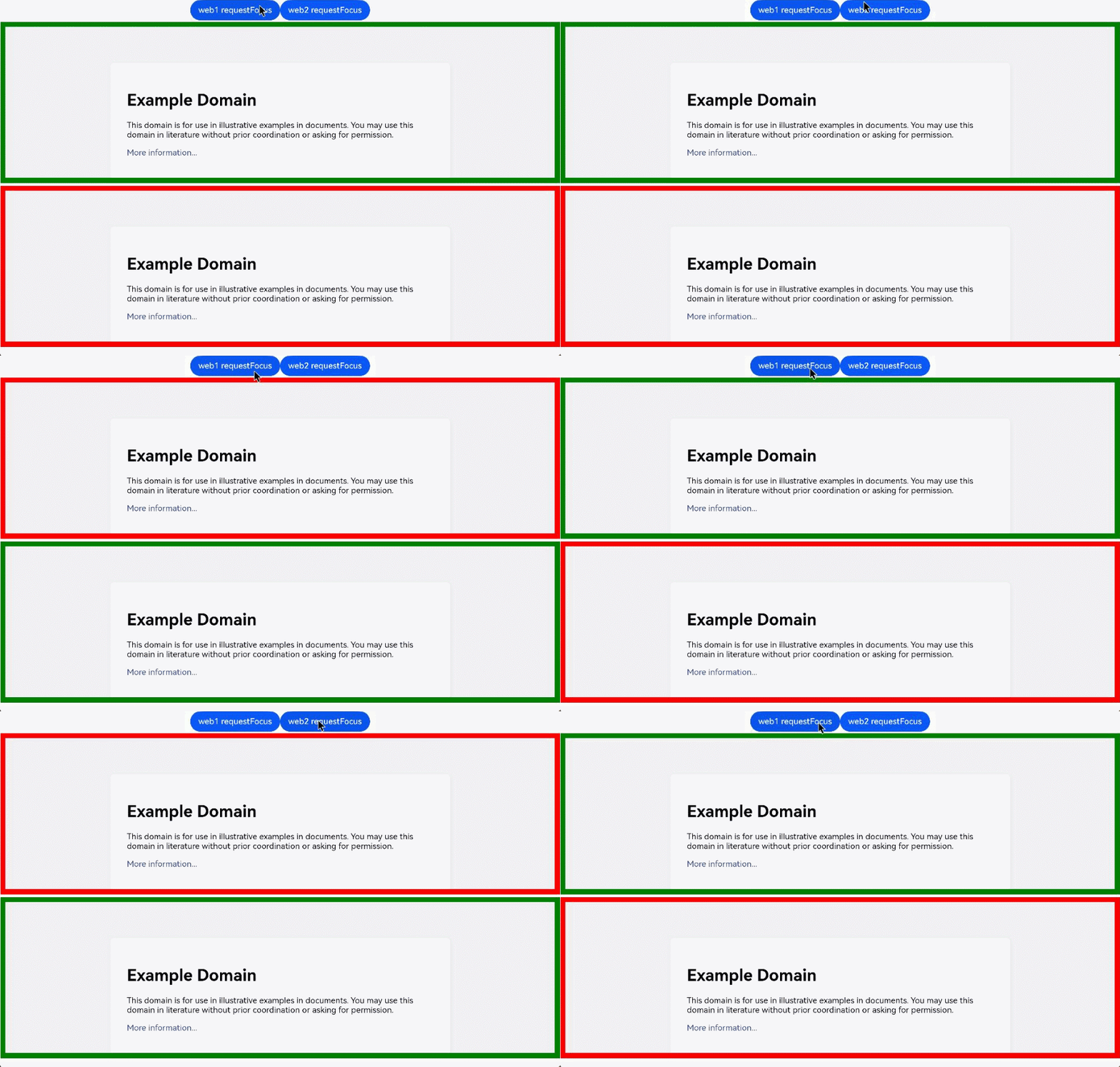
示例图1 组件获焦/失焦事件
通过requestFocus接口主动请求获焦,并监听通用接口onFocus和onBlur事件,改变Web组件边框颜色。
Web组件内H5元素焦点控制
- W3C标准事件focus,前端感知网页获焦
addEventListener("focus", (event) => {});

onfocus = (event) => {}; - W3C标准事件blur,前端感知网页失焦
addEventListener("blur", (event) => {});

onblur = (event) => {}; - W3C autofocus,表示元素应在页面加载时或其所属的 dialog 显示时获焦
<input name="q" autofocus />
在文档或对话框中,最多只能有一个元素具有 autofocus 属性。若应用于多个元素,第一个元素将获得焦点。
示例:
import { webview } from '@kit.ArkWeb';

@Entry
@Component
struct WebComponent {
  controller: webview.WebviewController = new webview.WebviewController();

  build() {
    Column() {
      Web({ src: $rawfile('test.html'), controller: this.controller })
    }
  }
}
加载的html文件。
<!-- test.html -->
<!DOCTYPE html>
<html>
<head>
<meta charset="utf-8">
<title>test</title>
</head>
<body>
  <form id="form">
    <input type="text" placeholder="text input" />
    <input type="password" placeholder="password" />
  </form>
</body>
<script>
const form = document.getElementById("form");

form.addEventListener(
  "focus",
  (event) => {
    event.target.style.background = "pink";
  },
  true,
);

form.addEventListener(
  "blur",
  (event) => {
    event.target.style.background = "";
  },
  true,
);
</script>
</html>
示例图2 Web组件内元素焦点获焦/失焦事件
通过监听W3C接口focus和blur事件,改变输入背景色。
