概述
在对文件处理性能要求高的场景中,Native侧访问文件处理数据比在ArkTS侧操作文件(详见应用文件访问(ArkTS))有更高的效率和更快的响应,例如处理大文件、复杂的文件操作以及实时通信等低时延场景。根据文件位置的不同,应用在Native侧访问文件可以分为以下两种类型:
- 类型一:访问应用沙箱内的文件进行读写操作,主要是通过沙箱路径进行访问。
- 类型二:访问系统公共目录中的文件进行读写操作,可以使用文件picker来获取文件描述符。
本文将针对这两种场景给出具体的实现方案。
访问应用沙箱文件
应用沙箱(详见应用沙箱目录)是一种以安全防护为目的的隔离机制,避免数据受到恶意路径穿越访问。在这种沙箱的保护机制下,应用可见的目录范围即为“应用沙箱目录”,沙箱中的文件就需要通过沙箱路径去进行访问。Native侧获取沙箱路径的方案有两种:
- 方案一:ArkTS侧获取沙箱路径(详见获取应用文件路径)传递给Native侧访问文件。
- 方案二:Native侧直接拼接沙箱路径(详见应用沙箱路径和真实物理路径的对应关系)访问文件。
[h2]方案一:ArkTS侧获取沙箱路径传递给Native侧访问文件
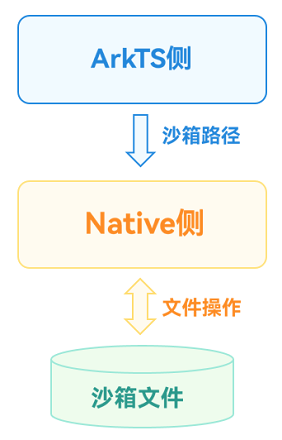
图 1 ArkTS侧获取沙箱路径传递给Native侧访问文件示意图
实现方案
这里以访问沙箱文件并写入文本的场景为例,实现方案分为Native侧定义操作文件的方法和ArkTS侧调用该方法两部分。
第一部分:在Native侧定义一个方法,用于接收沙箱路径并将文本写入到文件中。
通过Node-API接口将沙箱路径和要写入文本的内容传递到Native侧。
napi_get_value_string_utf8(env, argv[0], pathBuf, sizeof(pathBuf), &pathSize);
napi_get_value_string_utf8(env, argv[1], contentsBuf, sizeof(contentsBuf), &contentsSize);
通过指定的路径打开文件。
FILE *fp;
fp = fopen(pathBuf, "w");
使用C标准库的文件操作函数写入文件。
// Write a file using the file operation function of the C standard library.
fprintf(fp, "%s", contentsBuf);
完整代码如下所示:
// entry/src/main/cpp/FileAccessMethods.cpp static napi_value TransferSandboxPath(napi_env env, napi_callback_info info) { size_t argc = 2; napi_value argv[2] = {nullptr}; napi_get_cb_info(env, info, &argc, argv, nullptr, nullptr); // Convert the sandbox path and the contents of the text to be written into C-side variables through the Node-API interface. size_t pathSize, contentsSize; char pathBuf[BUFFER_SIZE], contentsBuf[BUFFER_SIZE]; napi_get_value_string_utf8(env, argv[0], pathBuf, sizeof(pathBuf), &pathSize); napi_get_value_string_utf8(env, argv[1], contentsBuf, sizeof(contentsBuf), &contentsSize); // Open the file through the specified path. snprintf(pathBuf, sizeof(pathBuf), "%s/TransferSandboxPath.txt", pathBuf); FILE *fp; fp = fopen(pathBuf, "w"); if (fp == nullptr) { OH_LOG_Print(LOG_APP, LOG_ERROR, DOMAIN, TAG, "Open file error!"); return nullptr; } OH_LOG_Print(LOG_APP, LOG_INFO, DOMAIN, TAG, "Open file successfully!"); // Write a file using the file operation function of the C standard library. fprintf(fp, "%s", contentsBuf); fclose(fp); return nullptr; }将该C++接口与ArkTS接口进行绑定和映射(详见Native侧方法的实现),同时在index.d.ts文件中,提供该接口方法以便于ArkTS侧调用。
export const transferSandboxPath: (path: string, contents: string) => void;
第二部分:在Native侧访问沙箱文件写数据的功能实现后,在ArkTS侧调用该方法。
引用Native侧相应的so库。
import FileAccess from 'libfile_access.so';
在ArkTS侧获取沙箱路径。
private sandboxFilesDir: string = this.getUIContext().getHostContext()!.filesDir;
获取到沙箱路径后,将该路径传递给Native侧,同时传递需要写入的内容。
FileAccess.transferSandboxPath(this.sandboxFilesDir, content);
通过上述步骤,实现了在Native侧通过ArkTS侧传递的沙箱路径访问与操作应用沙箱文件的方案。
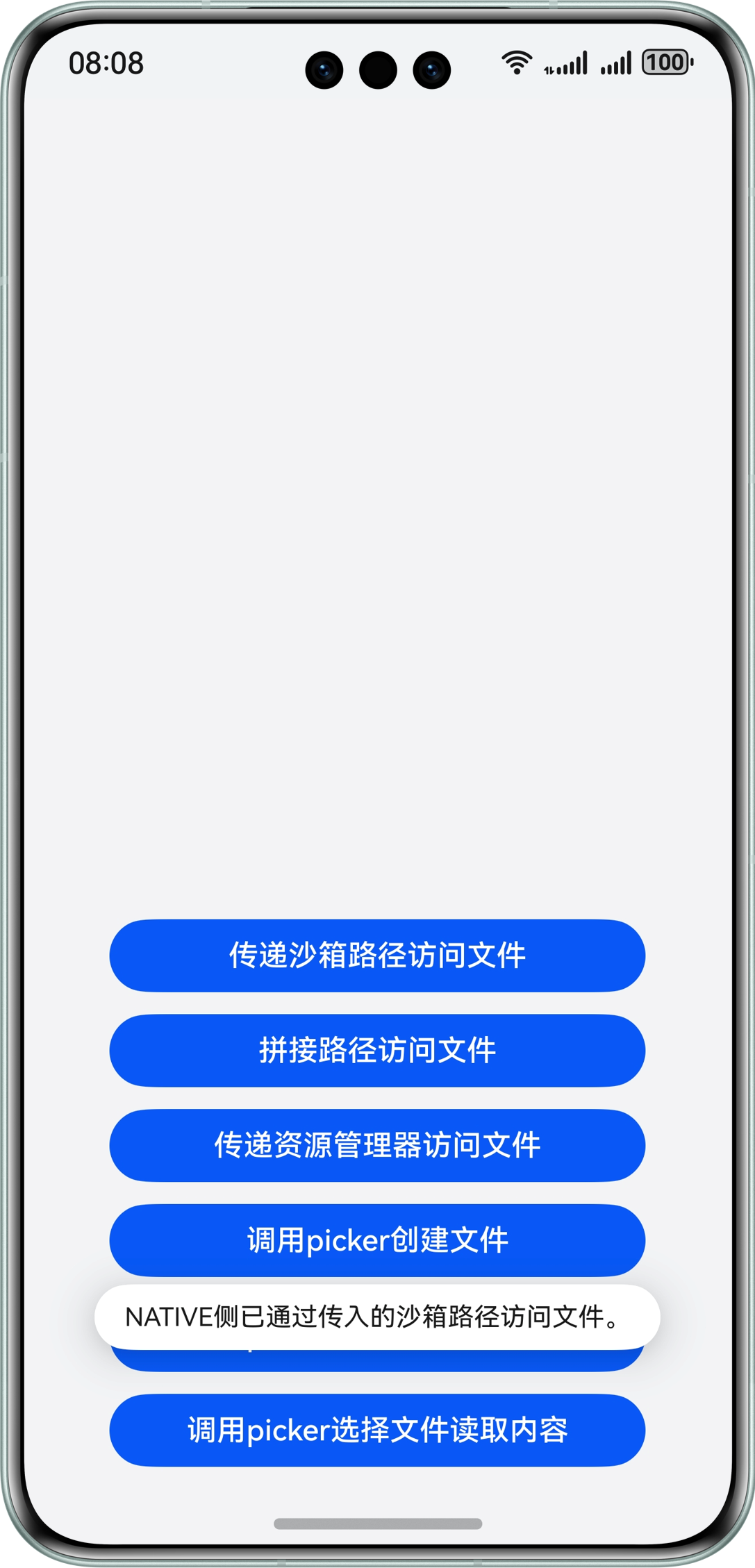
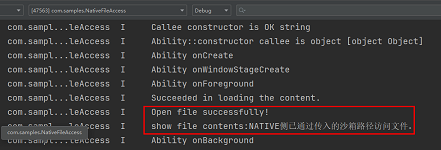
效果展示
图 2 ArkTS侧传递沙箱路径到Native侧方案效果展示
[h2]方案二:Native侧直接拼接沙箱路径访问文件
图 3 Native侧直接拼接沙箱路径访问文件示意图

实现方案
这里同样以访问沙箱文件并写入文本的场景为例,实现方案分为Native侧定义操作文件的方法和ArkTS侧调用该方法两部分。
第一部分:在Native侧定义一个方法,用于拼接沙箱路径并将文本写入到文件中。
根据实际文件位置拼接沙箱路径(详见应用沙箱路径和真实物理路径的对应关系)。
char pathBuf[READ_SIZE] = {0};
strncpy(pathBuf,FILE_PATH,READ_SIZE);
将要写入文本的内容通过Node-API接口传递到Native侧。
napi_get_value_string_utf8(env, argv[0], contentsBuf, sizeof(contentsBuf), &contentsSize);
通过指定的路径打开文件。
// Open the file through the specified path.
FILE *fp;
fp = fopen(pathBuf, "w");
使用C标准库的文件操作函数写入文件。
// Write a file using the file operation function of the C standard library.
fprintf(fp, "%s", contentsBuf);
完整代码如下所示:
static napi_value SplicePath(napi_env env, napi_callback_info info) { size_t argc = 1; napi_value argv[1] = {nullptr}; napi_get_cb_info(env, info, &argc, argv, nullptr, nullptr); // Splice the sandbox path according to the actual file location. size_t contentsSize; char pathBuf[READ_SIZE] = {0}; strncpy(pathBuf,FILE_PATH,READ_SIZE); // Convert the contents of the text to be written into C-side variables through the Node-API interface. char contentsBuf[BUFFER_SIZE]; napi_get_value_string_utf8(env, argv[0], contentsBuf, sizeof(contentsBuf), &contentsSize); // Open the file through the specified path. FILE *fp; fp = fopen(pathBuf, "w"); if (fp == nullptr) { OH_LOG_Print(LOG_APP, LOG_ERROR, DOMAIN, TAG, "Open file error!"); return nullptr; } OH_LOG_Print(LOG_APP, LOG_INFO, DOMAIN, TAG, "Open file successfully!"); // Write a file using the file operation function of the C standard library. fprintf(fp, "%s", contentsBuf); fclose(fp); return nullptr; }将该C++接口与ArkTS接口进行绑定和映射(详见Native侧方法的实现),同时在index.d.ts文件中,提供该接口方法。
export const splicePath: (contents: string) => void;
第二部分:Native侧访问沙箱文件写数据的功能实现后,在ArkTS侧调用该方法。
引用Native侧相应的so库。
import FileAccess from 'libfile_access.so';
在ArkTS侧调用该接口实现文件写入的操作。
FileAccess.splicePath(content);
通过上述步骤,实现了在Native侧通过拼接沙箱路径访问与操作应用沙箱文件的方案。
效果展示
图 4 Native侧拼接沙箱路径方案效果展示


访问公共目录文件
系统公共目录下储存的是用户文件(详见用户文件概述),应用对用户文件的操作需要提前获取用户授权,或由用户操作完成。可以通过系统预置的文件选择器(FilePicker)(详见选择文档类文件)实现该能力,目前主要有创建文件、写入和读取三类操作,创建文件(详见save)可以直接使用picker,针对Native侧,有如下两种场景:
- 场景一:写数据到公共目录文件。
- 场景二:从公共目录文件中读取数据。
[h2]场景一:写数据到公共目录文件
场景描述
ArkTS侧通过文件picker在公共目录下创建文件,并传递文件描述符到Native侧,Native侧通过文件描述符打开文件并将数据写入到文件中。
图 7 Native侧写入公共目录文件场景示意图

实现方案
实现方案分为Native侧定义操作文件的方法和ArkTS侧调用该方法两部分。
第一部分:在Native侧定义一个方法,用于接收文件描述符并将数据写入到文件中,注意使用文件描述符操作文件需要引用头文件unistd.h。
将传入的文件描述符和要写入文件的内容通过Node-API接口传递到Native侧。
// Convert the incoming file descriptor and the contents to be written into the file into C-side variables.
napi_get_value_uint32(env, argv[0], &fd);
napi_get_value_string_utf8(env, argv[1], contentsBuf, sizeof(contentsBuf), &contentsSize);
使用C标准库的文件操作函数写入文件。
// Write a file using the file operation function of the C standard library.
size_t buffSize = write(fd, contentsBuf, contentsSize);
根据write函数的返回值判断操作是否成功。
std::string res;
// According to the return value of the write function, judge whether the operation returns the result successfully.
napi_value contents;
if (buffSize == -1) {
    res = "Write File Failed!";
    OH_LOG_Print(LOG_APP, LOG_ERROR, DOMAIN, TAG, "%s", res.c_str());
} else {
    res = "Write File Successfully!!!";
    OH_LOG_Print(LOG_APP, LOG_INFO, DOMAIN, TAG, "%s", res.c_str());
}
napi_create_string_utf8(env, res.c_str(), sizeof(res), &contents);
return contents;
完整代码如下所示:
static napi_value WriteFileUsingPickerFd(napi_env env, napi_callback_info info) { size_t argc = 2; napi_value argv[2] = {nullptr}; napi_get_cb_info(env, info, &argc, argv, nullptr, nullptr); unsigned int fd = -1; size_t contentsSize; char contentsBuf[BUFFER_SIZE]; // Convert the incoming file descriptor and the contents to be written into the file into C-side variables. napi_get_value_uint32(env, argv[0], &fd); napi_get_value_string_utf8(env, argv[1], contentsBuf, sizeof(contentsBuf), &contentsSize); ftruncate(fd, 0); // Write a file using the file operation function of the C standard library. size_t buffSize = write(fd, contentsBuf, contentsSize); std::string res; // According to the return value of the write function, judge whether the operation returns the result successfully. napi_value contents; if (buffSize == -1) { res = "Write File Failed!"; OH_LOG_Print(LOG_APP, LOG_ERROR, DOMAIN, TAG, "%s", res.c_str()); } else { res = "Write File Successfully!!!"; OH_LOG_Print(LOG_APP, LOG_INFO, DOMAIN, TAG, "%s", res.c_str()); } napi_create_string_utf8(env, res.c_str(), sizeof(res), &contents); return contents; }将该C++接口与ArkTS接口进行绑定和映射(详见Native侧方法的实现),同时在index.d.ts文件中,提供该接口方法。
export const writeFileUsingPickerFd: (fd: number, contents: string) => string;
第二部分:Native侧访问公共目录文件写数据的功能实现后,在ArkTS侧调用该方法。
引用Native侧相应的so库。
import FileAccess from 'libfile_access.so';
在ArkTS侧拉起picker选择文件并将文件描述符传入Native接口中。
async function WriteFileByPicker(contents: string): Promise<string> {
  // Configure picker Selection Information
  const documentSelectOptions = new picker.DocumentSelectOptions();
  documentSelectOptions.maxSelectNumber = 1;
  documentSelectOptions.fileSuffixFilters = ['.txt'];

  let uris: Array<string> = [];
  const documentViewPicker = new picker.DocumentViewPicker();
  // Pull up the picker selection file
  return await documentViewPicker.select(documentSelectOptions).then((documentSelectResult: Array<string>) => {
    uris = documentSelectResult;
    let uri: string = uris[0];
    let path: string = new fileUri.FileUri(uri).path;
    Logger.info(`Open The File path is [${uri}]`);
    let file = fs.openSync(path, fs.OpenMode.WRITE_ONLY);
    // Call the native method to write a file
    let res = FileAccess.writeFileUsingPickerFd(file.fd, contents);
    fs.closeSync(file.fd);
    return res;
  }).catch((error: BusinessError) => {
    Logger.error(`Open The file failed, error code is [${error.code}], error message is [${error.message}]`);
    return 'Write Failed by Picker';
  })
}
通过上述步骤,实现了在Native侧通过ArkTS侧picker传递的文件资源描述符访问公共目录文件并写入内容的方案。
效果展示
图 8 Native侧写公共目录文件场景方案效果展示


[h2]场景二:从公共目录文件中读取数据
场景描述
ArkTS侧通过文件picker选择文件,并传递文件描述符到Native侧,Native侧通过文件描述符打开文件并读取文件数据。
图 9 Native侧读取公共目录文件场景示意图

实现方案
实现方案分为Native侧定义操作文件的方法和ArkTS侧调用该方法两部分。
第一部分:在Native侧定义一个方法,用于接收文件描述符并从文件中读取数据,注意使用文件描述符操作文件需要引用头文件unistd.h。
将传入的文件描述符通过Node-API接口传递到Native侧。
// Convert the incoming file descriptor into a C-side variable.
napi_get_value_uint32(env, argv[0], &fd);
使用C标准库的文件操作函数读取文件。
// Use the file operation function of the C standard library to read the file.
char buff[READ_SIZE];
size_t buffSize = read(fd, buff, sizeof(buff));
判断读取是否成功并返回文件内容。
// Judge whether the reading is successful or not and return the file content.
napi_value contents;
if (buffSize == -1) {
    OH_LOG_Print(LOG_APP, LOG_ERROR, DOMAIN, TAG, "Read File Failed!!!");
} else {
    OH_LOG_Print(LOG_APP, LOG_INFO, DOMAIN, TAG, "Read File Successfully!!!");
    napi_create_string_utf8(env, buff, buffSize, &contents);
}
return contents;
完整代码如下所示:
// entry/src/main/cpp/FileAccessMethods.cpp static napi_value ReadFileUsingPickerFd(napi_env env, napi_callback_info info) { size_t argc = 1; napi_value argv[1] = {nullptr}; napi_get_cb_info(env, info, &argc, argv, nullptr, nullptr); unsigned int fd = -1; // Convert the incoming file descriptor into a C-side variable. napi_get_value_uint32(env, argv[0], &fd); // Use the file operation function of the C standard library to read the file. char buff[READ_SIZE]; size_t buffSize = read(fd, buff, sizeof(buff)); // Judge whether the reading is successful or not and return the file content. napi_value contents; if (buffSize == -1) { OH_LOG_Print(LOG_APP, LOG_ERROR, DOMAIN, TAG, "Read File Failed!!!"); } else { OH_LOG_Print(LOG_APP, LOG_INFO, DOMAIN, TAG, "Read File Successfully!!!"); napi_create_string_utf8(env, buff, buffSize, &contents); } return contents; }将该C++接口与ArkTS接口进行绑定和映射(详见Native侧方法的实现),同时在index.d.ts文件中,提供该接口方法。
export const readFileUsingPickerFd: (fd: number) => string;
第二部分:Native侧访问公共目录文件读数据的功能实现后,在ArkTS侧调用该方法。
引用Native侧相应的so库。
import FileAccess from 'libfile_access.so';
在ArkTS侧拉起picker选择文件并将文件描述符传入Native接口中。
async function ReadFileByPicker(): Promise<string> {
  // Configure picker Selection Information
  const documentSelectOptions = new picker.DocumentSelectOptions();
  documentSelectOptions.maxSelectNumber = 1;
  documentSelectOptions.fileSuffixFilters = ['.txt'];
  // Pull up the picker selection file
  let uris: Array<string> = [];
  const documentViewPicker = new picker.DocumentViewPicker();
  return await documentViewPicker.select(documentSelectOptions).then((documentSelectResult: Array<string>) => {
    uris = documentSelectResult;
    let uri: string = uris[0];
    let path: string = new fileUri.FileUri(uri).path;
    Logger.info(`The Opened File path is [${uri}]`);
    let file = fs.openSync(path, fs.OpenMode.READ_ONLY);
    // Call the native method to read the file.
    let res = FileAccess.readFileUsingPickerFd(file.fd);
    fs.closeSync(file.fd);
    return res;
  }).catch((error: BusinessError) => {
    Logger.error(`Open The file failed, error code is [${error.code}], error message is [${error.message}]`);
    return 'Read Failed by Picker!';
  })
}
通过上述步骤,实现了在Native侧通过ArkTS侧picker传递的文件资源描述符访问公共目录文件并读取内容的方案。
效果展示
图 10 Native侧读公共目录文件场景方案效果展示

