概述
随着内容社交和移动应用的发展,用户越来越习惯于通过社交平台快捷地分享文章、商品或活动等内容,并期待受邀好友能够“一键直达”目标内容。为满足这一需求,系统提供了App Linking技术,实现高效、安全且用户体验极佳的社交分享跳转。
应用场景举例:
- 用户在社交应用中分享文章、商品或活动页面给好友,好友点击链接后自动拉起目标应用对应详情页。
- 当好友未装目标应用时,自动跳转应用市场,一键安装后首次打开即直达目标内容页面。
- 若不希望强制用户安装,可跳转到浏览器中打开Web页面,让用户直接访问对应内容,并可引导安装应用以获取更完整体验。

[h2]场景二:目标应用未安装,已配置直达应用市场
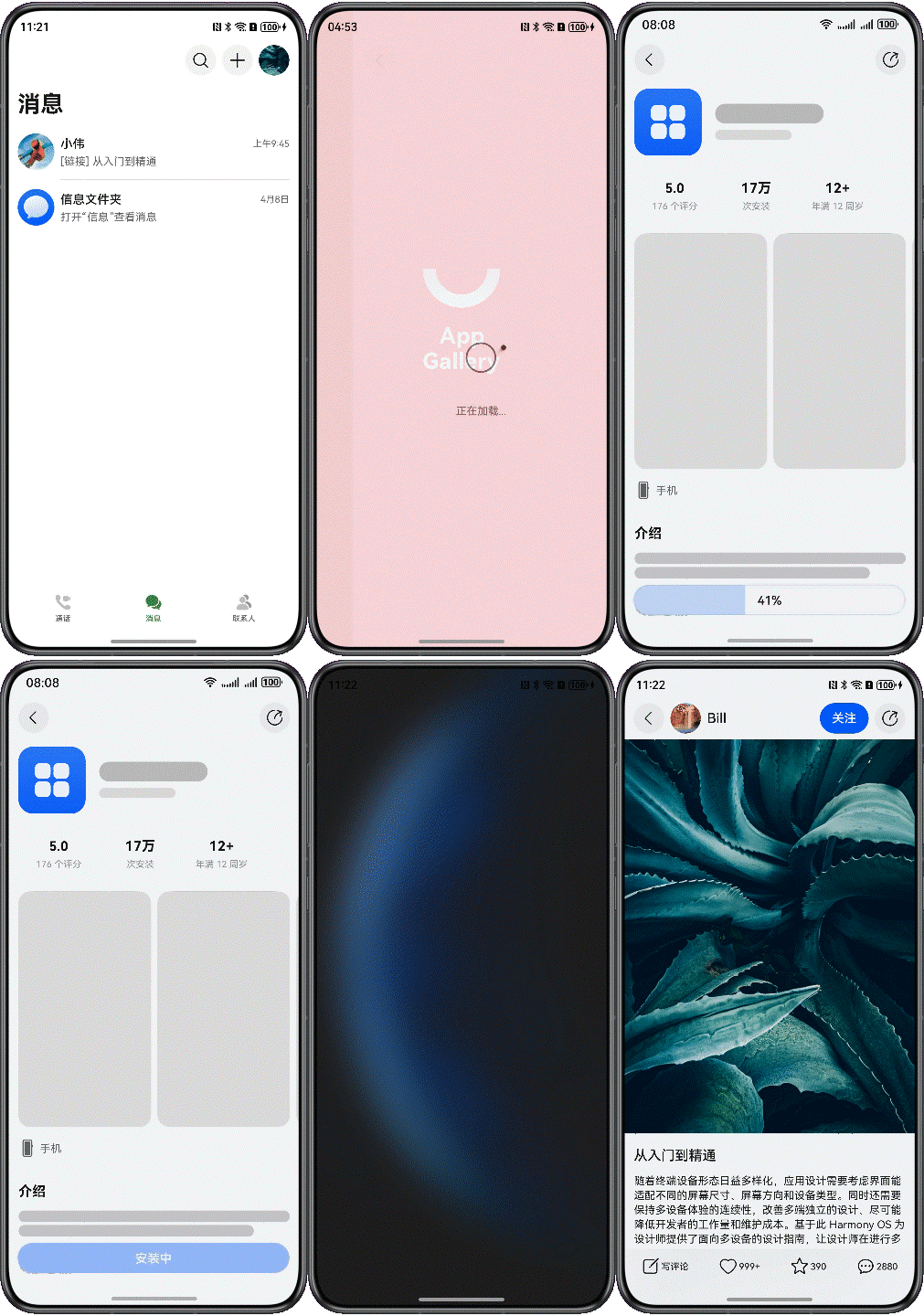
当用户未安装目标应用且开发者配置了直达应用市场功能时,点击链接将直接跳转到应用市场的应用详情页。
安装完成后,首次打开应用将通过延迟链接功能自动导航至原始分享内容,无需用户重新搜索或操作。
[h2]场景三:目标应用未安装,未配置直达应用市场(有Web页面)
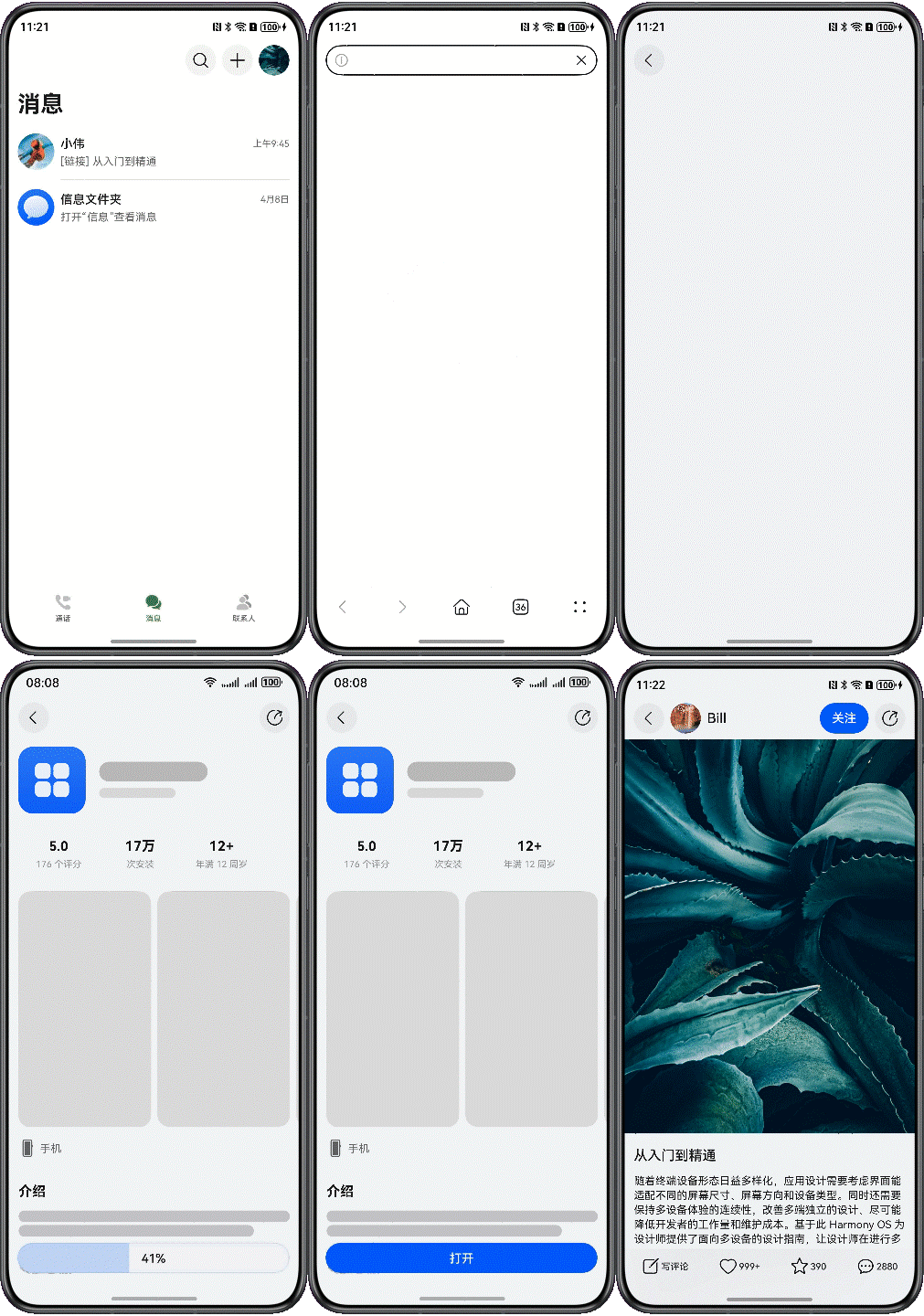
用户点击链接后,系统通过浏览器打开Web页面,用户可直接查看内容。
在Web页面可提供“下载”按钮,引导用户安装应用获取更佳体验,安装后仍可通过延迟链接直达原内容。

实现原理
App Linking基于HTTPS域名校验和云端配置,自动判断目标应用是否安装、是否提供Web页面,并做出最优跳转:
- 唯一绑定与安全防护:每个分享链接与内容和目标应用强关联,有效杜绝劫持与伪造。
- 智能路由:系统根据设备状态,自动选择拉起本地应用、跳转应用市场或打开浏览器Web页面。
- 延迟链接还原:即便用户经历先装应用再首次启动,也能还原到用户首次点开的具体内容页,极大提升转化率。
社交分享应用跳转的流程图如下所示。
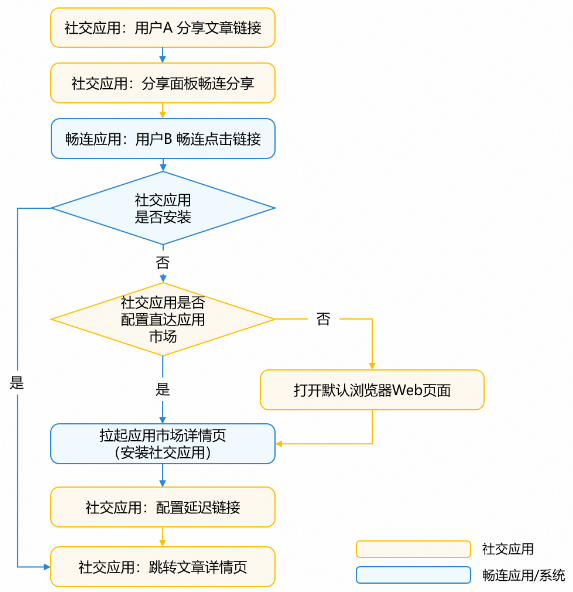
上图展示了从用户分享内容到好友接收并跳转的完整流程。系统根据接收方设备状态,自动选择最佳路径,确保无论哪种情况,用户都能获得连贯流畅的体验。
- 用户A在社交应用中生成App Linking分享链接。
- 用户B收到并点击链接,系统根据设备环境做出相应处理(跳转目标应用/应用市场/浏览器Web页面)。
- 若用户B未安装社交应用且已配置直达应用市场,将直接跳转应用市场详情页引导安装;安装后首次打开App可直达内容页,实现体验闭环。
本文将详细介绍社交分享应用使用App Linking实现跳转的开发步骤,可根据业务需求决定是否配置直达应用市场的跳转路径。社交应用主要开发步骤如下:
[h2]配置App Linking服务
-
// entry/src/main/module.json5
{
  "module": {
    // ...
    "abilities": [
      {
        "name": "EntryAbility",
        // ...
        "exported": true,
        "skills": [
          {
            "entities": [
              "entity.system.home",
              // entities must contain "entity.system.browsable"
              "entity.system.browsable"
            ],
            "actions": [
              "ohos.want.action.home",
              // Actions must contain "ohos.want.action.viewData"
              "ohos.want.action.viewData"
            ],
            "uris": [
              {
                // The scheme must be configured as https
                "scheme": "https",
                // The host must be configured as the associated domain name
                "host": "******",
                "path": ""
              }
            ],
            // domainVerify must be set to true
            "domainVerify": true
          }
        ]
      }
    ],
    // ...
  }
}
验证应用被拉起效果。
对应用进行手动签名。
编译打包,并安装应用至调试设备。
可以通过如下命令查询应用域名校验结果。
hdc shell hidumper -s AppDomainVerifyManager
运行hidumper命令后,即可在控制台上看到success消息。
BundleName:
  appIdentifier: 123456789
    domain verify status:
      https://www.example.com: success
将生成的App Linking链接保存到备忘录应用中。通过在备忘录应用中点击该链接,可以一键拉起对应的社交应用,以此来测试该社交应用是否能够成功通过App Linking链接被启动。此方法可用于验证App Linking配置的正确性以及应用的响应情况。
[h2]接入分享面板
社交应用可通过集成Share Kit(分享服务)拉起分享面板,用于分享文章详情的App Linking链接。接收方点击链接后可直接跳转至目标应用。详细请参见分享App Linking直达应用。
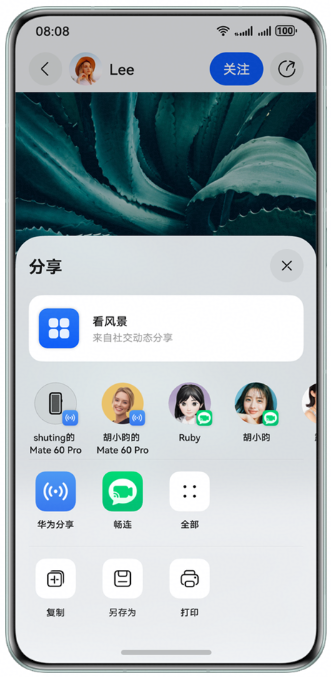
分享内容类型设为utd.UniformDataType.HYPERLINK,content字段传递生成的App Linking链接(带内容唯一标识)。
import { BusinessError } from '@kit.BasicServicesKit';
import { common } from '@kit.AbilityKit';
import { systemShare } from '@kit.ShareKit';
import { uniformTypeDescriptor } from '@kit.ArkData';
import { Logger } from '../common/Logger';
// ...
// entry/src/main/ets/pages/Detail.ets
@Entry
@Component
struct Detail {
  // ...
  private async share() {
    try {
      let context: common.UIAbilityContext = this.getUIContext().getHostContext() as common.UIAbilityContext;
      // ...
      // To construct ShareData, you need to configure a valid data message
      let shareData: systemShare.SharedData = new systemShare.SharedData({
        // The type of data shared is a link
        utd: uniformTypeDescriptor.UniformDataType.HYPERLINK,
        // The shared App Linking link is replaced with the real address here
        content: `https://hello.dra.agchosting.link?aid=${this.article?.aId}`,
        // ...
      });
      // The sharing panel is displayed
      let controller: systemShare.ShareController = new systemShare.ShareController(shareData);
      controller.show(context, {
        previewMode: systemShare.SharePreviewMode.DEFAULT,
        selectionMode: systemShare.SelectionMode.SINGLE
      })
        .then(() => {
          Logger.info(TAG, 'ShareController show success.');
        })
        .catch((error: BusinessError) => {
          Logger.error(TAG, `ShareController show error. code: ${error.code}, message: ${error.message}`);
        });
    } catch (err) {
      let error = err as BusinessError;
      Logger.error(TAG, `share err, code: ${error.code}, mesage: ${error.message}`);
    }
  }

  // ...
}
[h2]应用内处理并跳转指定页面
当用户点击分享链接并拉起应用时,跳转到文章详情页有以下两种情况:
应用未在后台运行:如果应用从冷启动开始(即不在后台),需要在onCreate()方法中获取链接中的文章唯一标识符aid。
// entry/src/main/ets/entryability/EntryAbility.ets
import { BusinessError } from '@kit.BasicServicesKit';
import { AbilityConstant, ConfigurationConstant, UIAbility, Want } from '@kit.AbilityKit';
import { hilog } from '@kit.PerformanceAnalysisKit';
import { window } from '@kit.ArkUI';
import { url } from '@kit.ArkTS';
import { Logger } from '../common/Logger';

const DOMAIN = 0x0000;
const TAG = 'EntryAbilityLogTag';

export default class EntryAbility extends UIAbility {
  private mAid: string = '';

  private getAid(want: Want): string {
    let uri = want?.uri;
    let aid: string = '';
    // Parse the parameters to obtain the app linking
    if (uri) {
      try {
        let urlObject = url.URL.parseURL(want?.uri);
        aid = urlObject.params.get('aid') as string;
        hilog.info(DOMAIN, 'testTag', '%{public}s', `getAid aid:${aid}`);
      } catch (err) {
        let error = err as BusinessError;
        Logger.error(TAG, `onAddForm err, code: ${error.code}, mesage: ${error.message}`);
      }
    }
    return aid;
  }

  onCreate(want: Want, launchParam: AbilityConstant.LaunchParam): void {
    hilog.info(DOMAIN, 'testTag', '%{public}s', 'Ability onCreate');
    try {
      this.context.getApplicationContext().setColorMode(ConfigurationConstant.ColorMode.COLOR_MODE_NOT_SET);
    } catch (err) {
      let error = err as BusinessError;
      Logger.error(TAG, `setColorMode err, code: ${error.code}, mesage: ${error.message}`);
    }
    this.mAid = this.getAid(want);
  }

  // ...
}
在onWindowStageCreate()回调中使用windowStage.loadContent()方法加载详情页的URL为“pages/Detail”。
// entry/src/main/ets/entryability/EntryAbility.ets
onWindowStageCreate(windowStage: window.WindowStage): void {

  let pageUrl: string = 'pages/Index';
  if (this.mAid && this.mAid !== '') {
    pageUrl = 'pages/Detail';
    AppStorage.setOrCreate('aid', this.mAid);
  }

  windowStage.loadContent(pageUrl, (err) => {
    if (err.code) {
      hilog.error(DOMAIN, 'testTag', 'Failed to load the content. Cause: %{public}s', JSON.stringify(err));
      return;
    }
    try {
      // ...
      hilog.info(DOMAIN, 'testTag', 'Succeeded in loading the content.');
    } catch (err) {
      let error = err as BusinessError;
      Logger.error(TAG, `loadContent err, code: ${error.code}, mesage: ${error.message}`);
    }
  });
}
应用已在后台运行:如果应用已经在后台,它将从后台切换到前台。此时,需要在onNewWant()方法中获取链接中的文章唯一标识符aid,保存到AppStorage。
export default class EntryAbility extends UIAbility {
  private mAid: string = '';

  private getAid(want: Want): string {
    // ...
  }

  // ...
  onNewWant(want: Want, launchParam: AbilityConstant.LaunchParam): void {
    let aid: string = this.getAid(want);
    if(aid){
      AppStorage.setOrCreate('aid',aid);
      AppStorage.setOrCreate('newWantFlag',true);
    }
  }

  // ...
}
在首页通过StorageLink获取aid,并通过UIContext.getRouter().pushUrl()方法进行页面跳转。
@StorageLink('newWantFlag') @Watch('newWantFlagChange') isNewWant: boolean = false;

newWantFlagChange() {
  if (this.isNewWant && AppStorage.has('aid')) {
    let aid: string = AppStorage.get('aid') as string;
    if (aid) {
      this.isNewWant = false;
      this.getUIContext().getRouter().pushUrl({
        url: 'pages/Detail',
        params: {
          aid: aid
        }
      }).catch((error: BusinessError) => {
        Logger.error(TAG, `pushUrl err, code: ${error.code}, mesage: ${error.message}`);
      });
    }
  }
}
获取到文章唯一标识aid之后,在详情页加载文章详情数据。
// entry/src/main/ets/pages/Detail.ets
@Entry
@Component
struct Detail {
  // ...
  private article: Article | undefined;

  aboutToAppear(): void {
    if (this.aid && this.aid !== '') {
      this.article = getArticleById(this.aid);
    } else {
      let params = this.getUIContext().getRouter().getParams() as Record<string, string>;
      this.article = getArticleById(params.aid);
    }
  }

  // ...
}
[h2]配置直达应用市场与延迟链接(可选)
为提升用户未安装应用时的体验,可配置直达应用市场功能,引导用户下载安装应用。
在AGC控制台的App Linking服务中,开启"直达应用市场"功能。
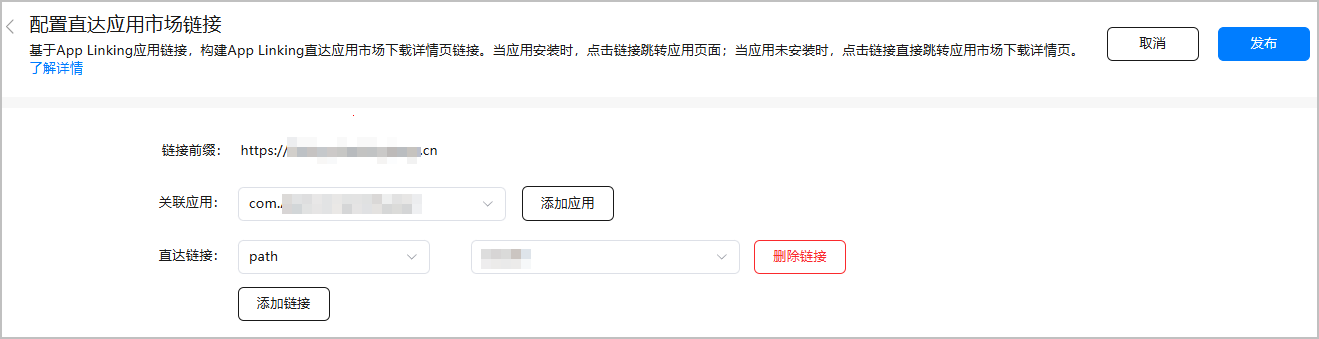
配置完成后,当用户点击畅连中分享的App Linking链接时,若设备未安装目标应用,系统将直接跳转至应用市场的应用详情页,支持一键下载安装。
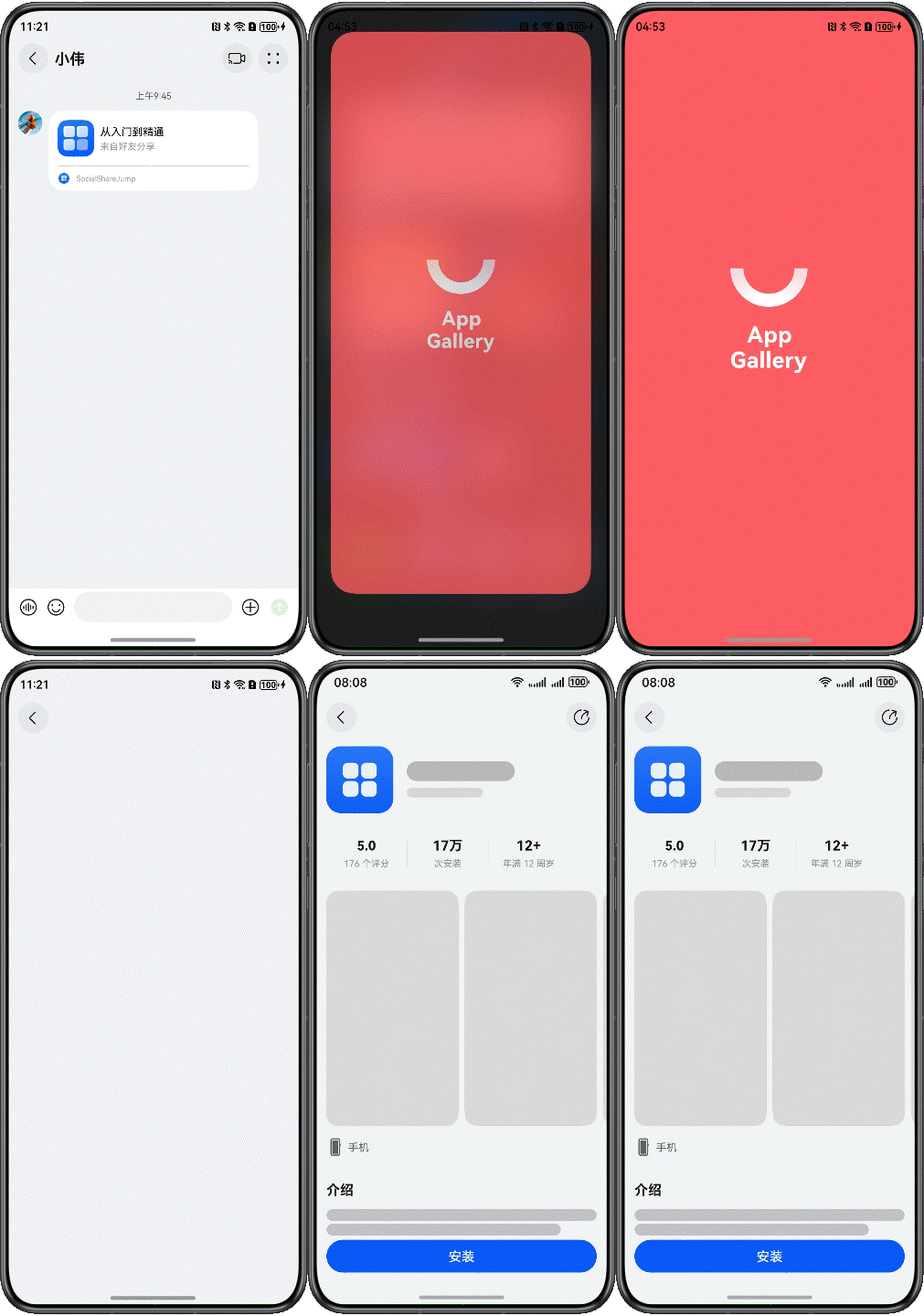
同时,需要实现延迟链接功能,确保安装后首次启动可直达内容。
安装完应用之后,开发者可以在用户首次打开应用时,使用延迟链接,可以直接跳转到文章详情,这一流程不仅优化了用户体验,还有助于提升链接的转化率。
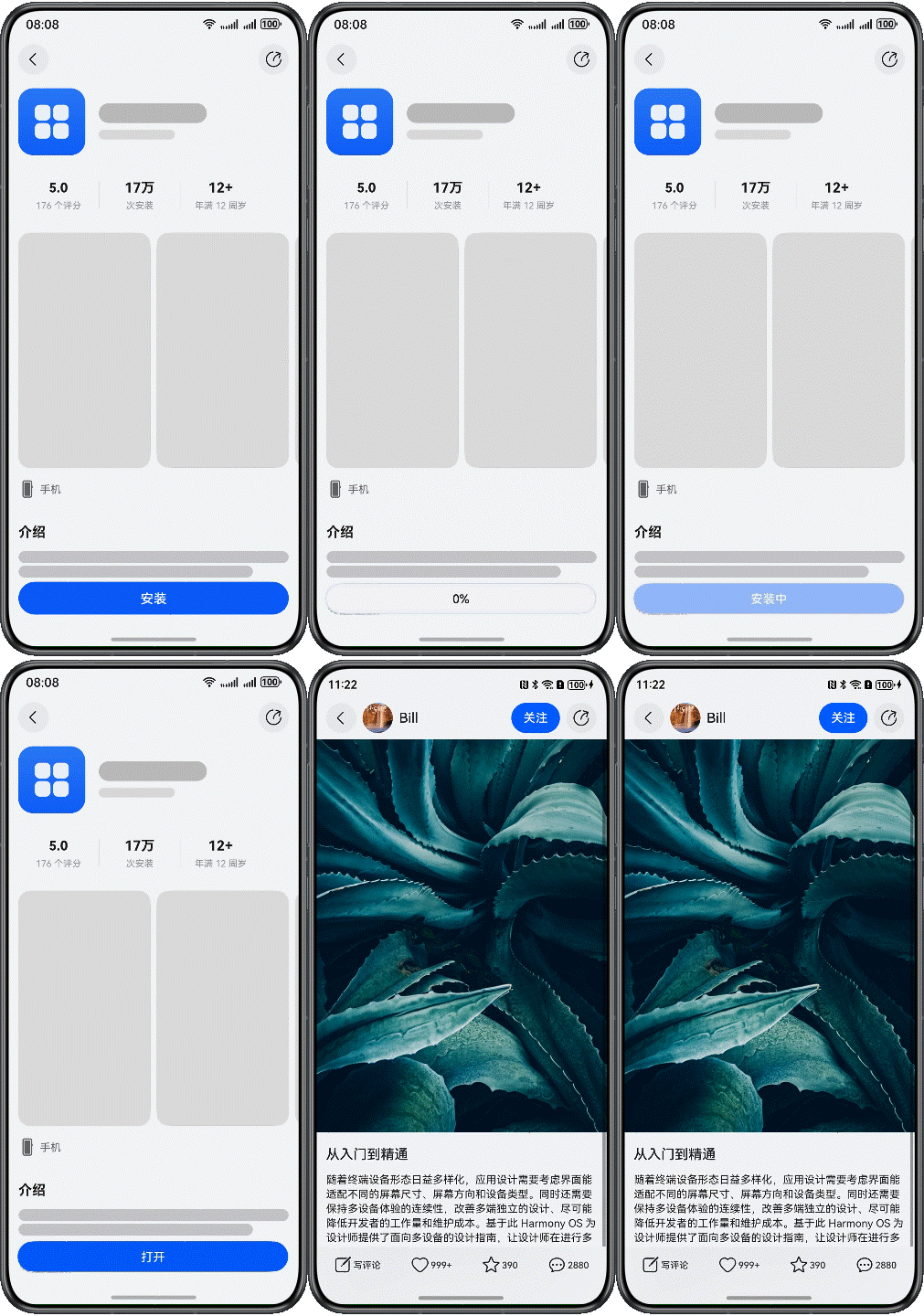
通过deferredLink.popDeferredLink()接口获取原始App Linking链接,并根据解析该链接直接跳转至对应的内容详情页。
// entry/src/main/ets/pages/Index.ets
import { BusinessError } from '@kit.BasicServicesKit';
import { deferredLink } from '@kit.AppLinkingKit';
import { url } from '@kit.ArkTS';
import { Logger } from '../common/Logger';
// ...
@Entry
@Component
struct Index {
  // ...
  aboutToAppear(): void {
    // Get the deferred link parameter and go to the details page
    deferredLink.popDeferredLink().then((link: string) => {
      Logger.info(TAG, `Succeeded in getting deferred link, result: ${link}`);
      if (link) {
        // Get the link parameters
        let urlObject = url.URL.parseURL(link);
        let aid = urlObject.params.get('aid') as string;
        // Go to the details component
        this.getUIContext().getRouter().pushUrl({
          url: 'pages/Detail',
          params: {
            aid: aid
          }
        });
      }
    }).catch((error: BusinessError) => {
      Logger.error(TAG, `Failed to get deferred link. code: ${error.code}, message: ${error.message}`);
    });
  }
  // ...
}
[h2]Web页面开发与部署(可选)
当应用未安装且未配置直达应用市场时,系统会打开浏览器Web页面。合理的Web页面开发是完善用户体验的关键环节,特别是与延迟链接结合使用。
Web页面UA适配
首先,需要准确识别HarmonyOS设备,以实现合适的跳转和内容适配。HarmonyOS设备的User-Agent(UA)字符串中通常包含特定的标识信息。开发者应解析UA字符串,结合系统类型(例如OS名称)和版本号进行判断。
如果未正确适配UA,可能导致以下问题:
- 页面无法正确识别设备类型,影响后续的应用跳转逻辑。
- 用户被错误跳转到不适合的下载或支持页面。
- 错误的文件提供(如直接提供APK下载而非对应平台软件)。
通过UserAgent中的{OSName}字段识别HarmonyOS系统,同时通过UserAgent中的{OSName}和{OSVersion}字段识别HarmonyOS系统及版本。
function matchHarmonyOS() {
  // Determine whether the recognition system is HarmonyOS.
  const isHarmonyOS = /HarmonyOS/i.test(navigator.userAgent);
  // Get system version number
  const matches = navigator.userAgent.match(/OpenHarmony (\d+\.?\d*)/);
  return isHarmonyOS && matches?.length && Number(matches[1]) >= 5;
}

function openLink() {
  if (matchHarmonyOS()) {
    // Launch the application through app linking.
    // ...
  } else {
    // Redirect logic for other platforms
  }
} 详细请参见User-Agent开发指导。
实现智能跳转逻辑
Web页面需提供两个关键功能:
- “打开”按钮 - 尝试拉起已安装的应用。
- “下载”按钮 - 引导未安装用户前往应用市场。
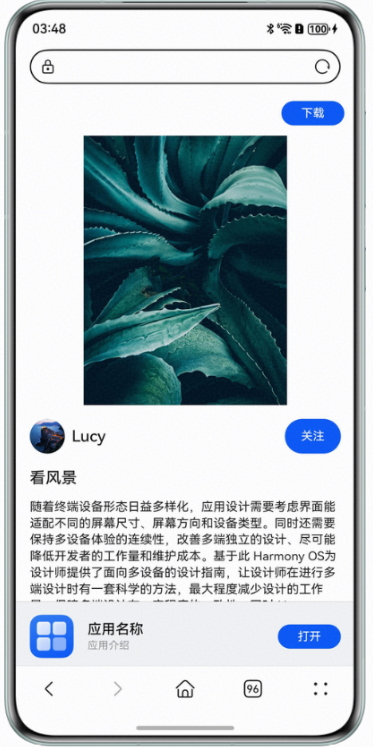
当应用已安装时,点击“打开”按钮,可以直接跳转社交应用,直达文章详情页。跳转链接使用前面配置App Linking服务中配置的链接,例如“https://www.example.com/”,通过设置window.location.href属性进行页面跳转。
function openLink() {
  if (matchHarmonyOS()) {
    // Launch the application through app linking.
    // Replace with a real usable app linking link.
    window.location.href = 'https://www.example.com?aid=' + aid;
  } else {
    // Redirect logic for other platforms
  }
}
当用户未安装社交应用时,点击“下载”按钮,可以直接跳转到应用市场详情页,方便用户下载安装应用,开发者可以使用应用市场的App Linking链接,通过设置window.location.href属性进行页面跳转。
function toAppgallery() {
  // Replace with a real usable application market app linking link.
  window.location.href = 'https://appgallery.huawei.com/app/detail?id=com.huawei.hmsapp.books';
}
延迟链接与Web页面结合
Web页面与延迟链接的结合是创建完整用户体验的关键。当用户通过Web页面安装应用后,可通过延迟链接实现首次打开应用时自动跳转到原始内容。

为确保App Linking正常工作,需要注意:
- Web页面域名应与App Linking配置的域名不同,否则系统将优先使用浏览器打开链接。
- 建议部署架构:
- 主域名(https://www.example.com)配置为App Linking域名,部署引导页。
- 子域名(https://m.example.com/detail):部署实际内容页面。
- 引导页通过重定向将用户引导至内容页。
[h2]如何查看App Linking是否在AGC上配置成功
- 登录AppGallery Connect,点击“开发与服务”。
- 在项目列表中点击HarmonyOS应用所在的项目。
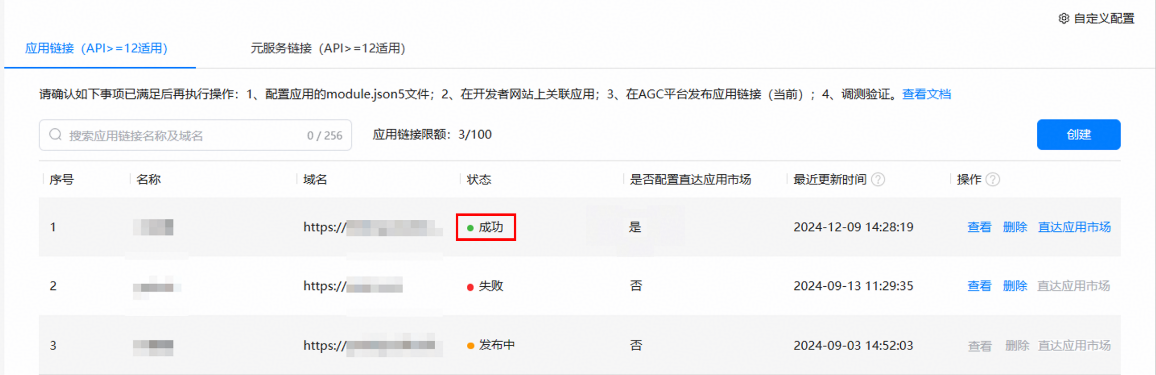
- 在左侧导航栏中选择“增长 > App Linking”菜单栏查看App Linking链接地址的配置状态,若为成功则表明AGC上App Linking配置成功。
[h2]AGC中App Linking显示配置失败如何解决
问题现象
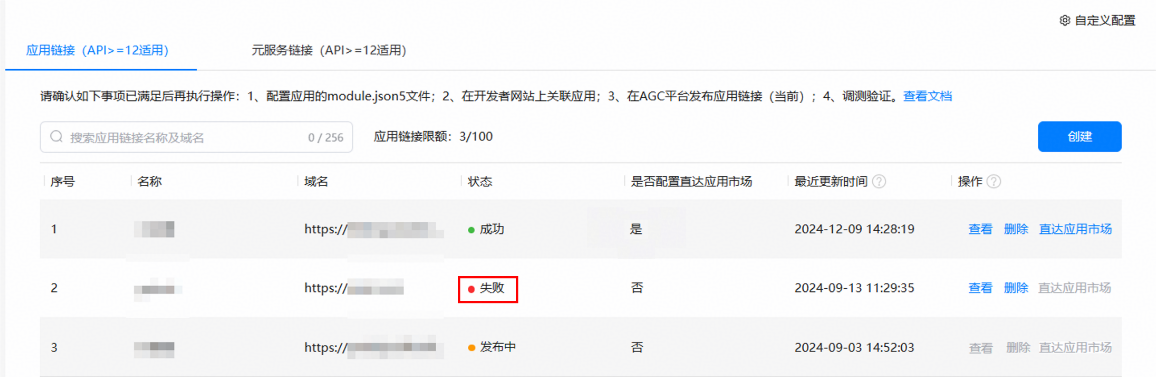
App Linking菜单栏查看App Linking链接地址的配置状态如下图,显示红色圆点并文本提示失败。
解决措施
- 首先,显示App Linking状态失败并不一定意味着配置错误。也有可能是配置正确,但 AppGallery Connect(AGC)未及时更新。若不确定是否为此问题,可以采取删除链接后重新添加的方式。如果问题依旧存在,那么大概率是服务器配置问题。
- applinking.json配置文件配置错误,请参考建立域名与应用关联关系进行配置。
- App Linking地址仅支持https链接、若为http链接,请自行申请SSL证书。
- 检查配置文件所处的文件目录与文件权限确保外部可以访问。
若上述检查无误,建议求助网站运维侧人员,共同解决。
[h2]AGC上显示了配置成功,但是配置到目标方后无法拉起如何解决
问题现象
AGC上显示链接地址配置成功,但是配置到目标方后,尝试使用openLink()或其他拉起方式,应用并未成功拉起。
可能原因
- AGC配置App Linking链接时以“/”结尾。
- 目标方中module.json5配置的链接与AGC配置链接不一致导致无法拉起。
- 应用未手动从AGC上申请证书签名进行应用签名。
- 开发者所处的网络有访问限制。
- module.json5配置文件配置错误。
解决措施
- 检查AGC上配置AppLinking链接地址,当前该链接不支持末尾以“/”结尾,检查AGC配置的链接地址末尾是否多了“/”。
- 检查module.json5中配置的链接地址与AGC中配置的链接地址是否一致,如AGC中配置了“https://www.huawei.com”而在代码中使用了“https://developer.huawei.com”。
- 开发者请参考验证应用被拉起效果在AGC上手动申请证书与Profile进行手动签名。
- 重新更换其他网络。
- 请对照以下代码检查module.json5配置是否满足要求。
// entry/src/main/module.json5
{
  "module": {
    // ...
    "abilities": [
      {
        "name": "EntryAbility",
        // ...
        "exported": true,
        "skills": [
          {
            "entities": [
              "entity.system.home",
              // entities must contain "entity.system.browsable"
              "entity.system.browsable"
            ],
            "actions": [
              "ohos.want.action.home",
              // Actions must contain "ohos.want.action.viewData"
              "ohos.want.action.viewData"
            ],
            "uris": [
              {
                // The scheme must be configured as https
                "scheme": "https",
                // The host must be configured as the associated domain name
                "host": "******",
                "path": ""
              }
            ],
            // domainVerify must be set to true
            "domainVerify": true
          }
        ]
      }
    ],
    // ...
  }
}
[h2]社交应用的链接点击后,打开的浏览器Web页面显示异常
问题现象
社交应用的链接点击后,打开的浏览器Web页面显示空白、无法正常交互,或页面加载异常。
可能原因
- Web页面的User-Agent(后续简称为UA)标识未适配HarmonyOS设备或浏览器环境,导致兼容性问题。
- 对应的Web页面可能未完全开发或存在错误(如资源加载失败、后端服务异常等)。
- 链接地址错误,导致无法正确加载目标页面。
解决措施
- 适配UA标识。确保Web页面适配了HarmonyOS设备和配套浏览器的UA标识,以正确识别设备并跳转到对应页面或平台。详细请参见User-Agent开发指导。
- 检查页面开发完整性。确认页面资源是否正常加载,后端接口是否返回正确数据。
- 验证链接地址。确保社交应用的聊天界面中发送的链接地址正确无误。
[h2]Web页面跳转跨应用页面异常
问题现象
用户点击社交应用的聊天界面中的链接进入Web页面后,尝试从该应用的Web A页面跳转到跨应用的Web B页面时发生异常(例如A应用的宽带充值页面跳转B应用的支付页面,在B应用的支付页面使用时发生异常)。
- 页面跳转失败,停留在当前页面。
- 跳转后页面加载错误或显示空白。
可能原因
- 目标Web B页面的UA标识未适配HarmonyOS设备或浏览器环境,导致兼容性问题。
- 目标Web B页面资源加载失败。
解决措施
- 适配UA标识。确保Web B页面适配了HarmonyOS设备和配套浏览器的UA标识,以正确识别设备并跳转到对应页面或平台。详细请参见User-Agent开发指导。
- 检查Web B页面的资源加载情况。
[h2]Web页面跳转应用异常
问题现象
用户从社交应用的聊天界面中的链接跳转到Web页面后,尝试通过页面操作跳转应用时发生异常,例如:
- 点击“打开”按钮后无反应。
- 点击“下载”按钮后跳转到错误平台,或提示直接下载APK包。
可能原因
- 点击“打开”按钮无反应,可能是因为目标应用未正确配置跳转逻辑(例如App Linking),或者配置过程中存在错误。
- 点击“打开”按钮无反应,Web页面使用链接不正确。
- 目标应用未安装,点击“下载”按钮,触发应用下载逻辑跳转到应用下载的Web页面,但如果Web页面未正确适配HarmonyOS设备的UA标识,导致跳转到错误平台,或提示直接下载APK包。
解决措施
- 检查跳转逻辑。确保Web页面跳转的目标应用正确配置了App Linking。详细请参见配置App Linking服务。
- 检查Web页面“打开”跳转地址的正确性。使用正确的App Linking跳转地址。
- 适配UA标识。确保Web页面适配了HarmonyOS设备和配套浏览器的UA标识,以正确识别设备并跳转到对应页面或平台。详细请参见User-Agent开发指导。