场景介绍
窗口外观用于描述窗口在屏幕上的显示形态和视觉效果,目前支持通过设置异形窗口、窗口阴影、窗口圆角以及窗口背景色实现窗口外观设置。
开发者可以根据界面设计和交互需求,对窗口外观进行定制。例如:
-
通过设置窗口掩码,将子窗或全局悬浮窗显示为异形窗口。
-
通过设置窗口边缘阴影的模糊半径,调整子窗或全局悬浮窗的阴影效果。
-
通过设置窗口圆角,调整子窗或全局悬浮窗的边缘显示效果。
-
通过设置窗口背景色,使窗口背景与应用页面或主题样式保持一致。
异形窗口
异形窗口为非常规形状的窗口,掩码用于描述异形窗口的形状。仅应用子窗和全局悬浮窗可设置为异形窗口。
可通过setWindowMask()或setWindowMaskWithAlpha()接口设置异形窗口的掩码,以定义窗口的可见区域。
设置掩码后,窗口将按照掩码形状显示,窗口阴影将被禁用,窗口的圆角半径变为0。
-
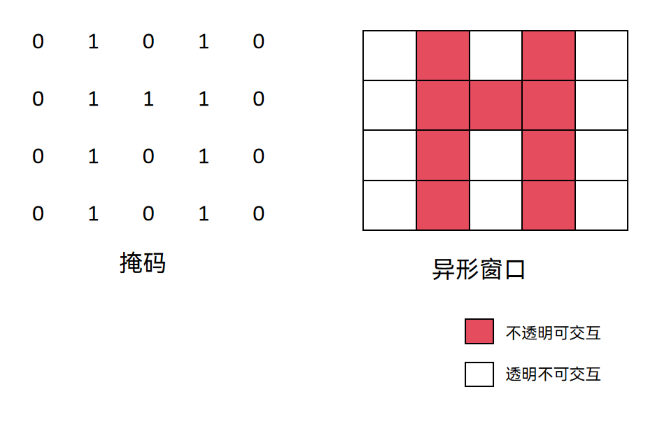
使用setWindowMask()接口设置异形窗口的掩码。
掩码仅支持取值为整数0和整数1的二维数组输入,数组行数对应窗口高度,列数对应窗口宽度。整数0代表对应像素透明且不可交互,整数1代表对应像素不透明且可交互。
-
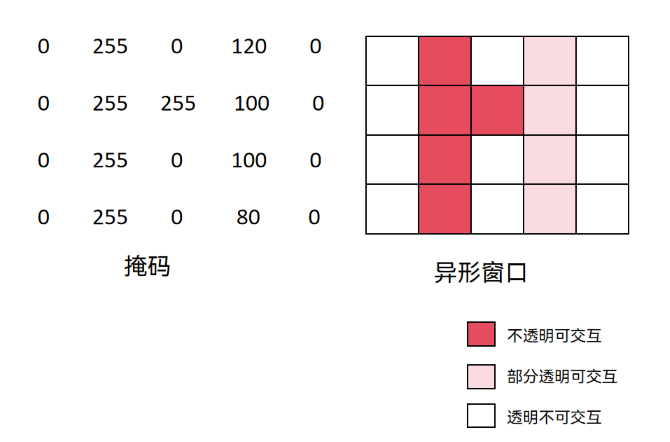
从API版本26.0.0开始,支持使用setWindowMaskWithAlpha()接口设置异形窗口的掩码。
掩码支持取值在[0, 255]范围的数组输入,数组长度等于窗口宽度乘以窗口高度。整数0代表对应像素透明且不可交互,整数255代表对应像素不透明且可交互,0~255之间代表对应像素部分透明且可交互。此接口性能优于setWindowMask(),推荐使用。
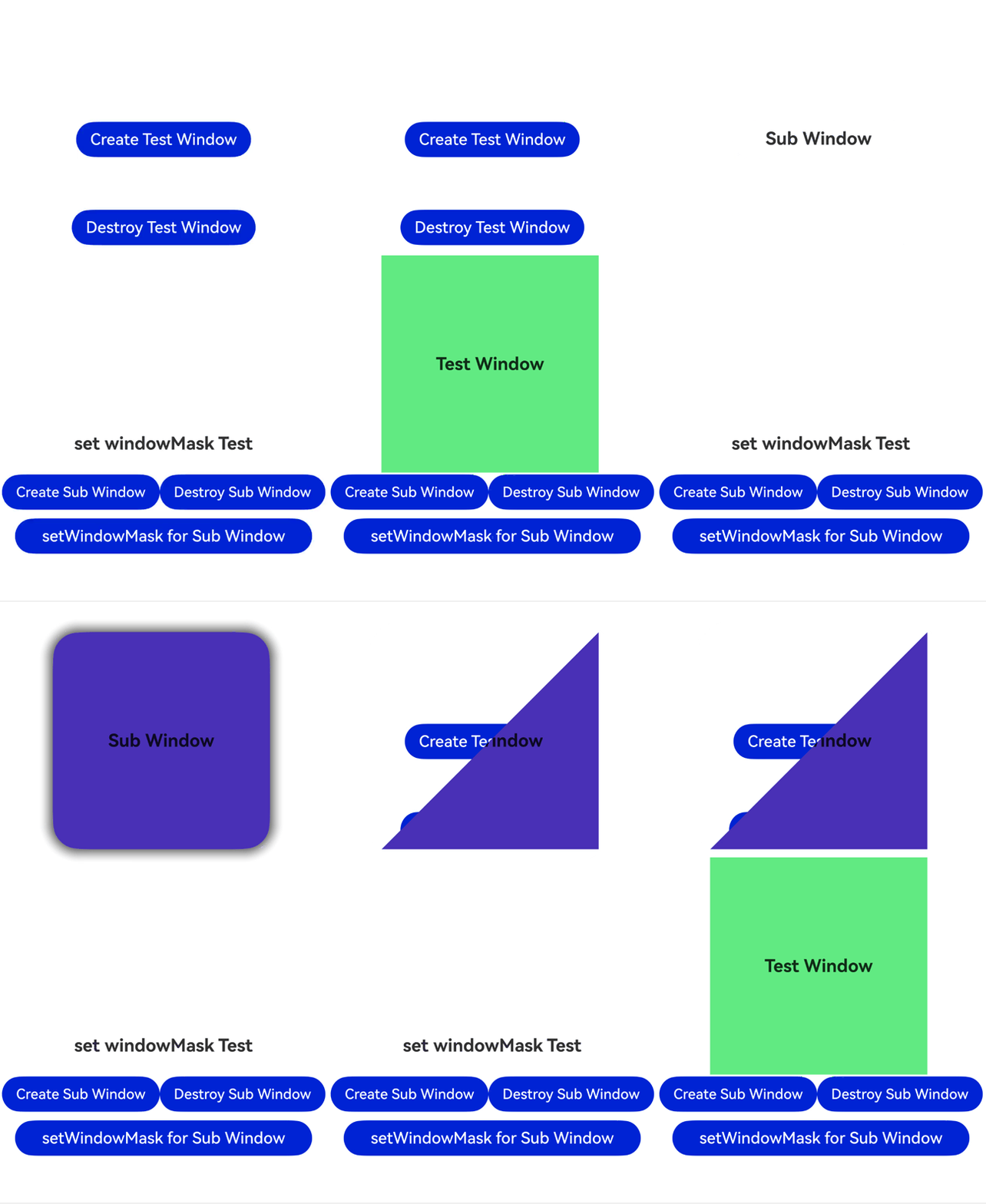
此处以设置子窗的异形窗口为例。此例主要实现以下效果:
-
点击“Create Sub Window”按钮可以创建子窗。
-
创建子窗后,点击“setWindowMask for Sub Window”按钮,可通过setWindowMaskWithAlpha()接口设置子窗掩码。子窗发生以下变化:
- 子窗变为三角形。
- 子窗的阴影和圆角消失。
- 子窗矩形区域的左上部分变为透明不可交互,通过点击“Create Test Window”按钮,事件透传到该按钮,创建出绿色的测试窗口。
import { window } from '@kit.ArkUI';
import { BusinessError } from '@kit.BasicServicesKit';

@Entry
@Component
struct Index {
  // ...
  private windowMaskSub: window.Window | undefined = undefined;

  // ...
  setWindowMask(window: window.Window) {
    let windowMask: Uint8Array = new Uint8Array(this.winWidth * this.winHeight);
    for (let i = 0; i < this.winHeight; i++) {
      for (let k = 0; k < this.winWidth; k++) {
        if ((i + k) < (this.winHeight + this.winWidth) / 2) {
          windowMask[i * this.winWidth + k] = 0;
        } else {
          windowMask[i * this.winWidth + k] = 255;
        }
      }
    }
    window.setWindowMaskWithAlpha(windowMask, this.winWidth, this.winHeight);
  }

  build() {
    Row() {
      Scroll(){
        Column() {
          // ...
          Row() {
            Button('setWindowMask for Sub Window')
              .width('90%')
              .type(ButtonType.Capsule)
              .margin({
                top: 10
              }).fontSize(18)
              .onClick(() => {
                if(this.windowMaskSub) {
                  this.setWindowMask(this.windowMaskSub);
                }
              })
          }
        }
        .width('100%')
      }
    }
    .height('100%')
  }

} 
窗口阴影
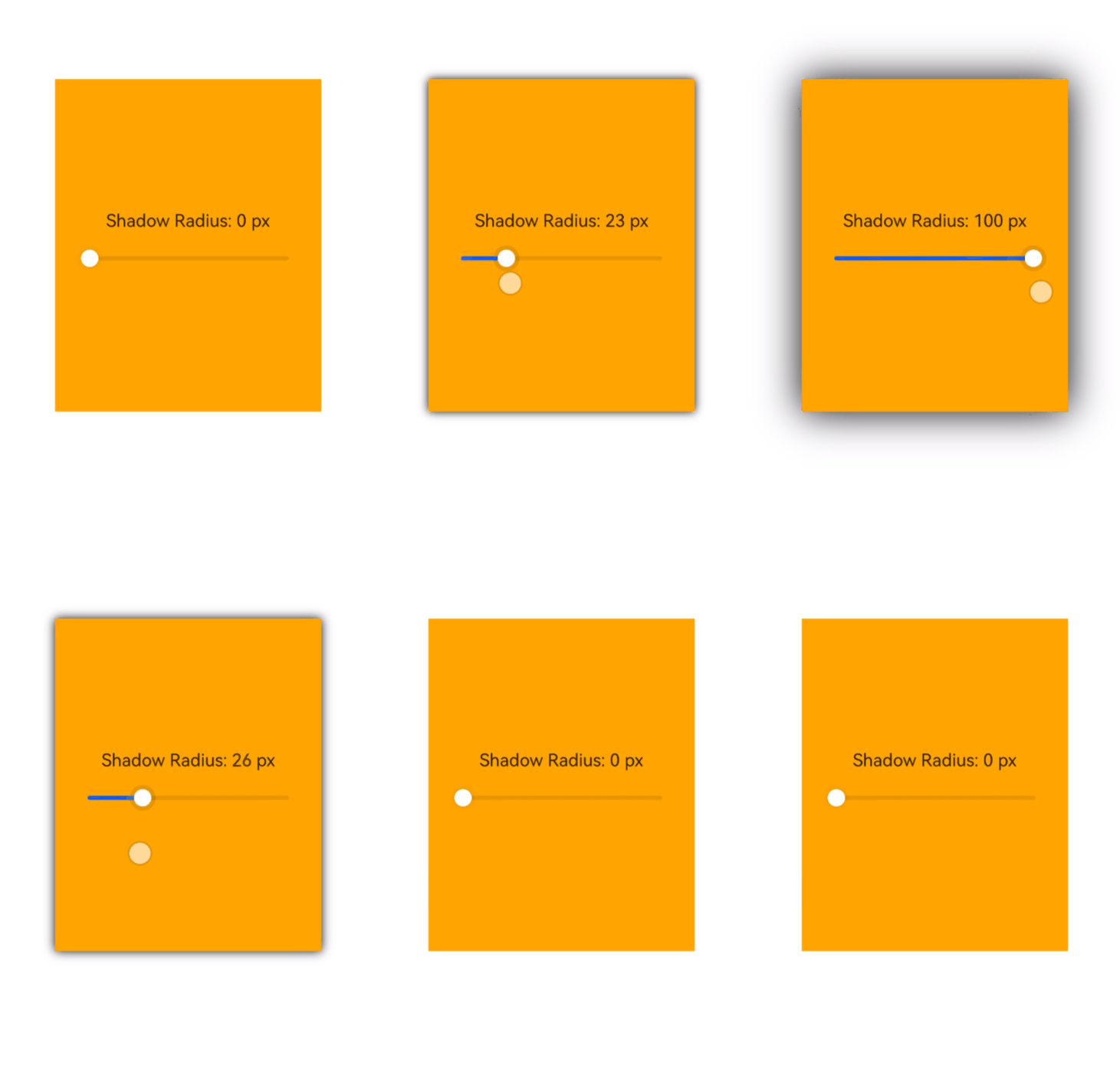
窗口阴影是显示在窗口边缘的投影效果,可以增强窗口与背景之间的层次感,使窗口呈现悬浮于背景之上的视觉效果。
-
可通过setWindowShadowRadius()接口设置窗口边缘阴影的模糊半径,仅支持子窗和全局悬浮窗使用。
此处以全局悬浮窗为例,设置其窗口边缘阴影的模糊半径。
// pages/page1.ets
import { window } from '@kit.ArkUI';

@Entry
@Component
struct SliderDemo {
  // ...

  // 设置窗口边缘阴影的模糊半径
  setShadowRadius(val: number) {
    const floatWindowObj = AppStorage.get<window.Window>('floatWindow');
    floatWindowObj?.setWindowShadowRadius(val);
  }

  build() {
    // ...
  }
}
设置窗口圆角
-
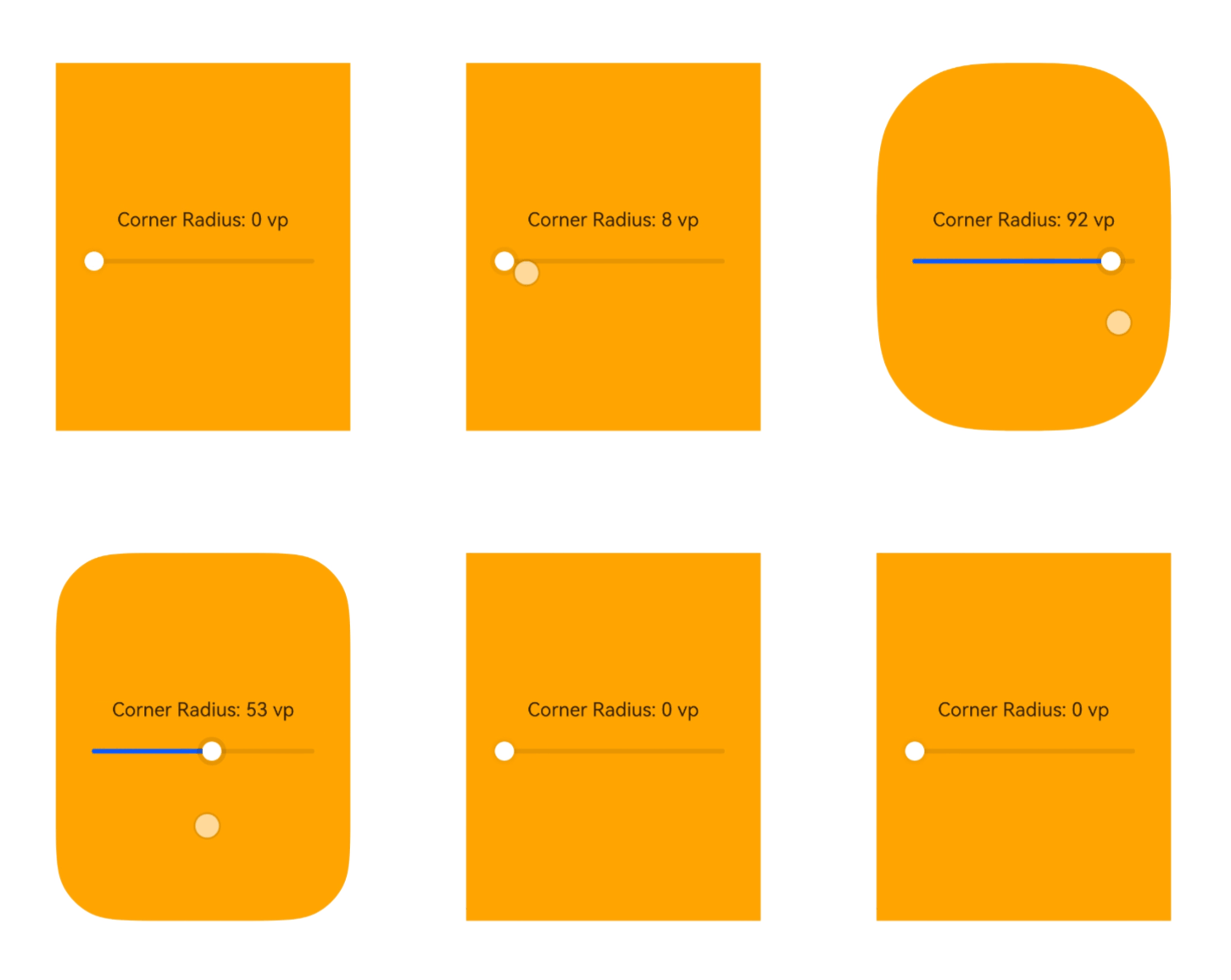
可通过setWindowCornerRadius()接口设置窗口的圆角半径,仅支持子窗和全局悬浮窗使用。
此处以全局悬浮窗为例,设置其窗口圆角。
// pages/page1.ets
import { window } from '@kit.ArkUI';

@Entry
@Component
struct SliderDemo {
  // ...

  // 设置圆角
  setCornerRadius(val: number) {
    const floatWindowObj = AppStorage.get<window.Window>('floatWindow');
    floatWindowObj?.setWindowCornerRadius(val);
  }

  build() {
    // ...
  }
}
窗口背景色
窗口背景色用于控制窗口内容区域或窗口容器区域的背景显示效果。
开发者可根据业务场景,选择设置应用内容区域背景色,或设置包含标题栏在内的窗口容器背景色,以实现页面背景透明、窗口整体配色统一等效果。
-
可使用setWindowBackgroundColor()接口调整窗口内容区域的背景色,主要影响窗口内承载UI内容的部分。可传入不区分大小写的十六进制RGB或ARGB颜色,调整背景颜色。从API version 18开始,支持传入ColorMetrics类型。
-
可使用setWindowContainerColor()接口设置PC/2in1或Tablet设备上的主窗口容器区域的背景色,窗口容器背景色会覆盖整个窗口区域,包括标题栏和内容区域。如果处于非自由窗口状态下,效果等同于setWindowBackgroundColor()。该接口不支持将非焦点态下的主窗口背景设置为透明。
-
当同时使用setWindowContainerColor()和setWindowBackgroundColor()时,内容区域显示setWindowBackgroundColor()设置的颜色,而标题栏则显示setWindowContainerColor()设置的颜色。
-
从API版本26.0.0开始,支持使用setWindowContainerModalColor()接口设置PC/2in1设备上的主窗口容器区域的背景色,以适配不同UI设计需求。通过该接口设置的背景色会作用于整个窗口容器区域,包括标题栏和内容区域。该接口支持将非焦点态下的主窗口背景设置为透明。

-
未调用setWindowContainerColor()或setWindowContainerModalColor()接口设置窗口容器区域背景色时,容器区域背景色默认跟随系统颜色模式:浅色模式下为'#FFF0F0F0',深色模式下为'#FF1A1A1A'。
-
需要在loadContent()或setUIContent()调用生效后才能设置背景色。
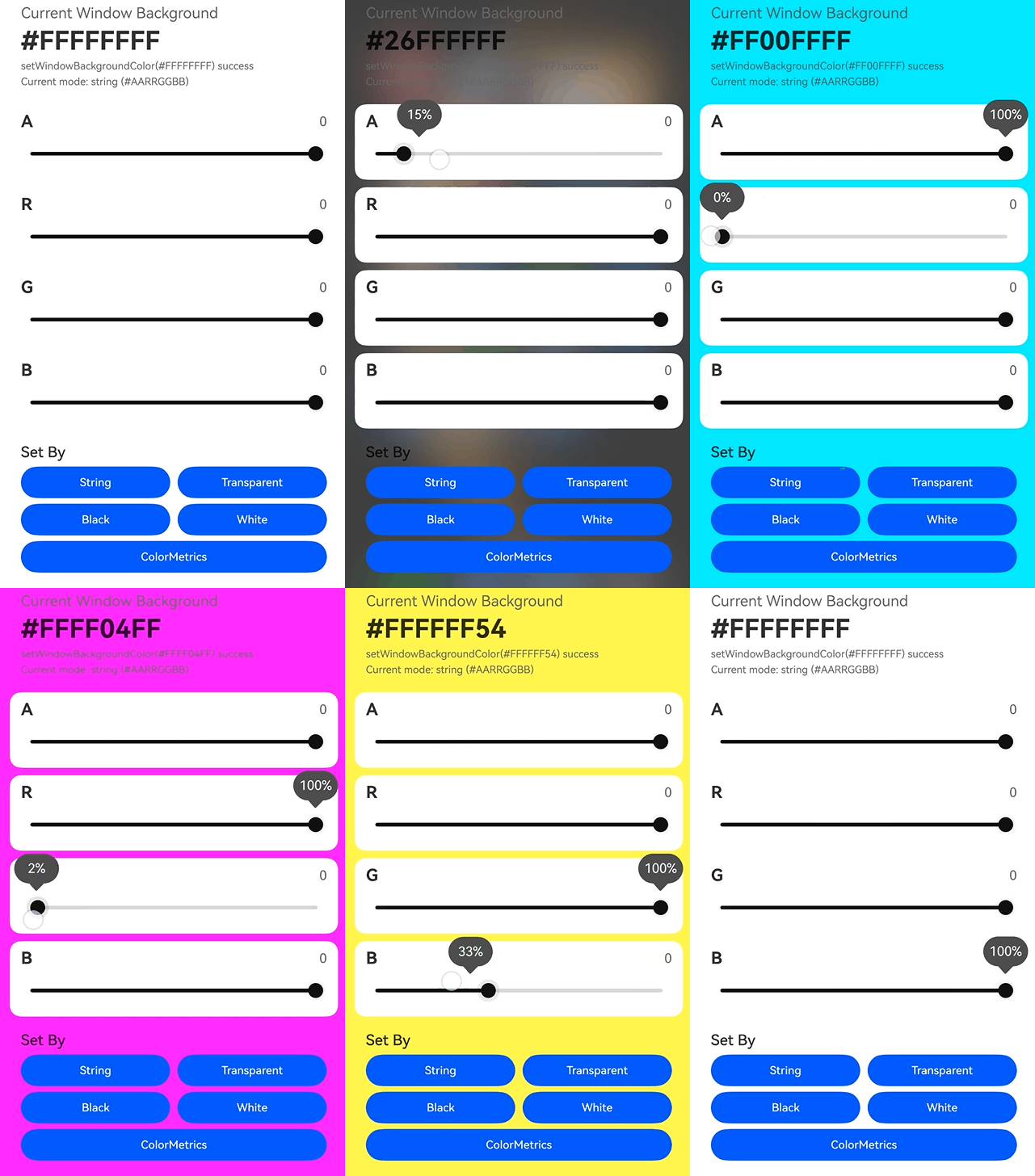
示例代码如下:
import { ColorMetrics, window } from '@kit.ArkUI';
import { hilog } from '@kit.PerformanceAnalysisKit';

const DOMAIN = 0x0000;

@Entry
@Component
struct Index {
  @StorageLink('mainWindow') mainWindow: window.Window | undefined = undefined;

  @State alpha: number = 0;
  @State red: number = 0;
  @State green: number = 0;
  @State blue: number = 0;
  @State statusText: string = 'Move the sliders to change the current window background color.';
  @State applyModeText: string = 'Current mode: string (#AARRGGBB)';

  // 将0~255的通道值转换成两位十六进制字符串,用于拼接 #AARRGGBB。
  private toHex(value: number): string {
    return Math.round(value).toString(16).padStart(2, '0').toUpperCase();
  }

  // 按ARGB顺序生成当前窗口背景色的十六进制字符串。
  private getColorValue(): string {
    return `#${this.toHex(this.alpha)}${this.toHex(this.red)}${this.toHex(this.green)}${this.toHex(this.blue)}`;
  }
  // ...
  // 直接用ColorMetrics.rgba(...)设置窗口背景色。
  private applyByColorMetrics(): void {
    if (!this.mainWindow) {
      this.statusText = 'Current window is unavailable.';
      return;
    }

    try {
      const alpha = Math.round(this.alpha) / 255;
      const colorMetrics = ColorMetrics.rgba(Math.round(this.red), Math.round(this.green),
                            Math.round(this.blue), alpha);
      this.mainWindow.setWindowBackgroundColor(colorMetrics);
      this.applyModeText = 'Current mode: ColorMetrics.rgba(...)';
      this.statusText = `setWindowBackgroundColor(ColorMetrics.rgba(${Math.round(this.red)}, ${Math.round(this.green)}, ${Math.round(this.blue)}, ${alpha.toFixed(2)})) success`;
      hilog.info(DOMAIN, 'backgroundColor', this.statusText);
    } catch (err) {
      this.statusText = `setWindowBackgroundColor by ColorMetrics failed: ${JSON.stringify(err)}`;
      hilog.error(DOMAIN, 'backgroundColor', this.statusText);
    }
  }

  // ...
}