
26.0.0版本开始,新增暂停下载任务接口,支持用户暂停下载任务。
场景介绍
随着HarmonyOS应用的持续发展,应用的功能将越来越丰富,实际上80%的用户使用时长都会集中在20%的特性上,其余的功能可能也仅仅是面向部分用户。为了避免用户首次下载应用耗时过长,及过多占用用户空间,应用市场服务提供按需分发的能力,支持用户按需动态下载自己所需的增强特性。
基本概念
按需分发:一个应用程序被打包成多个安装包,安装包包含了所有的应用程序代码和静态资源。用户从应用市场下载的应用只包含基本功能的安装包,当用户需要使用增强功能时,相应安装包将会从服务器下载到设备上(应用发布请参考发布HarmonyOS应用)。

约束与限制
-
应用需要上架应用市场。
-
产品特性按需分发功能支持Phone、Tablet、PC/2in1设备。并且从5.1.1(19)版本开始,新增支持TV设备。
-
产品特性按需分发接入调试功能支持ARM版本、X86版本的模拟器。
-
使用按需分发前,需先将应用拆分为基础包与增强功能模块,详细操作请参考模块管理。
接口说明
产品特性按需分发场景提供以下ArkTS接口,具体API说明详见接口文档。
| 接口名 | 描述 |
|---|---|
| getInstalledModule(moduleName: string): InstalledModule | 查询模块安装信息接口。 |
| createModuleInstallRequest(context: common.UIAbilityContext | common.ExtensionContext): ModuleInstallRequest | 创建按需加载请求对象。 |
| addModule(moduleName: string): ReturnCode | 添加要按需加载的模块名。 |
| fetchModules(moduleInstallRequest: ModuleInstallRequest): Promise<ModuleInstallSessionState> | 按需加载请求接口,异步返回结果。 |
| cancelTask(taskId: string): ReturnCode | 取消下载任务接口。 |
| pauseTask(taskId: string): ReturnCode | 暂停下载任务接口。 |
| showCellularDataConfirmation(context: common.UIAbilityContext | common.ExtensionContext, taskId: string): ReturnCode | 流量提醒弹窗接口。 |
| on(type: 'moduleInstallStatus', callback: Callback<ModuleInstallSessionState>, timeout: number): void | 监听当前应用下载任务的进度。 |
| off(type: 'moduleInstallStatus', callback?: Callback<ModuleInstallSessionState>): void | 取消监听当前应用下载任务的进度。 |
[h2]获取模块安装信息
-
导入moduleInstallManager模块及相关公共模块。
import { moduleInstallManager } from '@kit.AppGalleryKit'; -
构造参数。
入参为需要查询的模块名称。
const moduleName: string = 'AModulelib';
-
调用getInstalledModule方法,将步骤2中构造的参数传入模块中的getInstalledModule方法。
const moduleInfo: moduleInstallManager.InstalledModule =
  moduleInstallManager.getInstalledModule(moduleName);
[h2]创建按需加载的请求实例
-
导入moduleInstallManager模块及相关公共模块。
import { moduleInstallManager } from '@kit.AppGalleryKit'; import type { common } from '@kit.AbilityKit'; -
构造参数。
入参为当前应用的上下文context,只支持UIAbilityContext和ExtensionContext类型的上下文,其中UIAbilityContext类型的上下文是要校验当前应用是否在前台,如果不在前台,则会被拒绝调用。
const context: common.UIAbilityContext | common.ExtensionContext =
  this.getUIContext().getHostContext() as common.UIAbilityContext;
-
调用createModuleInstallRequest方法,将步骤2中构造的参数依次传入模块中的createModuleInstallRequest方法。
const moduleInstallProvider: moduleInstallManager.ModuleInstallProvider = new moduleInstallManager.ModuleInstallProvider();
const moduleInstallRequest: moduleInstallManager.ModuleInstallRequest = moduleInstallProvider.createModuleInstallRequest(context);
[h2]请求按需加载模块
-
导入moduleInstallManager模块及相关公共模块。
import { moduleInstallManager } from '@kit.AppGalleryKit'; import type { common } from '@kit.AbilityKit'; import { hilog } from '@kit.PerformanceAnalysisKit'; -
构造参数。
入参为当前要按需加载的模块名。
const moduleName: string = 'AModulelib';
-
调用ModuleInstallRequest中的addModule方法,将步骤2中构造的参数依次传入模块中的addModule方法。
let moduleInstallRequest: moduleInstallManager.ModuleInstallRequest; try { // ... const context: common.UIAbilityContext | common.ExtensionContext = this.getUIContext().getHostContext() as common.UIAbilityContext; const moduleInstallProvider: moduleInstallManager.ModuleInstallProvider = new moduleInstallManager.ModuleInstallProvider(); moduleInstallRequest = moduleInstallProvider.createModuleInstallRequest(context); // ... const retCode: moduleInstallManager.ReturnCode = moduleInstallRequest.addModule(moduleName); hilog.info(0, 'InstantDownload', `addModule result: ${JSON.stringify(retCode)}`); // ... } catch (error) { hilog.error(0, 'InstantDownload', `onError.code is ${error.code}, message is ${error.message}`); } -
调用fetchModules方法请求按需加载模块。
try {
  moduleInstallManager.fetchModules(moduleInstallRequest)
    .then((data: moduleInstallManager.ModuleInstallSessionState) => {
      hilog.info(0, 'InstantDownload', `fetchModule result: ${JSON.stringify(data)}`);
      // ...
    })
  // ...
} catch (error) {
  hilog.error(0, 'InstantDownload', `fetching Modules onError.code is ${error.code}, message is ${error.message}`);
}
[h2]暂停下载任务
-
导入moduleInstallManager模块及相关公共模块。
import { moduleInstallManager } from '@kit.AppGalleryKit'; // ... import { hilog } from '@kit.PerformanceAnalysisKit'; -
构造参数,入参为当前要暂停下载的任务ID。
// taskId是fetchModules返回结果ModuleInstallSessionState中的taskId字段
let taskId: string = '********';
-
在网络环境发生变化或设备资源不足时,调用pauseTask方法,实现暂停下载任务。
try {
  // ...
  const rtnCode: moduleInstallManager.ReturnCode = moduleInstallManager.pauseTask(taskId);
  hilog.info(0, 'InstantDownload', `Succeeded in getting result: ${JSON.stringify(rtnCode)}`);
  // ...
} catch (error) {
  hilog.error(0, 'InstantDownload', `pauseTask onError.code is ${error.code}, message is ${error.message}`);
  // ...
}
[h2]恢复下载任务
使用pauseTask暂停下载任务后,可通过调用fetchModules接口,实现下载任务从中断处继续下载。
import { moduleInstallManager } from '@kit.AppGalleryKit';
import type { common } from '@kit.AbilityKit';
import { hilog } from '@kit.PerformanceAnalysisKit';
// ...
@Component
struct ResumeTask {
  build() {
    Column() {
      Button('ResumeTask')
        .onClick(() => {
          try {
            const taskId: string = '********';
            // 暂停下载任务
            const rtnCode: moduleInstallManager.ReturnCode = moduleInstallManager.pauseTask(taskId);
            hilog.info(0, 'InstantDownload', `Succeeded in getting result: ${JSON.stringify(rtnCode)}`);
            const myModuleInstallProvider: moduleInstallManager.ModuleInstallProvider =
              new moduleInstallManager.ModuleInstallProvider();
            const context: common.UIAbilityContext | common.ExtensionContext =
              this.getUIContext().getHostContext() as common.UIAbilityContext;
            // 创建按需加载请求对象
            const myModuleInstallRequest: moduleInstallManager.ModuleInstallRequest =
              myModuleInstallProvider.createModuleInstallRequest(context);
            // 添加要按需加载的模块名
            myModuleInstallRequest.addModule('AModulelib');
            // 恢复下载任务
            moduleInstallManager.fetchModules(myModuleInstallRequest)
              .then(() => {
                hilog.info(0, 'InstantDownload', 'Succeeded in fetching modules success data.');
              })
          } catch (error) {
            hilog.error(0, 'InstantDownload',
              `fetching modules onError.code is ${error.code}, message is ${error.message}`);
          }
        })
        .width('100%')
    }
    .margin(16)
    .height('100%')
    .justifyContent(FlexAlign.Center)
  }
}
[h2]取消下载任务
-
导入moduleInstallManager模块及相关公共模块。
import { moduleInstallManager } from '@kit.AppGalleryKit'; import type { common } from '@kit.AbilityKit'; import { hilog } from '@kit.PerformanceAnalysisKit'; -
构造参数,入参为当前要取消下载的任务ID。
// taskId是fetchModules返回结果ModuleInstallSessionState中的taskId字段
let taskId: string = '********';
-
调用cancelTask方法,实现取消下载任务。
try {
  // ...
  const rtnCode: moduleInstallManager.ReturnCode = moduleInstallManager.cancelTask(taskId);
  hilog.info(0, 'InstantDownload', `Succeeded in getting result: ${JSON.stringify(rtnCode)}`);
  // ...
} catch (error) {
  hilog.error(0, 'InstantDownload', `cancelTask onError.code is ${error.code}, message is ${error.message}`);
  // ...
}
[h2]使用动态模块
假如应用A由entry.hap、AModulelib.hsp两个包组成,其中entry是基础包,AModulelib扩展是功能包(创建方式请参考应用程序包开发与使用)。通过应用市场下载安装只会下载安装entry包,在entry包里面可以通过fetchModules接口动态下载AModulelib包,并使用动态import技术调用AModulelib里的方法和组件。
AModulelib中主要实现如下:
-
在动态模块AModulelib的module.json5中设置deliveryWithInstall为false,来标识当前AModulelib在用户主动安装应用A的时候不会一起下载安装。
{ "module": { "name": "AModulelib", // ... "deliveryWithInstall": false } } -
在动态模块AModulelib中定义add方法和DateComponent组件。其中add方法用于计算加法,DateComponent用于显示文本。
Calc.ets定义如下:
export function add(a:number, b:number) {
    return a + b;
}
DateComponent.ets定义如下:
@Component struct DateComponent { build() { Column() { Text('我是AModulelib中的组件') .margin(10) } .width(300).backgroundColor(Color.Yellow) } } @Builder export function showDateComponent() { DateComponent() } -
在AModulelib的AModulelib/Index.ets中导出add方法和showDateComponent方法。
export { add } from './src/main/ets/utils/Calc';
export { showDateComponent } from './src/main/ets/components/DateComponent';
entry中主要实现如下:
-
在entry基础模块中,增加动态依赖配置。entry的oh-package.json5中使用dynamicDependencies来动态依赖AModulelib模块。
{ // ... "dynamicDependencies": { "AModulelib": "file:../AModulelib", // ... } } -
在entry中使用动态模块AModulelib模块里面的方法和组件。在调用AModulelib中的功能前需要判断AModulelib是否已经加载,未加载时请参考请求按需加载的接口完成加载。
import { moduleInstallManager } from '@kit.AppGalleryKit';
import type { common } from '@kit.AbilityKit';
import { hilog } from '@kit.PerformanceAnalysisKit';
import { BusinessError, Callback } from '@kit.BasicServicesKit';

// ...

@Entry
@Component
export struct Index {
  // ...
  @BuilderParam aModuleLibComponent: Function;
  @State countTotal: number = 0;
  @State isShow: boolean = false;
  // ...

  build() {
    Column() {
      // ...
          Column() {
            Button($r('app.string.invokeButton'))
              .onClick(() => {
                this.initAModulelib(() => {
                  import('AModulelib').then((ns: ESObject) => {
                    this.countTotal = ns.add(3, 6);
                  }).catch((error: BusinessError) => {
                    hilog.error(0, 'InstantDownload',
                      `add onError.code is ${error.code}, message is ${error.message}`);
                  })
                })
              });
            Text('计算结果:' + this.countTotal)
              .margin(10);

            Button($r('app.string.invokeToast'))
              .onClick(() => {
                this.initAModulelib(() => {
                  import('AModulelib').then((ns: ESObject) => {
                    this.aModuleLibComponent = ns.showDateComponent;
                    this.isShow = true;
                  }).catch((error: BusinessError) => {
                    hilog.error(0, 'InstantDownload',
                      `showDateComponent onError.code is ${error.code}, message is ${error.message}`);
                  })
                })
              }).margin({
              top: 10, bottom: 10
            });
            if (this.isShow) {
              this.aModuleLibComponent()
            }
            // ...
          }

          // ...
    }
    .width('100%')
    .height('100%')
    .padding(16)
  }

  private showToastInfo(msg: string | Resource) {
    this.getUIContext().getPromptAction().showToast({
      message: msg,
      duration: 2000
    });
  }

  /**
   * 检查是否已加载AModulelib包
   *
   * @param successCallBack 回调
   */
  private initAModulelib(successCallBack: Callback<void>): void {
    try {
      const moduleName: string = 'AModulelib';
      const moduleInfo: moduleInstallManager.InstalledModule =
        moduleInstallManager.getInstalledModule(moduleName);
      if (moduleInfo?.installStatus === moduleInstallManager.InstallStatus.INSTALLED) {
        hilog.info(0, 'InstantDownload', 'AModulelib installed');
        successCallBack && successCallBack();
      } else {
        // AModulelib模块未安装, 需要调用fetchModules下载AModulelib模块
        hilog.info(0, 'InstantDownload', 'AModulelib not installed');
        this.fetchModule(moduleName, successCallBack);
      }
    } catch (error) {
      hilog.error(0, 'InstantDownload',
        `getInstalledModule onError.code is ${error.code}, message is ${error.message}`);
    }
  }

  /**
   * 添加监听事件
   *
   * @param successCallBack 回调
   */
  private onListenEvents(successCallBack: Callback<void>): void {
    const timeout = 3 * 60; // 单位秒, 默认最大监听时间为30min(即30*60秒)
    moduleInstallManager.on('moduleInstallStatus', (data: moduleInstallManager.ModuleInstallSessionState) => {
      // 返回成功
      if (data.taskStatus === moduleInstallManager.TaskStatus.INSTALL_SUCCESSFUL) {
        successCallBack && successCallBack();
        this.showToastInfo('install success');
      }
    }, timeout)
  }

  /**
   * 加载指定包
   *
   * @param moduleName 需要加载的安装包名称
   * @param successCallBack 回调
   */
  private fetchModule(moduleName: string, successCallBack: Callback<void>) {
    let moduleInstallRequest: moduleInstallManager.ModuleInstallRequest;
    try {
      hilog.info(0, 'InstantDownload', 'fetchModule start');
      const context: common.UIAbilityContext | common.ExtensionContext =
        this.getUIContext().getHostContext() as common.UIAbilityContext;
      const moduleInstallProvider: moduleInstallManager.ModuleInstallProvider =
        new moduleInstallManager.ModuleInstallProvider();
      moduleInstallRequest = moduleInstallProvider.createModuleInstallRequest(context);
      if (!moduleInstallRequest) {
        hilog.warn(0, 'InstantDownload', 'moduleInstallRequest is empty');
        return;
      }
      const retCode: moduleInstallManager.ReturnCode = moduleInstallRequest.addModule(moduleName);
      hilog.info(0, 'InstantDownload', `addModule result: ${JSON.stringify(retCode)}`);

      moduleInstallManager.fetchModules(moduleInstallRequest)
        .then((data: moduleInstallManager.ModuleInstallSessionState) => {
          hilog.info(0, 'InstantDownload', `fetchModule result: ${JSON.stringify(data)}`);
          if (data?.taskStatus !== undefined &&
            data?.code === moduleInstallManager.RequestErrorCode.SUCCESS) {
            this.onListenEvents(successCallBack);
          } else {
            hilog.info(0, 'InstantDownload', 'fetchModule failure');
          }
        })
        .catch((error: BusinessError) => {
          hilog.error(0, 'InstantDownload',
            `fetching Modules onError.code is ${error.code}, message is ${error.message}`);
        })
    } catch (error) {
      hilog.error(0, 'InstantDownload', `onError.code is ${error.code}, message is ${error.message}`);
    }
  }

  // ...
}
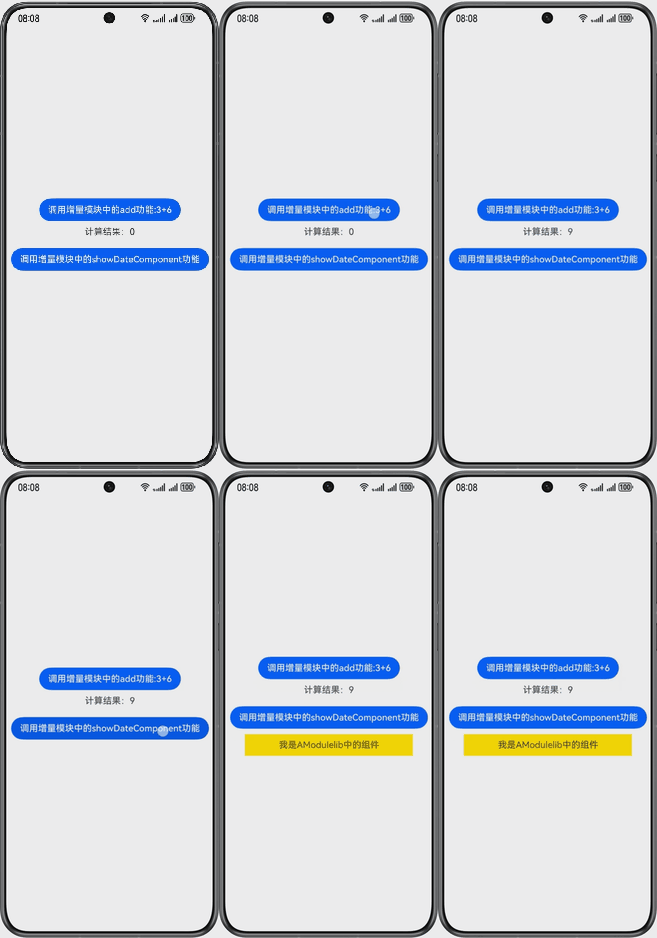
运行结果效果图:
[h2]接入调试功能
产品特性按需分发为开发者提供接入调试功能,支持开发者在接入过程中进行调试,应用无需上架应用市场。假如应用A由entry.hap、AModulelib.hsp两个包组成,其中entry是基础包,AModulelib是扩展功能包(创建方式请参考应用程序包开发与使用)。
-
使用调试证书签名应用/服务,本地编译构建出entry.hap、AModulelib.hsp,可通过HDC命令安装或DevEco Studio直接安装基础包。
hdc install entry.hap
-
打开开发者调试模式:进入设置 -> 机型 -> 关于手机,连续点击软件版本7次,弹出“开启“开发者模式””,点击“确认开启”。
-
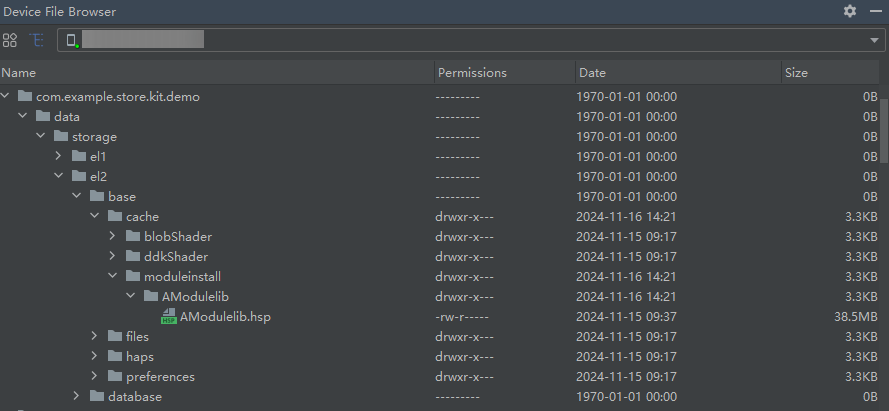
访问设备沙箱路径,在应用el2级别加密数据目录下,创建cache/moduleinstall/<ModuleName>目录(这里<ModuleName>是AModulelib),将模块调试包AModulelib.hsp上传至对应模块目录下(请确保模块调试包文件应有读写权限)。
-
按照创建按需加载的请求实例、请求按需加载的接口、取消下载任务、恢复下载任务和使用动态模块,无需改动参数即可安装好模块调试包,实现取消及恢复下载任务。监听到安装成功后,对应模块目录下的文件会被自动删除。