概述
组件复用是指自定义组件从组件树上移除后被放入缓存池,后续在创建相同类型的组件节点时,直接复用缓存池中的组件对象。
在应用开发时,组件复用是优化UI性能,确保应用流畅的重要手段。合理使用可复用组件,一方面,可以避免频繁创建和销毁对象的过程,减少内存回收的频率;另一方面,复用缓存中的组件可以直接绑定数据进行显示,与创建新视图相比,降低了计算开销,提升了显示效率。
常见的组件复用开发场景是长列表滑动:在应用展示大量数据的列表界面中,当用户快速地进行滑动操作,列表项反复创建销毁可能导致卡顿等性能问题。这种情况下,使用组件复用机制可以重用已经创建过的列表项视图,提高滑动的流畅度。
本文介绍以下组件复用开发场景,帮助开发者更好地理解复用机制,进而优化应用性能。

本文以列表相关场景为例介绍,但实际只要发生了自定义组件的销毁和再创建,都可以考虑使用组件复用。包括以下情形:
- 滑动场景下对子组件进行频繁创建和销毁。例如List、Grid、WaterFlow、Swiper等布局容器中的滑动。
- 界面中反复切换条件渲染的控制分支,且控制分支中的子组件树结构比较复杂。
[h2]场景描述
同一列表内的列表项组件复用是典型的应用开发场景。列表在滑动时,超出屏幕一定范围的列表项,被放入缓存池中,当新的列表项滑动进入屏幕范围内时,从缓存池中取出对象,绑定对应数据后呈现到列表界面中。
在实际业务中,同一列表内可能呈现一种或多种不同结构的列表项,可以进一步划分以下子场景:
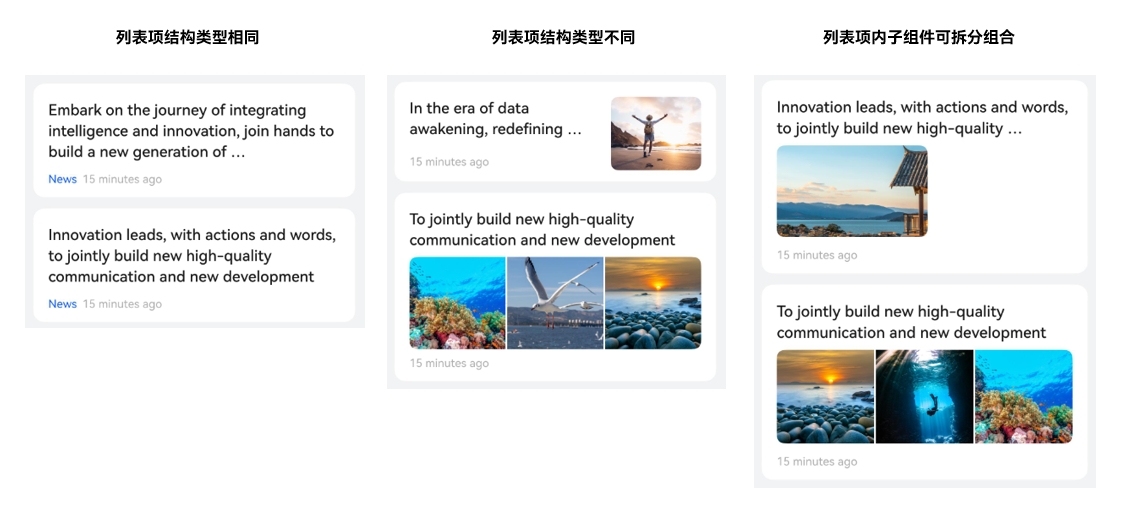
[h2]实现原理
ArkUI提供了@Reusable装饰器以实现自定义组件的复用,其原理如图所示:
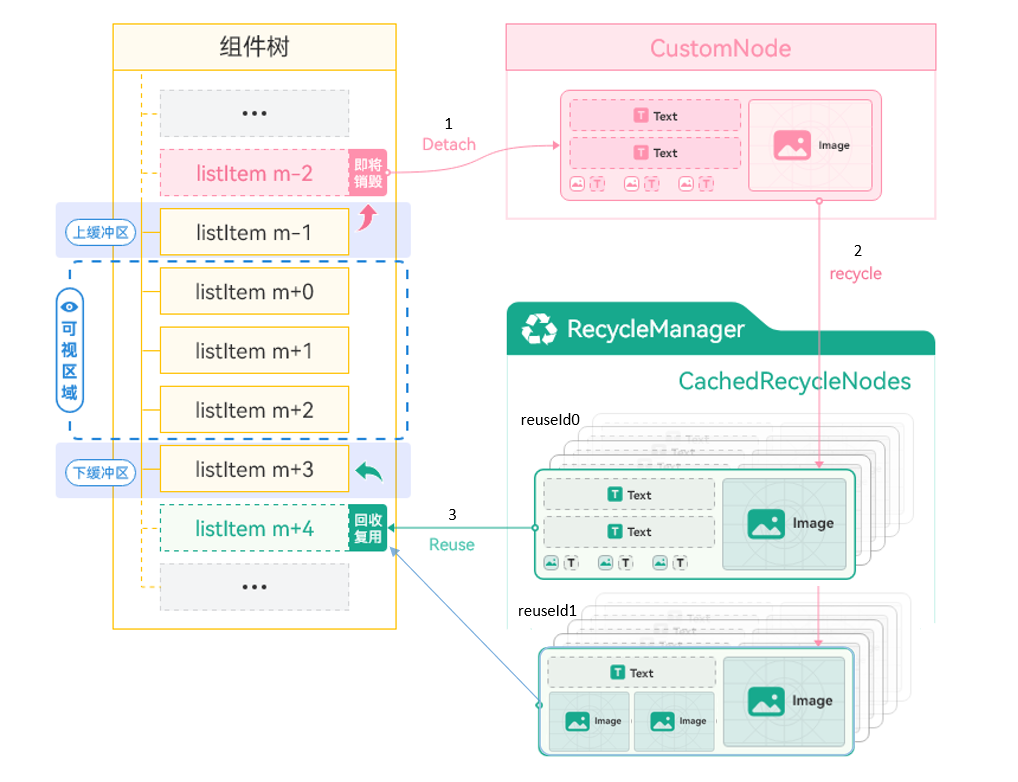
- 标记了@Reusable的自定义组件listItem列表项,在滑动出屏幕一定范围后,从组件树上被移除,组件的对象实例被放入CustomNode虚拟结点(与自定义组件一一对应的自定义结点)。
- 在不断滑动过程中,列表的RecycleManager将这些CustomNode虚拟结点回收,根据复用标识分组,形成CachedRecycleNodes的集合,即视图对象的复用缓存池。
- 继续滑动,新的listItem需要在列表上显示时,RecycleManager优先从复用缓存池(CachedRecycleNodes集合)中查找对应reuseId的视图对象,然后将新的数据绑定到该视图,重用该节点并添加到组件树上。
[h2]开发步骤
定义可复用组件:使用@Reusable装饰器修饰可复用的自定义组件。
实现复用回调:可复用组件需要实现aboutToReuse()生命周期回调。当组件从缓存中重新加入到节点树时,触发aboutToReuse()生命周期回调,组件的构造参数会传递进来,开发者根据需要在回调中处理数据刷新。
布局中使用可复用组件:设置reuseId划分组件的复用组别,以区分缓存池。未设置reuseId时,组件名会默认作为reuseId。
@Entry
@Component
struct Index {
  // ...

  build() {
    Column() {
      // ...
      if (this.switch) {
        ReusableComponent({ text: this.typeStr })
          .reuseId(this.typeStr)
      }
    }
    // ...
  }

  // ...
}

@Reusable
@Component
struct ReusableComponent {
  @State text: string = ''

  aboutToReuse(params: Record<string, Object>): void {
    this.text = params.text as string;
  }

  build() {
    // ...
  }
}

- @Reusable修饰的组件需要布局在同一个父自定义组件(后文简称“父组件”)下才能实现缓存复用。
不建议在@Reusable修饰的组件中嵌套使用另一个@Reusable组件。
更多注意事项参考指南限制条件。
[h2]列表项结构类型相同
这种场景下,列表中的每一项都是由相同类型的元素和布局构成,列表项组件可以作为复用逻辑的基本单位。
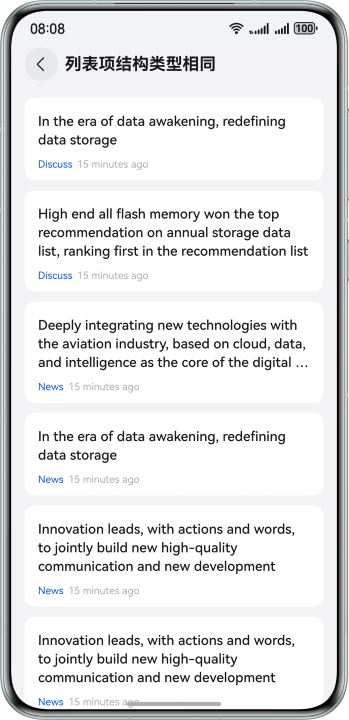
实现步骤:
- 将列表项封装为自定义组件ItemView,添加@Reusable修饰。
- 在ItemView组件内的aboutToReuse()方法中进行新数据绑定逻辑。
- 在列表的LazyForEach()中使用ItemView组件,设置reuseId。
下面的示例中,ItemView组件添加了@Reusable和aboutToReuse()方法,然后在OneTypeItemPage页面中使用,对ItemView组件设置reuseId('item_id'),表示此处以item_id为复用分组id。
@Component
export struct OneTypeItemPage {
  // ...
  build() {
    NavDestination() {
      Column() {
        List() {
          LazyForEach(this.dataSource, (item: ItemData) => {
            ListItem() {
              ItemView({ title: item.title, from: item.from, tail: item.tail })
                .reuseId('item_id')
            }
          }, (item: ItemData) => item.id.toString())
        }
        // ...
      }
      // ...
    }
    // ...
  }
}

@Reusable
@Component
struct ItemView {
  @State title: string | Resource = '';
  @State from: string | Resource = '';
  @State tail: string | Resource = '';

  aboutToReuse(params: Record<string, Object>): void {
    this.title = params.title as string;
    this.from = params.from as string;
    this.tail = params.tail as string;
  }

  build() {
    // ...
  }
}
[h2]列表项结构类型不同
这种场景下,列表中会有多种类型的列表项,如下图包含了文本、单图、多图等三种列表项,其布局、组成元素存在一定差异,可以将每种类型的列表项分别作为复用单位。
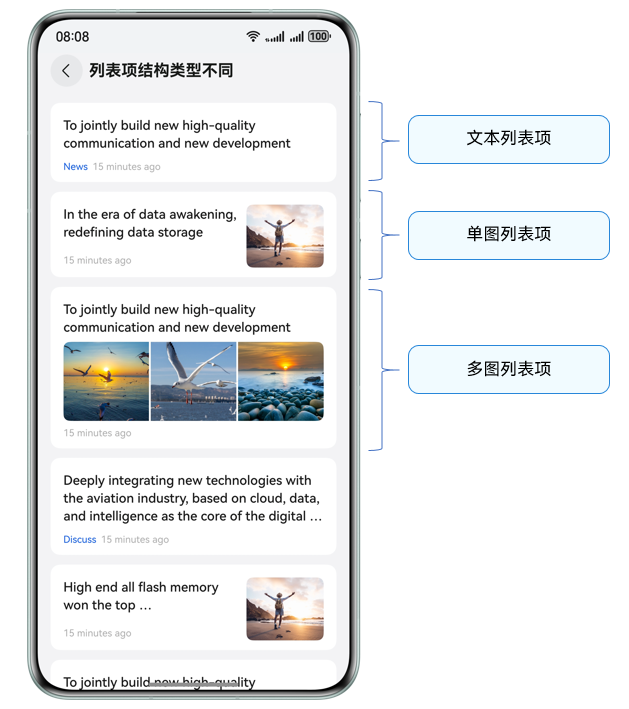
在滑动的过程中,不同类型的列表项将分别回收进入各自的缓存池,当需要复用时,根据类型找到对应视图缓存进行显示。
实现步骤:
- 将不同类型的列表项分别封装为自定义组件,添加@Reusable修饰。
- 在组件内的aboutToReuse()方法中进行新的数据绑定逻辑。
- 在列表的LazyForEach()中,根据业务逻辑进行if条件选择,布局相应类型的列表项组件,分别设置reuseId。
@Component
export struct MultiTypeItemPage {
  // ...

  build() {
    NavDestination() {
      Column() {
        List() {
          LazyForEach(this.dataSource, (item: ItemData) => {
            if (item.type === 0) {
              TextTypeItemView({ item: item })
                .reuseId('text_item_id')
            } else if (item.type === 1) {
              ImageTypeItemView({ item: item })
                .reuseId('image_item_id')
            } else if (item.type === 2) {
              ThreeImageTypeItemView({ item: item })
                .reuseId('three_image_item_id')
            }
          }, (item: ItemData) => item.id.toString())
        }
        // ...
      }
      // ...
    }
    // ...
  }
}

@Reusable
@Component
struct TextTypeItemView {
  // ...
}


@Reusable
@Component
struct ImageTypeItemView {
  // ...
}

@Reusable
@Component
struct ThreeImageTypeItemView {
  // ...
}
[h2]列表项内子组件可拆分组合
这种情况下,列表项也具有多种结构类型。通过观察可知,列表项内部子组件都是纵向分布排列,相同之处是顶部的文本标题、底部的发布时间,而不同之处是中间的区域部分:有单图、多图、视频三种情况。
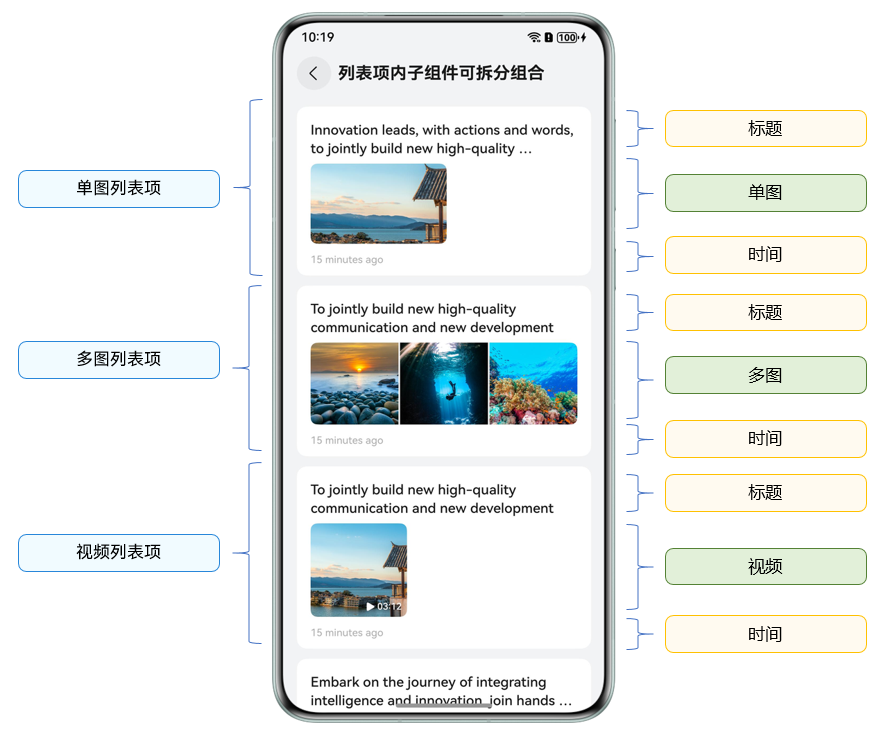
因此,可以创建五种复用子组件,通过子组件的选择组合,实现不同类型的列表项。
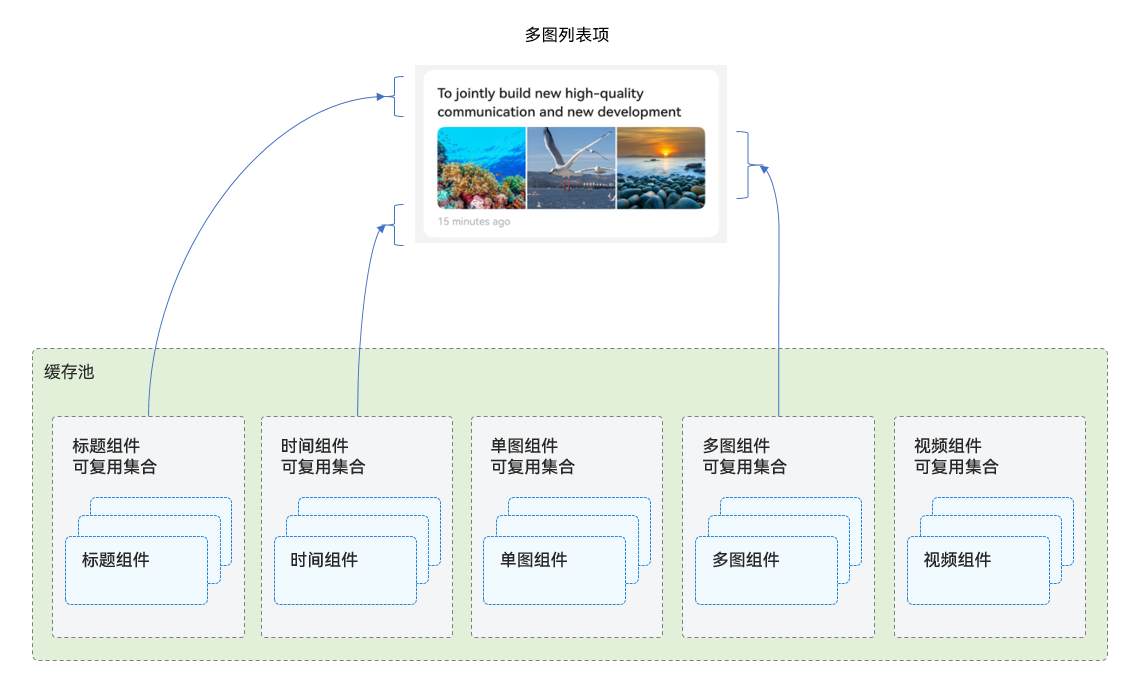
实现步骤:
- 将单图、多图、视频、顶部标题、底部时间等分别封装为子组件,添加@Reusable修饰。
- 在组件内的aboutToReuse()方法中进行新的数据绑定逻辑。
- 通过组合子组件,实现三个不同的@Builder函数,与三种列表项一一对应。
- 在列表的LazyForEach()中,根据业务逻辑进行条件选择,分别调用相应类型的@Builder函数。

使用 @Builder 而非直接嵌套子组件的原因如下:
由于缓存池位于自定义组件上,嵌套子组件后会将缓存池分割,导致复用不生效。而使用@Builder可以使内部的自定义组件依然汇聚在同一个缓存池里,从而实现相互复用。
正例:
itemBuilderSingleImage()函数使用@Builder装饰器实现,ComposableItemPage中调用this.itemBuilderSingleImage(item)布局,itemBuilderSingleImage()内部的自定义组件就会汇聚在ComposableItemPage对应的缓存池里,即TopView、MiddleSingleImageView、BottomView等Reusable组件汇聚在同一缓存池里,当调用ComposableItemPage中其他@Builder函数时,也可复用内部@Reusable装饰的组件。
@Component
export struct ComposableItemPage {
  // ...

  @Builder
  itemBuilderSingleImage(item: ItemData) {
    TopView({ item: item }).reuseId('top_id')
    MiddleSingleImageView({ item: item }).reuseId('middle_image_id')
    BottomView({ item: item }).reuseId('bottom_id')
  }

  @Builder
  itemBuilderThreeImage(item: ItemData) {
    TopView({ item: item }).reuseId('top_id')
    MiddleThreeImageView({ item: item }).reuseId('middle_three_image_id')
    BottomView({ item: item }).reuseId('bottom_id')
  }

  @Builder
  itemBuilderVideoImage(item: ItemData) {
    TopView({ item: item }).reuseId('top_id')
    MiddleVideoView({ item: item }).reuseId('middle_video_id')
    BottomView({ item: item }).reuseId('bottom_id')
  }

  build() {
    NavDestination() {
      Column() {
        List() {
          LazyForEach(this.dataSource, (item: ItemData) => {
            ListItem() {
              Column() {
                if (item.type === 0) {
                  this.itemBuilderSingleImage(item)
                } else if (item.type === 1) {
                  this.itemBuilderThreeImage(item)
                } else if (item.type === 2) {
                  this.itemBuilderVideoImage(item)
                }
              }
              // ...
            }
          }, (item: ItemData) => item.id.toString())
        }
        // ...
      }
      // ...
    }
    // ...
  }
}

@Reusable
@Component
struct TopView {
  // ...
}

@Reusable
@Component
struct BottomView {
  // ...
}

@Reusable
@Component
struct MiddleSingleImageView {
  // ...
}

@Reusable
@Component
struct MiddleThreeImageView {
  // ...
}

@Reusable
@Component
struct MiddleVideoView {
  // ...
}
反例:
如果将itemBuilderSingleImage()、itemBuilderThreeImage()等@Builder函数改为@Component装饰器实现,比如分别命名为SingleImageComponent、ThreeImageComponent等,这会导致SingleImageComponent内部的TopView、MiddleSingleImageView、BottomView等组件仅汇聚在SingleImageComponent组件对应的缓存池中,ThreeImageComponent内部同理。这些@Reusable组件因处在不同@Component的缓存池中,ComposableItemPage在最后布局绘制时,复用将不生效。
@Component
export struct ComposableItemPage {
  // ...
  build() {
    NavDestination() {
      Column() {
        List() {
          LazyForEach(this.dataSource, (item: ItemData) => {
            ListItem() {
              Column() {
                if (item.type === 0) {
                  SingleImageComponent({ item: item })
                } else if (item.type === 1) {
                  ThreeImageComponent({ item: item })
                } else if (item.type === 2) {
                  VideoComponent({ item: item })
                }
              }
              // ...
            }
          }, (item: ItemData) => item.id.toString())
        }
        // ...
      }
      // ...
    }
    // ...
  }
}

@Component
struct SingleImageComponent{
  // ...
   build() {
    Column() {
      TopView({ item: item }).reuseId('top_id')
      MiddleSingleImageView({ item: item }).reuseId('middle_image_id')
      BottomView({ item: item }).reuseId('bottom_id')
    }
  }
}

@Component
struct ThreeImageComponent{
  // ...
   build() {
    Column() {
      TopView({ item: item }).reuseId('top_id')
      MiddleThreeImageView({ item: item }).reuseId('middle_three_image_id')
      BottomView({ item: item }).reuseId('bottom_id')
    }
  }
}

@Component
struct VideoComponent{
  // ...
   build() {
    Column() {
      TopView({ item: item }).reuseId('top_id')
      MiddleVideoView({ item: item }).reuseId('middle_video_id')
      BottomView({ item: item }).reuseId('bottom_id')
    }
  }
}

@Reusable
@Component
struct TopView {
  // ...
}

@Reusable
@Component
struct BottomView {
  // ...
}

@Reusable
@Component
struct MiddleSingleImageView {
  // ...
}

@Reusable
@Component
struct MiddleThreeImageView {
  // ...
}

@Reusable
@Component
struct MiddleVideoView {
  // ...
} [h2]场景描述
应用开发有这种场景:在不同的标题页面中展示数据,每一页面下实现了一个列表,这样在页面切换时,列表与列表之间如果存在结构相同的列表项,就有组件复用的优化可能。例如下图,News、Hot等页签下,绘制了类型相同的列表项。

[h2]实现原理
在ArkUI中,可以采用Swiper+List实现这种功能场景,其中Swiper中的每个页面都使用一个List列表呈现内容。从@Reusable的复用机制可知,复用缓存池需要在同一父组件中,而列表项Item的父组件是当前页面的列表List,当Swiper内的页面切换时,无法直接复用上一个页面的列表项。
此时可以自定义一个全局的复用缓存池NodePool,利用BuilderNode的节点复用能力,根据页面状态创建、回收、复用子组件,实现这种跨页面多个列表间的组件复用。

为什么不使用Tabs+List,而是用Swiper+List组件实现?
当前Tabs内容页不支持使用LazyForEach(),只能使用ForEach+TabContent。如果使用ForEach(),Tabs页面显示时会一次性将所有的TabContent创建,TabContent子页面切换时也不会执行aboutToDisappear(),无法回收组件,进而不存在复用优化的可能。
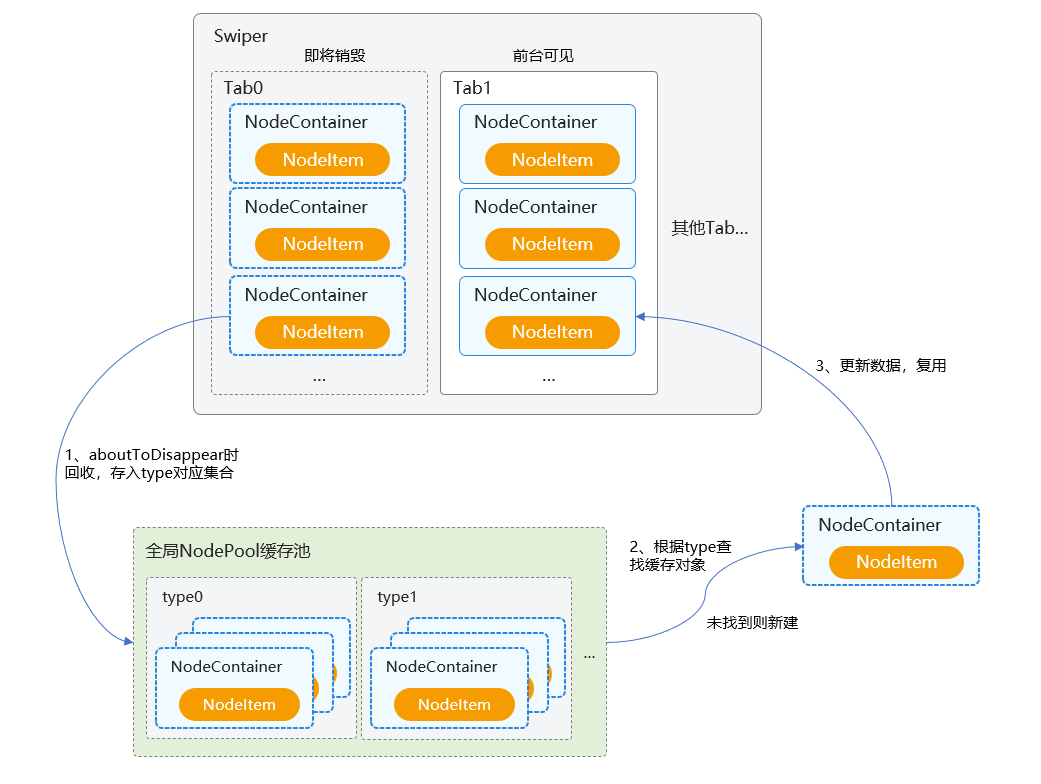
在需要布局自定义组件的位置,使用NodeContainer占位,然后继承NodeController实现NodeItem结点类,其内部需要持有BuilderNode实例以实现结点的创建和复用,同时需要持有视图相应的数据对象以更新界面显示。
- 当NodeItem随着视图组件即将销毁时,在aboutToDisappear()中回收NodeItem到NodePool缓存池,存入type类型对应的集合中。
- 每次需要创建自定义组件时,优先根据type类型查找对应的NodeItem对象,若未找到则新建一个NodeItem。
- 视图组件随着NodeContainer的生命周期显示时,执行数据更新,完成组件的复用过程。
这种方式需要自行维护复用池,开发者也可以考虑使用同一原理实现的全局组件复用池三方库:nodepool。
[h2]开发步骤
实现列表项占位结点类NodeItem,继承NodeController实现makeNode()方法,根据node是否存在,执行创建或刷新数据的逻辑,并在aboutToDisappear()时回收组件结点。
export class NodeItem extends NodeController {
  public builder: WrappedBuilder<ESObject> | null = null;
  public node: BuilderNode<ESObject> | null = null;
  public data: ESObject = {};
  public type: string = '';
  public id: number = 0;

  aboutToRecycle(): void {
    NodePool.getInstance().recycleNode(this.type, this);
  }

  update(data: ESObject) {
    this.data = data;
    this.node?.reuse(data);
  }

  makeNode(uiContext: UIContext): FrameNode | null {
    if (!this.node) {
      this.node = new BuilderNode(uiContext);
      this.node.build(this.builder, this.data);
    } else {
      this.update(this.data);
    }
    return this.node.getFrameNode();
  }

  // ...
}
使用单例模式实现复用缓存池NodePool工具类,在应用内统一管理组件的复用逻辑:实现取缓存getNode()方法,根据传入的type类型,获取对应的NodeItem,如果未找到,则新创建后绑定数据;实现缓存回收recycleNode()方法,根据type类型存入相应的集合中。
export class NodePool {
  private static instance: NodePool;
  private idGen: number;
  private nodePool: HashMap<string, LinkedList<NodeItem>>;

  private constructor() {
    this.nodePool = new HashMap();
    this.idGen = 0;
  }

  public static getInstance() {
    if (!NodePool.instance) {
      NodePool.instance = new NodePool();
    }
    return NodePool.instance;
  }

  public getNextId(): number {
    this.idGen += 1;
    return this.idGen;
  }

  public getNode(type: string, item: ESObject,
    builder: WrappedBuilder<ESObject>): NodeItem | undefined {
    let nodeItem: NodeItem | undefined = undefined;
    try {
      if (this.nodePool.get(type)) {
        for (let i = 0; i < this.nodePool.get(type)?.length; i++) {
          let tmpItem: NodeItem | undefined = this.nodePool.get(type)?.get(i);
          if (!tmpItem.node?.getFrameNode()?.getParent()) {
            nodeItem = tmpItem;
            this.nodePool.get(type)?.removeByIndex(i);
            break;
          }
        }
      }
    } catch (e) {
      let err = e as BusinessError;
      hilog.error(DOMAIN, 'testTag', `failed code=${err.code}, message=${err.message}`);
    }

    if (!nodeItem) {
      nodeItem = new NodeItem();
      nodeItem.builder = builder;
      nodeItem.type = type;
      nodeItem.data.item = item;
    } else {
      nodeItem.data.item = item;
    }
    return nodeItem;
  }

  public recycleNode(type: string, node: NodeItem) {
    try {
      let nodeArray: LinkedList<NodeItem> = this.nodePool.get(type);
      if (!nodeArray) {
        nodeArray = new LinkedList();
        this.nodePool.set(type, nodeArray);
      }
      node.data.item = {};
      nodeArray.add(node);
    } catch (e) {
      let err = e as BusinessError;
      hilog.error(DOMAIN, 'testTag', `failed code=${err.code}, message=${err.message}`);
    }
  }

  // ...
}
- getNode()方法中,如果找到的NodeItem父结点不为空(说明未完全下树),需要继续遍历查找下一个有效的NodeItem对象。
- recycleNode()方法中,需要对NodeItem对象属性重置,使节点内容还原,避免复用显示异常情况。
将步骤1中的列表项占位结点包装成组件,在对应的生命周期中分别取缓存、回收、复用。
@Component
export struct DiffListItemNode {
  @State type: string = '';
  @State item: ItemData = new ItemData('', 0);
  @State itemHeight: number = 0;
  @State builder: WrappedBuilder<ESObject> | null = null;
  private nodeItem: NodeItem = new NodeItem();

  aboutToAppear(): void {
    this.nodeItem = NodePool.getInstance().getNode(this.type, this.item, this.builder!)!;
  }

  aboutToDisappear(): void {
    if (this.nodeItem === undefined) {
      return;
    }
    this.nodeItem?.aboutToRecycle();
  }

  aboutToRecycle(): void {
    this.nodeItem?.node?.recycle();
  }

  aboutToReuse(params: ESObject): void {
    this.nodeItem?.node?.reuse(params);
  }

  build() {
    NodeContainer(this.nodeItem)
  }
}
封装列表项的界面视图组件,使用listItemBuilder函数对外export该组件。
@Builder
export function listItemBuilder(data: ESObject) {
  DiffListItemView({
    item: data.item
  })
}

@Component
export struct DiffListItemView {
  // ...

  aboutToReuse(params: ESObject): void {
    this.item = params.item;
  }

  build() {
    Row() {
      // ...
    }
    // ...
  }
}
在列表的LazyForEach()中,将步骤4的实际列表项视图wrapBuilder后作为参数传递给步骤3封装的占位组件,实现复用组件的布局。
export const listItemWrapper: WrappedBuilder<ESObject> = wrapBuilder<ESObject>(listItemBuilder);

@Component
export struct TabContentView {
  // ...

  build() {
    List() {
      LazyForEach(this.dataSource, (item: ItemData) => {
        DiffListItemNode({
          type: REUSE_VIEW_TYPE_ITEM,
          item: item,
          builder: listItemWrapper
        })
      }, (item: ItemData) => item.id.toString())
    }
    // ...
  }
}
[h2]使用onIdle()预创建组件
在当前场景下,首次进入页面可能耗时较高,因为在第一次进入时,自定义组件复用池中没有缓存可以复用,列表项都需要新创建。优化这个问题,可以考虑预创建组件,将组件对象提前放入复用缓存池中。
当组件数量较多,集中预创建本身也耗时较长,容易导致主线程阻塞。ArkUI中提供了onIdle()接口,会返回每一帧帧尾的空闲时间,可以将组件预创建分布到每一帧帧尾的空闲时间中执行,这样预创建过程就被平摊在多个周期里执行,避免集中运行的耗时影响,进而优化应用体验。


- 需要根据业务准确预估组件预创建耗时,同时将业务逻辑颗粒度拆小,以便能够分到多个onIdle()时机中完成。例如,单个组件预创建耗时在2ms左右,帧尾空闲时间只有1ms,那么就不能在当前帧进行预创建,而是延迟到下一帧中执行。
- 需要合理控制自定义组件复用池中预创建的数量,否则内存占用较多,可能会影响性能。
在NodePool工具类中实现预创建preBuild()方法:新建NodeItem实例,设置builder等属性,执行recycleNode()提前放入缓存池中。
export class NodeItem extends NodeController {
  // ...

  prebuild(uiContext: UIContext) {
    this.node = new BuilderNode(uiContext);
    this.node.build(this.builder, this.data);
  }
}

export class NodePool {
  // ...

  public preBuild(type: string, item: ESObject, builder: WrappedBuilder<ESObject>, uiContext: UIContext) {
    if (type) {
      let nodeItem: NodeItem | undefined = new NodeItem();
      nodeItem.builder = builder;
      nodeItem.data.item = item;
      nodeItem.type = type;
      nodeItem.prebuild(uiContext);
      this.recycleNode(type, nodeItem);
    }
  }
}
继承FrameCallback实现帧回调类,在构造器中传入预创建的数据,并实现onIdle()接口。
- 系统会通过onIdle()回调,将帧尾空闲时间通过参数idleTimeInNano传递出来,可根据单个组件的预创建耗时,设置预创建的剩余空闲时间上限(示例代码假设单个组件预创建耗时最长1ms=1000000ns)。
- 当剩余空闲时间足够创建组件时,在这一帧中进行组件预创建,并不断更新当前帧的剩余空闲时间。
- 若当前帧剩余空闲时间不足以创建组件,通过postFrameCallback()方法,将回调传递到下一帧,继续进行剩余组件的预创建。
export class IdleCallback extends FrameCallback {
  private uiContext: UIContext;
  private todoCount: number = 0;
  private dataArray: ItemData[] = [];

  constructor(context: UIContext, preBuildData: ItemData[]) {
    super();
    this.uiContext = context;
    this.dataArray = preBuildData;
  }

  onIdle(idleTimeInNano: number): void {
    if (this.todoCount >= this.dataArray.length) {
      return;
    }
    let cur: number = systemDateTime.getTime(true);
    let timeLeft = idleTimeInNano;
    while (timeLeft >= 1000000) {
      hiTraceMeter.startTrace('onIdle_prebuild', 1);
      NodePool.getInstance().preBuild('reuse_type_', this.dataArray[this.todoCount], listItemWrapper, this.uiContext);
      hiTraceMeter.finishTrace('onIdle_prebuild', 1);
      let now = systemDateTime.getTime(true);
      timeLeft = timeLeft - (now - cur);
      cur = now;
      this.todoCount++;
      if (this.todoCount >= this.dataArray.length) {
        return;
      }
      if (this.todoCount < this.dataArray.length) {
        this.uiContext.postFrameCallback(this);
      }
    }
  }
}
在进入Swiper+List的页面之前,选择合适的时机执行context.postFrameCallback(),开启IdleCallback帧回调逻辑。
@Entry
@Component
struct Index {
  // ...

  aboutToAppear(): void {
    let dataArray: ItemData[] = [];
    dataArray.push(...genMockItemData(100))
    let context = this.getUIContext();
    context.postFrameCallback(new IdleCallback(context, dataArray));
  }

  // ...
}
[h2]使用attributeUpdater实现组件属性的部分刷新
在可复用组件中使用attributeUpdater可以控制指定属性的刷新,避免不必要的重绘、减少渲染负载,从而提升应用性能。
默认情况下,直接使用状态变量在aboutToReuse()中进行数据赋值,会导致组件全部属性刷新。实际需求中,可能只需要更新组件的部分属性。例如,当组件复用显示时,只希望设置文本的字体颜色,那么可以使用attributeUpdater在aboutToReuse()修改fontColor属性。
反例:
这里通过aboutToReuse()对fontColor状态变量更新,导致组件全部属性进行刷新,造成不必要的耗时。
@Component
export struct LessEmbeddedComponent {
  aboutToAppear(): void {
    momentData.getFriendMomentFromRawfile();
  }

  build() {
    Column() {
      Text('use nothing')
      List({ space: ListConstants.LIST_SPACE }) {
        LazyForEach(momentData, (moment: FriendMoment) => {
          ListItem() {
            OneMomentNoModifier({ color: moment.color })
              .onClick(() => {

              })
          }
        }, (moment: FriendMoment) => moment.id)
      }
      .width("100%")
      .height("100%")
      .cachedCount(5)
    }
  }
}

@Reusable
@Component
export struct OneMomentNoModifier {
  @State color: string | number | Resource = "";

  aboutToReuse(params: Record<string, Object>): void {
    this.color = params.color as number;
  }

  build() {
    Column() {
      Text('This is title')
      Text('This is desc text')
        .fontColor(this.color)
        .textAlign(TextAlign.Center)
        .fontStyle(FontStyle.Normal)
        .fontSize(13)
        .lineHeight(30)
        .opacity(0.6)
        .margin({ top: 10 })
        .fontWeight(30)
        .clip(false)
        .backgroundBlurStyle(BlurStyle.NONE)
        .foregroundBlurStyle(BlurStyle.NONE)
        .borderWidth(1)
        .borderColor(Color.Pink)
        .borderStyle(BorderStyle.Solid)
        .alignRules({
          'top': { 'anchor': '__container__', 'align': VerticalAlign.Top },
          'left': { 'anchor': 'image', 'align': HorizontalAlign.End }
        })
    }
  }
}
正例:
通过attributeUpdater对Text组件中的fontColor属性进行精准刷新,避免重绘Text中不需要更改的属性。
export class MyTextUpdater extends AttributeUpdater<TextAttribute> {
  private color: string | number | Resource | Color = '';

  constructor(color: string | number | Resource | Color) {
    super();
    this.color = color;
  }

  initializeModifier(instance: TextAttribute): void {
    instance.fontColor(this.color)
  }
}

// ...

@Reusable
@Component
export struct OneMomentNoModifier {
  @State text: string = '';
  color: string | number | Resource | Color = '';
  textUpdater: MyTextUpdater | null = null;

  aboutToAppear(): void {
    this.textUpdater = new MyTextUpdater(this.color);
  }

  aboutToReuse(params: Record<string, Object>): void {
    this.color = params.color as string;
    this.text = params.text as string;
    this.textUpdater?.attribute?.fontColor(this.color);
  }

  build() {
    Column() {
      Text(this.text)
        .fontSize(18)
        .textAlign(TextAlign.Center)
        .fontWeight(500)
        .lineHeight(24)
        .fontColor(Color.Black)
        .opacity(0.6)
      Column() {
        Text('AAAAAAAAAAAAAAAAAAAAAAAAAAAAAAAAAAAAAAAAAAAAAAAAAAAAAAAAAAAAAAAAA')
          .attributeModifier(this.textUpdater)
          .textAlign(TextAlign.Start)
          .fontSize(16)
          .fontWeight(400)
          .lineHeight(21)
      }
      // ...
    }
    // ...
  }
}
[h2]使用@Link/@ObjectLink替代@Prop以减少深拷贝
在可复用组件中,建议使用@Link/@ObjectLink替代@Prop。因为@Prop装饰变量时会进行深拷贝,增加了创建时间及内存消耗,而改用@Link/@ObjectLink,变量会共享同一地址。
反例:
@Entry
@Component
struct lessEmbeddedComponent {
  aboutToAppear(): void {
    getFriendMomentFromRawfile();
  }

  build() {
    Column() {
      TopBar()
      List({ space: ListConstants.LIST_SPACE }) {
        LazyForEach(momentData, (moment: FriendMoment) => {
          ListItem() {
            OneMoment({moment: moment})
          }
        }, (moment: FriendMoment) => moment.id)
      }
      .cachedCount(Constants.CACHED_COUNT)
    }
  }
}

@Reusable
@Component
export struct OneMoment {
  @Prop moment: FriendMoment;

  build() {
    Column() {
      ...
      Text(`${this.moment.userName}`)
      ...
    }
  }
}

export class FriendMoment {
  id: string;
  userName: string;
  avatar: string;
  text: string;
  size: number;
  image?: string;
}
正例:
将子组件moment变量@Prop改为@ObjectLink即可。
父子组件之间的数据同步用了@ObjectLink来进行,子组件@ObjectLink包装类把当前this指针注册给父组件,会直接将父组件的数据同步给子组件,实现父子组件数据的双向同步,降低子组件创建时间和内存消耗。
[h2]避免对@Link/@ObjectLink/@Prop等自动更新的状态变量,在aboutToReuse()中重复赋值
如果可复用组件中使用了@Link/@ObjectLink/@Prop等自动同步父子组件数据的状态变量,则不需要在aboutToReuse()中对这些数据重复赋值。如果重新赋值这些变量,会导致组件的内容重新触发状态刷新,造成额外的计算更新耗时。
反例:
@Reusable
@Component
export struct OneMoment {
  @ObjectLink moment: FriendMoment;

  aboutToReuse(params: Record<string, Object>): void {
    this.moment.id = (params.moment as FriendMoment).id
    this.moment.userName = (params.moment as FriendMoment).userName
    this.moment.avatar = (params.moment as FriendMoment).avatar
    this.moment.text = (params.moment as FriendMoment).text
    this.moment.image = (params.moment as FriendMoment).image
  }

  build() {
    Column() {
      ...
      Text(`${this.moment.userName}`)
      ...
    }
  }
}
正例:
将aboutToReuse()中的赋值语句删除。
@ObjectLink修饰的moment状态变量已包含自动刷新功能,不需要再重复赋值刷新。
[h2]使用reuseId标记布局发生变化的组件
在同一段自定义组件代码中,如果使用if/else条件语句控制布局结构,会导致在不同逻辑分支中创建不同布局的组件,从而造成组件树结构的差异。此时可以使用reuseId来区分发生变化的分支逻辑,确保系统能够根据reuseId缓存各种结构的组件,提升复用性能。
反例:
组件通过if条件创建包含Image的Flex组件。不使用reuseId时,复用后根据if条件,可能会删除Flex或重新创建Flex,存在性能消耗。
@Entry
@Component
struct AboutReuseId {

  build() {
    Column() {
      TopBar()
      List({ space: ListConstants.LIST_SPACE }) {
        LazyForEach(momentData, (moment: FriendMoment) => {
          ListItem() {
            OneMoment({
              moment: moment,
              fontSize: moment.size
            })
          }
        }, (moment: FriendMoment) => moment.id)
      }
      .cachedCount(Constants.CACHED_COUNT)
    }
  }
}

@Reusable
@Component
export struct OneMoment {
  @Prop moment: FriendMoment;

  build() {
    Column() {
      ...
      Text(this.moment.text)

      if (this.moment.image !== '') {
        Flex({ wrap: FlexWrap.Wrap }) {
          Image($r(this.moment.image))
          Image($r(this.moment.image))
          Image($r(this.moment.image))
        }
      }
      ...
    }
  }
}
正例:
根据分支逻辑设置不同的reuseId,缓存不同布局结构下的组件,省去重复执行if的删除或创建逻辑。
@Entry
@Component
struct WithReuseId {
  // ...

  build() {
    Column() {
      List({ space: this.LIST_SPACE }) {
        LazyForEach(this.momentData, (moment: FriendMoment) => {
          ListItem() {
            OneMoment({ moment: moment })
              .reuseId((moment.image !== '') ? 'withImage_id' : 'noImage_id')
          }
        }, (moment: FriendMoment) => moment.id)
      }
      // ...
    }
  }
}

@Reusable
@Component
export struct OneMoment {
  @ObjectLink moment: FriendMoment;

  build() {
    Column() {
      // ...

      if (this.moment.image !== '') {
        Flex({ wrap: FlexWrap.Wrap }) {
          Image($r(this.moment.image))
            .width(Constants.LAYOUT_MAX)
            .height('27.5%')
            .borderRadius(16)
          Image($r(this.moment.image))
            .width(Constants.LAYOUT_MAX)
            .height('27.5%')
            .borderRadius(16)
            .margin({ top: 10 })
        }
        .width(Constants.LAYOUT_MAX)
        .margin({ top: 14 })
      }
    }
    // ...
  }
}
[h2]避免使用函数方法作为复用组件的入参
如果可复用组件的入参使用了函数方法,因每次复用都需要重新创建组件关联的数据对象,该函数会在每次复用时执行,造成性能问题。建议改为通过状态变量传递参数,从而减少重复执行入参中的函数所带来的性能消耗。
反例:
复用的子组件参数sum是通过模拟耗时函数countAndReturn()生成。该函数在每次组件复用时都执行,会造成性能问题,甚至导致列表滑动过程中的卡顿丢帧。
@Entry
@Component
struct withFuncParam {
  aboutToAppear(): void {
    getFriendMomentFromRawfile();
  }

  countAndReturn(): number {
    let temp: number = 0;
    for (let index = 0; index < 100000; index++) {
      temp += index;
    }
    return temp;
  }

  build() {
    Column() {
      TopBar()
      List({ space: ListConstants.LIST_SPACE }) {
        LazyForEach(momentData, (moment: FriendMoment) => {
          ListItem() {
            OneMoment({
              moment: moment,
              sum: this.countAndReturn()
            })
          }
        }, (moment: FriendMoment) => moment.id)
      }
      .cachedCount(Constants.CACHED_COUNT)
    }
  }
}

@Reusable
@Component
export struct OneMoment {
  @Prop moment: FriendMoment;
  @State sum: number = 0;

  aboutToReuse(params: Record<string, Object>): void {
    this.sum = params.sum as number;
  }

  build() {
    Column() {
      ...
      Text(`${this.moment.userName} (${this.moment.id} / ${this.sum})`)
      ...
    }
  }
}
正例:
可以先将countAndReturn()计算放到页面初始时执行,将结果赋值给this.sum变量。在复用组件的参数传递时,通过this.sum来进行。
@Entry
@Component
struct WithFuncParam {
  @State sum: number = 0;
  // ...
  private readonly MOCK_ASYNC_DEFAULT_NUM: number = 1000000;
  private readonly MOCK_ASYNC_TIME_OUT_NUM: number = 2000;

  aboutToAppear(): void {
    this.momentData.getFriendMomentFromRawFile();
    this.countAndReturn();
  }

  async countAndReturn(): Promise<void> {
    await this.sleep();
    this.sum = this.MOCK_ASYNC_DEFAULT_NUM;
  }

  sleep(): Promise<string> {
    return new Promise<string>((resolve) => {
      setTimeout(() => {
        resolve('ok');
      }, this.MOCK_ASYNC_TIME_OUT_NUM)
    });
  }

  build() {
    Column() {
      List({ space: this.LIST_SPACE }) {
        LazyForEach(this.momentData, (moment: FriendMoment) => {
          ListItem() {
            OneMoment({
              moment: moment,
              sum: this.sum
            })
          }
        }, (moment: FriendMoment) => moment.id)
      }
      // ...
    }
  }
}

@Reusable
@Component
export struct OneMoment {
  @ObjectLink moment: FriendMoment;
  @State sum: number = 0;
  // ...

  aboutToReuse(params: Record<string, Object>): void {
    this.sum = params.sum as number;
  }

  // ...
} [h2]如何检查组件复用是否生效
- 使用Code Linter扫描工具进行代码检查,重点关注@performance/hp-arkui-use-reusable-component规则。
- 通过Profiler工具抓取Trace,搜索组件名称,根据BuildRecycle字段识别是否触发复用渲染。具体可参考通过Trace识别懒加载渲染流程。
- 通过Profiler工具抓取Trace,识别是否发生丢帧,判断子组件创建的次数。具体分析过程可参考优化长列表-组件复用性能分析。