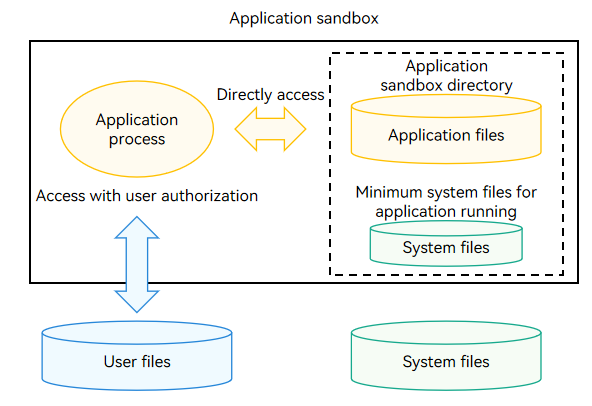
The application sandbox is an isolation mechanism used to prevent malicious data access through path traversal. With this mechanism, only the application sandbox directory is visible to an application.
-
The system provides a dedicated application sandbox directory in the internal storage to map the directory of each application. The application sandbox directory contains only the application file directory and the directory containing the minimum system files required for the running of the application.
-
The application sandbox limits the scope of data visible to an application. By default, each application can access only its own application files and the system files required for its running. On the device platform where all files are mounted, the File Manager application can view the data stored by other applications under the el2/base directory.
-
In each application sandbox directory, the application can save and process its application files in the application file directory, and can only read the system files and directories. To access user files, see User File Overview.
The following figure illustrates the file access mechanism in the application sandbox.
Figure 1 File access mechanism in the application sandbox
Application Sandbox Directory and Application Sandbox Path
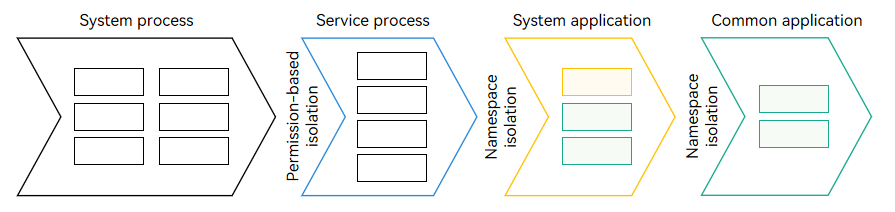
With the application sandbox mechanism, an application is not aware of the existence and location of other applications' directories and user file directories. Even the directories visible to an application are isolated by permission and namespace to form an independent directory view and shield the physical (real) paths.
-
As shown in the following figure, the application sandbox mechanism minimizes the number of directories and files visible to a common application (third-party application). In addition, the directories and file paths visible to a common application are different from those visible to a system process. The path of a file or folder in the application sandbox directory visible to a common application is called the application sandbox path.
-
During app development and debugging, you may need to push some files to the app sandbox for access or testing within the app. Use DevEco Studio to push the files to the application installation directory. For details, see Application Installation Resource Access.
-
The actual physical path and the sandbox path do not have a one-to-one mapping relationship. The sandbox path is always a subset of the physical paths visible from the system process perspective. Some physical paths visible from the perspective of debugging processes do not have corresponding paths in the corresponding app sandbox directory.
Figure 2 Different directory views to processes and applications
Application File Directory and Application File Path
The application sandbox directory consists of the application file directory and system file directory.
The system file directory visible to an application is preset by HarmonyOS.
The following figure shows the application file directory structure. The path of a file or a directory in the application file directory is called the application file path. Each file path has different attributes and features.
Figure 3 Application file directory structure


- Do not use file paths made up by level 1 to level 3 directory names. Incompatibility problems may occur if the directory names are changed in later versions.
- Use Context to obtain the application file paths, including but not limited to the directories highlighted in green in Figure 3. For details about how to obtain the context and application file paths, see Context (Stage Model).
-
Level 1 directory data/: root directory of app files.
-
Level 2 directory storage/: directory for persistent files of the application.
-
There are files of different encryption levels in el1/ to el5/.
Encryption Level 1 (EL1):
-
All files are protected on the device. After the device is powered on, users can access the files protected by EL1 without identity authentication. This method is not recommended unless otherwise required.
-
The ciphertext stolen from the storage device cannot be decrypted offline.
Encryption Level 2 (EL2):
-
On the basis of EL1, files are protected after the first user authentication. After the device is powered on, users can access the files protected by EL2 only after the first authentication. Those files are always accessible as long as the device is not powered off. This mode is recommended by default.
-
Files cannot be read by attackers if the phone is lost after power-off.
Encryption Level 3 (EL3):
- Files can be created but cannot be read when the screen is locked, which is different from EL4. This mode is not required unless otherwise specified.
Encryption Level 4 (EL4):
-
On the basis of EL2, files are protected when the device screen is locked. In this case, data protected by EL4 cannot be accessed. This mode is not required unless otherwise specified.
-
Files cannot be read by attackers if the device is stolen with screen locked.
Encryption Level 5 (EL5):
-
On the basis of EL2, files are protected when the device screen is locked. In this case, data protected by EL5 cannot be accessed, but files can be created, read, and written. This mode is not required unless otherwise specified.
-
EL5 directories are not generated by default unless the permissions for access to the EL5 database are configured. For details about the configuration, see Using an EL5 Database (ArkTS).

-
Unless otherwise required, application data is placed in the el2 directory for security purposes. The data that needs to be accessed before the first user authentication (such as the clock, alarm, and wallpaper data) is placed in the el1 directory.
-
You can listen for the COMMON_EVENT_USER_UNLOCKED event to detect that the first user authentication is complete.
-
For details about the operations on el1/ and el2/, see Obtaining and Modifying el Directories.
-
-
Level 4 and level 5 directories:
The application's global data is stored in the distributedfiles directory and files, cache, preferences, and temp in base. You can use ApplicationContext to obtain the application file paths of these directories.
Files of an HarmonyOS Ability Package (HAP) are stored in the haps/ directory. You can use UIAbilityContext, AbilityStageContext, and ExtensionContext to obtain application file paths related to a HAP. When a HAP is uninstalled, the files in the haps/ directory are automatically deleted, without affecting the files in application-level directories. An application in the development state has one or more HAPs. For details, see Application Package Structure in Stage Model.
The following table describes the application file paths and their lifecycle.
Table 1 Application file paths
Folder Name Context Attribute Name Type Description bundle bundleCodeDir Installation file path Directory where the app's HAP resource packages reside after app installation; cleaned up upon app uninstallation.
Do not access resource files by concatenating paths. Use the relevant APIs of @ohos.resourceManager (Resource Management) to access resources.
The directory can be used for storing the app's code resource data, which mainly includes HAP resource packages installed with the app, reusable library files, and plugin resources. The code resource data stored under this path can be used for dynamic loading.
base NA Directory for the device's files Directory for storing persistent data on the device (the directory is cleared when the application is uninstalled). The subdirectories include files/, cache/, temp/, and haps/.
You are not advised to store high-risk information such as cookies, passwords, and tokens in plaintext in this directory.
database databaseDir Database directory Directory in el2 for saving the files operated by the distributed database service.
This directory is cleared when the application is uninstalled.
This directory can be used to store the application's private database data, such as database files, in distributed scenarios only.
distributedfiles distributedFilesDir Distributed file path Directory for storing distributed files under el2 encryption conditions. Files placed in this directory can be directly accessed across devices in a distributed manner; cleaned up upon app uninstallation.
The directory can be used for storing data in app distributed scenarios, which mainly includes app multi-device shared files, app multi-device backup files, and app multi-device group collaboration files. Storing such data under this path makes the app more suitable for multi-device usage scenarios.
Note:
The .remote_share directory under distributedfiles is created and managed by the system. Do not create or manipulate it.
The distributedfiles directory supports direct operations on files on other devices. Do not delete files in this directory arbitrarily. For details, see Sharing and Accessing Files Across Devices.
files filesDir Application file directory Directory for saving the application's persistent files on the device.
This directory is cleared when the application is uninstalled.
You can place the application's private data, including persistent files, images, media files, and log files, in this directory. The data is stored in this directory to ensure privacy, security, and permanent validity.
cache cacheDir Application cache file directory Directory for caching the downloaded files of the application or saving the cache files regenerated on the device.
This directory is automatically cleared when the size of the cache directory reaches the quota or the system storage space reaches a certain threshold. End users can also clear this directory by using a system space management application. The application needs to check whether a file still exists and determine whether to cache the file again. This directory is cleared when the application is uninstalled.
You can place the cached data of the application, including offline data, cached images, database backup, and temporary files, in this directory. Data stored in this directory may be automatically deleted by the system. Therefore, do not store important data in this directory.
preferences preferencesDir Preferences file directory Directory for saving common application configuration and user preferences managed by ArkData APIs on the device.
This directory is cleared when the application is uninstalled. For details about how to make preferences data persistent, see Persisting Preferences Data.
You can place application preferences data, including preference files and configuration files, in this directory. This directory applies to storing only a small amount of data.
temp tempDir Temporary file directory Directory for saving the files generated and required during the application's runtime on the device.
This directory is cleared when the application exits.
You can place temporarily generated data of the application, including cached database data and images, temporary log files, downloaded application installation packages, in this directory. The data stored in this directory can be deleted immediately after being used.
Mappings Between Application Sandbox Paths and Physical Paths
The read and write operations performed on an application sandbox directory are eventually performed on the files in the physical directory after address conversion. The following table lists their mappings.
In the physical paths, <USERID> indicates the ID of the current user, which starts from 100, and <EXTENSIONPATH> is moduleName-extensionName. For details about the application running in an independent Extension sandbox, see ExtensionAbility Component.
| Application Sandbox Path | Physical Path |
|---|---|
| /data/storage/el1/bundle | Application installation package directory: /data/app/el1/bundle/public/<PACKAGENAME> |
| /data/storage/el1/base | Application directory of encryption level 1. - Application running in a non-independent sandbox: /data/app/el1/<USERID>/base/<PACKAGENAME> - Extension application running in an independent sandbox: /data/app/el1/<USERID>/base/+extension-<EXTENSIONPATH>+<PACKAGENAME> |
| /data/storage/el2/base | Application directory of encryption level 2. - Application running in a non-independent sandbox: /data/app/el2/<USERID>/base/<PACKAGENAME> - Extension application running in an independent sandbox: /data/app/el2/<USERID>/base/+extension-<EXTENSIONPATH>+<PACKAGENAME> |
| /data/storage/el1/database | Database directory of the application under el1/. - Application running in a non-independent sandbox: /data/app/el1/<USERID>/database/<PACKAGENAME> - Extension application running in an independent sandbox: /data/app/el1/<USERID>/database/+extension-<EXTENSIONPATH>+<PACKAGENAME> |
| /data/storage/el2/database | Database directory of the application under el2/. - Application running in a non-independent sandbox: /data/app/el2/<USERID>/database/<PACKAGENAME> - Extension application running in an independent sandbox: /data/app/el2/<USERID>/database/+extension-<EXTENSIONPATH>+<PACKAGENAME> |
| /data/storage/el2/distributedfiles | Distributed data directory with an account under el2/. - Physical directory: /mnt/hmdfs/<USERID>/account/merge_view/data/<PACKAGENAME> |