DevEco Studio provides the hot reload feature, which allows you to quickly see the effects of code changes of an app running or debugged on a real device or the Emulator without having to restart the app.
Hot reload supports most code modification scenarios. However, some changes require an app restart after hot reload to take effect. Therefore, since DevEco Studio 5.1.1 Beta1, hot restart is introduced as an enhanced capability based on hot reload. With hot restart enabled, DevEco Studio automatically switches to hot restart for scenarios that do not support hot reload.
Neither hot reload nor hot restart supports modifications to C++ or resource files. To resolve this limitation, Apply Changes is introduced as an enhanced capability based on hot restart, starting from DevEco Studio 6.1.1 Beta1. With Apply Changes enabled and the target device running API version 24 or later, DevEco Studio automatically switches to Apply Changes for incremental debugging of C++ code or resource files.

Hot reload does not support widgets. Therefore, avoid widget-related operations during hot reload.
Differences Between Hot Reload, Hot Restart, and Full Restart
- Hot reload: Does not restart the application and preserves application state. However, the entire process re-executes the logic within the entry file.
- Hot restart: Restarts the app, does not preserve the app state, and supports a wider range of ArkTS code modifications to take effect quickly. Once a hot restart is performed, subsequent hot reload operations will be replaced by hot restart.
- Full restart: Completely re-runs the application. This task is time-consuming because it recompiles the code and resource files in full.
Constraints
Modified File | Hot Reload | Hot Restart | Description |
|---|---|---|---|
ets and ts code files in the Entry module | Supported | Supported | - |
Code files in the HAR module on which the Entry module directly or indirectly depends | Supported | Supported | No HSP exists between the HAR module and the entry module. |
Code files in the HSP module on which the Entry module directly or indirectly depends | Not supported | Not supported | - |
Code files referenced from the HAR module of other projects | Supported | Supported | No HSP exists between the HAR module and the entry module. |
Code files referenced from the HSP module of other projects | Not supported | Not supported | - |
Worker thread files | Not supported | Not supported | - |
Index files in the module directory | Supported | Supported | - |
Code files added after the application is started | Not supported | Not supported | - |
C++ and .so files | Not supported | Not supported | - |
Resource files (for example, the string.json file) | Not supported | Not supported | You can modify resource references, for example, changing $r('app.color.greenColor') to $r('app.color.redColor'). |
Code Element | Change Type | Hot Reload | Hot Restart | Description |
|---|---|---|---|---|
UI code | Add, modify, and delete (for example, modifying the font size and color) | Supported | Supported | - |
UI events | Add, modify, and delete (for example, adding the onClick event) | Supported | Supported | - |
import (supported since DevEco Studio 6.1.0 Beta1) | Add | Partially supported | Partially supported | Importing modules from files not loaded at application launch is unsupported. |
Modify and delete | Supported | Supported | - | |
Dynamic import lazy import napi_load_module napi_load_module_with_info | Add | Partially supported since DevEco Studio 6.1.0 Beta1 | Partially supported since DevEco Studio 6.1.0 Beta1 | Importing modules from files not loaded during app launch is not supported. |
Modify and delete | Supported since DevEco Studio 6.1.0 Beta1 | Supported since DevEco Studio 6.1.0 Beta1 | - | |
export | Add | Partially supported | Partially supported | When adding the export default statement, you must add the corresponding import statement in the calling file. Otherwise, the operation fails. |
Modify and delete | Supported | Supported | - | |
Decorators (such as @State and @Prop) | Add, modify, and delete | Partially supported | Partially supported | Hot reload and hot restart enable the addition, modification, and deletion of @Styles in files decorated with @Entry to take effect. Hot restart enables the addition, modification, and deletion of @State in files decorated with @Entry to take effect. |
declare variables | Add, modify, and delete | Supported | Supported | - |
Struct code block | Add | Partially supported | Supported | Hot reload enables the addition of Struct code blocks in files except those decorated with @Entry to take effect. |
Modify | Partially supported | Supported | Hot reload enables the modification of member variables and member functions in files except those decorated with @Entry to take effect. | |
Delete | Supported | Supported | - | |
Class | Add | Partially supported | Supported | Hot reload enables the addition of classes containing member functions in files except those decorated with @Entry to take effect. |
Modify | Partially supported | Supported | Hot reload enables the modification of classes with member functions added in files except those decorated with @Entry to take effect. | |
Inherit | Partially supported | Supported | Hot reload supports class inheritance (either inheriting from other classes or being inherited by them) in files except those decorated with @Entry. | |
Delete | Supported | Supported | - | |
APIs | Add and delete | Supported | Supported | - |
Modify | Partially supported | Supported | Hot reload enables the API object modification in files except those decorated with @Entry to take effect. | |
Enums | Add and modify | Partially supported | Supported | Hot reload enables the enum addition and key and value modification in files except those decorated with @Entry to take effect. |
Delete | Supported | Supported | - | |
Anonymous function | Add, modify, and delete | Supported | Supported | - |
Lambda functions | Add, modify, and delete | Supported | Supported | - |
Closure functions | Add, modify, and delete | Supported | Supported | - |
Closure variables | Add and delete | Partially supported | Partially supported | Hot reload enables only the addition and deletion of top-level closure variables (excluding this variables) to take effect. Since DevEco Studio 6.0.0 Beta3, hot restart does not support the addition of this variables or the deletion of all this variables. |
Modify | Partially supported | Supported | Hot reload does not support the modification of top-level closure variables. | |
Custom components | Add, modify, and delete | Partially supported | Supported | Hot reload supports only the addition and modification of custom components imported using import in files decorated with @Entry. |
Scene | Hot Reload | Hot Restart | Description |
|---|---|---|---|
When a breakpoint is hit | Not supported | Not supported | Click Resume Program to continue the execution and then perform hot reload or hot restart. |
When the navigation code to other ability pages is modified | Not supported | Supported | After the code is modified and hot reload is performed, restart the ability page for the modification to take effect. |
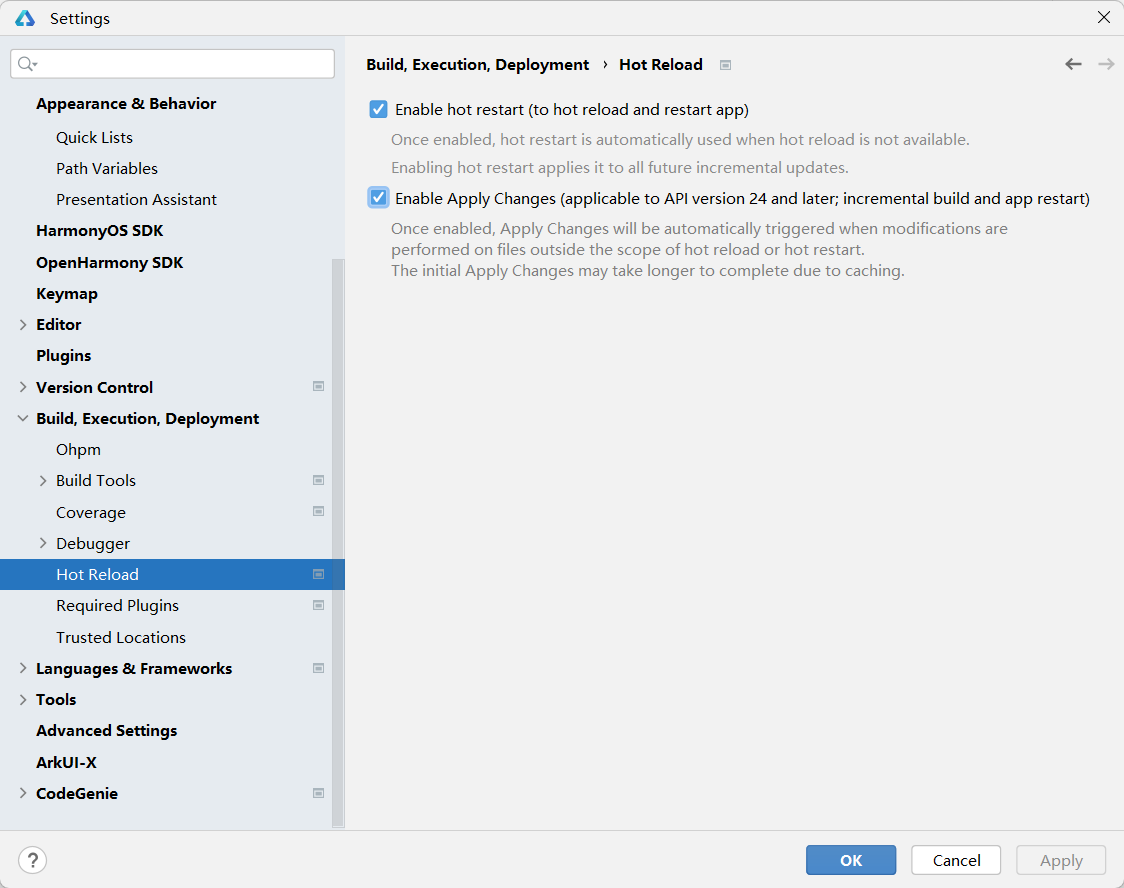
(Optional) Enabling Hot Restart/Apply Changes
To use hot restart or Apply Changes, enable the corresponding function first: choose File > Settings (DevEco Studio > Preferences/Settings on macOS) > Build, Execution, Deployment > Hot Reload, and select the following options:
- Enable hot restart: Enables hot restart.
- Enable Apply Changes: Enables Apply Changes.
Procedure
- Connect to a real device or start the Emulator.
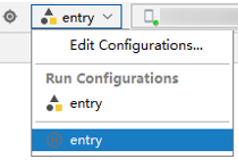
- In the entry drop-down menu, select
 (hot reload configuration).
- Run or debug the app. For details, see Running Your App on a Local Real Device or Running Your App on the Emulator.
- As you modify code, you can view the effect on the device using hot reload in any of the following ways:
- Method 1: Click the
 Hot Reload button.

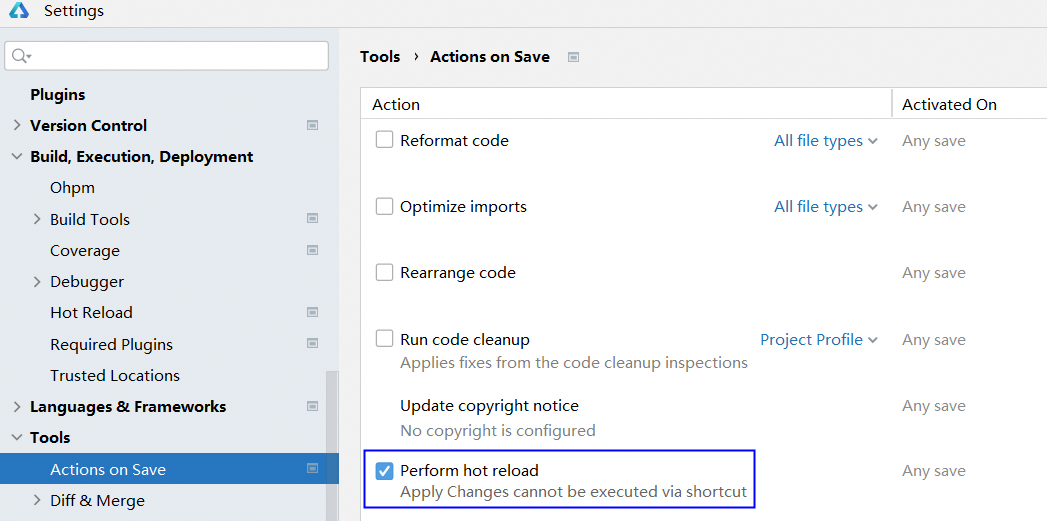
- Method 2: Press Ctrl+S. This requires you to enable the use of shortcut keys first: choose File > Settings (DevEco Studio > Preferences/Settings on macOS) > Tools > Actions on Save, select Perform hot reload, and click OK.
Apply Changes is only available via method 1 and cannot be invoked through the shortcut in method 2.
After successful execution of hot reload, the following information is displayed on the console:Performing hot reload... Syncing files to device xxx Reloaded 1 files in x s xxx ms.
After successful execution of hot restart, the following information is displayed on the console:Performing hot restart... $ hdc shell aa force-stop com.xx.xx Syncing files to device xxx Reloaded 1 files in x s xxx ms. $ hdc shell aa start -a EntryAbility -b com.xxx.xxx in xxx ms
After successful execution of Apply Changes, the following information is displayed on the console:
Performing Apply Changes...
$ hdc shell aa force-stop com.xx.xx
$ hdc file send xx xx in xx ms
FileTransfer finish, Size:xxxx, File count = xx, time:xxx ms rate:xxxx.xxkB/s
...
- Method 1: Click the
- Click the Stop button to stop the app running or debugging and exit the hot reload mode.
(Optional) Dynamically Configuring the Signature or App Version
In multi-developer collaboration scenarios, when using the hot reload feature, you can dynamically configure the signature or app version in hvigorfile.ts, eliminating the need for each developer to make local modifications. This feature is supported since DevEco Studio 6.0.2 Beta1.
- Signature configuration: Instead of using the automatically generated signature information in build-profile.json5, you can configure signature details in hvigorfile.ts. The hot reload feature will continue to function normally. For details, see Modifying build-profile.json5 Configuration for Individual hvigorNode.
- App version configuration: Instead of using versionCode in app.json5, you can dynamically configure the app version in hvigorfile.ts. The hot reload feature will continue to function normally. For details, see Modifying app.json5 Configuration.