OHAudio is a set of C APIs introduced in API version 10. These APIs are designed with a unified approach and support both regular audio paths and low-latency paths. Only PCM format is supported, making OHAudio suitable for scenarios where audio input is implemented at the native layer.
When an audio stream is in the working state (non-released), it occupies system audio stream resources. Because the system imposes a limit on the number of audio streams, you should call OH_AudioCapturer_Release() to release audio resources when the audio stream is temporarily not in use. This ensures proper resource utilization and prevents failures when creating audio streams later.
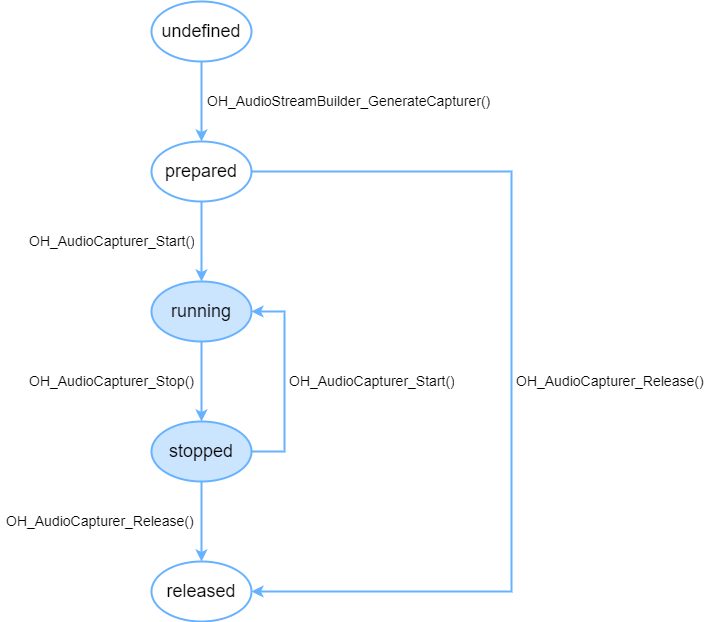
The following figure shows the state changes of OHAudio audio recording:
Prerequisites
To use the recording capabilities provided by OHAudio, you need to add the corresponding header files.
The examples below are code snippets. You can obtain the complete sample via the link at the lower-right corner of each snippet.
[h2]Linking the Dynamic Library in the CMake Script
target_link_libraries(sample PUBLIC libohaudio.so)
[h2]Adding Header Files
You can use audio recording APIs by importing the <native_audiostreambuilder.h> and <native_audiocapturer.h> header files.
#include <ohaudio/native_audiocapturer.h>
#include <ohaudio/native_audiostreambuilder.h>
[h2]Audio Stream Builder
OHAudio provides the OH_AudioStreamBuilder interface, which follows the builder design pattern for constructing audio streams. You need to specify the corresponding OH_AudioStream_Type based on your service scenario.
OH_AudioStream_Type includes two types:
- AUDIOSTREAM_TYPE_RENDERER
- AUDIOSTREAM_TYPE_CAPTURER
Use OH_AudioStreamBuilder_Create to create a builder instance:
OH_AudioStreamBuilder* builder;
OH_AudioStreamBuilder_Create(&builder, streamType);
After the audio operations are complete, call OH_AudioStreamBuilder_Destroy to destroy the builder.
OH_AudioStreamBuilder_Destroy(builder);
You can implement basic audio recording by following these steps.
[h2]Implementing Audio Recording
-
Create a builder.
OH_AudioStreamBuilder* builder;
OH_AudioStreamBuilder_Create(&builder, AUDIOSTREAM_TYPE_CAPTURER);
-
Configure audio stream parameters.
After creating the audio recording constructor, you can set the parameters required by the audio stream. Refer to the following example.
// Set the audio sample rate.
const int SAMPLING_RATE_48K = 48000;
OH_AudioStreamBuilder_SetSamplingRate(builder, SAMPLING_RATE_48K);
// Set the audio channel.
const int channelCount = 2;
OH_AudioStreamBuilder_SetChannelCount(builder, channelCount);
// Set the audio sample format.
OH_AudioStreamBuilder_SetSampleFormat(builder, AUDIOSTREAM_SAMPLE_S16LE);
// Set the encoding type of the audio stream.
OH_AudioStreamBuilder_SetEncodingType(builder, AUDIOSTREAM_ENCODING_TYPE_RAW);
// Set the usage scenario of the input audio stream.
OH_AudioStreamBuilder_SetCapturerInfo(builder, AUDIOSTREAM_SOURCE_TYPE_MIC);
During audio recording, audio data must be read in through a callback interface. You must implement the callback interface. Starting from API version 12, you can use OH_AudioStreamBuilder_SetCapturerReadDataCallback to set the callback function. For the callback function declaration, see OH_AudioCapturer_OnReadDataCallback.
-
Set the audio callback functions.
For concurrent audio processing, refer to Introduction to Audio Focus. The only difference lies in the API language used.
void MyOnReadData_NewAPI( OH_AudioCapturer* capturer, void* userData, void* audioData, int32_t audioDataSize) { // Obtain recording data of the specified length from the buffer. } void MyOnInterruptEvent_NewAPI( OH_AudioCapturer* capturer, void* userData, OH_AudioInterrupt_ForceType type, OH_AudioInterrupt_Hint hint) { // Update the capturer state and UI based on the audio interruption information indicated by type and hint. } void MyOnError_NewAPI( OH_AudioCapturer* capturer, void* userData, OH_AudioStream_Result error) { // Handle the audio exception based on the error information. } // ... // Configure the audio interrupt event callback. OH_AudioCapturer_OnInterruptCallback OnInterruptCb = MyOnInterruptEvent_NewAPI; OH_AudioStreamBuilder_SetCapturerInterruptCallback(builder, OnInterruptCb, nullptr); // Configure the audio error callback. OH_AudioCapturer_OnErrorCallback OnErrorCb = MyOnError_NewAPI; OH_AudioStreamBuilder_SetCapturerErrorCallback(builder, OnErrorCb, nullptr); // Configure the audio input stream callback. OH_AudioCapturer_OnReadDataCallback OnReadDataCb = MyOnReadData_NewAPI; OH_AudioStreamBuilder_SetCapturerReadDataCallback(builder, OnReadDataCb, nullptr); -
Construct the recording audio stream.
OH_AudioCapturer* audioCapturer;
OH_AudioStreamBuilder_GenerateCapturer(builder, &audioCapturer);
-
Use the audio stream.
The recording audio stream includes the following APIs for controlling the audio stream.
API Description OH_AudioStream_Result OH_AudioCapturer_Start(OH_AudioCapturer* capturer) Starts recording. OH_AudioStream_Result OH_AudioCapturer_Pause(OH_AudioCapturer* capturer) Pauses recording. OH_AudioStream_Result OH_AudioCapturer_Stop(OH_AudioCapturer* capturer) Stops recording. OH_AudioStream_Result OH_AudioCapturer_Flush(OH_AudioCapturer* capturer) Releases cached data. OH_AudioStream_Result OH_AudioCapturer_Release(OH_AudioCapturer* capturer) Releases the recording instance. 
Audio stream control APIs may take time to execute (for example, a single call to OH_AudioCapturer_Stop typically exceeds 50 ms). Avoid calling them directly on the main thread to prevent UI lag.
-
Release the builder.
When the builder is no longer needed, release the related resources.
OH_AudioStreamBuilder_Destroy(builder);
[h2]Setting the Low Latency Mode
When the device supports a low-latency path, you can use low latency mode to create an audio recording constructor for a lower-latency audio experience.
The development process is the same as that of normal recording (Implementing Audio Recording), except that in step 1, when creating the audio recording constructor, you need to call OH_AudioStreamBuilder_SetLatencyMode() to set the low latency mode.

- When the audio recording scenario OH_AudioStream_SourceType is AUDIOSTREAM_SOURCE_TYPE_VOICE_COMMUNICATION, actively setting low latency mode is not supported. The system determines the input audio path based on the device capabilities.
- In certain scenarios (such as incoming calls), system capabilities are limited and the mode falls back to the normal audio path mode, where the buffer size also changes. In this case, you must read all data from the buffer at once based on the buffer size, just as in the normal audio path mode. Otherwise, the recorded data will be discontinuous, resulting in noise.
OH_AudioStream_LatencyMode latencyMode = AUDIOSTREAM_LATENCY_MODE_FAST;
OH_AudioStreamBuilder_SetLatencyMode(builder, latencyMode);
[h2]Capturing Loopback Audio Effect Data
Starting from API version 26.0.0, when an app has enabled ear monitor and configured ear monitor effects such as reverb through hardware loopback mode in the same process, you can call OH_AudioStreamBuilder_SetCapturerLoopbackEffectEnabled when creating a recording stream to set the recording stream to capture audio data processed by ear monitor effects. This capability is suitable for scenarios such as karaoke and live streaming where the ear monitor effect processing result needs to be recorded.
This API must be called before OH_AudioStreamBuilder_GenerateCapturer generates the recording stream, and the target recording stream must be configured in AUDIOSTREAM_LATENCY_MODE_FAST low latency mode.
OH_AudioStream_Result result = OH_AudioStreamBuilder_SetCapturerLoopbackEffectEnabled != nullptr ?
    OH_AudioStreamBuilder_SetCapturerLoopbackEffectEnabled(builder, true) :
    AUDIOSTREAM_ERROR_ILLEGAL_STATE;
[h2]Setting the Mute Interruption Mode
The mute-on-interruption mode provides the capability to switch the interruption policy from stopping recording to muted recording, so that the recording session is not interrupted by the system based on audio focus concurrency rules, and other apps can still start recording during the session. When creating an audio recording constructor, call OH_AudioStreamBuilder_SetCapturerWillMuteWhenInterrupted to set whether to enable the mute-on-interruption mode. This mode is disabled by default, in which case the audio focus policy manages the execution order of concurrent audio streams. When enabled, if the recording is stopped or paused due to interruption by another app, the capturer enters the muted recording state, where the recorded audio contains no sound.
[h2]Setting Mute Hint for Recording Stream
Starting from API version 24, when an app has muted a recording stream on the service side, it can call OH_AudioCapturer_SetMuteHint to report this state to the system audio module. The system audio module then adjusts its policies based on the reported state to reduce power consumption. Note: This feature is currently effective only on certain PCs/2-in-1 devices. This API does not actually trigger muting, nor does it apply mute processing to the recording data. It only informs the system audio module that the app has muted the current recording stream. The app must still handle the recording data on its own, for example, by not sending captured data or by sending silent data.
This API can only be called when the recording stream is in the running state; otherwise, AUDIOSTREAM_ERROR_ILLEGAL_STATE is returned. If both stream-level mute hint and session-level mute hint OH_AudioSessionManager_SetCaptureMuteHint are set for the same recording stream, the stream-level mute hint takes precedence, and the stream-level setting is used. No system query API is currently provided. If the mute hint state needs to be displayed on the UI, the app must maintain the most recently set successful state on its own.
bool mute = true;
OH_AudioStream_Result setResult = OH_AudioCapturer_SetMuteHint(audioCapturer, mute);
if (setResult != AUDIOSTREAM_SUCCESS) {
    // Handle the exception based on the return value, for example, AUDIOSTREAM_ERROR_ILLEGAL_STATE.
}

mute = false;
OH_AudioStream_Result unsetResult = OH_AudioCapturer_SetMuteHint(audioCapturer, mute);
[h2]Echo Cancellation
The echo cancellation feature effectively eliminates echo interference during recording on supported devices, improving audio capture quality. You can enable this feature by specifying a specific audio source type OH_AudioStream_SourceType (AUDIOSTREAM_SOURCE_TYPE_VOICE_COMMUNICATION or AUDIOSTREAM_SOURCE_TYPE_LIVE). The system then automatically performs echo cancellation processing on the captured audio signal.
Before enabling this feature, you are advised to call OH_AudioStreamManager_IsAcousticEchoCancelerSupported (supported from API version 20) to check whether the current device supports echo cancellation for the audio source type OH_AudioStream_SourceType, ensuring feature availability. If supported, you can set the corresponding audio source type through OH_AudioStreamBuilder_SetCapturerInfo when creating the audio recording constructor, thereby activating the echo cancellation processing pipeline.
Precautions
Starting from API version 12, using OH_AudioCapturer_Callbacks to set audio callback functions is no longer recommended. If you must use it, complete initialization in either of the following ways before configuring the callback functions.

You must initialize the OH_AudioCapturer_Callbacks structure. Uninitialized callback fields may contain random addresses, which the system may mistakenly execute as callback functions when triggering callbacks, resulting in wild pointers and process crashes.
-
Method 1: Ensure that every callback in OH_AudioCapturer_Callbacks is explicitly initialized with either a custom callback or a null pointer. Unused callbacks must be set to null pointers and must not retain uninitialized values.
int32_t MyOnReadData_Legacy( OH_AudioCapturer* capturer, void* userData, void* buffer, int32_t length) { // Obtain the recorded audio data of length bytes from the buffer. return 0; } int32_t MyOnInterruptEvent_Legacy( OH_AudioCapturer* capturer, void* userData, OH_AudioInterrupt_ForceType type, OH_AudioInterrupt_Hint hint) { // Update the capturer state and UI based on the audio interruption information indicated by type and hint. return 0; } // ... // Configure callback functions. Assign values if listening is required. callbacks.OH_AudioCapturer_OnReadData = MyOnReadData_Legacy; callbacks.OH_AudioCapturer_OnInterruptEvent = MyOnInterruptEvent_Legacy; // (Required) If listening is not required, initialize with null pointers. callbacks.OH_AudioCapturer_OnStreamEvent = nullptr; callbacks.OH_AudioCapturer_OnError = nullptr; -
Method 2: Before use, initialize and zero out the structure to ensure that all unconfigured callback fields are null pointers.
int32_t MyOnReadData_Legacy(
    OH_AudioCapturer* capturer,
    void* userData,
    void* buffer,
    int32_t length)
{
    // Obtain the recorded data of length bytes from the buffer.
    return 0;
}
int32_t MyOnInterruptEvent_Legacy(
    OH_AudioCapturer* capturer,
    void* userData,
    OH_AudioInterrupt_ForceType type,
    OH_AudioInterrupt_Hint hint)
{
    // Update the capturer state and UI based on the audio interruption information indicated by type and hint.
    return 0;
}
// ...
    // Before use, initialize and zero out the structure.
    OH_AudioCapturer_Callbacks callbacks = {0};
    // Configure the required callback functions.
    callbacks.OH_AudioCapturer_OnReadData = MyOnReadData_Legacy;
    callbacks.OH_AudioCapturer_OnInterruptEvent = MyOnInterruptEvent_Legacy;