DevEco Studio supports multiple breakpoint types such as line breakpoints and log breakpoints for ArkTS code debugging, each triggering distinct operations.
Setting a Line Breakpoint
A link breakpoint, as the most common type of breakpoints, pauses the execution of an app at a specified line of code for debugging purposes. During the pause, you can check variables, evaluate expressions, and execute the code line by line to identify runtime errors.
To add a line breakpoint, perform the following steps:
- Locate the line of code that you want to pause the execution.
- Click the left sideline of the code line, or move the cursor to the line and press Ctrl+F8 (Command+F8 for macOS).
After a breakpoint is set, a red dot is displayed next to the code line, as shown in the following figure.
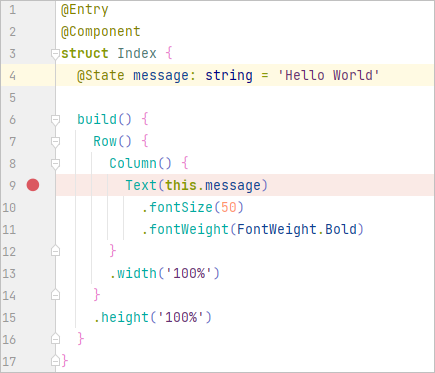
Right-click the red dot and set conditional breakpoints in the Condition field. These breakpoints suspend the app only when specified conditions are met.

- Start debugging. You can click
 Debug to debug an app that has not started or click
 Attach Debugger to Process to debug an app that is already running.
When the app runs to the breakpoint, it pauses at the code, which is highlighted.

Setting a Log Breakpoint
To print log information in Console when a breakpoint is hit, configure the following for the breakpoint on the Breakpoints page:
- Select "Breakpoint hit" message to print "Breakpoint reached" when the breakpoint is hit.
- Select Stack trace to print the stack of the thread when the breakpoint is hit.
- Select Evaluate and log and add an expression to print the value of the expression when the breakpoint is hit.

If Enabled is not selected, log information will not be printed for that breakpoint. If Enabled is selected and Suspend execution is not selected, log information will be printed. If Enabled is selected and Condition is set, log information will not be printed if the specified condition is not met.
Setting a Temporary Breakpoint
To set a one-time breakpoint, select Remove once hit for the breakpoint on the Breakpoints page. Then, the breakpoint will be removed after it is hit.
Setting a Function Breakpoint
Since DevEco Studio 6.0.0 Beta2, function breakpoints can be set in ArkTS code.
A function breakpoint, also called a method breakpoint or a symbolic breakpoint, pauses the execution when a function is called. A function name is set as the condition for hitting the breakpoint.
On the Breakpoints page, click + and select ArkTS Symbolic Breakpoints. In the dialog box displayed, enter the function name, and click OK to set a function breakpoint.


For DevEco Studio 6.0.1 Release or earlier, if a C++ breakpoint is hit during debugging, ArkTS function breakpoints cannot be added or removed. For DevEco Studio 6.0.2 Beta1 or later, ArkTS function breakpoints can be added and removed.
Setting an Exception Breakpoint
An exception breakpoint pauses the execution of an app when an exception is thrown.
On the BreakPoints page, select ArkTS/JS Exception Breakpoints to enable exception breakpoints.

When an exception is thrown during the debugging process, the exception is highlighted and  is displayed on the left of the code. You can see the current frames, variables, and error information on the page.


