[h2]Use Cases
After a user purchases an auto-renewable subscription and the subscription has taken effect, your app should provide the user with access to requested services in time.
When the app starts, obtain the list of active subscriptions and process the service delivery of these subscriptions. You are advised to check the service delivery status of the subscription. If the service is not delivered, deliver it. After the services is delivered, notify the IAP server about the delivery to complete the purchase process.
It is recommended that user services be associated with subscription status for standalone apps. The user will be entitled to access relevant services as long as the subscription is active.
[h2]Service Process

-
The app sends a queryPurchases request to IAP Kit to obtain the list of active subscriptions.
-
IAP Kit returns the PurchaseData list. PurchaseData is a JWS string that contains the relevant subscription information.
-
The app reports the PurchaseData list to the app server.
-
The app server decodes PurchaseData.jwsSubscriptionStatus and performs signature verification by referring to JWS Decoding and Signature Verification. Upon a successful verification, the JSON string SubGroupStatusPayload will be returned.
-
The app server processes product delivery. Check SubGroupStatusPayload.lastSubscriptionStatus.lastPurchaseOrder for whether the products are delivered. If not, deliver them and record the corresponding order information (PurchaseOrderPayload).

It is recommended that user services be associated with subscription status for standalone apps. The user will be entitled to access relevant services as long as the subscription is active.
-
The app queries the order delivery status from the app server.
-
The app server returns the delivery status and order information (PurchaseOrderPayload).
-
After a successful delivery, the app sends a finishPurchase request to IAP Kit, notifying the IAP server to update the delivery status and complete the purchase process. After the app successfully executes finishPurchase, the IAP server marks the purchased products as delivered. This step can also be performed on the app server. The app server can call the IAP server's API for Acknowledging the Delivery for a Subscription to acknowledge the delivery and complete the purchase process.

If this step is not performed for auto-renewable subscriptions, the subscription renewal will fail, and subscriptions in the same subscription group will fail to be switched.
[h2]Development Procedure
-
The app sends a queryPurchases request to IAP Kit to obtain the list of active subscriptions.
Set productType to iap.ProductType.AUTORENEWABLE and queryType to iap.PurchaseQueryType.CURRENT_ENTITLEMENT in the request parameter QueryPurchasesParameter. When the API request is successful, IAP Kit returns a QueryPurchaseResult object. It contains a list of PurchaseData that contains subscription information.
-
Verify the order information. Decode purchaseData.jwsSubscriptionStatus and perform signature verification by referring to JWS Decoding and Signature Verification. Upon a successful verification, the JSON string SubGroupStatusPayload will be returned. It is recommended that the app send purchaseData to the app server so that this task can be executed on the app server.
To improve security, parse purchaseToken and purchaseOrderId from SubGroupStatusPayload.lastSubscriptionStatus.lastPurchaseOrder and query the latest subscription information from the IAP server through the API described in Querying the Subscription Status to further confirm the subscription information accuracy.
-
Display the subscription status.
- If the value of SubGroupStatusPayload.lastSubscriptionStatus.status is 1, the subscription is active.
- If the value of SubGroupStatusPayload.lastSubscriptionStatus.status is 1 and the value of SubGroupStatusPayload.lastSubscriptionStatus.renewalInfo.autoRenewStatusCode is 1, the subscription is in auto-renewable state. Products in this state can no longer be purchased. All related purchase entry points must be disabled.
-
Deliver the product. Obtain SubGroupStatusPayload.lastSubscriptionStatus.lastPurchaseOrder (marked as PurchaseOrderPayload below) and deliver the product.
Check the product delivery status of the order. If the product is not delivered, deliver it. After the delivery is successful, record relevant information such as PurchaseOrderPayload for subsequent check.

It is recommended that user services be associated with subscription status for standalone apps. The user will be entitled to access relevant services as long as the subscription is active.
-
If the value of PurchaseOrderPayload.finishStatus is not 1 after service delivery, the app sends a finishPurchase request to acknowledge the delivery and complete the purchase process.
productType, purchaseToken, and purchaseOrderId in PurchaseOrderPayload must be passed in the request parameter FinishPurchaseParameter. After the request is successful, the IAP server marks the product as delivered.

This step can also be performed on the app server. The app server can call the IAP server's API for Acknowledging the Delivery for a Subscription to acknowledge the delivery and complete the purchase process.

import { iap } from '@kit.IAPKit';
import { BusinessError } from '@kit.BasicServicesKit';
import { common } from '@kit.AbilityKit';
import Logger from '../common/Logger';
import { JWSUtil } from '../common/JWSUtil';
import {
  FinishStatus,
  PurchaseData,
  PurchaseOrderPayload,
  SubGroupStatusPayload,
  SubStatus,
} from '../common/IapDataModel';
// ...
    await this.queryPurchases(iap.PurchaseQueryType.CURRENT_ENTITLEMENT);
    // ...
  queryPurchases(queryType: iap.PurchaseQueryType): Promise<void> {
    return new Promise<void>((resolve) => {
      const param: iap.QueryPurchasesParameter = {
        productType: iap.ProductType.AUTORENEWABLE,
        queryType: queryType,
      };
      iap.queryPurchases(this.context, param).then((res: iap.QueryPurchaseResult) => {
        Logger.info(TAG, 'Succeeded in querying purchases.');
        const purchaseDataList: string[] = res.purchaseDataList;
        if (purchaseDataList === undefined || purchaseDataList.length <= 0) {
          Logger.info(TAG, 'queryPurchases, purchaseDataList empty');
          resolve();
          return;
        }
        for (let i = 0; i < purchaseDataList.length; i++) {
          this.dealPurchaseData(purchaseDataList[i]);
        }
        resolve();
      }).catch((err: BusinessError) => {
        Logger.error(TAG, `Failed to query purchases. Code is ${err.code}, message is ${err.message}`);
        resolve();
      }).finally(() => {
        this.showNormalPage();
      });
    });
  }

  dealPurchaseData(purchaseData: string) {
    try {
      // You are advised to send purchaseData to your app server for signature verification.
      const jwsSubscriptionStatus = (JSON.parse(purchaseData) as PurchaseData).jwsSubscriptionStatus;
      if (!jwsSubscriptionStatus) {
        Logger.error(TAG, 'dealPurchaseData, jwsSubscriptionStatus invalid');
        return;
      }
      // Decode jwsSubscriptionStatus and verify the signature.
      const subscriptionStatus = JWSUtil.decodeJwsObj(jwsSubscriptionStatus);
      if (!subscriptionStatus) {
        Logger.error(TAG, 'dealPurchaseData, subscriptionStatus invalid');
        return;
      }
      // Customize the SubGroupStatusPayload class. Check SubGroupStatusPayload for the information included in this class.
      const subGroupStatusPayload = JSON.parse(subscriptionStatus) as SubGroupStatusPayload;
      const lastSubscriptionStatus = subGroupStatusPayload.lastSubscriptionStatus;
      if (!lastSubscriptionStatus) {
        Logger.error(TAG, 'dealPurchaseData, lastSubscriptionStatus is invalid');
        return;
      }
      if (lastSubscriptionStatus.status === SubStatus.ACTIVE) {
        // The subscription has taken effect, and you need to deliver the product.
        const productId = lastSubscriptionStatus.renewalInfo?.productId;
        if (productId) {
          this.setProductInfoStatus(subGroupStatusPayload.subGroupId, productId, lastSubscriptionStatus.status);
        }
        // Before performing the following steps, ensure that the product has been successfully delivered.
      }
      const purchaseOrderPayload = lastSubscriptionStatus.lastPurchaseOrder;
      if (purchaseOrderPayload && purchaseOrderPayload.finishStatus !== FinishStatus.FINISHED) {
        // Send a finishPurchase request to IAP Kit to acknowledge the delivery and complete the purchase.
        this.finishPurchase(purchaseOrderPayload);
      }
    } catch (e) {
      Logger.error(TAG, 'dealPurchaseData json error');
    }
  }

  finishPurchase(purchaseOrder: PurchaseOrderPayload) {
    if (!purchaseOrder.productType) {
      Logger.error(TAG, 'finishPurchase but productType is empty');
      return;
    }
    const finishPurchaseParam: iap.FinishPurchaseParameter = {
      productType: Number(purchaseOrder.productType),
      purchaseToken: purchaseOrder.purchaseToken,
      purchaseOrderId: purchaseOrder.purchaseOrderId,
    };
    iap.finishPurchase(this.context, finishPurchaseParam).then(() => {
      Logger.info(TAG, 'Succeeded in finishing purchase.');
    }).catch((err: BusinessError) => {
      Logger.error(TAG, `Failed to finish purchase. Code is ${err.code}, message is ${err.message}`);
    });
  }
Subscription Delivery Guarantee
After a subscription is successfully purchased or renewed, your app should provide the user with access to requested services in time. In real-world applications, unexpected events such as network errors can prevent the app from knowing whether a user's payment was successful. This can lead to failures in delivering services to users, a phenomenon known as "order loss."
To ensure service delivery, check whether the user has purchased a product for which the delivery is not acknowledged when iap.IAPErrorCode.PRODUCT_OWNED or iap.IAPErrorCode.SYSTEM_ERROR is returned in the createPurchase request. If so, deliver relevant services and acknowledge the delivery with IAP Kit to complete the purchase.
[h2]Service Process
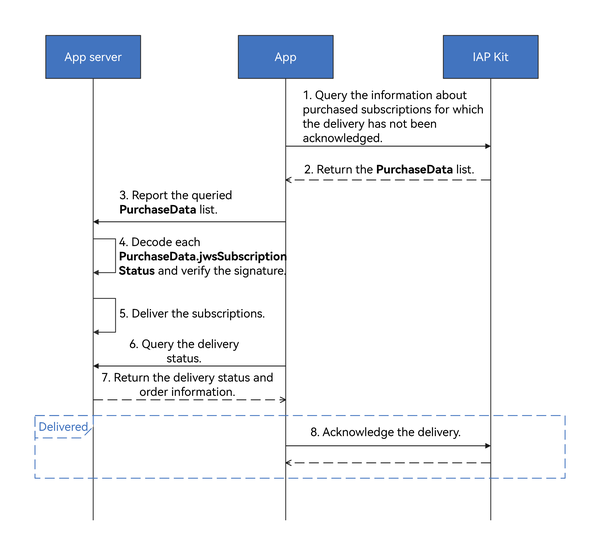
-
The app sends a queryPurchases request to IAP Kit to obtain the information about purchased subscriptions for which the delivery is not acknowledged.
-
IAP Kit returns the PurchaseData list. PurchaseData is a JWS string that contains the relevant subscription information.
-
The app reports the PurchaseData list to the app server.
-
The app server decodes PurchaseData.jwsSubscriptionStatus and performs signature verification by referring to JWS Decoding and Signature Verification. Upon a successful verification, the JSON string SubGroupStatusPayload will be returned.
-
The app server processes product delivery. Check SubGroupStatusPayload.lastSubscriptionStatus.lastPurchaseOrder for whether the products are delivered. If not, deliver them and record the corresponding order information (PurchaseOrderPayload).

It is recommended that user services be associated with subscription status for standalone apps. The user will be entitled to access relevant services as long as the subscription is active.
-
The app queries the order delivery status from the app server.
-
The app server returns the delivery status and order information (PurchaseOrderPayload).
-
After a successful delivery, the app sends a finishPurchase request to IAP Kit, notifying the IAP server to update the delivery status and complete the purchase process. After the app successfully executes finishPurchase, the IAP server marks the purchased products as delivered. This step can also be performed on the app server. The app server can call the IAP server's API for Acknowledging the Delivery for a Subscription to acknowledge the delivery and complete the purchase process.

If this step is not performed for auto-renewable subscriptions, the subscription renewal will fail, and subscriptions in the same subscription group will fail to be switched.
[h2]Development Procedure
-
The app sends a queryPurchases request to IAP Kit to obtain the information about purchased subscriptions for which the delivery is not acknowledged.
Set productType to iap.ProductType.AUTORENEWABLE and queryType to iap.PurchaseQueryType.UNFINISHED in the request parameter QueryPurchasesParameter. When the API request is successful, IAP Kit returns a QueryPurchaseResult object. It contains a list of PurchaseData that contains subscription information.
-
Verify the order information. Decode purchaseData.jwsSubscriptionStatus and perform signature verification by referring to JWS Decoding and Signature Verification. Upon a successful verification, the JSON string SubGroupStatusPayload will be returned. It is recommended that the app send purchaseData to the app server so that this task can be executed on the app server.
To improve security, parse purchaseToken and purchaseOrderId from SubGroupStatusPayload.lastSubscriptionStatus.lastPurchaseOrder and query the latest subscription information from the IAP server through the API described in Querying the Subscription Status to further confirm the subscription information accuracy.
-
Process product delivery.
If the value of SubGroupStatusPayload.lastSubscriptionStatus.status is 1, the subscription is in effect. Process the product delivery for the active subscription. You are advised to check the product delivery status of the order. If the product is not delivered, deliver it. After the delivery is successful, record relevant information such as PurchaseOrderPayload for subsequent check.
It is recommended that user services be associated with subscription status for standalone apps. The user will be entitled to access relevant services as long as the subscription is active.
-
If the value of PurchaseOrderPayload.finishStatus is not 1 after service delivery, the app sends a finishPurchase request to acknowledge the delivery and complete the purchase process.
productType, purchaseToken, and purchaseOrderId in PurchaseOrderPayload must be passed in the request parameter FinishPurchaseParameter. After the request is successful, the IAP server marks the product as delivered.

This step can also be performed on the app server. The app server can call the IAP server's API for Acknowledging the Delivery for a Subscription to acknowledge the delivery and complete the purchase process.

import { iap } from '@kit.IAPKit';
import { BusinessError } from '@kit.BasicServicesKit';
import { common } from '@kit.AbilityKit';
import Logger from '../common/Logger';
import { JWSUtil } from '../common/JWSUtil';
import {
  FinishStatus,
  PurchaseData,
  PurchaseOrderPayload,
  SubGroupStatusPayload,
  SubStatus,
} from '../common/IapDataModel';
// ...
  queryPurchases(queryType: iap.PurchaseQueryType): Promise<void> {
    return new Promise<void>((resolve) => {
      const param: iap.QueryPurchasesParameter = {
        productType: iap.ProductType.AUTORENEWABLE,
        queryType: queryType,
      };
      iap.queryPurchases(this.context, param).then((res: iap.QueryPurchaseResult) => {
        Logger.info(TAG, 'Succeeded in querying purchases.');
        const purchaseDataList: string[] = res.purchaseDataList;
        if (purchaseDataList === undefined || purchaseDataList.length <= 0) {
          Logger.info(TAG, 'queryPurchases, purchaseDataList empty');
          resolve();
          return;
        }
        for (let i = 0; i < purchaseDataList.length; i++) {
          this.dealPurchaseData(purchaseDataList[i]);
        }
        resolve();
      }).catch((err: BusinessError) => {
        Logger.error(TAG, `Failed to query purchases. Code is ${err.code}, message is ${err.message}`);
        resolve();
      }).finally(() => {
        this.showNormalPage();
      });
    });
  }

  dealPurchaseData(purchaseData: string) {
    try {
      // You are advised to send purchaseData to your app server for signature verification.
      const jwsSubscriptionStatus = (JSON.parse(purchaseData) as PurchaseData).jwsSubscriptionStatus;
      if (!jwsSubscriptionStatus) {
        Logger.error(TAG, 'dealPurchaseData, jwsSubscriptionStatus invalid');
        return;
      }
      // Decode jwsSubscriptionStatus and verify the signature.
      const subscriptionStatus = JWSUtil.decodeJwsObj(jwsSubscriptionStatus);
      if (!subscriptionStatus) {
        Logger.error(TAG, 'dealPurchaseData, subscriptionStatus invalid');
        return;
      }
      // Customize the SubGroupStatusPayload class. Check SubGroupStatusPayload for the information included in this class.
      const subGroupStatusPayload = JSON.parse(subscriptionStatus) as SubGroupStatusPayload;
      const lastSubscriptionStatus = subGroupStatusPayload.lastSubscriptionStatus;
      if (!lastSubscriptionStatus) {
        Logger.error(TAG, 'dealPurchaseData, lastSubscriptionStatus is invalid');
        return;
      }
      if (lastSubscriptionStatus.status === SubStatus.ACTIVE) {
        // The subscription has taken effect, and you need to deliver the product.
        const productId = lastSubscriptionStatus.renewalInfo?.productId;
        if (productId) {
          this.setProductInfoStatus(subGroupStatusPayload.subGroupId, productId, lastSubscriptionStatus.status);
        }
        // Before performing the following steps, ensure that the product has been successfully delivered.
      }
      const purchaseOrderPayload = lastSubscriptionStatus.lastPurchaseOrder;
      if (purchaseOrderPayload && purchaseOrderPayload.finishStatus !== FinishStatus.FINISHED) {
        // Send a finishPurchase request to IAP Kit to acknowledge the delivery and complete the purchase.
        this.finishPurchase(purchaseOrderPayload);
      }
    } catch (e) {
      Logger.error(TAG, 'dealPurchaseData json error');
    }
  }

  finishPurchase(purchaseOrder: PurchaseOrderPayload) {
    if (!purchaseOrder.productType) {
      Logger.error(TAG, 'finishPurchase but productType is empty');
      return;
    }
    const finishPurchaseParam: iap.FinishPurchaseParameter = {
      productType: Number(purchaseOrder.productType),
      purchaseToken: purchaseOrder.purchaseToken,
      purchaseOrderId: purchaseOrder.purchaseOrderId,
    };
    iap.finishPurchase(this.context, finishPurchaseParam).then(() => {
      Logger.info(TAG, 'Succeeded in finishing purchase.');
    }).catch((err: BusinessError) => {
      Logger.error(TAG, `Failed to finish purchase. Code is ${err.code}, message is ${err.message}`);
    });
  }
  // ...
              this.queryPurchases(iap.PurchaseQueryType.UNFINISHED);