ohpmrc is the ohpm configuration file.
Description
ohpm obtains its configuration from the command line and the .ohpmrc file. The ohpm config command is used to modify a user-level .ohpmrc file.
Files
- Project-level configuration file: /path/to/my/project/.ohpmrc
- User-level configuration file: ~/.ohpm/.ohpmrc
- All ohpm configuration files are INI files, each of which consists of parameters in the format of <key>= <value>.

- The command line tool preferentially reads the project-level configuration file. If some configuration items are missing, it reads them from the user-level configuration file.
- You can execute the ohpm command in any subdirectory of the project to read the project-level .ohpmrc configuration.
Configuration Update
Run the following command to set user-level configurations:
ohpm config set key value
Default Configuration Items
Configuration Item | Parameter | Description | Type | Default Value | Remarks |
|---|---|---|---|---|---|
Repository settings | registry | Repository to download. | String | https://ohpm.openharmony.cn/ohpm/ | You can configure multiple repository addresses, separated by commas (,). The system searches these repositories in the configured sequence until the target package is successfully downloaded. For example, when package a needs to be downloaded, the system searches from the first configured repository address. If package a is not found, it automatically tries the next repository, and so on. |
@group:registry | Repository to specify. | String | "" | This parameter is used to specify a repository address. You can configure multiple repository addresses, separated by commas (,). The priority is higher than that configured using registry. The system searches these repositories in the configured sequence until the target package is successfully downloaded. | |
Publish settings | publish_registry | Repository to publish. | String | https://ohpm.openharmony.cn/ohpm/ | This parameter is used to specify the address of a repository to be published. Only one address can be configured. |
publish_id | Publish ID. | String | "" | This ID is used to publish a third-party library and is globally unique. | |
Path settings | cache | Cache path. | String | ~/.ohpm/cache | - |
key_path | Private key path. | String | "" | This parameter specifies a path for storing the private key generated by the ssh-keygen tool. | |
crypto_path | Encryption component path | String | "" | Path of the encryption component. For details, see crypto_path. | |
Network settings | no_proxy | Repository addresses for which you do not want to use the proxy. | String | "" | You can configure multiple repository addresses, which can be either domain names or IP addresses, and separate them with commas (,). Wildcard characters (*) are supported for the second-level domain name s, for example, *.huawei.com. |
http_proxy | HTTP proxy to use. | String | "" | Network proxies requiring the user name and password authentication are supported. Special characters need to be escaped. Example: http://proxy_server:port and http://username:password@proxy_server:port. | |
https_proxy | HTTPS proxy to use. | String | "" | Network proxies requiring the user name and password authentication are supported. Special characters need to be escaped. Example: https://proxy_server:port and http://username:password@proxy_server:port. | |
strict_ssl | Enabled status of SSL verification. | Boolean | true | The default value is true, indicating that HTTPS certificate verification is enabled. If this parameter is set to false, verification is disabled. | |
ca_files | Save path of the CA certificate. | String | "" | This parameter is used to specify a path for storing the CA certificate required for verifying the server certificate when strict_ssl is set to true. You can specify multiple certificate paths and separate them by commas (,). For details, see Obtaining and Configuring the CA Certificate. | |
fetch_timeout | Request timeout interval. | Number | 60000 | Value range: [10000, 360000] (unit: ms) If the value is not within the value range, the default value 60000 is used. | |
Concurrency settings | max_concurrent | Maximum concurrency. | Number | 50 | This parameter specifies the maximum number of concurrent requests allowed during the installation of a module. The value ranges from 1 to 200. |
retry_times | Retry times upon errors. | Number | 1 | For exceptions in the trustlist, ohpm retries for a specified number of times based on this parameter setting. The value ranges from 0 to 5. The exceptions in the trustlist are as follows:
| |
retry_interval | Retry interval. | Number | 1000 | The value ranges from 1000 to 60000, in milliseconds. | |
Dependency conflict settings | resolve_conflict | Enabled status of the function of automatically resolving dependency version conflicts. | Boolean | true | The function is enabled by default. If this parameter is set to true or left as default, ohpm automatically resolves dependency version conflicts. For details, see resolve_conflict. |
resolve_conflict_strict | Enabled state of strict dependency conflict resolution. | Boolean | false | This function is disabled by default. If this parameter is set to true, ohpm resolves dependency version conflicts in strict mode. For details, see resolve_conflict_strict. | |
Security settings | key_passphrase | Encrypted private key password. | String | "" | This parameter is left empty by default. Use the encryption command to encrypt the private key password; when executing authentication commands involving the public-private key, the private key file will be automatically decrypted using key_passphrase, without requiring the user to manually enter the private key password. For details, see key_passphrase. |
Other settings | log_level | Log level. | String | info | This parameter specifies a log level, which can be debug, info, warn, or error. For details, see log_level. |
install_all | Whether to install the dependencies of all modules of the project. | Boolean | true | The default value is true. If this parameter is set to true or left as default, during the execution of ohpm install, ohpm update, and ohpm uninstall, all dependencies of the modules in the project will be installed. For details, see install_all. | |
:_auth and :_read_auth | AccessToken configuration items. | String | None | ohpm-repo supports authentication using the access token. For details, see AccessToken. | |
enforce_dependency_key | Whether to enable dependency name verification. | Boolean | false | The default value is false. When this parameter is set to true, ohpm will verify whether the names of the configured local dependencies match their corresponding package names. If they do not match, the command execution will fail. For details, see enforce_dependency_key. | |
ensure_dependency_include | Whether to enable dependency scanning. | Boolean | false | The default value is false. Since ohpm 1.7.0, when executing the ohpm publish command, ohpm checks whether the static imports of third-party dependencies in the source code are declared under dependencies or dynamicDependencies of the oh-package.json5 file. If there is a missing dependency declaration and this parameter is set to false, ohpm displays an alert message; if this parameter is set to true, the command will fail and an error message is displayed. For details, see ensure_dependency_include. | |
projectPackageJson:<project_root> | Configuration to overwrite the oh-package.json5 configuration. | String | None | This configuration item is used to overwrite the configuration in the oh-package.json5 file in the project's root directory.
For details, see projectPackageJson in .ohpmrc. | |
disallow_nested_package | Whether to enable detection of dependency configuration paths within the package for .har and .tgz files | Boolean | false | The default value is false. With value true, during the execution of prepublish or publish, the system will scan for dependencies within the package that are configured in the form of './' and have the .har or .tgz file name extension. If any are found, the command will fail and an error message will be displayed. For details, see disallow_nested_package. | |
odm_r2_project_root | Whether to enable the feature of automatically converting relative paths in overrideDependencyMap. | Boolean | false | The default value is false. With value true, if the overrideDependencyMap configuration exists and the configuration file specified contains dependencies configured with relative paths, ohpm will resolve these relative paths based on the project root path. For details, see odm_r2_project_root. | |
enable_cross_process_lock | Whether to enable the cross-process lock. | Boolean | false | The default value is false. Due to the oh_modules directory structure restrictions, ohpm does not support running multiple ohpm install, ohpm update, or ohpm uninstall commands in parallel within the same project. To execute such commands within the same project, you must set this configuration item to true. | |
compability_log_level | Log level for compatibility errors | String | warn | The default value is warn. When executing the prepublish or publish commands, ohpm checks whether all the fields required for compatibility testing (compatibleSdkVersion, compatibleSdkType, obfuscated, nativeComponents) are configured in the oh-package.json5 file. If they are not configured, ohpm displays a message at the specified log level. For details, see compability_log_level. | |
use_stream_threshold_size | Streaming upload threshold. | Number | 5 | Value range: [0, 300] (unit: MB). When a third-party library is published, if the file size exceeds this threshold, a streaming upload method will be used for the library. If the repository does not support a streaming upload API, it will automatically switch to uploading using Base64 encoding. | |
lockfile_stable_order | oh-package-lock.json5 stability order | Boolean | false | The default value is false. You can set this item to true to maintain the order and content of fields in the oh-package-lock.json5 file when the oh-package.json5 file has not been altered. | |
enable_unified_lockfile | lockfile integration | Boolean | false | The default value is false. If this parameter is set to true, the oh-package-lock.json5 files of all modules are integrated into the oh-package-lock.json5 file of the project. For details, see enable_unified_lockfile. | |
enable_boost_extraction_speed | File decompression acceleration | Boolean | false | The default value is false. If this parameter is set to true, a more efficient file decompression method will be used during ohpm installation. This feature is still under development. For details, see enable_boost_extraction_speed. | |
enable_lock_inner_pkg_version | Version locking for internal .har or .tgz sub-dependencies of the main dependency | Boolean | true | The default value is true. If this parameter is set to false, during ohpm installation, the versions of internal .har or .tgz sub-dependencies of the dependency will not be saved to oh-package-lock.json5. For details, see enable_lock_inner_pkg_version. | |
case_sensitive_check | Case sensitivity check for paths. | Boolean | false | The default value is false. If this parameter is set to true, during execution of ohpm commands, ohpm will throw an error to prompt you to modify the inconsistency if it detects case mismatches between the configured paths of files in the project and their actual paths. For details, see case_sensitive_check. This configuration item takes effect only in the Windows environment. | |
auto_skip_install | Whether to automatically skip the installation if the dependencies remain unchanged. | Boolean | false | The default value is false. When this parameter is set to true, after the first execution of the ohpm install command, subsequent runs of ohpm install will skip installation if no dependency modifications are detected. For details about the skip rules, see auto_skip_install. | |
metadata_cache_effective | Metadata cache validity period | Number | 10080 | The default value is 10080 (7 days). The value range is [1, 525600], in minutes. This configuration applies to all pre-release metadata files and full-version metadata files under ~/.ohpm/cache/metadata, as well as pre-release metadata stored in .ohpm/lock/oh-install-meta.json5 under the project directory. NOTE: Standard versions rarely change, so this parameter does not take effect for standard-version metadata files under ~/.ohpm/cache/metadata directory and standard-version metadata stored in .ohpm/lock/oh-install-meta.json5. | |
metadata_cache | Whether to read cached metadata files | Boolean | false | The default value is false. If this parameter is set to true, the cached metadata files (.ohpm/lock/oh-install-meta.json5 files and files in the ~/.ohpm/cache/metadata directory) are read when the ohpm install command is executed. This reduces network requests and shortens the installation time. For details, see metadata_cache. | |
symlink_for_local_dep | Whether to create a symbolic link for the path to the decompressed local HAR dependency | Boolean | false | The default value is false. If this parameter is set to true, a symbolic link is created for the path to the decompressed local HAR dependency during the execution of the ohpm install command. For details, see symlink_for_local_dep. |
Obtaining and Configuring the CA Certificate

The acquisition of CA certificates needs to be distinguished by system: Certificates downloaded from a Windows browser are only applicable to Windows, while certificates obtained from a macOS browser are applicable to both macOS and Linux.
Access the following certificate download addresses in sequence and download the CA certificate to a local path according to the operations shown in the following figure:
https://ohpm.openharmony.cn/
https://contentcenter-drcn.dbankcdn.cn/   // This domain is used to download file resources. The root path can only be used to obtain the CA certificate.
Access https://ohpm.openharmony.cn/ and download the certificate. Set Save as type to certificate chain. (Perform the same operation on https://contentcenter-drcn.dbankcdn.cn/).

Obtain the openharmony.cn.crt certificate from https://ohpm.openharmony.cn/ and the update.hicloud.crt certificate from https://contentcenter-drcn.dbankcdn.cn/. Set ca_files to certificate path 1 and certificate path 2 (both files need to be configured) in the .ohpmrc file.
ca_files=D:\_.openharmony.cn.crt,D:\update.hicloud.crt
Access the following certificate download addresses in sequence and download the CA certificate to a local path according to the operations shown in the following figure:
https://ohpm.openharmony.cn/
https://contentcenter-drcn.dbankcdn.cn/   // This domain is used to download file resources. The root path can only be used to obtain the CA certificate.
Access https://ohpm.openharmony.cn/ and download the certificate. Set Save as type to certificate chain. (Perform the same operation on https://contentcenter-drcn.dbankcdn.cn/).

Obtain the openharmony.cn.pem certificate from https://ohpm.openharmony.cn/ and the update.hicloud.pem certificate from https://contentcenter-drcn.dbankcdn.cn/. Set ca_files to certificate path 1 and certificate path 2 (both files need to be configured) in the .ohpmrc file.
ca_file=/Users/User name/_.openharmony.cn.pem,/Users/User name/_.update.hicloud.pem
log_level
This parameter specifies the ohpm log level, which can be debug, info (default), warn, or error. When you run ohpm commands, the logs of different levels are as follows:
- debug: The console prints debug, info, warn, and error logs.

- info: The console prints info, warn, and error logs.

- warn: The console prints warn and error logs.

- error: The console prints only error logs.

install_all
In the ohpm client version 1.8.0, the .ohpmrc file supports an install_all configuration to control the behavior of ohpm install, ohpm update, and ohpm uninstall. When install_all is set to true or left as default:
- Running the ohpm install command will install all module dependencies under the project, which is consistent with running ohpm install --all.
- Running the ohpm update command will by default update the dependencies of the current module and install all module dependencies under the project, which is consistent with running ohpm update --all.
- Running the ohpm uninstall command will by default delete the dependencies of the current module and uninstall all module dependencies under the project, which is consistent with running ohpm uninstall --all.
resolve_conflict
Since version 1.5.0, ohpm supports the function of automatically resolving dependency version conflicts. To enable this function, set resolve_conflict to true or leave it as default in the .ohpmrc file. If your project depends on different versions of a third-party library, ohpm selects the latest version for installation, avoiding possible version conflicts.

If a third-party library has both a remote version and a local version (local file or source code dependency), the local version is preferentially selected as the version to be installed, regardless of whether the local version is later than the remote version.
[h2]Dependency Version Conflicts of a Module

In the dependency path shown in the preceding figure, moduleA is the module that you are developing, and its direct dependencies are B@1.1 and C@1.1. B@1.1 and C@1.1 depend on D@1.2 and D@1.3, respectively. If you enable the function of automatically resolving dependency version conflicts, ohpm selects D@1.3 as the version to be installed. The final dependency path is marked by blue arrows in the following figure.

[h2]Dependency Version Conflicts Across Modules

In the dependency path shown in the preceding figure, moduleA and moduleB are two modules that you are developing for the same project. moduleA depends on B@1.1, moduleB depends on C@1.1, and B@1.1 and C@1.1 depend on D@1.2 and D@1.3, respectively. If you enable the function of automatically resolving dependency version conflicts and run the ohpm install --all command to install the version, ohpm selects D@1.3 for installation. The final dependency path is marked by blue arrows in the following figure.

[h2]Updating Dependency Versions
If you want to update the direct dependency of a module to another version, as shown in the following figure, you need to manually update C@1.1 to C@1.2.

Due to the update from C to C@1.2, which no longer depends on D, if the version of D has been previously locked at D@1.3 through ohpm's automatic conflict resolution mechanism, then the update of C will not cause D's version to regress from D@1.3 to D@1.2. This ensures that each update only makes the minimal necessary modifications on the previous result. The final dependency path will be resolved as indicated by the blue arrows in the following diagram.

In the scenario described above, if you want version D to also revert to D@1.2, you will need to execute the ohpm clean command before running ohpm install to clear the oh-package-lock.json5 files under each module.
[h2]Dependency Conflict Resolution When the ohpm install Command Is Used with the --target_path Option
target_path contains custom dependency configuration files (oh-package.json5) automatically generated by hvigor for each module based on the target product during the build process. For details, see target_path. In the generated oh-package.json5 file, the version of the dependency may include targetName, for example, "version": "1.0.0+targetName".
The complete format of the version containing targetName information is: <major>.<minor>.<patch>[-<pre-release>][+<targetName>]. The conflict resolution rules are as follows:
1. The comparison rules for the <major>.<minor>.<patch>[-<pre-release>] part still follow the handling rules described in the previous scenarios, that is, the dependency with the largest version number is taken.
2. When the <major>.<minor>.<patch>[-<pre-release>] parts of two versions are consistent, the dependency with the [+<targetName>] information at the end is taken.

1. When both versions have [+<targetName>] information at the end and the targetName values are inconsistent, the system checks whether targetName in the <target_path>/dependencyMap.json5 file is empty.
- If targetName is empty, a warning message is printed.
- If targetName has a value, an error message is displayed and the program is terminated.
2. If one of the two dependencies is a local dependency, the local dependency is preferred; if both dependencies are local, the version configured in the oh-package.json5 file of the local dependency package is obtained and compared again according to the above rules.
[h2]Restrictions
- To resolve the dependency version conflicts of all modules in a project, run the ohpm install --all command to install dependencies.
- If you run the ohpm update or ohpm uninstall command, the original dependency version conflict processing result of the project may be damaged. In this case, run the ohpm install --all command to reprocess the dependency version conflicts of all modules in the current project.
- If conflicts occur between local file (with .har or .tgz suffix) dependencies, between local source code module dependencies, or between local file (with .har or .tgz suffix) dependencies and local source code module dependencies, the ohpm automatic conflict resolution mechanism will compare the version number configured in the version field of the oh-package.json5 file inside the dependency, and the dependency with the larger version number will be installed.

If it is difficult to detect the version number in local files or local source code dependencies, you are advised to use overrides to handle conflicts.
resolve_conflict_strict
Since version 5.0.9, ohpm provides a strict conflict resolution mechanism for managing dependency versions. To enable this feature, set resolve_conflict_strict to true in the .ohpmrc file.
When strict conflict resolution is enabled, if your project depends on multiple versions of a third-party library, ohpm applies the strict conflict resolution algorithm to identify and install the most appropriate version. If ohpm cannot identify the version that meets the requirements, it reports an error.
[h2]Strict Conflict Resolution Algorithm
- If a dependency has a fixed version (for example, 1.0.1) and multiple range versions (for example, ^1.0.0, ~1.1.0, and >1.0.0), and the fixed version falls within the intersection of all range versions, ohpm will install that fixed version. Otherwise, conflict resolution fails.
- If a dependency has only multiple range versions and there is an intersection among them, ohpm will install the latest version available in the repository that lies within the intersection range. If no intersection exists among the range versions, conflict resolution fails.
- If the same local dependency (for example, ./a.har) has inconsistent paths, conflict resolution fails.
- If a dependency has both a local version (for example, ./a.har) and a remote version (for example, ^1.0.0), conflict resolution fails.
- If a dependency has multiple fixed versions, conflict resolution fails.
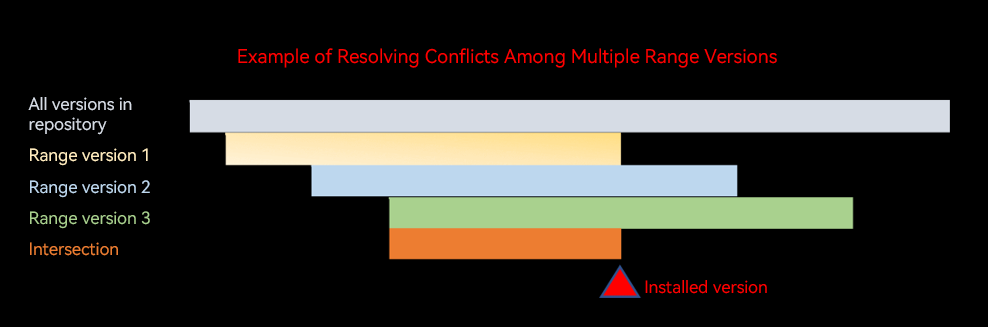

- When a conflict is successfully resolved, ohpm displays a warning message that includes the dependency name, all conflicting versions, the installed version, and a list of affected modules.
- When a conflict cannot be resolved, ohpm prints the dependency conflict tree, highlights the dependencies and their versions that fail to be resolved, and displays the error messages of such dependencies, including the dependency names and all conflicting versions. In such cases, version conflicts can be addressed using the overrides configuration.
- Set resolve_conflict_strict to true.
ohpm config set resolve_conflict_strict true
- Configure the dependency @ohos/axios in the oh-package.json5 file in the root directory of the AppTest3 project.
{ "modelVersion": "6.1.1", "description": "Please describe the basic information.", "dependencies": { "@ohos/axios": "2.2.5" } } - Configure the dependency @ohos/axios in the oh-package.json5 file of the entry module in the AppTest3 project.
{ "name": "entry", "version": "1.0.0", "description": "Please describe the basic information.", "main": "", "author": "", "license": "", "dependencies": { "@ohos/axios": "2.2.6" } } - Run the ohpm install --all command in any directory of the AppTest3 project. According to the strict dependency version conflict handling rules, ohpm fails to be installed and the dependency conflict tree is printed, as shown in the following:

crypto_path
Since ohpm 5.2.0, sensitive configuration items can be encrypted for storage and read.
Sensitive configuration items that can be encrypted
Configuration Item | Description | Example Format |
|---|---|---|
Private key password of key_path, which must be encrypted. | key_passphrase=security:xxx | |
http_proxy | Proxy configuration. The proxy username and password can be encrypted (replace username:password with ciphertext). | http_proxy=http://security:xxx@proxy:port |
https_proxy | Proxy configuration. The proxy username and password can be encrypted (replace username:password with ciphertext). | https_proxy=https://security:xxx@proxy:port |
Repository authentication configuration (replace _auth and _read_auth with ciphertext). | //<Repository address>/:_auth=security:xxx //<Repository address>/:_read_auth=security:xxx |
To encrypt configurations:
- Run the ohpm config encrypt command to generate an encryption component and encrypt the data from standard input.
- Configure crypto_path (encryption component path) and sensitive configuration items in the .ohpmrc file.
crypto_path=D:\path\to\crypto_dir
key_passphrase=security:xxx
http_proxy=http://security:xxx@proxy:port
https_proxy=https://security:xxx@proxy:port
//<Repository address>/:_auth=security:xxx
//<Repository address>/:_read_auth=security:xxx

1. The key_passphrase configuration item must be configured in ciphertext. Other sensitive configuration items can still be configured in plaintext.
2. When the command is executed, the sensitive configuration items required by the command are obtained based on the priority (project-level .ohpmrc > user-level .ohpmrc). The encryption component specified by crypto_path at the same level as these configuration items is used for decryption.
key_passphrase
Since version 5.2.0, the ohpm client has supported configuring key_passphrase (private key password) in the .ohpmrc file, which is used to automatically decrypt the private key file corresponding to key_path.
- When you run commands that require authentication, such as ohpm publish or ohpm unpublish, the system automatically uses key_passphrase to decrypt the private key.
- key_passphrase must be the ciphertext generated by running the ohpm config encrypt command.
- key_path (private key file path) must be configured.
- crypto_path (encryption component path) must be configured for decrypting key_passphrase during running.
Example
key_path=:\path\to\key_file
crypto_path=D:\path\to\crypto_dir
key_passphrase=security:xxx
AccessToken
AccessToken is a new authentication mechanism introduced in ohpm-repo 2.1.0. You can generate a token on the ohpm-repo page and add it to the configuration file of the ohpm client.
When interacting with ohpm-repo, the client automatically packs a token for identity authentication. The token has two permission levels:
- Read-only tokens allow the execution of ohpm info and ohpm install commands.
- In addition to the read-only permissions, read-write tokens support ohpm publish and ohpm unpublish commands.
A maximum of 10 tokens can be generated for each permission type. When a token is generated for the first time, the system automatically copies it to the clipboard and does not display the complete token content later.
[h2]AccessToken Obtaining
Currently, only ohpm-repo supports AccessToken. To generate tokens, click admin in the upper-right corner of the ohpm-repo homepage and choose Security manage > AccessToken.
[h2]AccessToken Configuration
The following is a configuration example of the .ohpmrc file:
//127.0.0.1:8088/repos/ohpm/:_auth=readWriteToken
//127.0.0.1:8088/repos/ohpm/:_read_auth=readOnlyToken
Where:
- // 127.0.0.1:8088/repos/ohpm/ is the registry address of ohpm-repo without the protocol name.
- :_auth and :_read_auth represent the configuration for read-write tokens or read-only tokens, respectively. readWriteToken and readOnlyToken represent the specific values of the tokens. If the ohpm client executes the info and install commands, it preferentially uses read-only tokens over read-write tokens. If the ohpm client executes the publish and unpublish commands, it uses only read-write tokens. For each type of token, a maximum of three tokens can be configured.
enforce_dependency_key
Since ohpm 1.7.0, ohpm supports configuring enforce_dependency_key in the .ohpmrc file. The value of this configuration item is of the boolean type, with a default value of false. If enforce_dependency_key is set to true, ohpm verifies that the names of local direct dependencies configured in the oh-package.json5 file of each module match their corresponding package names (module names). If any mismatch exists, dependency installation will fail, and the mismatched dependency names along with their corresponding package names (module names) will be output to the error log.
Example
There is a module named foo in the MyApplication project. The oh-package.json5 file of the foo module contains the following content:
{
  "name": "foo",
  "version": "2.0.0",
  "description": "Please describe the basic information.",
 }
There is another module named bar in the MyApplication project, and the bar module depends on the foo module. The oh-package.json5 file of the bar module contains the following content:
{
  "name": "bar",
  "version": "1.0.0",
  "description": "Please describe the basic information.",
  "dependencies": {
    "fee": "file:../foo"
  },
 }
As shown above, the dependency on the foo module is configured in the oh-package.json5 file of the bar module, and an alias fee is created for the foo module. When enforce_dependency_key is set to true in .ohpmrc:
enforce_dependency_key=true
If you run the ohpm install --all command in MyApplication, the following error log is displayed and the command execution is interrupted:
ohpm ERROR: local dependency "fee" found in "D:\DevecostudioProjects\MyApplication2\bar\oh-package.json5" does not match the actual name "foo" of its oh-package.json5
ohpm ERROR: Install failed, detail: There are some dependency names that are inconsistent with the actual package names.
If enforce_dependency_key is not set or is set to false, the command will not be interrupted, and the log level of the preceding error logs will be lowered to warn.
ohpm WARN: local dependency "fee" found in "D:\DevecostudioProjects\MyApplication2\bar\oh-package.json5" does not match the actual name "foo" of its oh-package.json5
You are advised to set enforce_dependency_key to true, and do not configure local dependencies using aliases to avoid the following scenarios.
There is a module named fee in MyApplication, and the version of this module is earlier than that of the foo module. The oh-package.json5 file of the fee module contains the following content:
{
  "name": "fee",
  "version": "1.0.0",  // The version number is earlier than 2.0.0 of foo.
  "description": "Please describe the basic information.",
 }
The entry module depends on both the fee and bar modules. The dependency configuration in the oh-package.json5 file of the entry module is as follows:
{
  "name": "entry",
  "version": "1.0.0",
  "dependencies": {
    "fee": "file:../fee",
    "bar": "file:../bar"
  },
 }
In the dependency tree of the entry module, there are two versions of a dependency named fee: one is the foo module with the alias fee, and the other is the fee module itself. If the resolve_conflict feature is enabled and since the actual version number of the fee module is 1.0.0, which is earlier than the version number of the foo module (2.0.0), when ohpm install is executed, only the foo module with the alias fee will be installed under oh_modules of the entry module. The actual fee module will not be installed. The situation can be illustrated as follows.

A symbolic link named fee is created in the oh_modules directory of the entry module. This symbolic link, however, points to the foo module instead of the fee module.

If the entry module actually intends to depend on the real fee module rather than the foo module, the presence of the symbolic link can cause compilation issues.

1. Since ohpm 5.0.7, if useNormalizedOHMUrl is set to true under strictMode in the project-level build-profile.json5 file, the priority of this configuration is higher than that of enforce_dependency_key; if ohpm detects that the dependency alias is different from the name in oh-package.json5, an error message is displayed and the program execution is stopped. If useNormalizedOHMUrl is set to false or not set, the enforce_dependency_key configuration determines whether to verify alias consistency.
2. In the project-level build-profile.json5 file, if useNormalizedOHMUrl is set to true for any product under products, useNormalizedOHMUrl in ohpm is set to true, which means that, if ohpm detects that the dependency alias in the project is different from the name in oh-package.json5, an error message is displayed and the program execution is stopped.
ensure_dependency_include
Since ohpm 1.7.0, ohpm supports configuring ensure_dependency_include in the .ohpmrc file. The value of this configuration item is of the boolean type, with a default value of false.
When ohpm prepublish or ohpm publish is executed, ohpm scans the content of the package to be published. If the code imports content from a package that is not configured in dependencies or dynamicDependencies, ohpm prints an error message and aborts execution when this configuration item is set to true, or only prints a warning message when it is set to false.
For example, the code in the test.har package imports the @ohos/hypium package, but the @ohos/hypium dependency is not configured in dependencies in the oh-package.json5 file of test.har. The following examples illustrate how ohpm publish works under different ensure_dependency_include settings.
[h2]Example 1
- Set ensure_dependency_include to false.
ohpm config set ensure_dependency_include false
- Publish test.har.
ohpm publish test.har
- When ensure_dependency_include is set to false, an alarm is displayed after publishing.

[h2]Example 2
- Set ensure_dependency_include to true.
ohpm config set ensure_dependency_include true
- Publish test.har.
ohpm publish test.har
- If ensure_dependency_include is set to true, an error is reported during the publishing.

disallow_nested_package
Since ohpm 1.8.0, ohpm supports configuring disallow_nested_package in the .ohpmrc file. The value of this configuration item is of the boolean type, with a default value of false. When ohpm prepublish or ohpm publish is executed, ohpm scans the dependencies and dynamicDependencies configurations of the package to be published. If the dependency configurations include .har or .tgz dependencies configured with relative or absolute paths and disallow_nested_package is set to true, ohpm reports an error.
[h2]Example
- Configure dependencies in lib_nested.har as follows:
{ "dependencies": { "liblib_nested.so": "file:./src/main/cpp/types/liblib_nested", "hsp": "./libs/hsp-default.tgz", "lib_har": "./libs/lib_har.har" } } - Set disallow_nested_package to true.
ohpm config set disallow_nested_package true
- Publish lib_nested.har.
ohpm publish lib_nested.har
- If disallow_nested_package is set to true, an error is reported during publishing.

odm_r2_project_root
odm_r2_project_root is a configuration added in ohpm 1.8.0, with a default value of false. You can set the value either through the config command or directly in the .ohpmrc file.
With value true, if the overrideDependencyMap configuration exists and the configuration file specified contains dependencies configured with relative paths, ohpm will resolve these relative paths based on the project root path.
Example:
- Set odm_r2_project_root to true in the .ohpmrc file.
odm_r2_project_root=true
- The following is a configuration example of overrideDependencyMap:Add the overrideDependencyMap configuration to the oh_package.json5 file in the project's root directory as follows:
{ "overrideDependencyMap": { "lib1": "lib1-override-dep-map.json5", "lib2": "lib2-override-dep-map.json5" } } - The dependency override file lib1-override-dep-map.json5 for the dependency lib1 is configured as follows:
{
  "dependencies": {
    "@ohos/test": "file:./test.har"
  }
}
As demonstrated in Step 3, when odm_r2_project_root is set to true, ohpm will use the project root directory as the starting point to resolve relative paths to files. For example, if the project root path is D:\path\to\MyProject, and there is a relative path specified for a file such as ./test.har in the dependency override configuration, ohpm will resolve the absolute path for test.har to be D:\path\to\MyProject\test.har.
compability_log_level
compability_log_level is supported since ohpm 5.0.1. It is used to control the behavior of ohpm when the fields required for compatibility testing are missing.
The default value of compability_log_level is warn. For details about the available values, see Values of compability_log_level.
When executing the prepublish and publish commands, ohpm checks whether all the fields required for compatibility testing (compatibleSdkVersion, compatibleSdkType, obfuscated, and nativeComponents) are configured in the oh-package.json5 file. For details, see Fields in the Module-level oh-package.json5 File. If any of the fields is not configured, ohpm displays a message or reports an error based on the log level.
[h2]Values of compability_log_level
- close: The fields required for compatibility testing are not checked.
- info: If any field required for compatibility testing is not configured, an info log is printed.
- warn: If any field required for compatibility testing is not configured, a warn log is printed.
- error: If any field required for compatibility testing is not configured, an error message is displayed and the program is terminated.
enable_unified_lockfile
The enable_unified_lockfile field is added to the ohpm client since 5.1.1. If this field is set to true, ohpm automatically integrates the oh-package-lock.json5 files of all submodules in the project to the oh-package-lock.json5 file in the root directory of the project.
If enable_unified_lockfile is set to true, the lockfile files are managed in a unified manner at the project level. If there are repeated dependencies between modules, the ohpm install command execution duration is significantly reduced, optimizing the build process.

If enable_unified_lockfile is set to true, the .hsp dependency installation directories of each module are migrated to the root directory of the project. When this feature is enabled on the pipeline, it must be used with Hvigor.
enable_boost_extraction_speed
Since ohpm 5.3.0, the enable_boost_extraction_speed field is supported. ohpm installation involves decompression and traversal of third-party package files in .har or .tgz format. After this feature is enabled, a high-performance method is used for decompression and traversal. If the project has large file dependencies, the execution time of ohpm install can be significantly reduced. This feature is currently in the experimental phase and does not yet support decompressing third-party package files that contain symbolic links.
enable_lock_inner_pkg_version
Since ohpm 5.3.1, the enable_lock_inner_pkg_version field is supported. This field defaults to true. If it is set to false, during ohpm installation, the versions of internal .har or .tgz sub-dependencies will not be saved to the oh-package-lock.json5 file. This prevents the lock file from storing invalid paths that could cause errors during subsequent installations.
As shown in the figure below, the blue arrow indicates the final dependency to be installed. Dependency D@1.0.0 comes from dependency B@1.0.0 (dependencies with the same name and version are treated as identical, and the final installed version is determined by the build order). Since B@1.0.0 is not installed, and the version of dependency D is locked in oh-package-lock.json5, a "dependency path not found" error will occur during reinstallation. In such cases, set this field to false.

Example of the oh-package-lock.json5 file
- Generate library.har with the following oh-package.json5 configuration:
{ "name": "library", "version": "1.0.0", "description": "Please describe the basic information.", "author": "", "license": "Apache-2.0", "dependencies": { "inner": "./libs/inner.har" }, "types": "Index.d.ets", "artifactType": "obfuscation", "compatibleSdkVersion": 21, "compatibleSdkType": "HarmonyOS", "obfuscated": false } - Make entry depend on library.har with the following oh-package.json5 configuration:
{ "name": "entry", "version": "1.0.0", "description": "Please describe the basic information.", "main": "", "author": "", "license": "", "dependencies": { "library": "./library.har" } } - Configure enable_lock_inner_pkg_version=false in .ohpmrc, then run ohpm install --all. The generated entry/oh-package-lock.json5 file will not lock the version of the internal package inner, as shown in the following output:
{
  "specifiers": {
    "library@library.har": "library@library.har"
  },
  "packages": {
    "library@library.har": {
      "name": "library",
      "version": "1.0.0",

      "resolved": "library.har",
      "registryType": "local",
      "dependencies": {
        "inner": "./libs/inner.har"
      }
    }
  }
}
Configure enable_lock_inner_pkg_version=true in .ohpmrc, then run ohpm install --all. The generated entry/oh-package-lock.json5 file is as follows:
{
  "specifiers": {
    "inner@../oh_modules/.ohpm/library@85ursk4cfzbgycewlyxweed+cyyeeixxig5mlazoo+g=/oh_modules/library/libs/inner.har": "
inner@../oh_modules/.ohpm/library@c0jkxsxl3amvdd7rr1enrkrejzharxwucdoyc29br+u=/oh_modules/library/libs/inner.har",
    "library@library.har": "library@library.har"
  },
  "packages": {
    "
inner@../oh_modules/.ohpm/library@c0jkxsxl3amvdd7rr1enrkrejzharxwucdoyc29br+u=/oh_modules/library/libs/inner.har
": {
      "name": "inner",
      "version": "1.0.0",
      "resolved": "../oh_modules/.ohpm/library@c0jkxsxl3amvdd7rr1enrkrejzharxwucdoyc29br+u=/oh_modules/library/libs/inner.har"
      "registryType": "local"
    },
    "library@library.har": {
      "name": "library",
      "version": "1.0.0",
      "resolved": "library.har"
      "registryType": "local",
      "dependencies": {
        "inner": "./libs/inner.har"
      }
    }
  }
}
case_sensitive_check
Since ohpm 6.21.0, the case_sensitive_check field is supported. If this parameter is set to true, during execution of ohpm commands, ohpm will throw an error to prompt you to modify the inconsistency if it detects case mismatches between the configured paths of files in the project and their actual paths. This configuration item takes effect only in the Windows environment.
Detection Scope
- Paths of the .har package, .tgz package, and module used as dependencies in the project.
- Directories or paths configured in commands for prefix, target_path, and parameterFile.
- Local dependency paths in the overrides configuration, configuration files involved in overrideDependencyMap and their internal local dependency paths, and parameterFile configuration files and their internal local dependency paths.
Example
- Prepare a local .har package test.har. In the oh-package.json5 file inside this .har package, set the name field to test. Place this package in the libs directory of the entry module.
- Configure the entry module to depend on test.har. The original dependency path is: <project_dir>/entry/libs/test.har. The content of entry's oh-package.json5 is as follows:
{ "name": "entry", "version": "1.0.0", "description": "Please describe the basic information.", "dependencies": { "test": "./Libs/test.har" } } - Run ohpm install. ohpm will detect a case mismatch between the actual path of test.har (<project_dir>/entry/libs/test.har) and the configured path (<project_dir>/entry/Libs/test.har). Specifically, the configured directory name Libs uses an uppercase "L", which does not match the original directory name libs. At this point, ohpm will throw an error with a prompt and abort execution.
auto_skip_install
The auto_skip_install field is added to the ohpm client since version 26.0.0.410. The value of this field is of the boolean type and defaults to false. When this field is set to true, after the initial execution of the ohpm install command, subsequent runs of ohpm install will check for dependency changes. If no dependencies have been modified, the installation process will be skipped.
Detection scope
- Project-level or module-level dependencies configured in the oh-package.json5 file, including:
- Project-level and module-level dependencies, devDependencies, and dynamicDependencies parameters
- Project-level overrides, parameterFile, and overrideDependencyMap parameters
- Dynamic dependencies defined in the hvigorfile.ts file. For details, see Modifying Dependencies in oh-package.json5.
- Parameters in the .ohpmrc configuration file, including:
- install_all
- resolve_conflict
- resolve_conflict_strict
- enforce_dependency_key
- odm_r2_project_root
- enable_unified_lockfile
- case_sensitive_check
- Completeness of package directories under project-level oh_modules.
Example
- Create a HarmonyOS project and set auto_skip_install to true in the .ohpmrc file. The following is an example of the oh-package.json5 file in the entry module:
{ "name": "entry", "version": "1.0.0", "description": "Please describe the basic information.", "main": "", "author": "", "license": "", "dependencies": { "test": "1.0.0" } } - After running ohpm install, run the command again without modifying the project dependency configuration. Since the dependency versions remain unchanged, the second run skips installation and outputs a corresponding prompt.
ohpm WARN: project dependency not change, skip install
install completed in 0s 29ms
- Add the parameterFile and overrides configurations to the project-level oh-package.json5 file as follows:
{ "modelVersion": "26.0.0", "description": "Please describe the basic information.", "parameterFile": "./parameterFile.json", "overrides": { "test": "@param:dependencies.test" } } - Add the following content to the parameterFile.json file:
{ "version": "1.0.0", "dependencies": { "test": "1.0.1" } } - Run the ohpm install command. Since dependencies have changed, the changed fingerprint information will be reported, and no installation skip log will be printed.
ohpm WARN: fingerprint rootNodesFingerprint changed
ohpm WARN: fingerprint old: 34f4ab8795166b45c388b44803b3bb44
ohpm WARN: fingerprint new: 68fea7ec8dd32e6375b52ef44a0914ef
ohpm INFO: MetaDataFetcher fetching meta info of package 'test' from https://ohpm.openharmony.cn/ohpm/
ohpm INFO: fetch meta info of package 'test' success https://ohpm.openharmony.cn/ohpm/test
ohpm INFO: fetch package done 1 test from https://ohpm.openharmony.cn/ohpm/test/-/test-1.0.1.har
install completed in 1s 217ms
metadata_cache
The metadata_cache field is added to the ohpm client since version 26.0.0.410. The value of this field is of the boolean type and defaults to false. If metadata_cache is set to false, only the metadata cached in the oh-package-lock.json5 file is loaded when ohpm install is executed. If metadata_cache is set to true, the cached metadata is loaded based on the following priority when ohpm install is executed: oh-package-lock.json5 file > oh-install-meta.json5 file > ~/.ohpm/cache/metadata/.
With metadata_cache set to true, running ohpm install generates the oh-install-meta.json5 file and metadata cache files at the following paths:
- oh-install-meta.json5: under the .ohpm/lock directory of the current project
~/project .ohpm/ lock/ oh-install-meta.json // Metadata aggregated from all remote packages in the packages object across all oh-package-lock.json5 files in the project. - Metadata cache files: at the cache path ~/.ohpm/cache/metadata; displayed by group name and package name
~/.ohpm/cache/
metadata/
  group/
    packagenameA/
        -- all.json // All metadata.
        -- xx.json  // Metadata of a fixed version. xx indicates the version number.
     packagenameB/
        -- xx.json  // Metadata of a fixed version.
  packagenameC/
      -- all.json // All metadata.
      -- xx.json  // Metadata of a fixed version.

When metadata_cache is enabled (set to true), if a version range is configured in oh-package.json5 and a new version within this range has been released, ohpm may read metadata from local cache rather than initiating a network request. This may result in the failure to obtain the new package version. To resolve this, run ohpm cache clean @group/package to clear the metadata cache file of the specified package, or run ohpm cache clean to clear all metadata cache files. For details about the command, see ohpm cache clean.
symlink_for_local_dep
The symlink_for_local_dep field is added to the ohpm client since version 26.0.0.630. The value of this field is of the boolean type and defaults to false. If symlink_for_local_dep is set to true, during the execution of ohpm install, a symbolic link is created for the path to the decompressed local HAR dependency and placed in the /oh_modules/.ohpm/oh_modules directory of the project.
{
  "modelVersion": "6.1.0",
  "description": "Please describe the basic information.",
  "dependencies": {
    "library5": "file:./library5.har"
  }
}
The created soft link is as follows.
