Hardware-Assisted Address Sanitizer (HWASan) is a memory error detection tool similar to ASan. Compared with ASan, HWASan uses significantly less memory, making it more suitable for system-wide sanitization. For details about the HWASan detection principles, see HWASan Detection Principles.
Constraints
- HWASan is only available for hardware with AArch64 architecture.
- ASan, TSan, UBSan, and HWASan cannot be enabled simultaneously; only one of these sanitizers can be enabled at a time.
Enabling HWASan
For versions earlier than DevEco Studio 6.1.0 Beta1, HWASan can be enabled only for C++ source code.
Since DevEco Studio 6.1.0 Beta1, binary instrumentation is supported for .so files generated from C++ compilation without source code, enabling HWASan.
[h2]Method 1
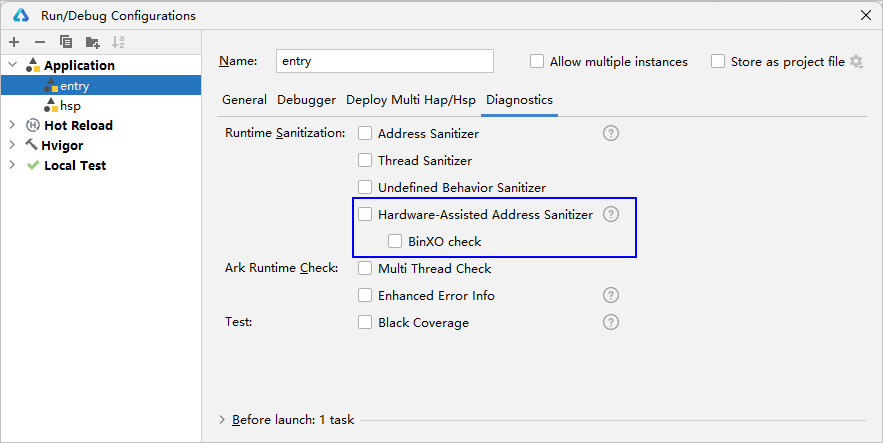
- Choose Run > Edit Configurations > Diagnostics and select Hardware-Assisted Address Sanitizer to enable C++ source code instrumentation.
Since DevEco Studio 6.1.0 Beta1, you can also select BinXO check to enable HWASan instrumentation for .so files without source code.
- (Optional) If some source-free .so files do not require HWASan instrumentation, you can configure the excludeSoFromBinXO field in the project-level or module-level build-profile.json5 file to specify a list of .so files to be excluded; regular expressions are supported.
"buildOption": {
  "nativeLib": {
    "excludeSoFromBinXO": ["**/liblibrary.so"]
  }
}
[h2]Method 2
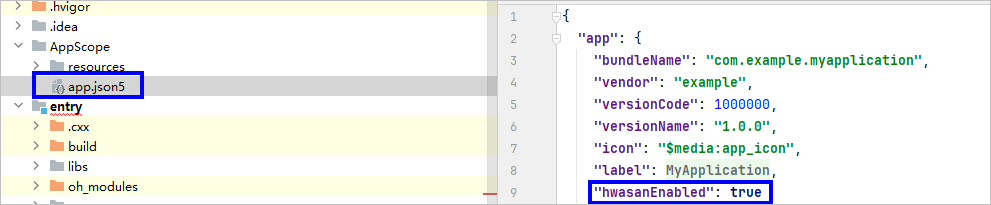
- In the AppScope/app.json5 file of the project, add the HWASan configuration.
"hwasanEnabled": true
- In the module-level build-profile.json5 file where HWASan needs to be enabled, add build parameters to enable HWASan instrumentation.
// For versions earlier than DevEco Studio 6.1.0 Beta1 "buildOption": { "externalNativeOptions": { "arguments": ["-DOHOS_ENABLE_HWASAN=ON"] } // For DevEco Studio 6.1.0 Beta1 and later versions, enable HWASan instrumentation for both C++ files with and without source code. "buildOption": { "externalNativeOptions": { "arguments": ["-DOHOS_ENABLE_HWASAN=ON", "-DOHOS_ENABLE_BINXO=ON"] } - If some source-free .so files do not require HWASan instrumentation, you can configure the excludeSoFromBinXO field in the project-level or module-level build-profile.json5 file to specify a list of .so files to be excluded; regular expressions are supported.
"buildOption": {
  "nativeLib": {
    "excludeSoFromBinXO": ["**/liblibrary.so"]
  }
}
Using HWASan
- Run or debug the app.
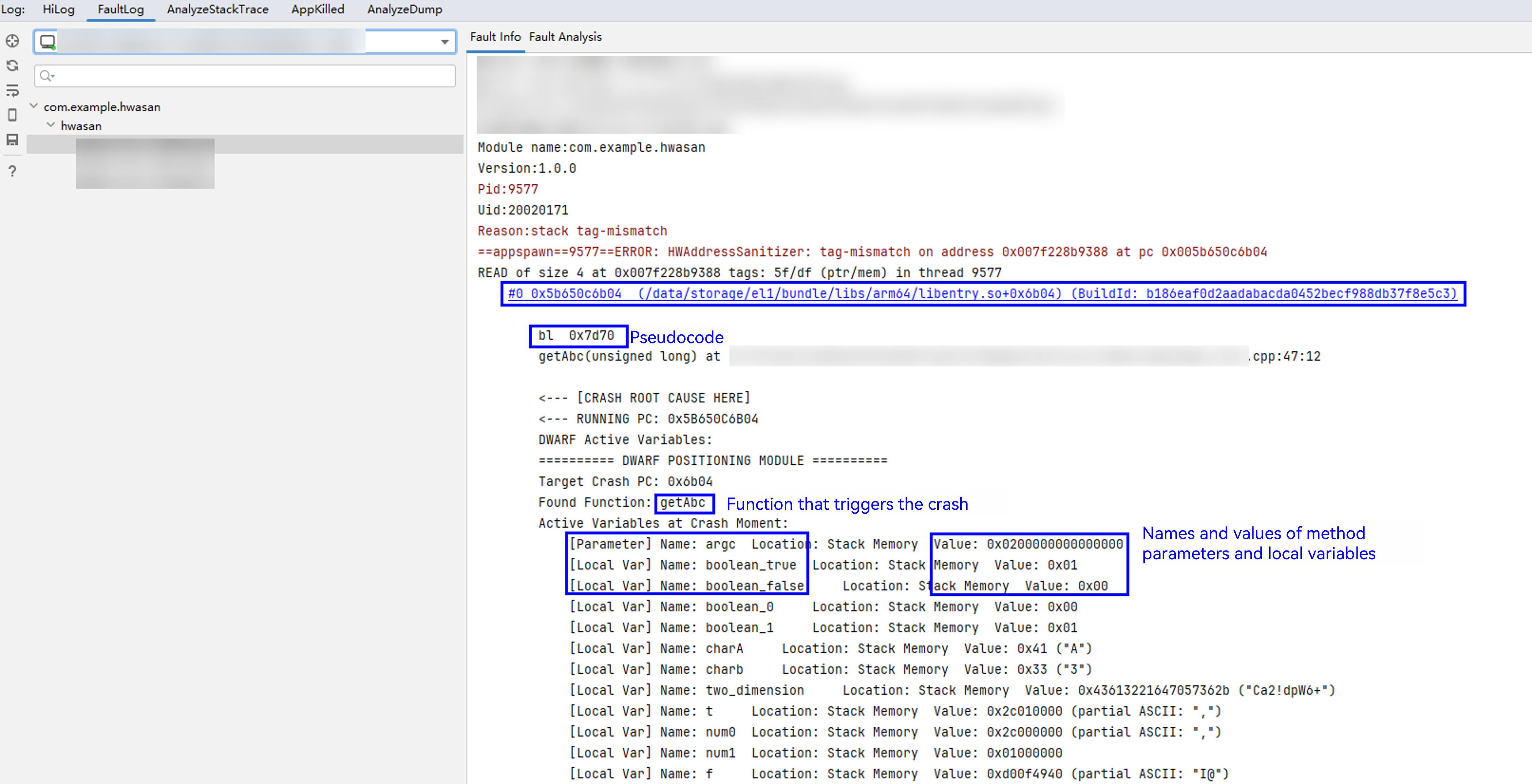
- When a memory error occurs, the HWASan log information will be displayed. You can click the link in the information to go to the code that causes the memory error. For details about the description of each field in the log, see HWASan Log Specifications; for details about detectable error types, see Detectable Error Types.
Since version 26.0.0, the pseudocode, method parameters, and names and values of variables corresponding to the error stack can be parsed. Only the first three stack frames (#0 to #2) are parsed. For frame #0, the input parameters, variable names, and variable values are parsed. For frames #1 and #2, only the input parameters and variable names are parsed.
To ensure correct stack trace parsing, debug information must be retained in the code. For details, see Precautions.
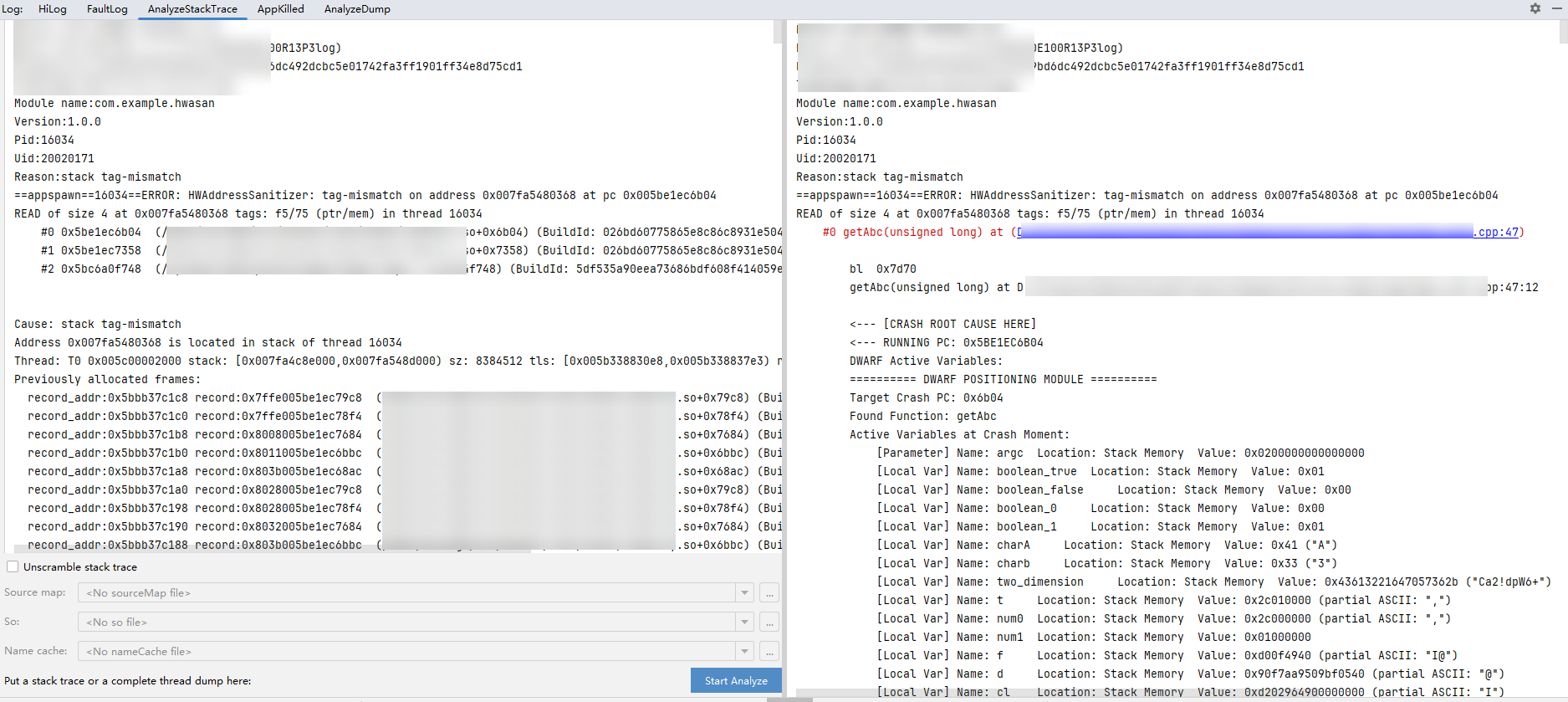
- If it is a release app and there is no source code available locally, you can use the AnalyzeStackTrace feature. Provide the .so file for which you want to analyze the stack trace; the analysis result will give you the source code addresses.
Precautions
To ensure correct stack trace parsing, debug information must be retained in the code. To achieve this, perform the steps below.
- When referencing a .har package, set strip to false in the build-profile.json5 file of the .har package.
"nativeLib": { "debugSymbol": { "strip": false } } - Compilation optimization may remove debug information from the code. To prevent this, add the following configuration to CMakeLists.txt to disable compilation optimization.
set_source_files_properties(
    filename.cpp
    PROPERTIES COMPILE_FLAGS "-O0"
)
string(REPLACE "-O2" "-O0"
    CMAKE_CXX_FLAGS_RELEASE
    "${CMAKE_CXX_FLAGS_RELEASE}"
)
string(REPLACE "-O2" "-O0"
    CMAKE_C_FLAGS_RELEASE
    "${CMAKE_C_FLAGS_RELEASE}"
)