Use Cases
Geographical location information obtained from the GPS hardware or network location is signed by creating an attestation key and initializing an attestation session, to ensure authenticity and integrity of the geographical location information.
Constraints
This feature requires that the device supports location security verification.
After calling initializeAttestContext to initialize the attestation session for location security verification, you can call getCurrentSecureLocation to obtain the data to verify location security. If the API call fails with ATTEST_ERROR_LOCATION_SERVICE_UNAVAILABLE returned, the current device does not support location security verification. The following is an example:
// After the attestation session for location security verification is initialized, obtain the data to verify location security. The following uses the "Speed first" policy as an example:
const timeout = 5000; // Timeout interval for obtaining the data to verify location security, in milliseconds.
const priority = trustedAppService.LocatingPriority.PRIORITY_LOCATING_SPEED; // The "Speed first" policy is used.
try {
  return await trustedAppService.getCurrentSecureLocation(timeout, priority);
} catch (err) {
  const error = err as BusinessError;
  if (error.code == trustedAppService.AttestExceptionErrCode.ATTEST_ERROR_LOCATION_SERVICE_UNAVAILABLE) {
    hilog.error(0x0000, 'TrustedAppService', 'current device not support secure location');
  } else {
    hilog.error(0x0000, 'TrustedAppService',
      `Failed to get location by PRIORITY_LOCATING_SPEED. Code: ${error.code}, Message: ${error.message}`);
  }
  throw new Error(error.message);
}
Service Process
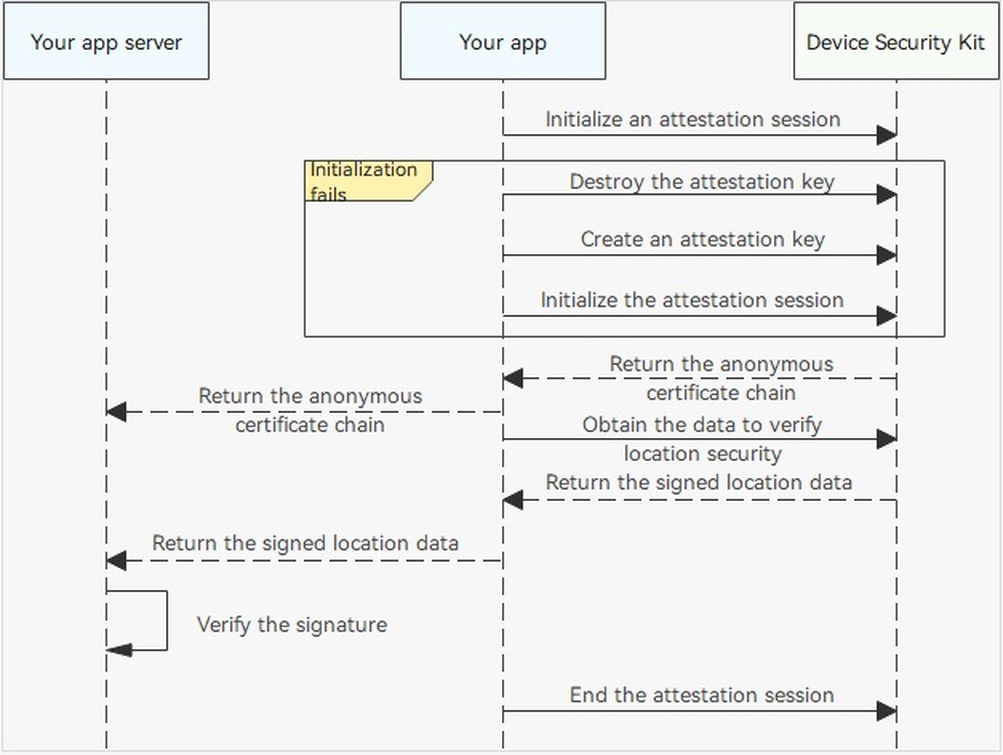
There are two priority policies for an app to obtain the data to verify location security: accuracy first and speed first. If the accuracy first policy is used, TrustedAppService returns the GPS location preferentially, and returns the network location if obtaining the GPS location times out. If the speed first policy is used, TrustedAppService returns the GPS or network location whichever is obtained first.
API Description
For details about the APIs and their usage, see API Reference.
| API | Description |
|---|---|
| createAttestKey(options: AttestOptions): Promise<void> | Creates an attestation key. |
| initializeAttestContext(userData: string, options: AttestOptions): Promise<AttestReturnResult> | Initializes an attestation session. |
| finalizeAttestContext(options: AttestOptions): Promise<void> | Ends an attestation session. |
| destroyAttestKey(): Promise<void> | Destroys an attestation key. |
| getCurrentSecureLocation(timeout: number, priority: LocatingPriority): Promise<SecureLocation> | Obtains the data to verify location security. |
Development Procedure
-
Apply for the location permissions ohos.permission.APPROXIMATELY_LOCATION and ohos.permission.LOCATION. For details, please refer to Requesting User Authorization.
-
Import the trustedAppService module and dependent modules.
import { trustedAppService } from '@kit.DeviceSecurityKit'; import { BusinessError } from '@kit.BasicServicesKit'; import { util } from '@kit.ArkTS'; import { cryptoFramework } from '@kit.CryptoArchitectureKit'; import { cert } from '@kit.DeviceCertificateKit'; import hilog from '@ohos.hilog'; -
Create an attestation key and initialize an attestation session.
- Create an attestation key for location security verification:
private async creatSecureLocationAttestKey(): Promise<void> { // Parameters for creating an attestation key. const createProperties: Array<trustedAppService.AttestParam> = [ { tag: trustedAppService.AttestTag.ATTEST_TAG_ALGORITHM, value: trustedAppService.AttestKeyAlg.ATTEST_ALG_ECC }, { tag: trustedAppService.AttestTag.ATTEST_TAG_KEY_SIZE, value: trustedAppService.AttestKeySize.ATTEST_ECC_KEY_SIZE_256 } ]; const createOptions: trustedAppService.AttestOptions = { properties: createProperties }; // Create an attestation session. try { await trustedAppService.createAttestKey(createOptions); hilog.info(0x0000, 'TrustedAppService', 'createAttestKey successfully'); } catch (error) { const err = error as BusinessError; hilog.error(0x0000, 'trustedappservice', `createattestkey failed, errCode: ${err.code}, errMsg: ${err.message}`); throw new Error(err.message); } } - Initialize an attestation session for location security verification:
private async initSecureLocationAttestContext(): Promise<number> {
  try {
    // Parameters for initializing an attestation session.
    const deviceId = 0;
    const initProperties: Array<trustedAppService.AttestParam> = [
      {
        tag: trustedAppService.AttestTag.ATTEST_TAG_DEVICE_TYPE,
        value: trustedAppService.AttestType.ATTEST_TYPE_LOCATION
      },
      {
        tag: trustedAppService.AttestTag.ATTEST_TAG_DEVICE_ID,
        value: BigInt(deviceId) // This parameter does not take effect in secure location scenarios.
      }
    ];
    const initOptions: trustedAppService.AttestOptions = {
      properties: initProperties
    };
    let userData = 'trusted_app_service_default_userdata'; // Example value. Generate a value on your own, which contains 16 to 127 bytes.
    // Initialize an attestation session.
    const certChainResult = await trustedAppService.initializeAttestContext(userData, initOptions);
    if (certChainResult.certChains.length < 1) {
      throw new Error('empty returned cert chain');
    }
    // ...
    return 0;
  } catch (err) {
    const businessError = err as BusinessError;
    hilog.error(0x0000, 'TrustedAppService',
      `initializeAttestContext failed. errCode: ${businessError.code}, errMsg: ${businessError.message}`);
    const finalNumericCode = Number(String(businessError.code ?? '').replace('n', '').trim());
    return Number.isNaN(finalNumericCode) ? -1 : finalNumericCode;
  }
}
- Create an attestation key for location security verification:
-
Obtain the data to verify location security. The following uses the "Accuracy first" policy as an example:
private async getSecureLocationByAccuracy(): Promise<trustedAppService.SecureLocation> { const timeout = 5000; // Timeout interval for obtaining the data to verify location security, in milliseconds. const priority = trustedAppService.LocatingPriority.PRIORITY_ACCURACY; // The "Accuracy first" policy is used. // Obtain the data to verify location security. try { return await trustedAppService.getCurrentSecureLocation(timeout, priority); } catch (err) { const error = err as BusinessError; hilog.error(0x0000, 'TrustedAppService', `Failed to get location by PRIORITY_ACCURACY. Code: ${error.code}, Message: ${error.message}`); throw new Error(error.message); } } -
End the attestation session.
private async finalizeSecureLocationAttestContext(): Promise<void> {
  // Parameters for ending the attestation session.
  const finalProperties: Array<trustedAppService.AttestParam> = [
    {
      tag: trustedAppService.AttestTag.ATTEST_TAG_DEVICE_TYPE,
      value: trustedAppService.AttestType.ATTEST_TYPE_LOCATION
    }
  ];
  const finalOptions: trustedAppService.AttestOptions = {
    properties: finalProperties,
  };
  // End the attestation session.
  try {
    await trustedAppService.finalizeAttestContext(finalOptions);
  } catch (err) {
    const error = err as BusinessError;
    hilog.error(0x0000, 'TrustedAppService',
      'Failed to finalize attest context, code: ${error.code}, message: ${error.message}');
  }
}
To destroy an attestation key, call the destroyAttestKey API after the attestation session ends. Image security verification, location security verification, and secure image compression and cropping share the same attestation key. Before destroying an attestation key, ensure that the other functions are not using the attestation key.