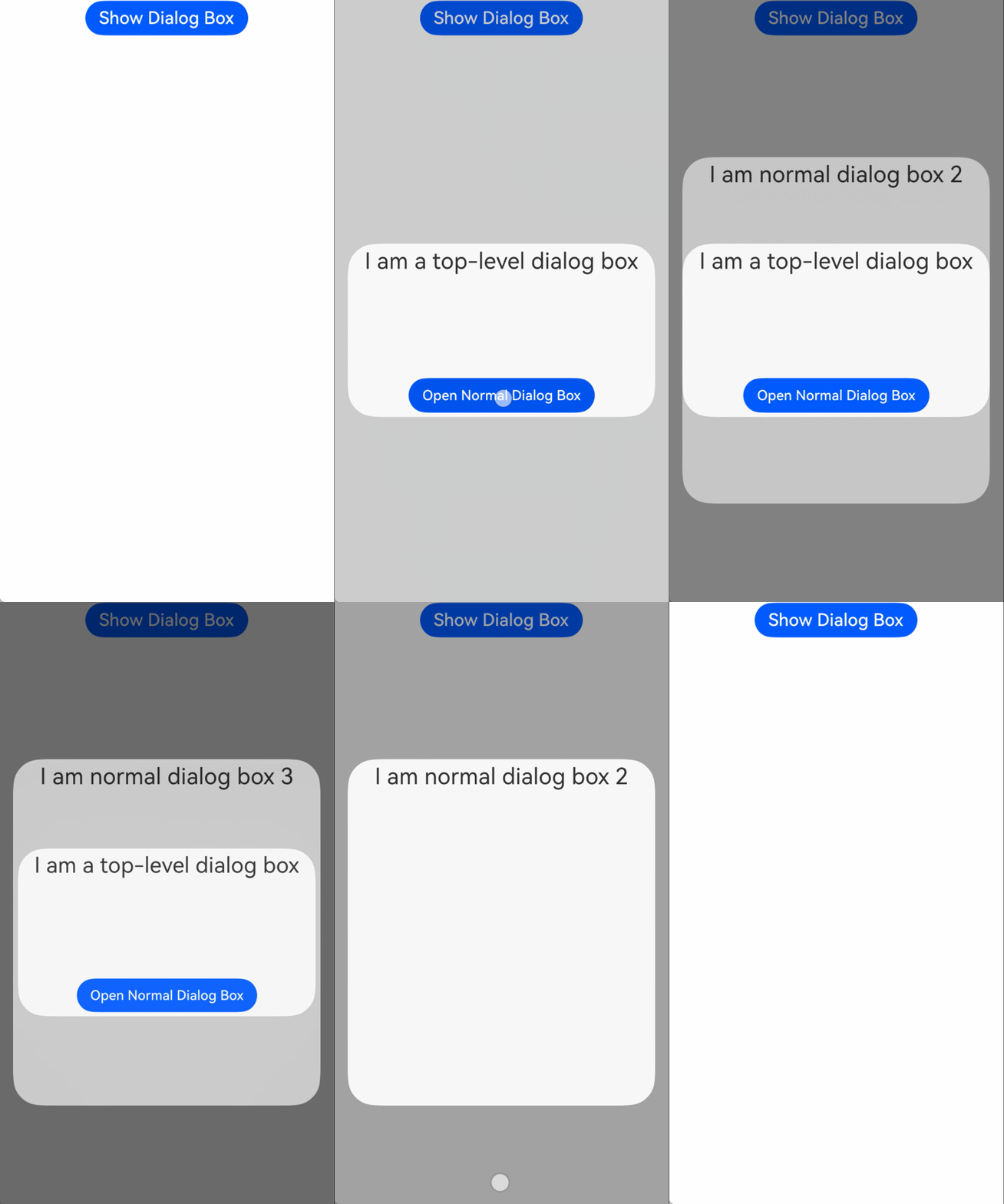
By default, ArkUI dialog box nodes are directly mounted on the root node in ascending order of their levels. Under the root node, dialog box nodes with higher levels are displayed above those with lower levels. A newly created dialog box node is inserted at the position corresponding to its level, and dialog box nodes at the same level are mounted in the order of creation.
Since API version 18, you can set the levelOrder parameter to manage the display sequence of dialog boxes. This lets you control which dialog box appears on top of others.
Constraints
Currently, openCustomDialog, CustomDialog, AlertDialog, ActionSheet, and showDialog support managing dialog box levels through the levelOrder parameter.

Dialog box layer management does not support subwindow scenarios. If showInSubWindow is set to true, the levelOrder parameter has no effect, and the display sequence of dialog boxes cannot be dynamically updated.
Creating Dialog Boxes at Different Levels

-
Initialize a dialog box content area with a Text component.
@Builder normalCustomDialog(index: number) { Column() { // Configure the resource whose name is 'open_normal_dialog' and value is a non-empty string in the resources\base\element\string.json file. Text(this.getUIContext().getHostContext()?.resourceManager.getStringByNameSync('open_normal_dialog') as string + index).fontSize(30) }.height(400).padding(5).justifyContent(FlexAlign.SpaceBetween) } -
Initialize another dialog box content area with a button to open a common dialog box: In the click event, call the getPromptAction API in UIContext to obtain a PromptAction object. Then, use this object to call the openCustomDialog API and set the levelOrder parameter to 0 to create a normal-level dialog box.
@Builder topCustomDialog() { Column() { // Replace $r('app.string.top_dialog') with the actual resource file. In this example, the value in the resource file is "I am a top-level dialog box." Text($r('app.string.top_dialog')).fontSize(30) Row({ space: 50 }) { // Replace $r('app.string.open_dialog') with the actual resource file. In this example, the value in the resource file is "Open Normal Dialog Box." Button($r('app.string.open_dialog')) .onClick(() => { this.getUIContext().getPromptAction().openCustomDialog({ builder: () => { this.normalCustomDialog(this.dialogIndex); }, levelOrder: LevelOrder.clamp(0), }) .catch((err: BusinessError) => { hilog.error(DOMAIN, 'dialogBoxLayer', 'openCustomDialog error: ' + err.code + ' ' + err.message); }); this.dialogIndex++; }) } }.height(200).padding(5).justifyContent(FlexAlign.SpaceBetween) } -
Create a top-level dialog box: In the click event, call the getPromptAction API in UIContext to obtain a PromptAction object. Then, use this object to call the openCustomDialog API and set the levelOrder parameter to 100000 to create a top-level dialog box.
this.getUIContext().getPromptAction().openCustomDialog({
  builder: () => {
    this.topCustomDialog();
  },
  levelOrder: LevelOrder.clamp(100000)
}).catch((err: BusinessError) => {
  hilog.error(DOMAIN, 'dialogBoxLayer', 'openCustomDialog error: ' + err.code + ' ' + err.message);
});
Sample Code
import { LevelOrder } from '@kit.ArkUI';
import { BusinessError } from '@kit.BasicServicesKit';
import { hilog } from '@kit.PerformanceAnalysisKit';

const INDEX: number = 0;
const DOMAIN = 0x0000;

@Entry
@Component
export struct DialogBoxLayer {
  @StorageLink('dialogIndex') dialogIndex: number = INDEX;

  @Builder
  normalCustomDialog(index: number) {
    Column() {
      // Configure the resource whose name is 'open_normal_dialog' and value is a non-empty string in the resources\base\element\string.json file.
      Text(this.getUIContext().getHostContext()?.resourceManager.getStringByNameSync('open_normal_dialog') as string +
        index).fontSize(30)
    }.height(400).padding(5).justifyContent(FlexAlign.SpaceBetween)
  }


  @Builder
  topCustomDialog() {
    Column() {
      // Replace $r('app.string.top_dialog') with the actual resource file. In this example, the value in the resource file is "I am a top-level dialog box."
      Text($r('app.string.top_dialog')).fontSize(30)
      Row({ space: 50 }) {
        // Replace $r('app.string.open_dialog') with the actual resource file. In this example, the value in the resource file is "Open Normal Dialog Box."
        Button($r('app.string.open_dialog'))
          .onClick(() => {
            this.getUIContext().getPromptAction().openCustomDialog({
              builder: () => {
                this.normalCustomDialog(this.dialogIndex);
              },
              levelOrder: LevelOrder.clamp(0),
            })
              .catch((err: BusinessError) => {
                hilog.error(DOMAIN, 'dialogBoxLayer', 'openCustomDialog error: ' + err.code + ' ' + err.message);
              });
            this.dialogIndex++;
          })
      }
    }.height(200).padding(5).justifyContent(FlexAlign.SpaceBetween)
  }


  build() {
    NavDestination() {
      Row() {
        Column({ space: 5 }) {
          // Replace $r('app.string.click_dialog') with the actual resource file. In this example, the value in the resource file is "Show Dialog Box."
          Button($r('app.string.click_dialog'))
            .fontSize(20)
            .onClick(() => {
              this.getUIContext().getPromptAction().openCustomDialog({
                builder: () => {
                  this.topCustomDialog();
                },
                levelOrder: LevelOrder.clamp(100000)
              }).catch((err: BusinessError) => {
                hilog.error(DOMAIN, 'dialogBoxLayer', 'openCustomDialog error: ' + err.code + ' ' + err.message);
              });
            })
        }.width('100%')
      }
    }
  }
}