Overview
Theme fonts are specialized custom fonts available for use in theme applications. You can enable them using specific APIs.
Implementation Mechanism
Figure 1 Switching and using theme fonts
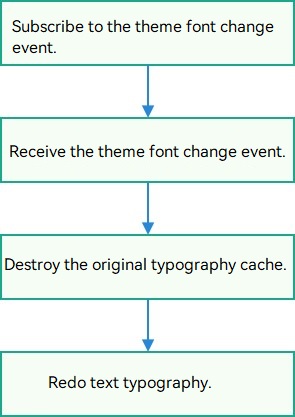
For the switching and usage of theme fonts, the application must subscribe to the theme font change event. Upon receiving the event, the application needs to actively trigger a page refresh to enable theme font switching. Otherwise, the theme font changes will only take effect after the application is restarted.
Available APIs
The following table lists the APIs for registering and using theme fonts. For details, see @ohos.graphics.text (Text).
| Name | Description |
|---|---|
| getGlobalInstance(): FontCollection | Obtains a global font collection instance. |
How to Develop
-
Make sure that you can apply a theme font in the theme applications on your device.
-
Import the required module.
import { text } from '@kit.ArkGraphics2D'; -
Call the getGlobalInstance() API to obtain the global font collection object. The system framework only passes theme font information to the global font collection object during theme font registration.
// Obtain the global FontCollection instance of the font manager.
let fontCollection = text.FontCollection.getGlobalInstance();
-
Create a paragraph style and use the font collection instance to construct a ParagraphBuilder instance for generating paragraphs.

When generating a paragraph object and setting paragraph style parameters, do not specify the fontFamilies attribute. Otherwise, the system prioritizes the specified font over the theme font.
If no theme font is configured in the system theme app, the system default font is used for rendering.
// Set the text style. let myTextStyle: text.TextStyle = { color: { alpha: 255, red: 255, green: 0, blue: 0 }, fontSize: 33 }; // Create a paragraph style object to set the typography style. let myParagraphStyle: text.ParagraphStyle = { textStyle: myTextStyle, align: 3, wordBreak: text.WordBreak.NORMAL }; // Create a paragraph generator. let paragraphBuilder = new text.ParagraphBuilder(myParagraphStyle, fontCollection); -
Set the text style, add text content, and generate paragraph text for subsequent text drawing and display.
// Set the text style in the paragraph generator. paragraphBuilder.pushStyle(myTextStyle); // Set the text content in the paragraph generator. paragraphBuilder.addText("Hello World. \nThis is the theme font."); // Generate a paragraph using the paragraph generator. let paragraph = paragraphBuilder.build(); -
Create a render node and save it to an array. (This sample code is simplified and uses an array as the container. During development, you should choose a proper container based on your use case to ensure that the addition and deletion of nodes correspond to each other.)
// Create a render node array. const renderNodeMap: Array<RenderNode> = new Array(); // Create a node controller. class MyNodeController extends NodeController { private rootNode: FrameNode | null = null; makeNode(uiContext: UIContext): FrameNode { this.rootNode = new FrameNode(uiContext); if (this.rootNode == null) { return this.rootNode; } const renderNode = this.rootNode.getRenderNode(); if (renderNode != null) { renderNode.frame = { x: 0, y: 0, width: 300, height: 50 }; renderNode.pivot = { x: 0, y: 0 }; } return this.rootNode; } addNode(node: RenderNode): void { if (this.rootNode == null) { return; } const renderNode = this.rootNode.getRenderNode(); if (renderNode != null) { renderNode.appendChild(node); // Add the node to the render node array. renderNodeMap.push(node); } } clearNodes(): void { if (this.rootNode == null) { return; } const renderNode = this.rootNode.getRenderNode(); if (renderNode != null) { renderNode.clearChildren(); // Remove the node from the render node array. renderNodeMap.pop(); } } } -
Create and export the render node update function for files (such as EntryAbility.ets) to use. The purpose of redrawing the node is to update the font information in the typography. If the font information is not updated, the residual result may be used, causing garbled characters.
// Export the render node update function. export function updateRenderNodeData() { renderNodeMap.forEach((node) => { // Trigger node redrawing. node.invalidate(); }); } -
Receive the theme font change event in EntryAbility.ets and call the render node update function.
import { AbilityConstant, Configuration, UIAbility, Want } from '@kit.AbilityKit';
import { hilog } from '@kit.PerformanceAnalysisKit';
import { window } from '@kit.ArkUI';
import { updateRenderNodeData } from '../pages/Index';

// ...

export default class EntryAbility extends UIAbility {
  preFontId = "";
  // ...

  onConfigurationUpdate(newConfig: Configuration): void {
    let fontId = newConfig.fontId;
    if (fontId && fontId !== this.preFontId) {
      this.preFontId = fontId;
      updateRenderNodeData();
      // ...
    }
  }
}

