Symptom
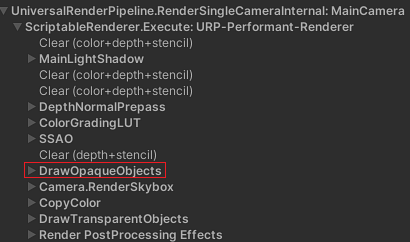
Take the URP of Tuanjie Engine as an example. When ABR adjusts the resolution of the buffer bound to DrawOpaqueObjects, the shadow effect of Screen Space Ambient Occlusion (SSAO) becomes abnormal.
Cause analysis
In the URP, SSAO is a "preprocessing" operation in the rendering pipeline, and its output image will function as the input for DrawOpaqueObjects. When the ABR capability performs adaptive resolution adjustment on the buffer bound to DrawOpaqueObjects, the image output by SSAO uses the original resolution while the buffer bound to DrawOpaqueObjects uses a lower resolution. This resolution inconsistency leads to an abnormal shadow effect.
Solution
-
For game engines supporting only the render thread
-
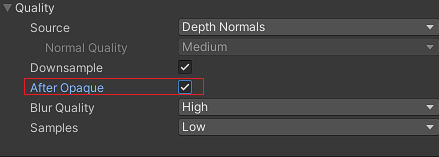
Solution 1: Adjust the rendering pipeline by using SSAO as a "postprocessing" operation. Then, SSAO will not be affected by the resolution of the buffer bound to DrawOpaqueObjects.
Select After Opaque in the URP asset.
-
Solution 2: Obtain the real-time ABR buffer resolution factor and adjust related rendering data accordingly.
The shader of SSAO will perform calculation based on the scaledScreenParams parameter, which is related to the rendering resolution. After the ABR capability is integrated, the scaledScreenParams parameter needs to be adjusted based on the real-time ABR buffer resolution factor.
For Tuanjie Engine, set the scaledScreenParams parameter in the SetPerCameraShaderVariables function of ScriptableRenderer.cs based on the buffer resolution factor.
void SetPerCameraShaderVariables(CommandBuffer cmd, ref CameraData cameraData, bool isTargetFlipped)
{
    Camera camera = cameraData.camera;
    float scaledCameraWidth = (float)cameraData.cameraTargetDescriptor.width;
    float scaledCameraHeight = (float)cameraData.cameraTargetDescriptor.height;
    // scale indicates the ABR buffer resolution factor obtained through the HMS_ABR_GetScale API.
    scaledCameraWidth *= scale;
    scaledCameraHeight *= scale;
    cmd.SetGlobalVector(ShaderPropertyId.scaledScreenParams, new Vector4(scaledCameraWidth, scaledCameraHeight, 1.0f + 1.0f / scaledCameraWidth, 1.0f + 1.0f / scaledCameraHeight));
}
-
-
For game engines supporting both the render thread and Render Hardware Interface (RHI) thread
For game engines that support both the render thread and RHI thread (the RHI thread is executed after the render thread), the ABR buffer resolution factor obtained by the render thread through the HMS_ABR_GetScale API does not help fix the problem.
In this case, the render thread calls the HMS_ABR_GetNextScale API after buffer rendering to obtain the ABR buffer resolution factor of the next frame and adjusts related rendering data synchronously based on the obtained buffer resolution factor.
// Call the API after buffer rendering.
float scale = 1.0f;
errorCode = HMS_ABR_GetNextScale(context_, &scale);
if (errorCode != ABR_SUCCESS) {
    GOLOGE("HMS_ABR_GetNextScale execution failed, error code: %d.", errorCode);
}

// Adjust the rendering data synchronously based on the buffer resolution factor.
void SetViewUniformParameters()
{
    ViewUniformParameters.BufferSize.X = (int)(ViewUniformParameters.BufferSize.X * scale);
    ViewUniformParameters.BufferSize.Y = (int)(ViewUniformParameters.BufferSize.Y * scale);
    ViewUniformParameters.BufferInvSize.X /= scale;
    ViewUniformParameters.BufferInvSize.Y /= scale;
}