Overview
ArkWeb pages support Hypium integration with the Selenium framework and ChromeDriver for UI automated testing.
Environment Configuration
Set up the Hypium environment.
Install Selenium.
Selenium is mainly used for automated testing of web applications. Its core function is to simulate user operations in the browser, such as clicking buttons, entering text, and navigating pages.
pip install selenium
- Integrate the ChromeDriver driver.
ChromeDriver acts as an intermediary between Selenium WebDriver and the web page. When Selenium sends commands, ChromeDriver converts these commands into a protocol that the web kernel can understand and returns the response to Selenium. ArkWeb is developed based on the Chromium kernel. For details about the mapping between the system version and the Chromium version, see Constraints. Visit the ChromeDriver official website to obtain the ChromeDriver mapping the Chromium version.
First, integrate ChromeDriver into the resource folder of the test project. Then, call the set_chromedriver_exe_path method in the WebDriverSetupTool class to specify the path for storing the chromedriver file, or call the set_chromedriver_exe_search_path method to specify the path of the folder where the chromedriver file is stored.
self.web_tools = WebDriverSetupTool(self.driver)
# If you use the **set_chromedriver_exe_path** method to specify the **chromedriver** path, you need to specify the executable **chromedriver** file of the corresponding version.
self.web_tools.set_chromedriver_exe_path(r"D:\WebAutoTest\resource\web_debug_tools\chromedriver_132\chromedriver.exe")
self.web_tools = WebDriverSetupTool(self.driver)
# If you use the **set_chromedriver_exe_search_path** method to specify the folder where the **chromedriver** file is stored, Hypium searches the specified folder for this file of the corresponding version.
self.web_tools.set_chromedriver_exe_search_path(r"D:\WebAutoTest\resource\web_debug_tools")

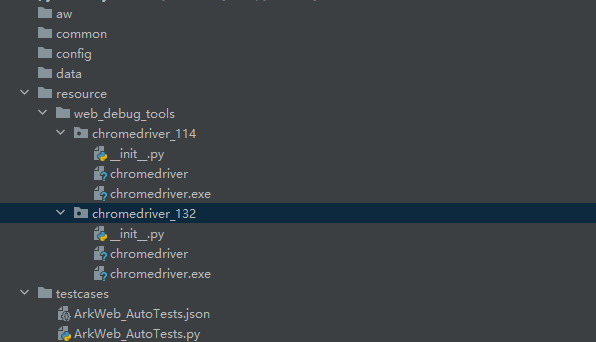
When set_chromedriver_exe_search_path method is used to specify the path of the folder where the chromedriver file is stored, the naming rule of the lower-layer folder is **chromedriver_**Version number, as shown in the following figure.
Sample Code
The following code is used to complete the automated test of the ArkWeb page. You can initialize the Selenium webdriver and then use the API for interacting with the web page through the webdriver to navigate the page and search for page elements.
For more information about how to use the webdriver, see the official Selenium documentation: Driver Sessions | Selenium.
from devicetest.core.test_case import TestCase, Step, CheckPoint
from hypium import UiDriver, BY
from hypium.webdriver.webdriver_setup_tool import WebDriverSetupTool

class ArkWeb_AutoTests(TestCase):
    def __init__(self, configs):
        self.TAG = self.__class__.__name__
        TestCase.__init__(self, self.TAG, configs)
        self.driver = UiDriver(self.device1)
        self.driver_width, self.driver_height = self.driver.get_display_size()
        self.web_tools = WebDriverSetupTool(self.driver)
        # Set the path for storing chromedriver.
        self.web_tools.set_chromedriver_exe_search_path(r"D:\WebAutoTest\resource\web_debug_tools")
        # Use the bundle name to connect to the WebView page of the specified application.
        self.web_tools.connect("com.huawei.hmos.browser")
        # Initialize the webdriver of Selenium.
        self.web_driver = self.web_tools.driver

    def setup(self):
        pass

    def process(self):
        # Navigate to the page: Use the webdriver of Selenium to access the https://developer.huawei.com/ website.
        self.web_driver.get("https://developer.huawei.com/")
        # Search for a page element: Use the webdriver of Selenium to search for the element whose page ID is **th**.
        self.web_driver.find_element(BY.ID, "th")

    def teardown(self):
        # After the operation is complete, you need to invoke the close method in webdriver_setup_tool to close the connection established by web_tools.
        self.web_tools.close()