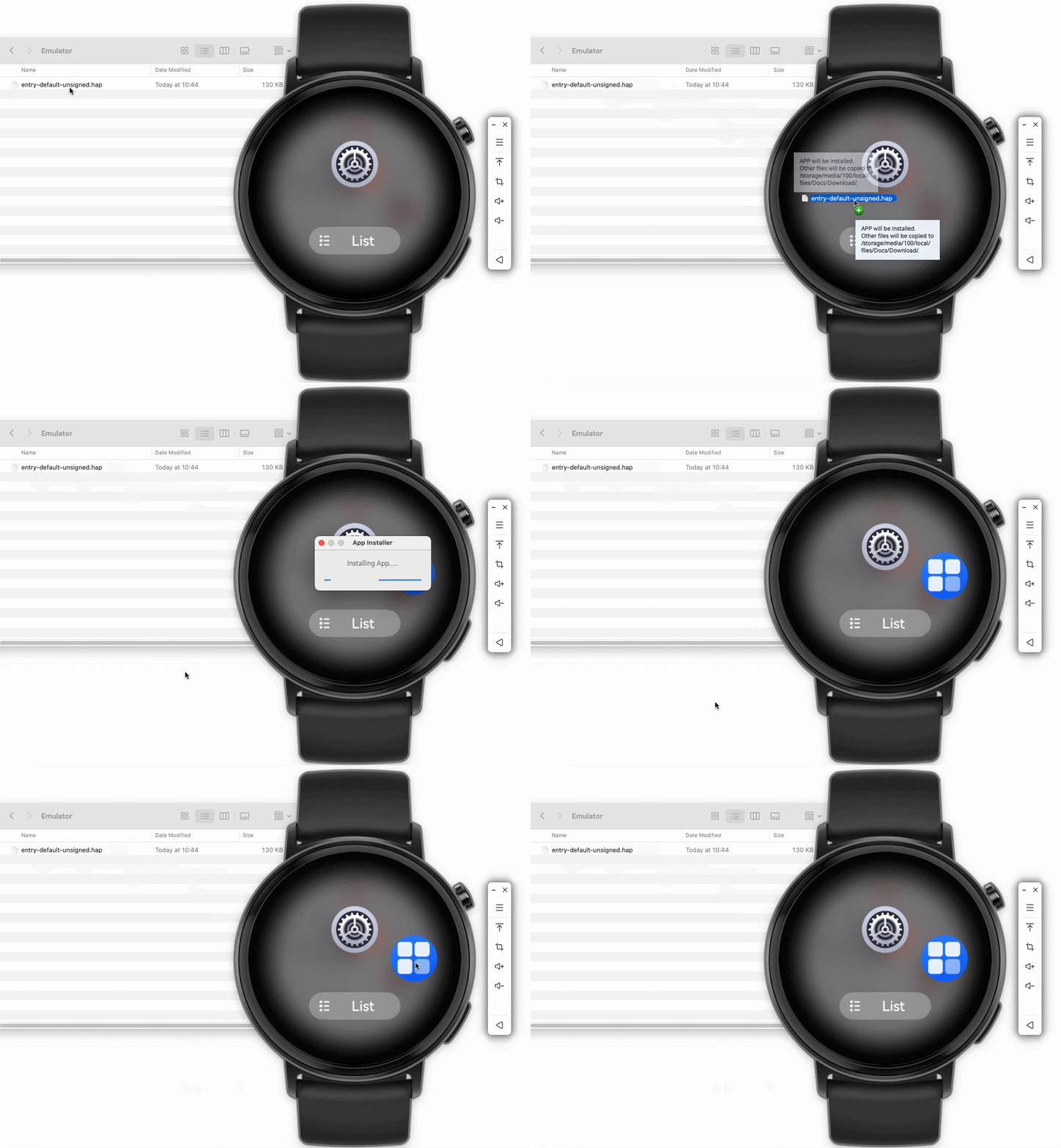
- Installing an app package
You can install a local Harmony Ability Package (HAP) on the emulator by simply dragging it to the emulator screen. Multiple HAPs can be installed in one go by dragging them together. The emulator also supports the installation of apps that contain Harmony Shared Packages (HSPs). You only need to drag the HSP and HAP to the emulator screen.
You can also go to sdk\default\openharmony\toolchains under the DevEco Studio installation directory in the CLI and run the hdc app install command to install the package. After the installation is complete, you can view the installed app in the app list.
- Uploading files
You can upload a local file to the emulator by simply dragging the file to the emulator screen. The emulator supports batch file upload. The uploaded files are stored in the /storage/media/100/local/files/Docs/Download/ directory of the virtual device.
You can also go to sdk\default\openharmony\toolchains under the DevEco Studio installation directory in the CLI and run the hdc file send command to upload files.
Since DevEco Studio 6.1.0 Beta2, when you use an image with API version 21 or later, the uploaded image files will be saved in the gallery.