To protect code assets, source code obfuscation is originally enabled by default in DevEco Studio: For projects developed using API version 10 or later based on the stage model and built in release mode, parameter names and local variable names in source code are obfuscated by default.
Since DevEco Studio NEXT Developer Beta3 (5.0.3.600), source code obfuscation is disabled by default for new projects and modules. If source code obfuscation is enabled in the module-level build-profile.json5 file, the following recommended obfuscation options are enabled by default: -enable-property-obfuscation, -enable-toplevel-obfuscation, -enable-filename-obfuscation, and -enable-export-obfuscation. You can customize these and other obfuscation options in the obfuscation-rules.txt configuration file. For details, see ArkGuard Obfuscation Options.
Constraints
- Only the projects developed on the stage model are supported.
- Code obfuscation takes effect only when the build mode is release.
- Obfuscation is not disabled for modules and the HARs and HSPs on which each module depends.
Fields
You can configure source code obfuscation in the module-level build-profile.json5 file. The available fields are described as follows.
Field | Type | Mandatory | Description | |
|---|---|---|---|---|
ruleOptions | Object | No | Configuration of the code obfuscation rule. | |
enable | Boolean | Yes | Whether to enable source code obfuscation.
NOTE: Since DevEco Studio NEXT Developer Beta3 (5.0.3.600), the default value is changed from true to false. | |
files | String array | No | Relative paths of the obfuscation rule files. By default, the obfuscation-rules.txt file is used. The obfuscation rules configured in the file take effect only during the module's compilation process (including the dependent code). NOTE:
| |
consumerFiles | String/String array | No | Relative paths of the obfuscation rule files transferred to the integrator. This field is exclusive to HAR/HSP modules. Multiple files can be configured, and each file can have a custom name. NOTE:
| |
Enabling Code Obfuscation
To protect code assets, code obfuscation is recommended. You can enable source code obfuscation in the module-level build-profile.json5 file.
"arkOptions": {
  "obfuscation": {
    "ruleOptions": {
      "enable": true  // Set this field to true to enable source code obfuscation.
    }
  }
}
Since DevEco Studio NEXT Developer Beta3 (5.0.3.600), enabling obfuscation automatically enables the recommended obfuscation rules in the obfuscation-rules.txt file, including the -enable-property-obfuscation, -enable-toplevel-obfuscation, -enable-filename-obfuscation, and -enable-export-obfuscation options.

In release build mode, you are advised to enable obfuscation and correctly configure obfuscation rules. Failure to do so could lead to runtime issues.
Enabling Advanced Obfuscation
After obfuscation is enabled, you can proceed to set up advanced obfuscation rules for more refined control over the obfuscation process.
[h2]Configuring All Obfuscation Rules
- Open the module-level build-profile.json5 file and configure the relative paths of the obfuscation rule files under the files field. You can specify multiple files, and the default file is at ./obfuscation-rules.txt.
{ "apiType": "stageMode", "buildOptionSet": [ { "name": "release", "arkOptions": { "obfuscation": { "ruleOptions": { "enable": true, "files": [ "./obfuscation-rules.txt" // Obfuscation rule file. ] } } } }, ], } - Open the obfuscation-rules.txt file in the module directory to configure obfuscation rules. For details, see Obfuscation Options. To preserve specific content, configure Retention Options.
When multiple obfuscation rule files are specified, their rules are merged. For details about the merging and how the merged rules are applied, see Obfuscation Rule Merging Strategies.

[h2]Configuring Retention Options for HAR/HSP Modules
To ensure seamless integration and functionality of the HAR or HSP module, configure retention options in the rule files for any content that you do not want the integrator to obfuscate, such as variables or functions exported from the HAR or HSP module.
- Open the module-level build-profile.json5 file and configure the relative paths of the obfuscation rule files to be passed to the integrator under the consumerFiles field. You can specify multiple files. The default file is located at ./consumer-rules.txt, which corresponds to the obfuscation.txt file in the compiled HAR package.
{ "apiType": "stageMode", "buildOptionSet": [ { "name": "release", "arkOptions": { "obfuscation": { "ruleOptions": { "enable": true, "files": [ "./obfuscation-rules.txt" ] }, "consumerFiles": [ // Obfuscation rule in use when the module is depended on. "./consumer-rules.txt" ] } } }, ], } - Open the consumer-rules.txt file in the module directory to configure retention options.
When multiple obfuscation rule files are specified, their rules are merged. For details about the merging and how the merged rules are applied, see Obfuscation Rule Merging Strategies.

Configuring Retention Options Using ObfuscationHelper
When source code obfuscation is enabled, methods, properties, or paths in your code may be renamed. However, if the application runtime still references the original, unobfuscated names, functionality may fail. To resolve this, you must configure retention options for the affected fields. For specific scenarios and configuration guidelines, see Retention Options.
Given the numerous scenarios to troubleshoot and fields to configure, DevEco Studio provides the ObfuscationHelper tool. It scans source code by module and usage scenario to rapidly identify required retention options and trustlist fields, allowing developers to generate obfuscation rule files with a single click. For dynamically accessed names or properties (determined only at runtime), ObfuscationHelper identifies such scenarios. You must further verify and configure trustlists based on service requirements.
[h2]Scanning Code
- Open ObfuscationHelper using either of the following methods:
- Choose Tools > ObfuscationHelper from the menu bar.
- Right-click the module directory and choose ObfuscationHelper from the shortcut menu.

- Select the module to be scanned from the drop-down list.
- If a module has been previously scanned and a trustlist has been generated from the troubleshooting process, corresponding historical records will be created. Select a relevant historical record, with which the current scan automatically associates. Fields already checked in the historical record require no re-examination.
Historical records can be associated since DevEco Studio 6.0.0 Beta1.

- Select one or more scanning tasks based on the involved obfuscation scenarios and click Scan. For details about scanning tasks, see Scanning Tasks.

- After the scan is successful, go to the Recommended Trustlist and Supplemental Trustlist pages. You can also click Cancel to stop the scan.
[h2]Configuring the Recommended Trustlist
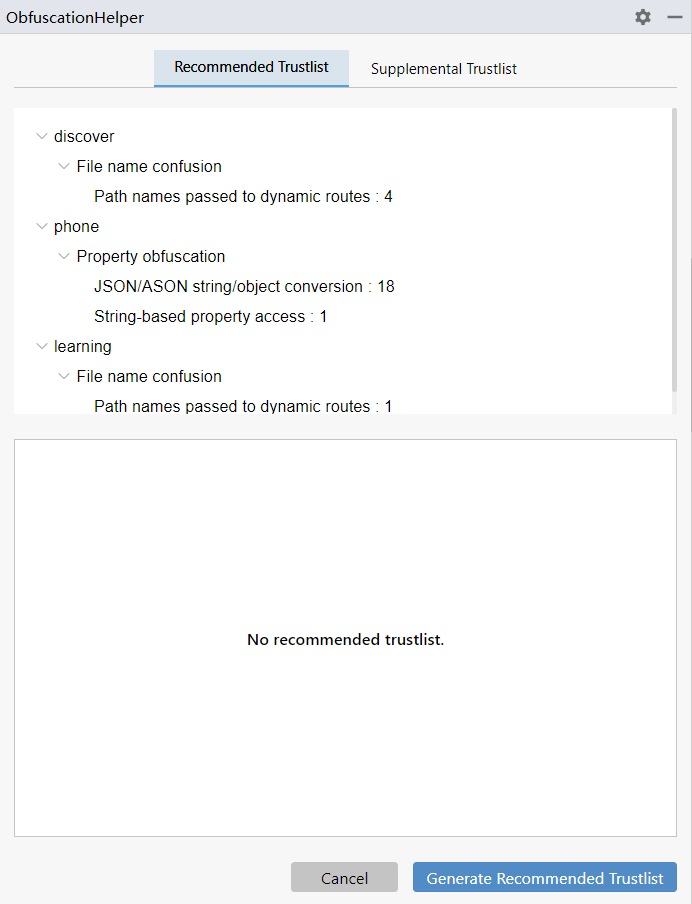
On the Recommended Trustlist configuration page, view identified retention options and trustlist fields from the scan results, then generate an obfuscation rule file with one click.
- In the upper part of the page, the scan results are displayed in the following tree structure.
Module name
----Obfuscation options
--------Scanning task: number of recommended trustlist fields found in the scanning task
Select a scanning task. The recommended retention options and trustlist fields are displayed in the following tree structure in the lower part of the page.
Retention options
----Core code
--------Trustlist field --> File where the field is located: code line
- Core code: Click the core code to go to the file and code line where the code is located.

- Trustlist field: Click a trustlist field to go to the file and code line where the field is located.

- Core code: Click the core code to go to the file and code line where the code is located.
- To generate the trustlist file in the project, click Generate Recommended Trustlist. ObfuscationHelper will generate the recommended trustlist files Hm-recommend-keep-list.txt and Hm-recommend-consumer-keep-list.txt in the corresponding module and display the file paths. At the same time, the trustlist Excel file obfuscation-helper-xxx.xlsx is generated in the root directory of the project.
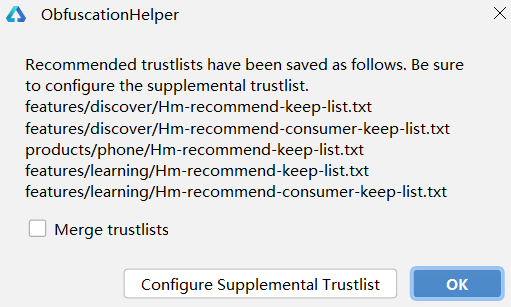
- Click OK. The dialog box is closed, and the Recommended Trustlist page is displayed.
- Click Configure Supplemental Trustlist. The dialog box is closed, and the Supplemental Trustlist page is displayed.
If Merge trustlists is selected, and you click OK or Configure Supplemental Trustlist, the merged trustlist file Hm-merge-recommend-keep-list.txt is generated in the project root directory. This file merges the Hm-recommend-keep-list.txt files of entry modules and the Hm-recommend-consumer-keep-list.txt files of all modules.
For example, the recommended trustlist file is generated in the following modules:

- Add a trustlist file to the obfuscation configuration in either of the following ways:
- Add Hm-recommend-keep-list.txt to the files field and Hm-recommend-consumer-keep-list.txt to the consumerFiles field in the build-profile.json5 file of each module. For details about the fields, see Fields.
- Add the merged file Hm-merge-recommend-keep-list.txt to the files field in the build-profile.json5 file of the entry module.

- In the upper part of the page, the scan results are displayed in the following tree structure.
[h2]Configuring the Supplemental Trustlist
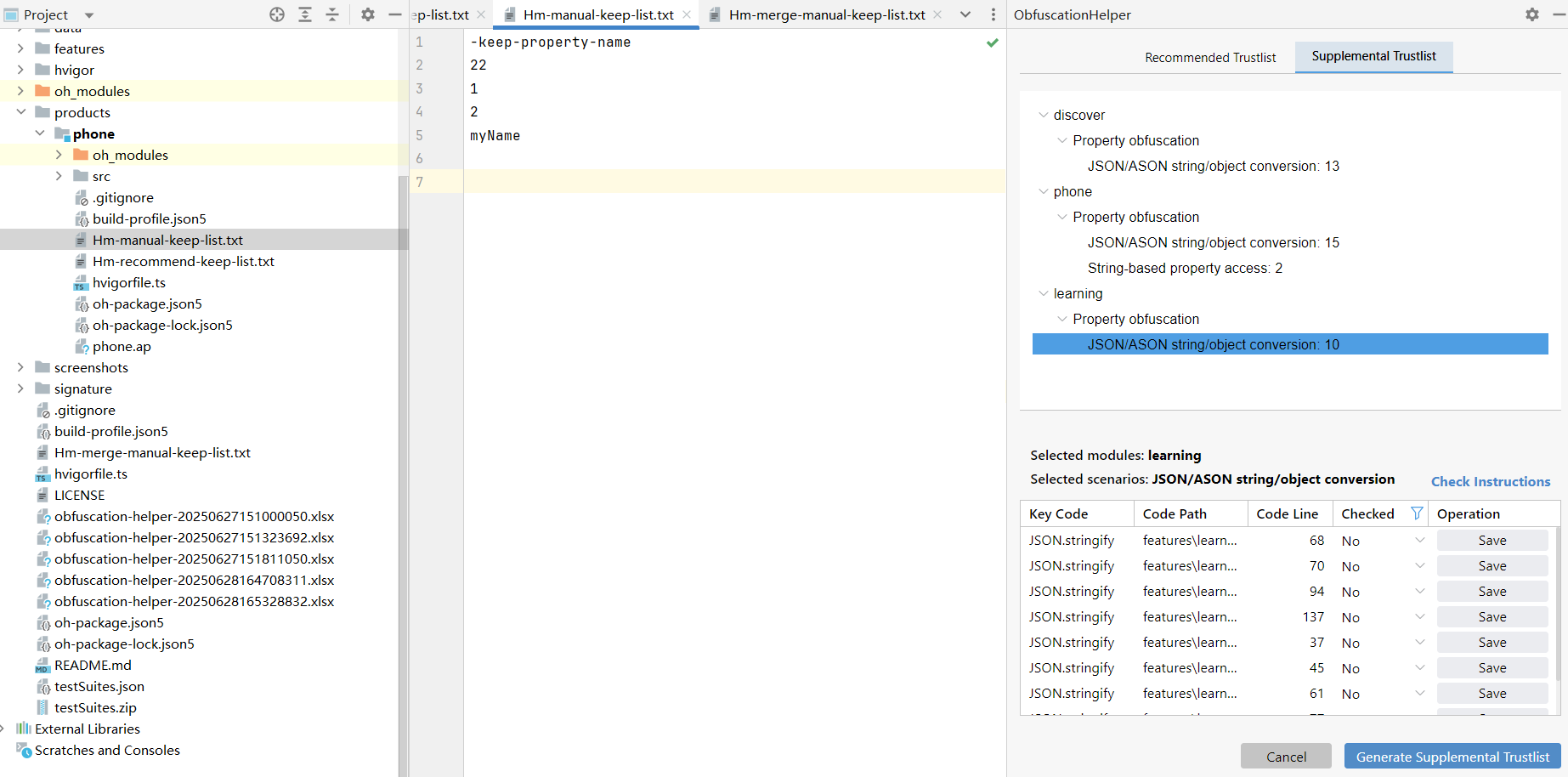
On the Supplemental Trustlist page, view the scanned core code and further check the core code, identify trustlist fields, and configure the fields in the target file.
- In the upper part of the page, the scan results are displayed in the following tree structure.
Module name
----Obfuscation options
--------Scanning task: number of core code statements to be checked
Select a scanning task. The code to be checked is displayed in the lower part of the page. Click the core code to go to the file and code line where the code is located.

- After redirection to the code line, determine whether to configure the trustlist fields based on the specific scenario. For details, see Scanning Tasks.
- If no fields need to be configured to the trustlist, change No in the Checked column to Yes.
- If some fields need to be configured to the trustlist, click Add, enter the retention options and trustlist fields in the text box, and click Save. After the configuration is saved, the item is marked as Yes in the Checked column.
If an item is marked as Yes, it does not need to be checked again when the module and scenario are scanned again with the check record associated.

- After check, click Generate Supplemental Trustlist. ObfuscationHelper will generate the supplemental trustlist files Hm-manual-keep-list.txt and Hm-manual-consumer-keep-list.txt in the corresponding module and display the file paths. At the same time, the trustlist Excel file obfuscation-helper-xxx.xlsx is generated in the root directory of the project.

If Merge trustlists is selected, and you click OK, the merged trustlist file Hm-merge-manual-keep-list.txt is generated in the project root directory. This file merges the Hm-manual-keep-list.txt files of entry modules and the Hm-manual-consumer-keep-list.txt files of all modules.
For example, the supplemental trustlist file is generated in the following modules:
- Add a trustlist file to the obfuscation configuration in either of the following ways:
- Add Hm-manual-keep-list.txt to the files field and Hm-manual-consumer-keep-list.txt to the consumerFiles field in the build-profile.json5 file of each module. For details about the fields, see Fields.
- Add the merged file Hm-merge-manual-keep-list.txt to the files field in the build-profile.json5 file of the entry module.

- In the upper part of the page, the scan results are displayed in the following tree structure.
[h2]Viewing Historical Records
After you generate a recommended trustlist or supplemental trustlist, a historical record is generated, which can be used for further check.
On the home screen of ObfuscationHelper, click History at the bottom to view all historical records.

- The save path points to the cache file of historical records. Hover over the save path to view the save path of the trustlist file and Excel file.
- Click
 to go to the corresponding trustlist configuration page.
- Click the deletion icon to delete a specified historical record, and the corresponding cache file and Excel file. However, the trustlist file is not deleted.
[h2]Scanning Tasks
The following describes the scanning tasks performed by ObfuscationHelper.
Property obfuscation
- JSON data parsing and object serialization
Properties in object types converted via JSON/ArkTSUtils.ASON must be retained.
// JSON.parse class JSONTest { prop1: string = "" prop2: number = 0 } // Example JSON file (test.json) /* { "prop1": "value", "prop2": 10 } */ const jsonData = buffer.from(this.context.resourceManager.getRawFileContentSync("test.json")).toString(); let demo: JSONTest = JSON.parse(jsonData) // Add JSONTest to keep-property-name. let demo = JSON.parse(jsonData) as JSONTest // Add JSONTest to keep-property-name. let demo = JSON.parse(jsonData) as ESObject as JSONTest // Add JSONTest to keep-property-name. let demo: ESObject = JSON.parse(jsonData) // Add dynamically typed objects (including ESObject, Object, and object) to the supplemental trustlist, which requires adding all keys in jsonData (such as prop1 and prop2) to keep-property-name. // ArkTSUtils.ASON.parse let demo: JSONTest = ArkTSUtils.ASON.parse(jsonData) // Add JSONTest to keep-property-name. let demo = ArkTSUtils.ASON.parse(jsonData) as JSONTest // Add JSONTest to keep-property-name. let demo = ArkTSUtils.ASON.parse(jsonData) as ESObject as ESObject as JSONTest // Add JSONTest to keep-property-name. let demo: ESObject = ArkTSUtils.ASON.parse(jsonData) // Add dynamically typed objects (including ESObject, Object, and object) to the supplemental trustlist, which requires adding all keys in jsonData (such as prop1 and prop2) to keep-property-name. // JSON.stringify let type = new JSONTest() let str = JSON.stringify(type) //Add JSON.stringify to the supplemental trustlist, which requires adding all properties in JSONTest to keep-property-name. // ArkTSUtils.ASON.stringify let type = new JSONTest() let str = ArkTSUtils.ASON.stringify(type) // Add ArkTSUtils.ASON.stringify to the supplemental trustlist, which requires adding all properties in JSONTest to keep-property-name. - Object properties accessed via strings
Properties accessed through bracket notation ([]), and properties in Object.defineProperty, Object.defineProperties, and Object.getOwnPropertyDescriptor APIs must be retained.
// For properties accessed via bracket notation like obj['name'], if name is a variable, add to the supplemental trustlist, which requires adding the corresponding content to -keep-property-name. Object.defineProperty(obj, 'y', {}) // If y is a variable, add to the supplemental trustlist, which requires adding the corresponding content to -keep-property-name. Object.defineProperties(obj, { // Add properties prop1 and prop2 to -keep-property-name in the recommended trustlist. prop1: { value: 'Hello', writable: true, enumerable: true, configurable: true }, prop2: { value: 'Hello', writable: true, enumerable: true, configurable: true } }); Object.getOwnPropertyDescriptor(obj, 'bbb'); // If bbb is a variable, add to the supplemental trustlist, which requires adding the corresponding content to -keep-property-name. obj.s=0; let key='s'; obj[key] // If key is a variable, add to the supplemental trustlist, which requires adding the corresponding content s to keep-property-name. - ArkTS object properties accessed/operated from the C++ side
You need to check the ArkTS property strings related to the C++ APIs and manually add them to the trustlist. For details about the involved C++ APIs, see Setting ArkTS Object Properties Using Node-API.
//index.ets func() { let obj: NapiTestClassObj = { napiTestClassObjData: 0, napiTestClassObjMessage: "hello world" }; let result: ESObject = testNapi.setProperty(obj, "napiTestClassObjMessage", "100"); // Manual check based on the napi_set_property API reveals that the napiTestClassObjMessage property has been modified, which must be added to -keep-property-name in the trustlist. if (obj.napiTestClassObjMessage === "100") { console.log("setProperty success"); return true; } return false; } //napi_init.cpp static napi_value SetProperty(napi_env env, napi_callback_info info) { size_t argc = 3; napi_value args[3]; napi_status status = napi_get_cb_info(env, info, &argc, args, nullptr, nullptr); if (status != napi_ok) { napi_throw_error(env, nullptr, "Node-API napi_get_cb_info fail"); } status = napi_set_property(env, args[0], args[1], args[2]); // Detected critical API: napi_set_property if (status != napi_ok) { napi_throw_error(env, nullptr, "Node-API napi_set_property fail"); return nullptr; } return args[0]; } - Properties in the database key-value pair type (ValuesBucket)
Properties in the database key-value pair type (ValuesBucket) must be retained.
const valueBucket: ValuesBucket = { 'ID1': ID1, // Add ID1, NAME1, AGE1, and SALARY1 to -keep-property-name. 'NAME1': name, 'AGE1': age, 'SALARY1': salary }; - Member variables, methods, and parameters decorated with custom decorators
Member variables, methods, and parameters decorated with custom decorators need to be checked to see if they should be added to the trustlist.
function logClass(target: any) { console.log('Class created:', target); // MyClass is not obfuscated. Therefore, the class name decorated with @logClass does not need to be added to the trustlist. return target; } export function logMethod(target: any, methodName: string, descriptor: PropertyDescriptor) { const originalMethod = descriptor.value; descriptor.value = function (...args: any[]) { if(methodName === 'myMethod'){ // methodName is obfuscated. The comparison with yMethod does not meet the expectation. Therefore, the method name myMethod decorated with @logMethod needs to be added to the trustlist. console.log('Calling myMethod') } console.log(`The ${methodName} method is about to be called with arguments:`, args); const result = originalMethod.apply(this, args); console.log(`Method ${methodName} call completed. Result:`, result); return result; }; return descriptor; } function logProperty(target: any, propertyName: string) { let value; const getter = function () { console.log(`Obtaining the ${propertyName} property`); // propertyName is obfuscated, which does not affect the running result. You do not need to add it to the trustlist. return value; }; const setter = function (newValue: any) { console.log(`Setting the ${propertyName} property to ${newValue}`); value = newValue; }; Object.defineProperty(target, propertyName, { get: getter, set: setter, enumerable: true, configurable: true }); return; } @logClass class MyClass { // Name of the class decorated with a custom decorator. Check whether MyClass should be added to the trustlist. @logProperty myProperty: number; // Name of the property decorated with a custom decorator. Check whether myProperty should be added to the trustlist. constructor() { this.myProperty = 10; } @abcd @logMethod myMethod(arg1: number, arg2: number) { // Name of the method decorated with a custom decorator. Check whether myMethod should be added to the trustlist. return arg1 + arg2; } } - Properties of record-type objects
Properties of record-type objects must be preserved. This scenario is supported starting from DevEco Studio 6.0.1 Beta1.
// Supported scenario
export function hello() {
  const person: Record<string, Object> = {
    ddName: 'zhangsan',    // Properties ddName, ggAge, and isWfStudent of the record-type object 'person' are preserved via -keep-property-name.
    ggAge: 25,
    isWfStudent: true
  }
  person.wwArea = '112';     // The wwArea property, added via dot notation, is preserved via -keep-property-name.
  return person;
}
// Unsupported scenarios
// 1. Scanning is not supported for the sssd property added via dot notation on a record-type object obtained by calling this function; the property will not be preserved and will be obfuscated.
let ret = hello();
ret.sssd = '1111';
// 2. Scanning is not supported for properties a123 and b123 of the implicit record-type object 'parameters'; these properties will not be preserved and will be obfuscated.
export function sendPost3() {
  const want: Want = {
    action: 'ohos.want.action.viewData',
    entities: ['entity.system.browsable'],
    uri: '123',
    parameters: {
      a123: 1,
      b123: 2
    }
  };
}
Top-level scope name obfuscation
- Names exported from namespaces
Names exported from namespaces and nested namespaces must be retained.
export namespace namespace1 { export class namespace1Class1 { // Add namespace1Class1 to -keep-global-name in the recommended trustlist. } export namespace namespace1_1 { // Add namespace1_1 to -keep-global-name in the recommended trustlist. export let namespace1Property1_1: string = '111'; // Add namespace1Property1_1 to -keep-global-name in the recommended trustlist. export function namespace1Func1_1() { // Add namespace1Func1_1 to -keep-global-name in the recommended trustlist. console.log('namespace1Func1_1 execute success'); } export class namespaceClass1_1{ // Add namespaceClass1_1 to -keep-global-name in the recommended trustlist. func(){ console.log(""namespaceClass1_1 success"") } } } } - Dynamically imported names
API names, property names, and class names that are dynamically imported must be retained. This feature is supported since DevEco Studio 6.0.0 Beta2.
// After module import, add the used class name TestClass to keep-global-name in the recommended trustlist.
try {
  let test = (await import('../model/TestClass')).TestClass
  console.warn(TAG, 'test = ', test);
  // console.warn(TAG, 'test TestClass = ', test.);
  console.warn(TAG, 'test staticGlsAdd = ', test.staticGlsAdd(5, 6));
} catch (e) {
  console.warn(TAG, `error = ${e}`);
}
// After module import, add the used method name componentClass to keep-global-name in the recommended trustlist.
let util = await import('harlibrary/src/main/ets/utils/Util');
try {
    console.warn(TAG, 'util = ', util);
    console.warn(TAG, 'call util function = ', await util.componentClass());
} catch (e) {
    console.warn(TAG, `error = ${e}`);
}
// After module import, add the name of the warn method called after default to keep-global-name in the recommended trustlist.
import('hsplibrary/src/main/ets/utils/Logger').then(logger => {
    try {
    console.warn(TAG, 'import Logger success.');
    logger.default.warn('this is logger warn')
    } catch (e) {
    console.warn(TAG, `error = ${e}`);
    }
})
// Encapsulate dynamic import into a method. If the exported class instance is a variable, add it to the supplemental trustlist. After the check, add the variable value to keep-global-name.
public static importFile<T>(modulePath: string, resultClassName: string) {
    return import(modulePath).then((ns: ESObject) => {
      let res: T = new ns[resultClassName]();   // Add this line to the supplemental trustlist. After the check, add TestClass corresponding to resultClassName to keep-global-name.
      return res;
    }).catch((err: Error) => {
      console.warn('chisj debug: importFile error = ', err);
      return undefined;
    });
  }
// Index.ets
let modulePath = '../model/TestClass';
let className = 'TestClass';
ImportUtil.importFile<ESObject>(modulePath, className).then((ns:ESObject) => {
    try {
    console.warn(TAG, 'import importFile success')
    console.warn(TAG, 'ns = ', ns)
    console.warn(TAG, 'calcAdd = ', ns?.calcAdd(1, 2));
    } catch (e) {
    console.warn(TAG, `error = ${e}`);
    }
})
// Encapsulate dynamic import into a method, and add the Calc method called by the exported module myModule to the recommended trustlist.
// ImportUtil.ts
export function dynamicImport<T>(modulePath: string): Promise<T> {
  return import(modulePath).then(module => {
    // Some modules may have default exports; additional processing is needed here.
    return module.default || module as T;
  });
}
// Index.ets
const myModule = await dynamicImport<typeof import('harlibrary')>('harlibrary');
console.warn(TAG, '1 calc = ', myModule.Calc(1, 2))
File name obfuscation
- Dynamically imported path names
The path names corresponding to the sources field in the build-profile.json5 file of the module must be retained.
// Module-level build-profile.json5 { "apiType": "stageMode", "buildOption": { "arkOptions": {"runtimeOnly": {"sources": ["./aaa/bbb", "./ccc/dddd"]}} // Add ./aaa/bbb and ./ccc/dddd to keep-file-name. }, "buildOptionSet": [ { "name": "release", "arkOptions": { "runtimeOnly": {"sources": ["./e/f", "./g/h"]}, // Add ./e/f and ./g/h to keep-file-name. "obfuscation": { "ruleOptions": { "enable": true, "files": [ "./obfuscation-rules.txt" ] } } }, }, ], } - Path names passed to dynamic routes
The path names corresponding to the pageSourceFile field in the resources/base/profile/route_map.json file of the module must be retained.
// resources/base/profile/route_map.json file of the module
{
  "routerMap": [
    {
      "name": "PageOne",
      "pageSourceFile": "src/main/ets/pages/directory/PageOne.ets",  // Add src/main/ets/pages/directory/PageOne.ets to keep-file-name.
      "buildFunction": "PageOneBuilder",
      "data": {
        "description" : "this is PageOne"
      }
    }
  ]
}
Imported/exported name obfuscation
- APIs imported from .so libraries
The APIs imported from .so libraries and their properties accessed in dot notation must be retained. In versions earlier than DevEco Studio 6.1.1 Release, only the methods exported from src/main/cpp/lib{Module name}/Index.d.ts can be scanned.
import testNapi from "xxxx.so" // Add testNapi to keep-global-name. import {testNapi} from "xxxx.so" // Add testNapi to keep-global-name. import {testNapi as napi} from "xxxx.so" // Add testNapi to keep-global-name. testNapi.add() // Add add to -keep-property-name. - APIs exposed by HSPAPI names and property names exported from HSP entry files (typically index.ets) must be retained.
// Exported constant export const LOCAL_NUM = 100 // Add LOCAL_NUM to keep-global-name. // Exported method export function harFun() { // Add harFun to keep-global-name. } // Names of the exported class and its properties (including the parent class and its properties). If a property is also a class, that class must be retained in the same manner. class FatherClass { prop4: string = "bbb" } class SubClass { prop3: string = "bbb" } export class HSPClass extends FatherClass{ // Add the class name HSPClass to -keep-global-name. prop1: string = "aaa" prop2: SubClass = new SubClass() // Add prop1, prop2, prop3, and prop4 to -keep-property-name. } // Exported namespace, including its methods, constants, classes (with the retention method the same as above), and sub-namespaces. export namespace NmSpace { export const NUM_NAME_SPACE = 100 // Add the NUM_NAME_SPACE constant to -keep-global-name. export class classNameSpace { // Add the class name classNameSpace to -keep-global-name. prop: string = "bbb" // Add the class property prop to -keep-property-name. } export function funNameSpace() { // Add the funNameSpace method to -keep-global-name. } } // Add the relative path of the entry file, for example, ./index.ets, to the keep option. // Add the entry file name, for example, index.ets, to the keep-file-name option. - APIs imported from HSP
The APIs imported from HSP files and their properties accessed in dot notation must be retained.
import MyClass1 from "xxxx" // Add MyClass1 to keep-global-name. import {MyClass2} from "xxxx" // Add MyClass2 to keep-global-name. import {MyClass3 as MyClass} from "xxxx" // Add MyClass3 to keep-global-name. MyClass1.add() // Add add to keep-property-name. - APIs exposed by HAR
For details, see APIs exposed by HSP.
A HAR will be scanned only when HAP->HSP->HAR and HAP->HAR simultaneously, where -> indicates a dependency relationship.
