Description of uris
uris declared in skills of the module.json5 file contains the following fields.
-
scheme: scheme name, for example, http, https, file, and ftp. Custom values are also supported.
-
host: domain name or IP address, for example, developer.huawei.com or 127.0.0.1.
-
port: port number, for example, 80 in developer.huawei.com:80.
-
path: directory or file path on the DNS. It is valid only when the scheme exists. The path field does not support wildcards. If wildcards are required, use pathRegex.
-
pathStartWith: prefix of the directory or file path on the DNS. It is used for prefix matching.
-
pathRegex: regular expression of the directory or file path on the DNS. It is used for regular expression matching. It is valid only when the scheme exists.
-
linkFeature: application's function type (such as file opening, sharing, and navigation). The value is a string with a maximum of 127 bytes.

- When an application page is opened using a browser, the browser automatically converts uppercase letters in scheme and host in uris to lowercase letters, causing a failure to match the application. Therefore, it is recommended that scheme and host do not contain uppercase letters.
- Do not add slashes (/) before and after the values of path, pathStartWith, and pathRegex. For example, for the application link https://developer.huawei.com/consumer/en/support, set path to consumer/en/support, pathStartWith to consumer/en, and pathRegex to ^consumer/en/support$.
[h2]Basic URL Format
URIs can be expressed in different formats based on the available fields. Among them, scheme is mandatory. Other fields are valid only when scheme is configured.
-
Only scheme is configured: scheme://
-
The combination of scheme and host is configured: scheme://host
-
The combination of scheme, host, and port is configured: scheme://host:port
-
When path, pathStartWith, or pathRegex is configured, the formats are as follows.
- Full path expression: scheme://host:port/path
- Prefix expression: scheme://host:port/pathStartWith
- Regular expression: scheme://host:port/pathRegex

- The scheme configured for a third-party application component must not duplicate that of a system application. Otherwise, the third-party application component cannot be launched through the URI.
- If multiple applications have the same URL configuration and multiple applications are matched during application redirection, an application selection dialog is displayed. For a better user experience, developers can use the path field of the link to distinguish different applications under the same domain name. For example, the link https://www.example.com/path1 launches target application 1, and the link https://www.example.com/path2 launches target application 2.
[h2]Description of linkFeature

The number of linkFeature declared in a bundle cannot exceed 150.
The use of the linkFeature field enables an application to deliver a more user-friendly redirection experience. (The declaration of the linkFeature field must be reviewed by the application market before being released.) The use scenarios are as follows:
-
Identification of applications of the same type: When the caller starts a vertical application (for example, navigation applications), the system identifies the matched applications based on the linkFeature field and displays the applications on the vertical domain panel.
Value Description AppStorageMgmt Clears cache data in the application sandbox directory. For details about the use scenario, see Clearing Application Sandbox Cache Data. FileOpen Opens a file. For details about the use scenario, see Using startAbility to Start a File Application. Navigation Provides navigation. For details about the use scenario, see Using startAbilityByType to Start a Navigation Application. RoutePlan Plans a route. For details about the use scenario, see Using startAbilityByType to Start a Navigation Application. PlaceSearch Searches a location. For details about the use scenario, see Using startAbilityByType to Start a Navigation Application. DetailLocation Indicates the location details feature. For the usage scenario, see launching navigation class applications. Transfer Indicates the transfer and remittance feature. For the usage scenario, see launching finance class applications. CreditCardRepayment Indicates the credit card repayment feature. For the usage scenario, see launching finance class applications. ComposeMail Indicates the compose email feature. For the usage scenario, see launching email class applications. QueryByFlightNo Indicates the feature of querying flights by flight number. For the usage scenario, see launching flight class applications. QueryByLocation Indicates the feature of querying flights by departure and arrival locations. For the usage scenario, see launching flight class applications. QueryExpress Indicates the express query feature. For the usage scenario, see launching express class applications. AppNotificationMgmt Indicates the in-app notification settings feature. PrimaryContactMgmt Starting from API version 23, this field is newly supported. Indicates the "important contacts list" settings feature of social communication class applications. -
Skip the confirmation dialog when an application of a specified type is launched: Normally, when an application of a specified type is launched, a dialog asking whether to open the application is displayed. If your application provides login, sharing, or payment capabilities to other applications, you can declare the corresponding LinkFeature in the application (see the following table for values). After the application passes the review and is published, no dialog will be displayed when other applications launch your application.
Value Description Login Common login and authorized login. Pay Payment and cashier. Share Sharing.
[h2]Clearing Application Sandbox Cache Data
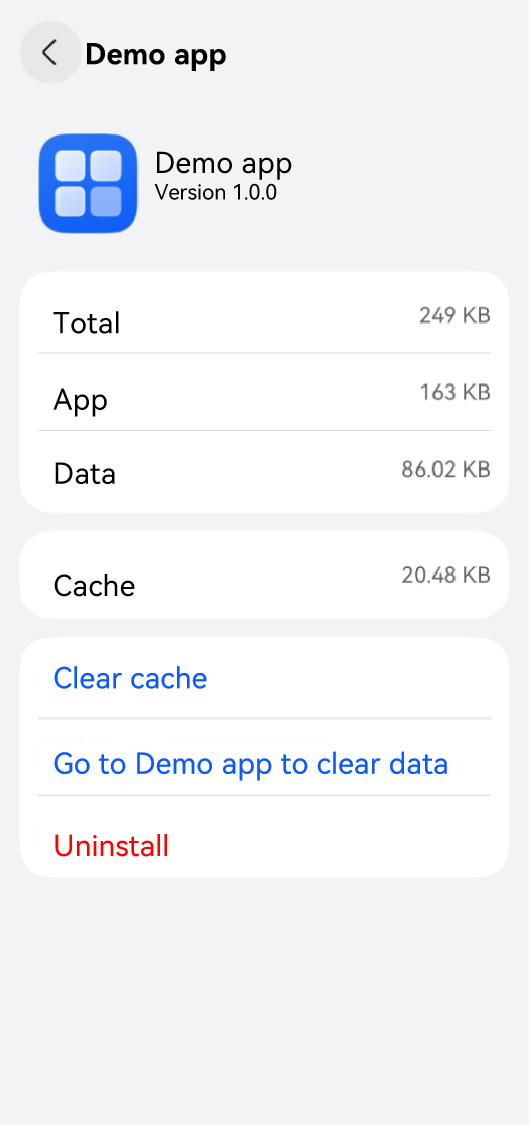
You can go to Settings > Storage to access the application details page of a specific application. By default, this page includes a Clear cache option to clear all cached data of the current application.
If you have implemented a custom data clearing page and want to provide a redirection entry on the application details page, you can configure the linkFeature field.
-
In the module.json5 file, add the following skills configuration to the ability that implements data clearing.
The linkFeature field must be set to AppStorageMgmt, and other field values should be set based on project requirements.
{ "name": "ClearAbility", "srcEntry": "./ets/clearability/ClearAbility.ets", "description": "$string:ClearAbility_desc", "icon": "$media:layered_image", "label": "$string:ClearAbility_label", // ··· "skills": [ { "uris": [ { "scheme": "storage", "host": "developer.huawei.com", "path": "clearcache", "linkFeature": "AppStorageMgmt" } ] } ] } -
Verify the function.
- On the phone, go to Settings > Storage, and select the current application to access the application details page.
- Tap Clear data in xx to go to the corresponding cache data clearing page.
The following figures show the effects.
[h2]Skipping the Confirmation Dialog When an App of a Specified Type Is Launched
The following uses the login scenario as an example to describe how to skip the confirmation dialog when an app of a specified type is launched.
-
Set the linkFeature attribute to declare the feature supported by the current app, so that the system can find the app that supports this feature among the apps installed on the device. In the login scenario, linkFeature is fixed to Login.
-
Set the scheme, host, port, and path/pathStartWith attributes to match the uri in Want, so as to distinguish different functions. Set linkFeature to Login.
"uris": [ { "scheme": "https", "host": "developer.huawei.com", "path": "consumer", "linkFeature": "Login" } ] -
Parse the parameters and perform the corresponding processing.
UIAbility.onCreate(want: Want, launchParam: AbilityConstant.LaunchParam): void
The parameter want.uri carries the uri corresponding to the linkFeature configured by the target party.