Both the widget host (for example, the home screen) and the widget provider can trigger updates to the widget page. Moreover, the widget framework notifies the widget provider of updates according to the scheduled information. Therefore, widget updates include active updates initiated by the widget provider, active updates initiated by the widget host, and interval-based or time-specific updates. In all these update modes, the widget provider is responsible for pushing the widget data to be updated.
Widget Data Interaction
The ArkTS Widget Manager supports the data interaction between the widget provider (for example, applications) and widget. The widget transfers data to the widget provider through postCardAction, and the widget provider can transfer data to the widget through updateForm. After the widget provider transfers data to the widget, the data can be used for widget page refresh.
The widget provider and widget are independent of each other. Therefore, data can be transferred only through LocalStorageProp, and the getContext method cannot be used. After the widget provider pushes data, the widget UI receives it via LocalStorageProp, and the received data is converted to a string.
[h2]Active Update
Active updates include the updates triggered by the widget provider and the widget host. For details, see Active Update of ArkTS Widgets.
Figure 1 Flowchart of active update by the widget provider

If there is a need to update widget data, the widget provider, as long as it is running, can proactively update the widget using the updateForm API provided by formProvider.
Figure 2 Flowchart of active update by the widget host
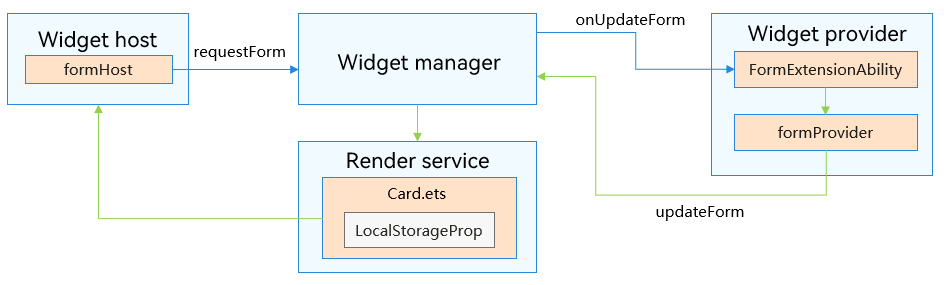
When the widget host detects a change in the system language or theme mode (such as light or dark mode), it can proactively request a widget update through the requestForm API provided by formHost (available only for system apps). The widget management service then notifies the widget provider to complete the update.
[h2]Passive Update
Passive update includes interval-based update and time-specific update. For details, see Passive Update of ArkTS Widgets.
Interval-based update: The widget content will be automatically updated at the specified interval by calling onUpdateForm.
Time-specific update: The widget content will be automatically updated at a designated time every day.
Figure 3 Flowchart of interval-based and time-specific updates by the widget provider
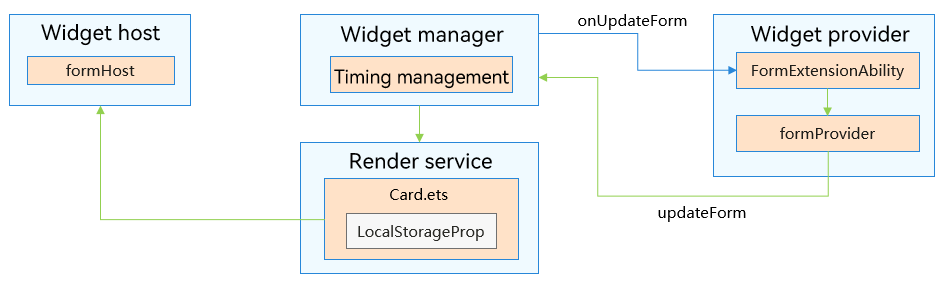
Based on the scheduled update information configured by the widget provider, the widget manager determines whether to instruct the provider to update the widget, considering factors such as timing information, widget visibility status, and the number of updates.
Constraints
-
The widget provider is only allowed to update its own widgets.
-
The widget host is only allowed to update the widgets added to it.
-
Starting from API version 20, if the widget refresh data is updated through shared memory, the total refresh data size must not exceed 10 MB, and the number of refreshed images must not exceed 20. For API version 19 and earlier, the maximum number of image files is 5, with each image limited to 2 MB of memory. Images exceeding the limit may display abnormally.