Starting from API version 20, the low power player (LPP) can be used to implement the video path capability from the media source to rendering with low power consumption. This guide walks you through playing a local video file using the LPP APIs.

The LPP does not support pure video or audio playback. For details about low-power audio playback, see Low-Power Audio Playback.
The full playback process includes creating a demuxer, creating a player, setting callback functions, configuring playback parameters (speed and volume), controlling playback (play, pause, resume, stop, and reset), and releasing the player instance.
Figure 1 Playback state transition
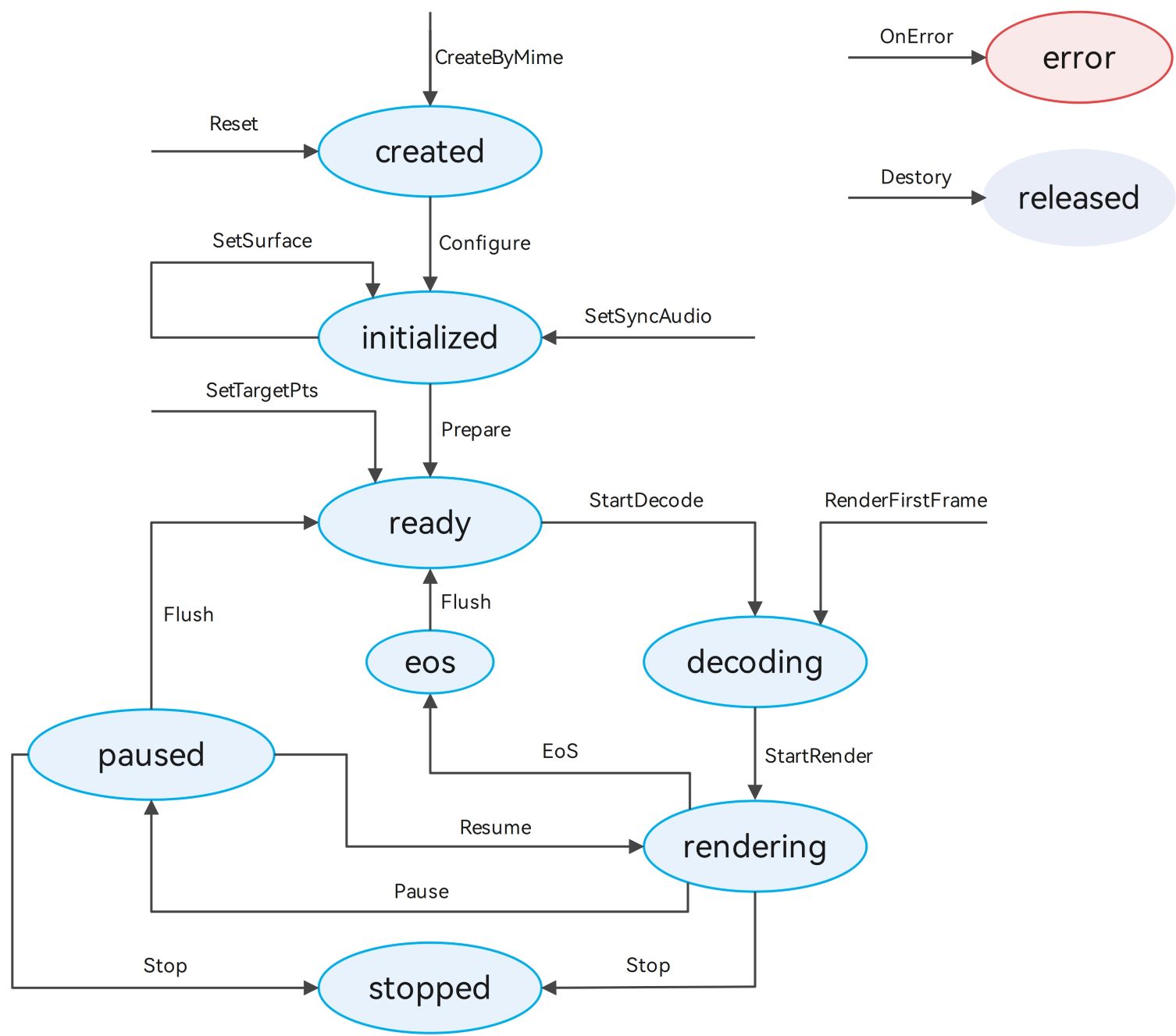
The playback process consists of five phases: created, initialized, ready, decoding, and rendering.
The application calls CreateByMime to initialize and create a decoder instance. After the decoder parameters are configured, it is switched to the initialized state.
Then, the decoder resources are preloaded (Prepare), and the video enters the ready state. The decoding process (StartDecode) is then started, the decoder is switched to the decoding state, and the first frame rendering (RenderFirstFrame) is triggered. Finally, the rendering process (StartRender) is started, and the decoder is switched to the rendering state.
During rendering, if the video is paused (Pause), the decoder is switched to the paused state. In this case, the decoding and rendering are temporarily suspended but resources are not released. When rendering resumes (Resume), the video resumes and returns to the rendering state. If the video is stopped (Stop), the decoder is switched to the stopped state. In this case, the decoder stops working, but the instance still exists. When the stream ends (EoS) during rendering, the decoder is switched to the EoS state.
If an error occurs during playback (OnError), the decoder enters an abnormal state and must be reset or switched to the released state to destroy the decoder instance and release all resources.
When the player is in the ready, decoding, rendering, paused, or stopped state, it occupies system resources. Call reset or destroy to reclaim the resources when it is no longer needed.
Development Tips
This topic describes only how to implement the playback of a media asset. In practice, background playback and playback conflicts may be involved. You can refer to the following description as needed.
-
Due to hardware differences, LPP capabilities are only available on certain smartphones. You are advised to use OH_LowPowerAVSink_GetCapability to check whether the LPP capabilities are supported. This API is available since API version 21. If they are not supported, use AVCodec for playback.
-
When an application is playing media data that involves audio, it may be interrupted by other applications according to the system audio management policy. (For details, see Processing Audio Interruption Events.) It is recommended that the application proactively listen for audio interruption events through OH_LowPowerAudioSinkCallback_SetInterruptListener and handle the events accordingly to avoid inconsistencies between the application status and the expected effect.
-
When the device is connected to multiple audio output devices, it is recommended that the application listen for audio output device change events through OH_LowPowerAudioSinkCallback_SetDeviceChangeListener and handle the events accordingly.
-
During application execution, system internal exceptions may occur, such as network exceptions, insufficient memory, or unavailable media services. It is recommended that the application listen for errors through OH_LowPowerAudioSinkCallback_SetErrorListener or OH_LowPowerVideoSinkCallback_SetErrorListener and handle the errors accordingly.
-
During playback, the player obtains the buffer of a specified track through OH_AVDemuxer_ReadSampleBuffer and encapsulates multiple buffers through OH_AVSamplesBuffer_AppendOneBuffer. Then the player starts consumption through notifications invoked by OH_LowPowerAudioSink_ReturnSamples or OH_LowPowerVideoSink_ReturnSamples. When the player needs data, it triggers the callback registered through OH_LowPowerAudioSinkCallback_SetDataNeededListener or OH_LowPowerVideoSinkCallback_SetDataNeededListener.
-
Pay attention to the timing of API calls. Make reasonable calls according to the state diagram and detailed API documentation. After the program execution, call the corresponding OH_***_Destroy API to release resources.
-
When registering a callback, you can configure custom data in the last parameter void *userData to perform certain settings (such as state changes) in the callback functions.
Other callback functions:
OH_LowPowerAudioSinkCallback_SetPositionUpdateListener: called when the playback progress updates.
OH_LowPowerAudioSinkCallback_SetEosListener or OH_LowPowerVideoSinkCallback_SetEosListener: called when the playback is completed.
OH_LowPowerVideoSinkCallback_SetRenderStartListener: called when video rendering starts.
OH_LowPowerVideoSink_SetTargetStartFrame: called when the target frame is reached.
OH_LowPowerVideoSinkCallback_SetStreamChangedListener: called when the video stream is switched.
OH_LowPowerVideoSinkCallback_SetFirstFrameDecodedListener: called when the first frame of video is decoded.
How to Develop
Link the dynamic libraries in the CMake script.
target_link_libraries(sample PUBLIC liblowpower_avsink.so)
Include the header files.
#include "multimedia/player_framework/lowpower_audio_sink_base.h"
#include "multimedia/player_framework/lowpower_audio_sink.h"
#include "multimedia/player_framework/lowpower_video_sink.h"
#include "multimedia/player_framework/lowpower_video_sink_base.h"
To use system logging, include the following header file:
#include <hilog/log.h>
In addition, link the following dynamic libraries in the CMake script:
target_link_libraries(sample PUBLIC libhilog_ndk.z.so)
Include the following libraries: demuxer, basic decoding, and display rendering.
set(BASE_LIBRARY
    libnative_media_codecbase.so libnative_media_core.so libnative_media_vdec.so libnative_window.so
    libnative_media_venc.so libnative_media_acodec.so libnative_media_avdemuxer.so libnative_media_avsource.so
    libohaudio.so
)
target_link_libraries(sample PUBLIC ${BASE_LIBRARY})
Include the lowpower_audio_sink_base.h, lowpower_audio_sink.h, lowpower_video_sink.h and lowpower_video_sink_base.h header files to use audio and video playback APIs.
-
Create a player.
Based on actual service requirements, you can use a self-developed demuxer or create an OH_AVSource instance by calling OH_AVSource_CreateWithDataSource(), OH_AVSource_CreateWithFD(), or OH_AVSource_CreateWithURI(). Then call OH_AVDemuxer_CreateWithSource() through the OH_AVSource instance to create a demuxer and obtain video metadata.
source_ = OH_AVSource_CreateWithFD(info.inputFd, info.inputFileOffset, info.inputFileSize);
// ...
demuxer_ = OH_AVDemuxer_CreateWithSource(source_);
// ...
int32_t ret = GetTrackInfo(sourceFormat, info);
-
Based on the video metadata, call OH_LowPowerAudioSink_CreateByMime or OH_LowPowerVideoSink_CreateByMime to create a player.
lppVideoStreamer_ = OH_LowPowerVideoSink_CreateByMime(videoCodecMime.c_str());
lppAudioStreamer_ = OH_LowPowerAudioSink_CreateByMime(audioCodecMime.c_str());
-
Set callbacks.
Call OH_LowPowerAudioSinkCallback_Create or OH_LowPowerVideoSinkCallback_Create to create a callback for OH_LowPowerAudioSinkCallback or OH_LowPowerVideoSinkCallback. Add the callbacks to the structure via the setListener API, and register them with registerCallback.
lppAudioStreamerCallback_ = OH_LowPowerAudioSinkCallback_Create(); OH_LowPowerAudioSinkCallback_SetDataNeededListener(lppAudioStreamerCallback_, LppCallback::OnDataNeeded, lppUserData); // ... OH_LowPowerAudioSinkCallback_SetPositionUpdateListener(lppAudioStreamerCallback_, LppCallback::OnPositionUpdated, lppUserData); // ... ret = OH_LowPowerAudioSink_RegisterCallback(lppAudioStreamer_, lppAudioStreamerCallback_); -
Configure the player.
Based on the metadata obtained through demultiplexing, create and configure OH_AVFormat. Configure the player by calling OH_LowPowerAudioSink_Configure or OH_LowPowerVideoSink_Configure. For details about the parameters, see the sample code. For video streams, call OH_LowPowerVideoSink_SetVideoSurface to set the display window.
OH_AVFormat *format = OH_AVFormat_Create();

// ...
OH_AVFormat_SetIntValue(format, OH_MD_KEY_WIDTH, sampleInfo.videoWidth);
OH_AVFormat_SetIntValue(format, OH_MD_KEY_HEIGHT, sampleInfo.videoHeight);
OH_AVFormat_SetDoubleValue(format, OH_MD_KEY_FRAME_RATE, sampleInfo.frameRate);
OH_AVFormat_SetIntValue(format, OH_MD_KEY_PIXEL_FORMAT, sampleInfo.pixelFormat);
OH_AVFormat_SetIntValue(format, OH_MD_KEY_ROTATION, sampleInfo.rotation);

// ...
int ret = OH_LowPowerVideoSink_Configure(lppVideoStreamer_, format);
-
Prepare for playback.
Call OH_LowPowerVideoSink_SetSyncAudioSink to set audio-video synchronization binding. Then, call OH_LowPowerAudioSink_Prepare or OH_LowPowerVideoSink_Prepare. After a successful call, the player enters the ready state.
auto ret = OH_LowPowerVideoSink_SetSyncAudioSink(lppVideoStreamer_, audioStreamer);
auto ret = OH_LowPowerVideoSink_Prepare(lppVideoStreamer_);
auto ret = OH_LowPowerAudioSink_Prepare(lppAudioStreamer_);
-
Start playback.
Call OH_LowPowerAudioSink_Start or OH_LowPowerVideoSink_StartRenderer to start rendering. For video streams, before rendering, call OH_LowPowerVideoSink_StartDecoder to start decoding, or call OH_LowPowerVideoSink_RenderFirstFrame to start decoding and display the first frame, thereby entering the decoding state.
auto ret = OH_LowPowerVideoSink_StartDecoder(lppVideoStreamer_);
auto ret = OH_LowPowerVideoSink_StartRenderer(lppVideoStreamer_);
-
(Optional) Control the playback.
To pause the playback, call OH_LowPowerAudioSink_Pause or OH_LowPowerVideoSink_Pause.
To resume the playback, call OH_LowPowerAudioSink_Resume or OH_LowPowerVideoSink_Resume.
To stop the playback, call OH_LowPowerAudioSink_Stop or OH_LowPowerVideoSink_Stop.
To set the playback volume, call OH_LowPowerAudioSink_SetVolume.
To set the playback speed, call OH_LowPowerAudioSink_SetPlaybackSpeed or OH_LowPowerVideoSink_SetPlaybackSpeed.
To clear cache data (which can be used for seeking), call OH_LowPowerAudioSink_Flush or OH_LowPowerVideoSink_Flush.
-
(Optional) Replace resources.
Call OH_LowPowerAudioSink_Reset or OH_LowPowerVideoSink_Reset to reset the resource. You can replace resources and reconfigure the player.
-
Exit the playback.
Call OH_LowPowerAudioSink_Destroy or OH_LowPowerVideoSink_Destroy to destroy the instance. The LPP player enters the released state and exits the playback.