Use Cases
Since version 5.0.2(14), unified checkout supports mixed payment.
After a user selects a product in your app/atomic service and confirms the payment, the app/atomic service launches the unified checkout screen, on which the user can select Huawei Pay or a third-party payment method to complete the order payment.
Supported merchant models: direct merchant, platform merchant, and service provider
The following figure shows the unified checkout screen for mixed payment.
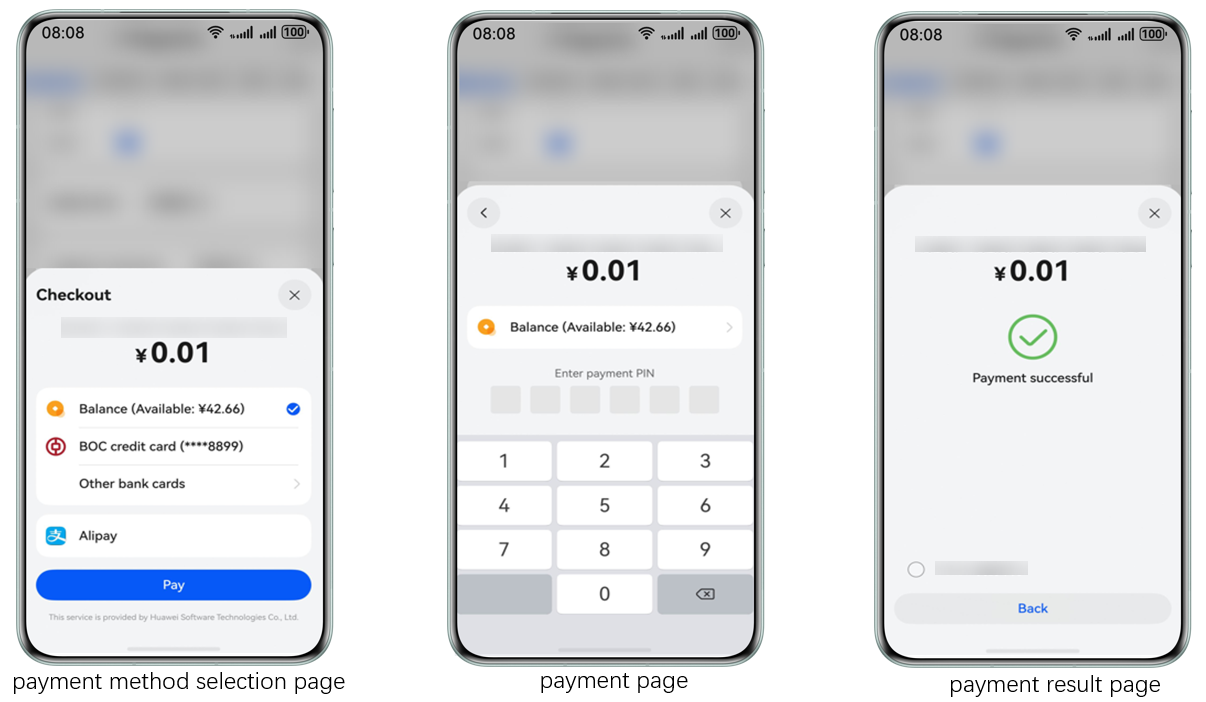
Integration Process
The table below describes how to implement mixed payment via unified checkout.
| Step | Description |
|---|---|
| Register a merchant and prepare for the development | - Register a Huawei Pay merchant and prepare for the development. Before starting development, the merchant needs to register with the Huawei Pay merchant platform and complete the development preparations. Supported merchant models: direct merchant, platform merchant, and service provider - (Optional) Register a third-party payment merchant. The third-party payment will be completed directly on the third-party payment platform. Therefore, you may need to register or create a merchant on this platform. (You are advised to use a new merchant account for distinguishing from existing ones.) |
| Enable the product and configure the payment modes | After registration, a merchant needs to communicate with the Huawei Pay service side (click here for cooperation consultation) to apply for enabling third-party payment and configure related payment modes. |
| Integrate unified checkout | Integrate unified checkout according to the development procedure for mixed payment. |
Service Process
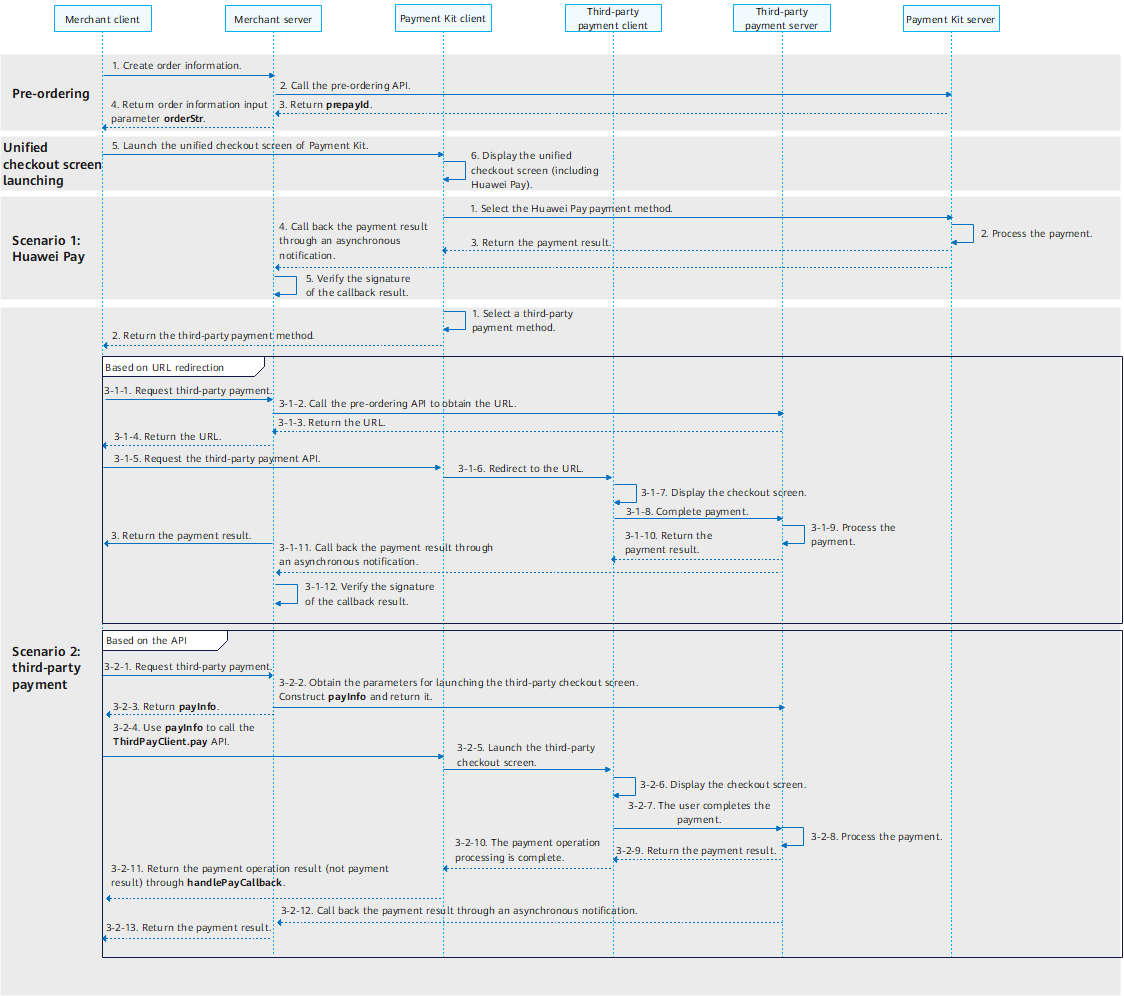
In mixed payment mode, users can choose to pay using Huawei Pay or a third-party payment method on the checkout screen. The integration process is as follows.
-
The merchant client requests the merchant server to create an order.
-
The merchant server calls the pre-ordering API for direct merchants or pre-ordering API for platform merchants/service providers of the Payment Kit server based on the merchant model.
-
The Payment Kit server returns the prepayment ID (prepayId).
-
The merchant server constructs the order payment information orderStr and returns it to the merchant client.
-
The merchant client calls the requestPayment API to launch the unified checkout screen of Payment Kit.
-
The Payment Kit client displays the unified checkout screen that contains Huawei Pay, and completes the payment based on the payment method selected by the user.
[h2]Huawei Pay Payment Scenario
-
The user selects Huawei Pay for payment. The Payment Kit client sends a payment request to the Payment Kit server.
-
The Payment Kit server processes the payment.
-
The Payment Kit server synchronously returns the payment status to the Payment Kit client. The Payment Kit client displays the payment status and goes back to the merchant client.
-
The Payment Kit server returns the payment result to the merchant server through the callback API.
-
After receiving the payment result callback response, the merchant server performs SM2-based signature verification on the payment result.
[h2]Third-Party Payment Scenario
-
The user selects a third-party payment method and confirms the payment.
-
After the user selects a payment method and confirms the payment on the unified checkout screen, the Payment Kit client returns the payment information PayResult to the merchant client.
Launching the checkout screen based on URL redirection:
3-1-1. The merchant client notifies the merchant server of the payment method.
3-1-2. The merchant server calls the third-party payment API to obtain the payment information.
3-1-3. The third-party payment server returns the payment redirection URL to the merchant server.
3-1-4. The merchant server returns the payment redirection URL to the merchant client.
3-1-5. The merchant client constructs the order payment redirection information orderStr and calls the requestPayment API of Payment Kit to redirect the user to the third-party payment screen.
3-1-6. The Payment Kit client launches the third-party checkout screen based on the passed payment information.
3-1-7. The third-party payment client displays the checkout screen.
3-1-8. The user completes the payment.
3-1-9. The third-party payment server processes the payment.
3-1-10. The third-party payment server synchronously returns the payment status to the third-party payment client. The third-party payment client displays the payment status and goes back to the merchant client.
3-1-11. The third-party payment server returns the payment result to the merchant server through the callback API.
3-1-12. After receiving the payment result callback request, the merchant server performs signature verification on the payment result based on the requirements of the third-party payment service.
Launching the checkout screen based on the API:
3-2-1. The merchant client sends the returned payment method to the merchant server.
3-2-2. The merchant server obtains the parameters for launching the third-party checkout screen, and constructs and returns payInfo (the parameters for launching the checkout screen vary with the third-party payment method).
3-2-3. The merchant server returns the third-party payment information payInfo to the merchant client.
3-2-4. The merchant client uses payInfo to call the ThirdPayClient.pay API of Payment Kit to start the third-party payment client. (The ThirdPayClient.handlePayCallback API can also be called to obtain the third-party payment processing result.)
3-2-5. Payment Kit launches the third-party checkout screen.
3-2-6. The third-party payment client displays the checkout screen.
3-2-7. The user completes the payment.
3-2-8. The third-party payment server processes the payment.
3-2-9. The third-party payment server synchronously returns the payment status to the third-party payment client. The third-party payment client displays the payment status and goes back to the merchant client.
3-2-10. The third-party payment client synchronizes the payment completion result to the Payment Kit client.
3-2-11. The Payment Kit client returns the payment result to the merchant client through the ThirdPayClient.handlePayCallback API.
3-2-12. The third-party payment server returns the payment result to the merchant server through the callback API.
3-2-13. After receiving the payment result callback request, the merchant server performs signature verification on the payment result based on the requirements of the third-party payment service, and returns the payment result to the client.
API Description
The API for launching the unified checkout screen in the mixed payment scenario returns the result through a promise. For details about the API, please refer to API Reference.
| API Name | Description |
|---|---|
| requestPayment(context: common.UIAbilityContext, orderStr: string, payload: string): Promise<PayResult> | Launches the unified checkout screen of Payment Kit (including Huawei Pay) and redirects to the third-party checkout screen. |
| pay(payInfo: string): Promise<void>; | Launches the third-party checkout screen. |
| handlePayCallback(want: Want): boolean; | Synchronizes the third-party payment result to the Huawei Pay checkout screen through a callback. |
[h2]Huawei Pay Pre-ordering (On-Server Development)
-
Call the pre-ordering API for direct merchants or pre-ordering API for platform merchants/service providers based on the merchant model to obtain the prepayment ID (prepayId).
To ensure the security and reliability of payment orders, the input parameters in the request body and the PayMercAuth object in the request header need to be sorted and concatenated for signing. For details, please refer to Signing Rules.
-
Construct the order information parameter orderStr and return it to the client. For details about the sample code of a service API request, please refer to Service API Request.
[h2]Launching the Unified Checkout Screen (On-Device Development)
The merchant client uses orderStr as a parameter to call the requestPayment API to launch the checkout screen of Payment Kit.
If the API returns a response using the .then() method, the API request is properly responded. If the API returns a response using the .catch() method, the API request is not properly responded. If the request is abnormal, you can obtain the error code through error.code. For details about the error code, please refer to Error Codes. The sample code is as follows:
import { BusinessError } from '@kit.BasicServicesKit';
import { paymentService } from '@kit.PaymentKit';
import { common } from '@kit.AbilityKit';

@Entry
@Component
struct Index {
  context: common.UIAbilityContext = this.getUIContext().getHostContext() as common.UIAbilityContext;
  requestPaymentPromise() {
    // Use your own order information (orderStr).
    const orderStr = '{"app_id":"***","merc_no":"***","prepay_id":"xxx","timestamp":"1680259863114","noncestr":"1487b8a60ed9f9ecc0ba759fbec23f4f","sign":"****","auth_id":"***"}';
    paymentService.requestPayment(this.context, orderStr, '')
      .then((payResult: paymentService.PayResult) => {
        // The payment is successful.
        console.info('succeeded in paying, pay result: ', payResult);
      })
      .catch((error: BusinessError) => {
        // The payment fails.
        console.error(`failed to pay, error.code: ${error.code}, error.message: ${error.message}`);
      });
  }

  build() {
    Column() {
      Button('requestPaymentPromise')
        .type(ButtonType.Capsule)
        .width('50%')
        .margin(20)
        .onClick(() => {
          this.requestPaymentPromise();
        })
      }
    .width('100%')
    .height('100%')
  }
}
[h2]Payment Processing
Scenario 1: The user selects Huawei Pay for payment.
If the user selects Huawei Pay for payment, unified checkout directly processes the payment. After the payment is successful, the Huawei Pay server calls the callback API provided by you to return the payment information to your server. For details about the callback, please refer to the payment result callback notification for direct merchants or the payment result callback notification for platform merchants/service providers based on the merchant model.
To ensure the validity of the information, the merchant server needs to perform SM2-based signature verification on the returned payment information. Pay attention to the following during signature verification:
-
Use the complete content of the notification for signature verification.
-
Before signature verification, sort and combine the returned data. The sign field indicates the signature value. The content to be verified must exclude the sign field.
-
Use the Huawei Pay certificate as the public key for signature verification.

-
If a user has not signed in, the system will automatically launch the HUAWEI ID sign-in screen, asking the user to sign in first.
-
The payment is successful. It is not recommended to use the result returned by the client as the user's payment result. Instead, use the result notification received by the server or the result returned by the query API.
-
The callback API is the input parameter callbackUrl used when you call the pre-ordering API.
Scenario 2: The user selects a third-party payment method for payment.
Launch the third-party checkout screen based on the payment method configured in Product Enabling and Configuration.