The HarmonyOS NDK provides dynamic and static library files of OpenMP so that you can use OpenMP in native applications. This topic guides you through on how to call library files in DevEco Studio to use OpenMP. For details about the APIs and examples, see clang-OpenMPSupport.
[h2]Adding Dependencies
There are two ways to incorporate the OpenMP library: static linking and dynamic linking.

Static Linking
(1) Open the entry/src/main/cpp/CMakeLists.txt file, and add the static library libomp.a and log dependency libhilog_ndk.z.so to target_link_libraries.
target_link_libraries(entry PUBLIC libomp.a libace_napi.z.so libhilog_ndk.z.so)
(2) Open the entry/build-profile.json5 file, and add -static-openmp -fopenmp to cppFlags under buildOption > externalNativeOptions.
"buildOption": {
    "externalNativeOptions": {
      "path": "./src/main/cpp/CMakeLists.txt",
      "arguments": "",
      "cppFlags": "-static-openmp -fopenmp",
    }
  }
Dynamic linking
(1) Open the entry/src/main/cpp/CMakeLists.txt file, and add the dynamic library libomp.so and log dependency libhilog_ndk.z.so to target_link_libraries.
target_link_libraries(entry PUBLIC libomp.so libace_napi.z.so libhilog_ndk.z.so)
(2) Open the entry/build-profile.json5 file, and add -fopenmp to cppFlags under buildOption > externalNativeOptions.
"buildOption": {
    "externalNativeOptions": {
      "path": "./src/main/cpp/CMakeLists.txt",
      "arguments": "",
      "cppFlags": "-fopenmp",
    }
  }
(3) Copy the dynamic library file libomp.so in the {SDK installation directory}{Version number}\HarmonyOS\native\llvm\lib\aarch64-linux-ohos directory to the entry/libs/arm64-v8a directory of the project.
[h2]Modifying Source Files
(1) In entry/src/main/cpp/napi_init.cpp, include the omp.h header file, and add the OmpTest function.
#include "napi/native_api.h"
#include "omp.h"
#include "hilog/log.h"

#undef LOG_DOMAIN
#undef LOG_TAG
#define LOG_DOMAIN 0x3200 // Global domain, which identifies the service domain.
#define LOG_TAG "MY_TAG"  // Global tag, which identifies the module log tag.

static napi_value OmpTest(napi_env env, napi_callback_info info)
{

    OH_LOG_INFO(LOG_APP, "=================Hello OpenMP test.====================");
    #pragma omp parallel
    {
        OH_LOG_INFO(LOG_APP, "Hello OpenMP!");
    }
    return nullptr;
}

EXTERN_C_START
static napi_value Init(napi_env env, napi_value exports)
{
    napi_property_descriptor desc[] = {
        { "ompTest", nullptr, OmpTest, nullptr, nullptr, nullptr, napi_default, nullptr }
    };
    napi_define_properties(env, exports, sizeof(desc) / sizeof(desc[0]), desc);
    return exports;
}
EXTERN_C_END

static napi_module demoModule = {
    .nm_version = 1,
    .nm_flags = 0,
    .nm_filename = nullptr,
    .nm_register_func = Init,
    .nm_modname = "entry",
    .nm_priv = ((void*)0),
    .reserved = { 0 },
};

extern "C" __attribute__((constructor)) void RegisterEntryModule(void)
{
    napi_module_register(&demoModule);
}
(2) In entry/src/main/cpp/types/libentry/Index.d.ts, export the ompTest function.
export const ompTest: () => null;
(3) In entry/src/main/ets/pages/Index.ets, call the ompTest function.
import testNapi from 'libentry.so';

@Entry
@Component
struct Index {
  @State message: string = 'Hello OpenMP';

  build() {
    Row() {
      Column() {
        Text(this.message)
          .fontSize(50)
          .fontWeight(FontWeight.Bold)
          .onClick(() => {
            testNapi.ompTest();
          })
      }
      .width('100%')
    }
    .height('100%')
  }
}
[h2]Running the Application and Verifying the Result
Check the device connection and sign the application information. Click the Run button in the upper right corner of DevEco Studio. After the application is started, the Hello OpenMP page is displayed on the device. Tap Hello OpenMP and view the Log page on DevEco Studio. You can see multiple "Hello OpenMP!" messages.
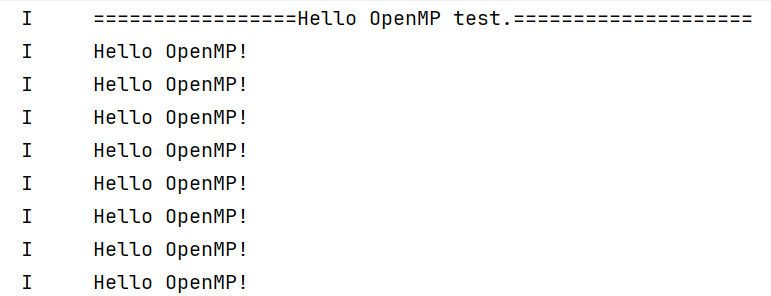

When an OpenMP program runs, HiLog outputs the error message "dlopen_impl load library header failed for libarcher.so" (as shown in the following figure). The libarcher.so mentioned in this error message is required only when Tsan detection is enabled for the OpenMP program. Currently, HarmonyOS does not support Tsan detection for OpenMP programs, so this error message can be ignored and does not affect normal program execution.
