Lists the installed third-party libraries.
Command Format
ohpm list [options] [[<@group>/]<pkg>[@<version>]]
alias: ls

- @group: namespace of the third-party library. This parameter is optional.
- pkg: name of the third-party library. This parameter is optional.
- version: version number of the third-party library. This parameter is optional.
Description
This command is used to list information about all installed third-party libraries of the current project and their dependencies in a tree structure.
If the name of a third-party library is specified, its parent dependencies are all listed. If no name is specified, only direct dependencies are listed by default. You can add the depth option to specify the depth of dependencies to print.
[h2]depth
- Default value: 0
- Value type: number
- Alias: d
You can append the -d <number> or --depth <number> parameter to the ohpm list command to set the maximum depth of the output tree structure. If the depth exceeds the maximum, no data is output. If this parameter is not configured, the default value 0 is used, that is, only direct dependencies are displayed.
Since the DevEco Studio console only displays up to 5000 lines by default, for large projects, use the ohpm list -d <number> > fileName.txt command to redirect the output to a specified file.

If garbled characters appear in the output, run the powershell -Command "(Get-Content 'fileName.txt') -replace ([char]27 + '\[[0-9;]*m'), ''" > result.txt command to export the content to the result.txt file.
[h2]json
- Default value: none
- Alias: j
You can append the -j or --json parameter to the ohpm list command to output information about all third-party libraries installed in the current project and their dependencies in JSON format.
[h2]prefix
- Default value: ""
- Value type: string
You can append the --prefix <string> parameter to the ohpm list command to specify the root directory of the package. The root directory must contain the oh-package.json5 file.
[h2]parameterFile
- Default value: none
- Value type: string
- Alias: pf
You can append the --pf <string> or --parameterFile <string> parameter to the ohpm list command to specify the path to the parameterization configuration file. Before running this command, ensure that parameterFile is configured in the project-level oh-package.json5 file.
[h2]recursive
- Default value: false
- Value type: boolean
- Alias: r
Since version 5.2.0, the OHPM client allows you to append the -r or --recursive parameter to the ohpm list command to print information about third-party libraries installed in all project modules, as well as their dependencies.
[h2]target_path
- Default value: none
- Value type: string
You can append the --target_path <string> parameter to the ohpm list command to specify the path of the dependency configuration file (oh-package.json5) of each module in the context of a specific target product. When you run the ohpm list command, ohpm installs the dependency in the <target_path>/<moduleName>/oh-package.json5 file first. For details, see target_path.
[h2]log_level
- Default value: none
- Value type: string
In ohpm 6.0.2.636 and later versions, you can append the --log_level <string> parameter to the ohpm list command to specify the log level (info, debug, warn, or error) for execution of the current command. If this parameter is not set, the log_level setting in the .ohpmrc file is applied.
[h2]debug
- Default value: false
- Value type: boolean
In ohpm 6.0.2.636 and later versions, you can append the --debug parameter to the command to set the log level to debug for execution of the current command. This configuration takes effect only on the current command line and does not alter the log level configured in the .ohpmrc file. If this parameter is not set, the log_level setting in the .ohpmrc file is applied.
Example
View all third-party libraries installed in the current project and their dependencies.
Run the following command:
ohpm list
Below is an output example:
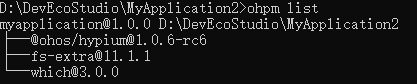
View the dependencies of a third-party library installed in the current project.
Run the following command:
ohpm list universalify
Below is an output example:
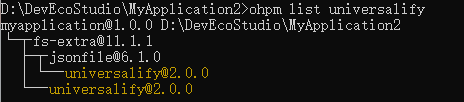
- View all third-party libraries installed in the project modules and their dependencies.
Run the following command:
ohpm list -r
Below is an output example:
. D:\xxx\ProjectName
└── @ohos/hypium 1.0.6

module1 D:\xxx\ProjectName\module1
├─┬ lib1 1.0.0
│ ├── lib1_sub1 1.0.0
│ └── lib1_sub2 1.0.0
└─┬ lib2 1.0.0
  ├── lib2_sub1 1.0.0
  └── lib2_sub2 1.0.0

module2 D:\xxx\ProjectName\module2
└── @ohos/lib3 1.0.0
- When target_path is specified, view all third-party libraries installed in the project modules and their dependencies.
If the module dynamic is added to the target_path directory and module1 has a new dependency lib3, run the following command:
ohpm list -r --target_path xxx/.hvigor/dependencyMap
Below is an output example:
. D:\xxx\ProjectName
└── @ohos/hypium 1.0.6

dynamic D:\xxx\ProjectName1\dynamic // Import the module using target_path.
└── @ohos/lib4 1.0.0

module1 D:\xxx\ProjectName\module1
├─┬ lib1 1.0.0
│ ├── lib1_sub1 1.0.0
│ └── lib1_sub2 1.0.0
└─┬ lib2 1.0.0
  ├── lib2_sub1 1.0.0
  └── lib2_sub2 1.0.0
└── lib3 1.0.0 // New dependency of target_path.

module2 D:\xxx\ProjectName\module2
└── @ohos/lib3 1.0.0