SOTER is a biometric authentication platform and standard that enables services to use sensors (such as face sensors and fingerprint sensors) on devices to perform secure and efficient passwordless sign-in and payment. Currently, SOTER has been widely used in service scenarios such as WeChat mini programs and official accounts as well as fingerprint payment.
Use Cases
Users can use biometric features, instead of traditional passwords, to implement passwordless authentication.
-
Enable biometric enablement capabilities (fingerprint or 3D facial recognition) for SOTER passwordless authentication on mobile devices.
-
Perform SOTER passwordless authentication based on biometric features (fingerprints or 3D faces) on mobile devices.
-
Disable SOTER passwordless authentication based on biometric features (fingerprint or 3D facial recognition) on mobile devices.
Constraints
-
You need to deploy the SOTER server for your app.
-
Mobile devices must support biometric features (fingerprints or 3D faces). Check whether a mobile device supports the ATL4 authentication trust level.
import { soter } from '@kit.OnlineAuthenticationKit'; import { userAuth } from '@kit.UserAuthenticationKit'; import { BusinessError } from '@kit.BasicServicesKit'; // ... function getAvailableStatus() { try { // Example: Check whether the device supports the ATL4 authentication trust level for facial recognition. userAuth.getAvailableStatus(userAuth.UserAuthType.FACE, userAuth.AuthTrustLevel.ATL4); console.info('current auth trust level is supported'); } catch (error) { const err: BusinessError = error as BusinessError; console.error(`current auth trust level is not supported. Code is ${err?.code}, message is ${err?.message}`); } } -
Mobile devices must be connected to the Internet to use the service.
-
The SOTER service returns anonymized personal information such as fingerprint ID and facial ID to the app to provide passwordless authentication capabilities based on specific biometric features. Before uploading personal information to the cloud, an app must explicitly inform the user and obtain their consent. For details, see Personal Data Processing Description.
Service Process
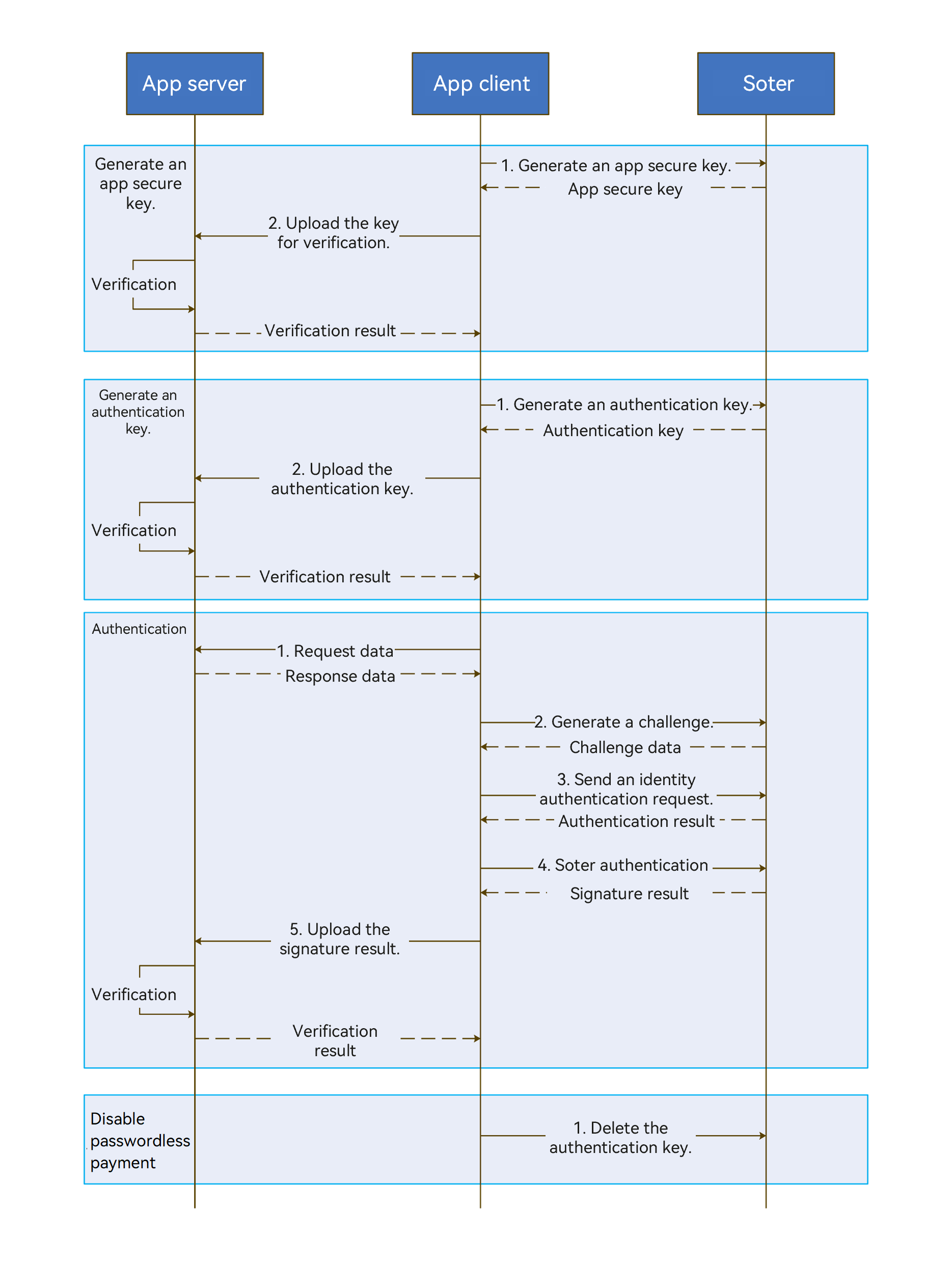
App Key Generation Process:
- An app client calls the generateAppSecureKey API to generate an app key.
- The app client uploads the app key to the app server. The app server verifies the app key and returns the verification result.
Authentication Key Generation Process:
- The app client calls the generateAuthKey API to generate an authentication key.
- The app client uploads the authentication key to the app server. The app server verifies the authentication key and returns the verification result.
Authentication Process:
- The app client requests data from the app server.
- The app client calls the generateChallengeSync API to generate a challenge.
- The app client requests identity authentication and completes biometric authentication.
- The app client calls the signWithAuthKeySync API to perform SOTER authentication and obtain the signature result.
- The app client uploads the signature result to the app server. The app server verifies the signature result and returns the verification result.
Passwordless Payment Disabling Process:
The app client calls the deleteAuthKey API to delete the authentication key.
API Description
The following table lists the APIs required for registration, authentication, and deregistration. For details about the APIs, see API Reference.
| API | Description |
|---|---|
| generateAppSecureKey(keyType: KeyType): Promise<Uint8Array> | Generates an app secure key and returns the result asynchronously through a promise. |
| generateAuthKey(keyAlias: string, keyType: KeyType): Promise<SignedResult> | Generates an authKey and returns the result asynchronously through a promise. |
| generateChallengeSync(keyAlias: string): Uint8Array | Generates a challenge and returns the result synchronously. |
| signWithAuthKeySync(keyAlias: string, authToken: Uint8Array, info: string): SignedResult | Performs SOTER passwordless authentication and returns the signed message synchronously. |
| deleteAuthKey(keyAlias: string): Promise<void> | Deletes an AuthKey and returns the result asynchronously through a promise. |
Development Procedure
-
Import the SOTER modules.
import { soter } from '@kit.OnlineAuthenticationKit'; import { userAuth } from '@kit.UserAuthenticationKit'; import { BusinessError } from '@kit.BasicServicesKit'; -
Generate an app secure key and authentication key, which will be used for the subsequent enabling and authentication processes.
let keyType: soter.KeyType = soter.KeyType.ECC_P256; // Encryption type. Only ECC_P256 is supported. let keyAlias: string = 'keyAlias'; // Customize a key alias for yourself. // Generate an app secure key. try { let appSecureKey: Promise<Uint8Array> = soter.generateAppSecureKey(keyType); // ... } catch (error) { const err = error as BusinessError; console.error(`Failed to generate app secure key. Code is ${err.code}, message is ${err.message}`); // ... } // Generate an authKey. try { let authKey: Promise<soter.SignedResult> = soter.generateAuthKey(keyAlias, keyType); } catch (error) { const err = error as BusinessError; console.error(`Failed to generate auth key. Code is ${err.code}, message is ${err.message}`); } -
Use the authentication key for signature to implement SOTER passwordless authentication.
let keyType: soter.KeyType = soter.KeyType.ECC_P256; // Encryption type. Only ECC_P256 is supported. let keyAlias: string = 'keyAlias'; // Customize a key alias for yourself. let info: string = 'Message to be signed.'; // Here, info needs to be delivered by your app server. The SOTER service will sign the data and then upload the data to your app server. // Obtain **challenge** of the passwordless payment. let soterChallenge: Uint8Array = new Uint8Array([0]); try { soterChallenge = soter.generateChallengeSync(keyAlias); } catch (error) { const err = error as BusinessError; console.error(`Failed to generate challenge. Code is ${err.code}, message is ${err.message}`); } let authParam: userAuth.AuthParam = { challenge: soterChallenge, authType: [userAuth.UserAuthType.FINGERPRINT], authTrustLevel: userAuth.AuthTrustLevel.ATL4 }; // Use authParam to request authentication. try { let userAuthInstance = userAuth.getUserAuthInstance(authParam, {title: ' '}); // If authToken is not obtained, error code 1 is returned. userAuthInstance.on('result', { onResult(result) { let authToken = result.token; try { // After biometric features are successfully authenticated, call SOTER authentication. console.info('soter auth start'); // Use the soter.signWithAuthKeySync API to sign the data to be authenticated. You can choose to return the result synchronously or asynchronously based on your service needs. let authResult: soter.SignedResult = soter.signWithAuthKeySync(keyAlias, authToken, info); console.info('Succeeded in doing authSyn authResult'); // Process authResult. // ... } catch (err) { console.error(`Failed to signWithAuthKeySync. Code: ${err.code}, message: ${err.message}`); // ... } } }); userAuthInstance.start(); } catch (error) { const err = error as BusinessError; console.error(`Failed to user auth. Code is ${err.code}, message is ${err.message}`); } -
Delete the authentication key once passwordless authentication is disabled.
let keyAlias: string = 'keyAlias'; // Customize a key alias for yourself.
try {
  soter.deleteAuthKey(keyAlias);
  // ...
} catch (error) {
  const err = error as BusinessError;
  console.error(`Failed to delete auth key. Code is ${err.code}, message is ${err.message}`);
  // ...
}