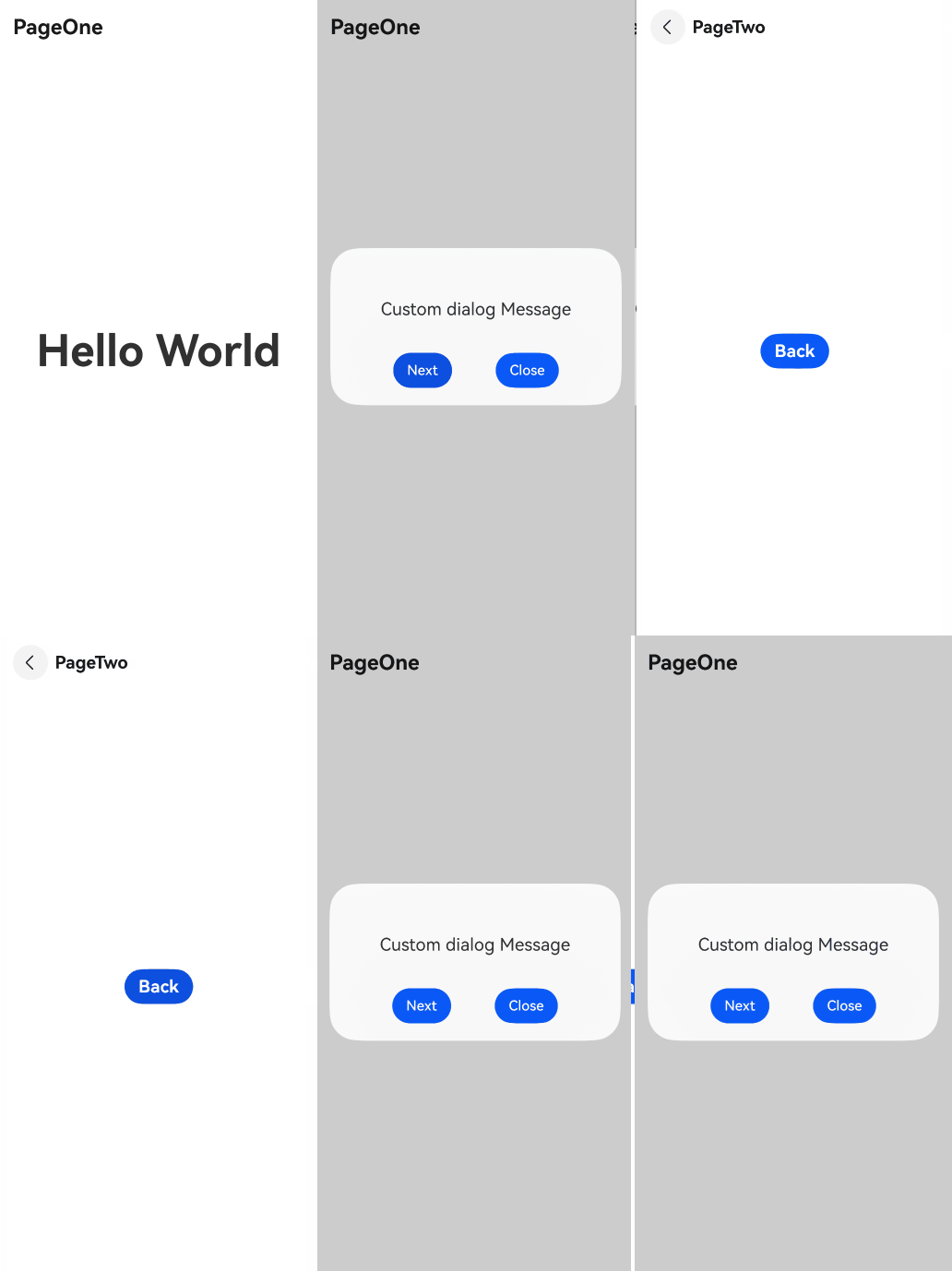
By default, ArkUI dialog boxes are displayed at the global level, meaning the dialog box node is a subnode of the root node of the page and appears above all route and navigation pages in the application. If a dialog box is not explicitly closed using the close API during a route redirection, it will remain visible on the next page.
Since API version 15, you can use a page-level dialog box that disappears with the previous routing page during page switching and reappears when the user returns to the previous page.

The page-level capability only takes effect when the dialog box is in non-subwindow mode, that is, the showInSubWindow parameter is set to false or is not set.
Page-level dialog boxes are typically used with navigation and routing capabilities. For more details, see Component Navigation and Page Routing Overview.
Before using a page-level dialog box, familiarize yourself with the basic dialog box usage in Dialog Box Overview.
Setting Parameters

Set the levelMode attribute in the options parameter of the dialog box. A value of LevelMode.EMBEDDED enables the page-level dialog box capability.
When the dialog box is displayed, the current page is automatically obtained, and the dialog box node is mounted to this page. As a result, the dialog box appears above all navigation pages under the current page.
this.getUIContext().getPromptAction().openCustomDialog({
  builder: () => {
    this.customDialogComponent();
  },
  levelMode: LevelMode.EMBEDDED, // Enable the page-level dialog box.
  // ···
})
To display the dialog box in a specific page, set the levelUniqueId attribute in the options parameter. This attribute accepts a node ID within the page. When set, the dialog box automatically queries the Navigation page where the node corresponding to this ID resides, and mounts the dialog box under the NavDestination node of the child page.

- When the levelMode parameter is set to LevelMode.EMBEDDED but the node corresponding to the ID specified by levelUniqueId cannot be found, the page-level capability does not take effect. If the node mapped by levelUniqueId exists but no NavDestination node is found when traversing upward, the dialog box node is mounted under the Page node.
- levelUniqueId must be set to the uniqueId of a FrameNode. You are advised to use the getUniqueId method of FrameNode to obtain the uniqueId.
In the following example, a Text node is used as a reference node on a specific page. The getFrameNodeById API obtains the node, and the getUniqueId API obtains the internal ID of the node, which is then passed as the value of levelUniqueId.
Text(this.message).id('test_text')
  .onClick(() => {
    const node: FrameNode | null = this.getUIContext().getFrameNodeById('test_text') || null;
    this.getUIContext().getPromptAction().openCustomDialog({
      builder: () => {
        this.customDialogComponent();
      },
      // ···
      levelMode: LevelMode.EMBEDDED, // Enable the page-level dialog box.
      levelUniqueId: node?.getUniqueId(), // Set the ID of any node on the target page.
    })
      .then((dialogId: number) => {
        customDialogId = dialogId;
      });
  })
If the dialog box is configured with a mask, the mask coverage adjusts based on changes in the page hierarchy. By default, the mask covers the display area of the dialog box's parent node (the Page or Navigation page). In this case, the status bar and navigation bar are not covered by the mask. To cover the status bar and navigation bar, set the immersiveMode parameter to ImmersiveMode.EXTEND.
Text(this.message).id('test_text')
  .fontSize(50)
  .fontWeight(FontWeight.Bold)
  .onClick(() => {
    const node: FrameNode | null = this.getUIContext().getFrameNodeById('test_text') || null;
    this.getUIContext().getPromptAction().openCustomDialog({
      builder: () => {
        this.customDialogComponent();
      },
      levelMode: LevelMode.EMBEDDED, // Enable the page-level dialog box.
      levelUniqueId: node?.getUniqueId(), // Set the ID of any node on the target page.
      immersiveMode: ImmersiveMode.EXTEND, // Extend the mask to cover the status bar and navigation bar.
    })
      .then((dialogId: number) => {
        customDialogId = dialogId;
      });
  })
Interaction Logic
The page-level dialog box interactions follow the interaction policies below:
-
Handling of the swipe gesture: When users swipe to return to the previous page, any displayed dialog box will be closed first, consuming the gesture. To return to the previous page, users must perform the swipe gesture again.
-
By default, clicking the dialog box mask closes the dialog box. Clicking outside the mask does not close the dialog box.
Complete Example
The following example describes a page-level dialog box in router mode.
import { LevelMode, ImmersiveMode } from '@kit.ArkUI';

let customDialogId: number = 0;

@Builder
function customDialogBuilder(uiContext: UIContext) {
  Column() {
    Text('Custom dialog Message').fontSize(20).height(100)
    Row() {
      Button('Next').onClick(() => {
        // Perform route redirection within the dialog box.
        uiContext.getRouter().pushUrl({ url: 'pages/Next' });
      })
      Blank().width(50)
      Button('Close').onClick(() => {
        uiContext.getPromptAction().closeCustomDialog(customDialogId);
      })
    }
  }.padding(20)
}

@Entry
@Component
export struct PageLevelDialogBox {
  @State message: string = 'Hello World';
  private uiContext: UIContext = this.getUIContext();

  @Builder
  customDialogComponent() {
    customDialogBuilder(this.uiContext);
  }

  build() {
    NavDestination() {
      Row() {
        Column() {
          Text(this.message).id('test_text')
            .fontSize(50)
            .fontWeight(FontWeight.Bold)
            .onClick(() => {
              const node: FrameNode | null = this.getUIContext().getFrameNodeById('test_text') || null;
              this.getUIContext().getPromptAction().openCustomDialog({
                builder: () => {
                  this.customDialogComponent();
                },
                levelMode: LevelMode.EMBEDDED, // Enable the page-level dialog box.
                levelUniqueId: node?.getUniqueId(), // Set the ID of any node on the target page.
                immersiveMode: ImmersiveMode.EXTEND, // Extend the mask to cover the status bar and navigation bar.
              })
                .then((dialogId: number) => {
                  customDialogId = dialogId;
                });
            })
        }
        .width('100%')
      }
      .height('100%')
    }
  }
}
// Next.ets
@Entry
@Component
struct Next {
@State message: string = 'Back';
build() {
Row() {
Column() {
Button(this.message)
.fontSize(20)
.fontWeight(FontWeight.Bold)
.onClick(() => {
this.getUIContext().getRouter().back();
})
}
.width('100%')
}
.height('100%')
}
} 
The following example describes a page-level dialog box in navigation mode. Before getting started, you need to create and configure the index page and the router_map.json file by referring to Using NavDestination as a Navigation Page in Navigation. In addition, replace the PageHome and PageOne components described in the reference document with the PageLevelDialogInNavigation and PageLevelDialogInNavigationTestTwo components in the following sample code.
import { LevelMode, ImmersiveMode } from '@kit.ArkUI';

let customDialogId: number = 0;

@Builder
function customDialogBuilder(uiContext: UIContext, stack: NavPathStack | undefined) {
  Column() {
    Text('Custom dialog Message').fontSize(20).height(100)
    Row() {
      Button('Next').onClick(() => {
        // Perform route redirection within the dialog box.
        if (stack) {
          stack.pushPath({ name: 'Custom_ROUTE_PREFIX/PageLevelDialogInNavigationPageTwo'})
        }
      })
      Blank().width(50)
      Button('Close').onClick(() => {
        uiContext.getPromptAction().closeCustomDialog(customDialogId);
      })
    }
  }.padding(20)
}

@Component
export struct PageLevelDialogInNavigation {
  @State info: string = '';
  private stack: NavPathStack | undefined = undefined;
  private uiContext: UIContext = this.getUIContext();
  @State message: string = 'Hello World';

  @Builder
  customDialogComponent() {
    customDialogBuilder(this.uiContext, this.stack);
  }

  build() {
    NavDestination() {
      Stack({alignContent: Alignment.Center}) {
        Column() {
          Text(this.message).id('test_text')
            .fontSize(50)
            .fontWeight(FontWeight.Bold)
            .onClick(() => {
              const node: FrameNode | null = this.getUIContext().getFrameNodeById('test_text') || null;
              this.uiContext.getPromptAction().openCustomDialog({
                builder: () => {
                  this.customDialogComponent();
                },
                levelMode: LevelMode.EMBEDDED, // Enable the page-level dialog box.
                levelUniqueId: node?.getUniqueId(), // Set the ID of any node on the target page.
                immersiveMode: ImmersiveMode.EXTEND, // Extend the mask to cover the status bar and navigation bar.
              }).then((dialogId: number) => {
                customDialogId = dialogId;
              })
            })
        }
        .width('100%')
      }.width('100%').height('100%')
    }
    .width('100%').height('100%')
    .title('PageOne')
    .onReady((ctx: NavDestinationContext) => {
      this.stack = ctx.pathStack;
    })
  }
}

@Component
export struct PageLevelDialogInNavigationTestTwo {
  @State message: string = 'Back';
  private stack: NavPathStack | undefined = undefined;

  build() {
    NavDestination() {
      Stack({alignContent: Alignment.Center}) {
        Column() {
          Button(this.message)
            .fontSize(20)
            .fontWeight(FontWeight.Bold)
            .onClick(() => {
              if (this.stack) {
                this.stack.pop()
              }
            })
        }
        .width('100%')
      }.width('100%').height('100%')
    }
    .width('100%').height('100%')
    .title('PageTwo')
    .onReady((ctx: NavDestinationContext) => {
      this.stack = ctx.pathStack;
    })
  }
}