When a large C/C++ project is opened, code indexing takes a long time and continuously consumes CPU and memory resources, forcing you to wait before coding, which compromises the development efficiency.
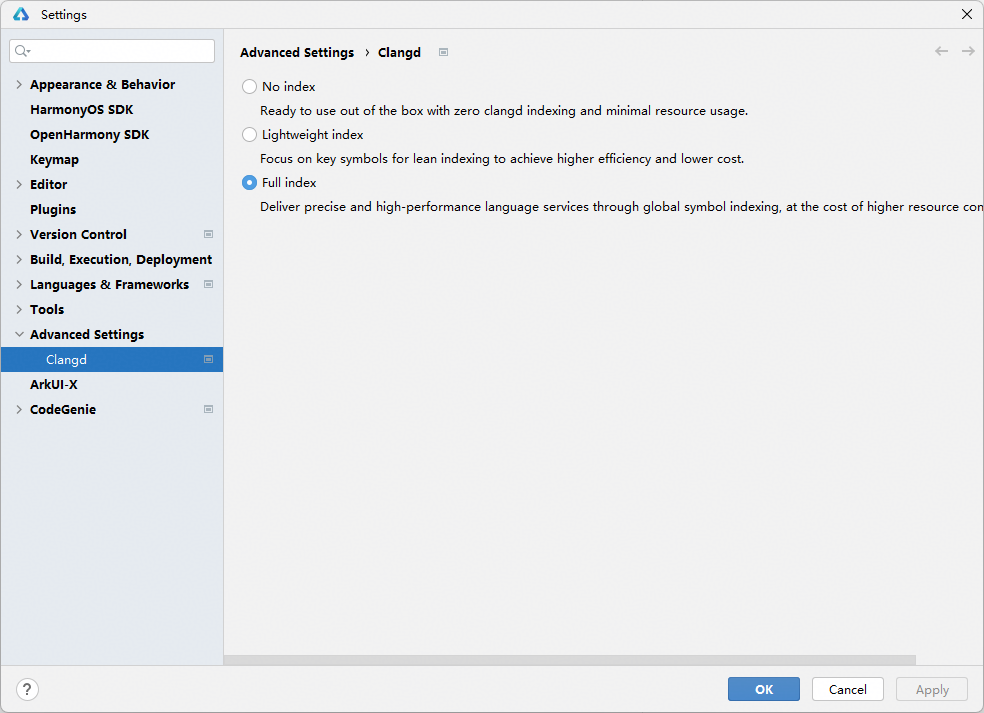
Since version 26.0.0, DevEco Studio allows you to switch between C/C++ code indexing modes to accommodate different project sizes and development requirements. The available code indexing modes are No index, Lightweight index, and Full index (default).
- No index: Does not rely on clangd background indexing. Resource usage is minimized, and loading speed is the fastest. This indexing mode affects features such as code navigation, reference search, code renaming, and Safe Delete.
- Lightweight index: Focuses on core symbols and builds a streamlined index, reducing indexing time and improving indexing efficiency. This indexing mode affects features such as code navigation, reference search, code renaming, and Safe Delete in template scenarios.
- Full index: Builds a global symbol index, providing accurate and efficient language services at the cost of longer indexing time and higher resource overhead.

The configuration takes effect persistently for the current project.
Choose File > Settings (DevEco Studio > Preferences/Settings on macOS) > Advanced Settings > Clangd to switch the indexing mode. After mode switching, restart DevEco Studio.
When a large C/C++ project is opened, a prompt will appear in the lower-right corner of DevEco Studio, recommending that you switch the indexing mode.
