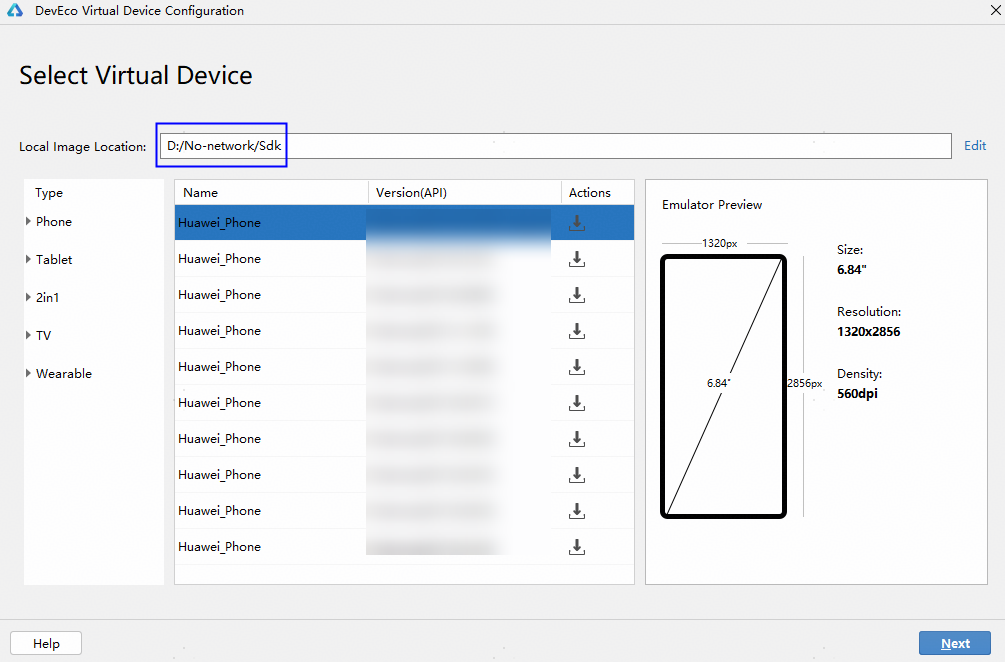
If you are using a computer without Internet access, set up the development environment by following the instructions below.
On a computer with Internet access
Download and install DevEco Studio, then download the required emulator image. For details, see Creating an Emulator.
For example, to download a phone image on a Windows computer and specify the save path as D:\Sdk, the actual full image path would be D:\Sdk\system-image\HarmonyOS-xxx\phone_all_x86.

On a computer without Internet access
- Copy DevEco Studio and the emulator image files to the offline computer. The subfolder path for the image files (such as system-image\HarmonyOS-xxx\phone_all_x86) must be consistent between the computers with and without Internet access.
Create a directory (such as D:\No-network\Sdk) on the offline computer to store the copied image files. Under this directory, create a subfolder for the image files system-image\HarmonyOS-xxx\phone_all_x86, and copy all files from the phone_all_x86 folder on the computer with Internet access to this subfolder path on the offline computer.
- Create an emulator on the offline computer. During creation, change the image path to the one used in the previous step (such as D:\No-network\Sdk). For specific steps, see Creating an Emulator. Once created successfully, the emulator is ready for use.